
Tapo Tapo C310
Tapo C310 Outdoor Security Wi-Fi Camera User Manual
Model: Tapo C310
Introduction
The Tapo C310 is a high-definition outdoor security Wi-Fi camera designed to provide reliable surveillance for your property. Featuring 3MP video resolution, advanced night vision, two-way audio communication, and motion detection with instant notifications, this camera offers comprehensive monitoring capabilities. It supports both wired Ethernet and wireless Wi-Fi connectivity for flexible installation.

Image: The Tapo C310 camera shown alongside a smartphone, illustrating its connectivity and monitoring capabilities.
What's in the Box
Verify that all components are present in your package:
- Tapo C310 Outdoor Security Wi-Fi Camera
- Power Adapter (Note: This item is UK spec and comes with a Type G power plug. A separate US universal adapter will be provided for use in the US.)
- Mounting Template
- Anchors and Screws
- Waterproof Seal
- Waterproof Cable Attachments
- Quick Start Guide
Setup
Follow these steps to set up your Tapo C310 camera:
- Download the Tapo App: Search for 'Tapo Camera' in the Apple App Store or Google Play Store, or scan the QR code in the Quick Start Guide to download the app.
- Power On the Camera: Connect the camera to a power outlet using the provided power adapter. Ensure the US universal adapter is used if you are in the US. The status LED will blink red and green.
- Add Camera in App: Open the Tapo app, tap the '+' icon, and select your camera model. Follow the in-app instructions to connect the camera to your Wi-Fi network or via Ethernet cable.
- Mount the Camera: Use the mounting template to mark the drilling positions. Drill holes, insert anchors, and secure the camera with screws. Ensure the camera is positioned for optimal viewing and coverage.

Image: A diagram illustrating the flexible connectivity options of the Tapo C310, including Wi-Fi, wired Ethernet, and power supply.
Operating
Learn how to utilize the key features of your Tapo C310 camera:
Video Monitoring
The Tapo C310 records in crystal-clear 3MP high definition, providing sharp and detailed video footage. Its advanced night vision allows for clear viewing up to 30 meters (98 feet) even in total darkness, ensuring round-the-clock surveillance.

Image: A direct front view of the Tapo C310 camera, showcasing its main lens and integrated LED for status indication.
Two-Way Audio
Communicate directly through the camera using the built-in microphone and speaker. This feature allows you to interact with visitors, delivery personnel, or deter unwanted guests from anywhere using the Tapo app.

Image: The Tapo C310 camera positioned to facilitate two-way audio communication between a homeowner and a delivery person at the front door.
Motion Detection and Notifications
The camera is equipped with intelligent motion detection. When movement is detected, you will receive instant notifications on your smartphone, allowing you to monitor suspicious activity in real-time. You can customize detection zones and sensitivity settings within the Tapo app.
Local Storage (SD Card)
The Tapo C310 supports local storage via a microSD card (up to 128 GB, not included). This allows you to record and store video footage directly on the camera without needing a cloud subscription.
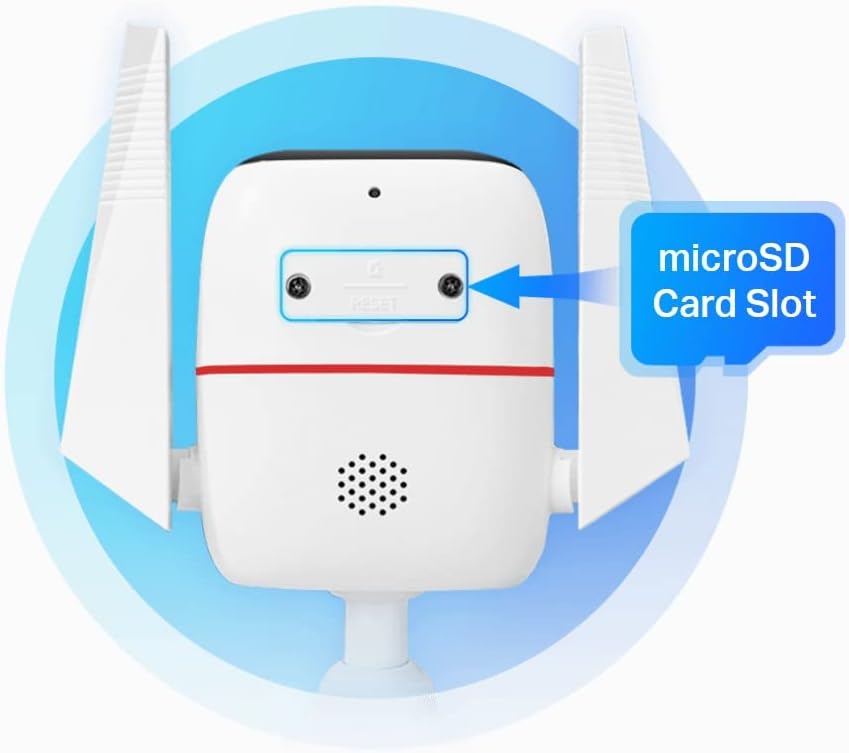
Image: A detailed view of the Tapo C310 camera's underside, clearly indicating the location of the microSD card slot for local storage.
Maintenance
Proper maintenance ensures the longevity and optimal performance of your Tapo C310 camera:
- Cleaning: Periodically wipe the camera lens and body with a soft, damp cloth to remove dust and dirt. Do not use harsh chemicals or abrasive cleaners.
- Firmware Updates: Regularly check for and install firmware updates via the Tapo app. Updates often include performance improvements, new features, and security enhancements.
- Weather Protection: While the camera is waterproof (IP66 rated), ensure its mounting location provides some shelter from extreme weather conditions to prolong its lifespan.
- Cable Management: Ensure all cables are securely fastened and protected from environmental damage or tampering.
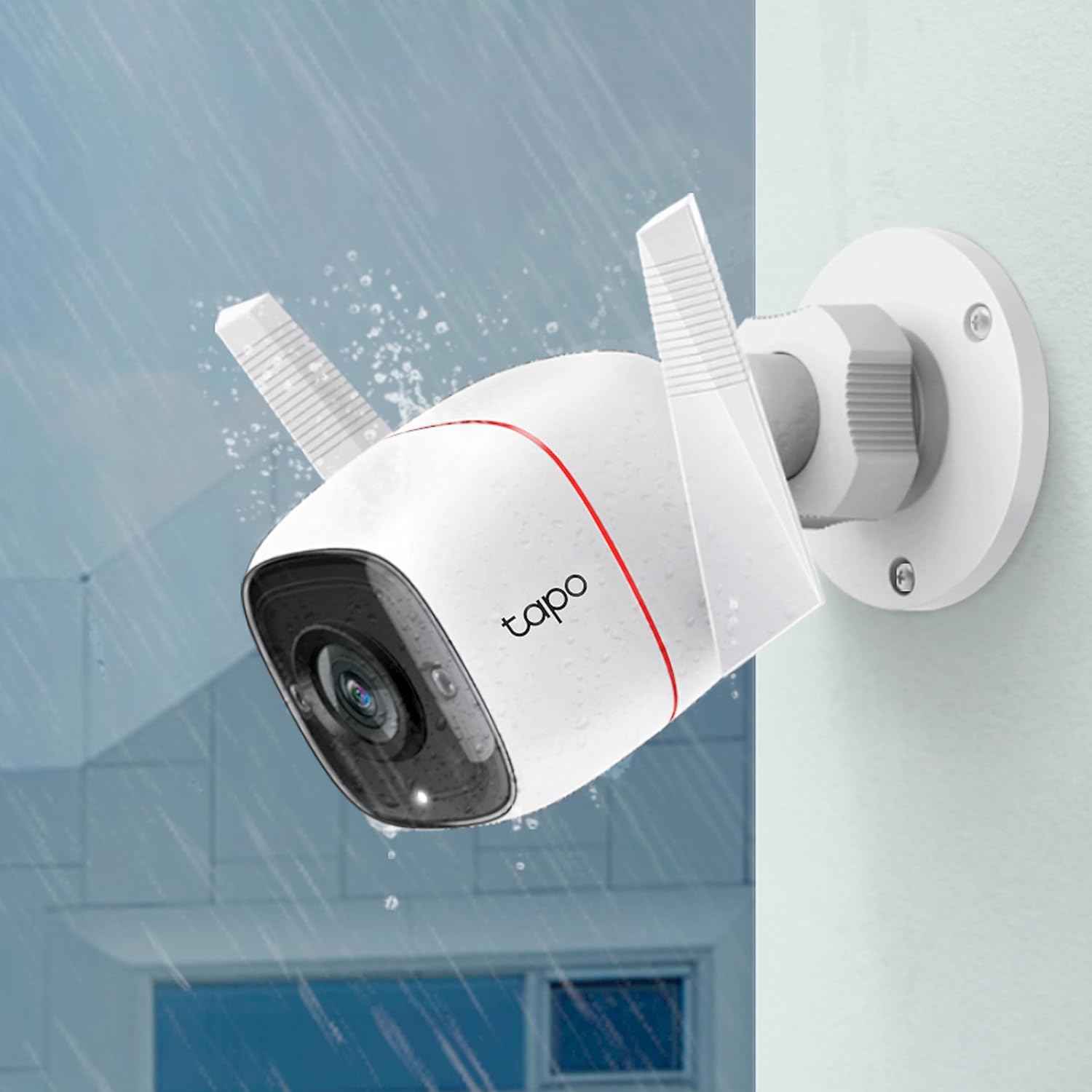
Image: The Tapo C310 camera shown mounted outdoors, with water droplets on its surface, demonstrating its waterproof design suitable for outdoor use.
Troubleshooting
If you encounter issues with your Tapo C310 camera, refer to the following common solutions:
- Camera Offline:
- Check power connection and ensure the adapter is working.
- Verify Wi-Fi signal strength at the camera's location. Move the camera closer to the router or use an Ethernet connection.
- Restart the camera by unplugging and replugging it.
- Ensure your router's internet connection is stable.
- Poor Video Quality:
- Clean the camera lens.
- Check your internet upload speed. A slow connection can affect streaming quality.
- Ensure there are no obstructions blocking the camera's view.
- No Motion Detection Alerts:
- Verify motion detection is enabled in the Tapo app settings.
- Adjust motion sensitivity and detection zones.
- Check app notification settings on your smartphone.
- SD Card Not Recording:
- Ensure the microSD card is inserted correctly.
- Format the microSD card via the Tapo app.
- Check if the SD card is damaged or full. Try a different card.
Specifications
| Feature | Detail |
|---|---|
| Model Name | Tapo C310 |
| Indoor/Outdoor Usage | Outdoor |
| Connectivity Technology | Wired, Wireless (Wi-Fi) |
| Video Capture Resolution | 3 MP (1296 Effective Video Resolution) |
| Night Vision Distance | Up to 30m (98 ft) |
| Two-Way Audio | Yes |
| Motion Detection | Yes (Motion Only Alert Type) |
| Local Storage | MicroSD Card Slot (up to 128 GB Flash Memory Installed Size) |
| Power Source | Corded Electric (240 Volts, 3600 watts) |
| Water Resistance Level | Waterproof (IP66 International Protection Rating) |
| Dimensions (L x W x H) | 3.54 x 7.09 x 7.87 inches |
| Item Weight | 1.06 pounds (16.93 Ounces) |
| Field Of View | 120 Degrees |
| Compatible Devices | Smartphone, Tablet (Controller Type: Amazon Alexa) |
| Mounting Type | Wall Mount |
| Color | White |
Warranty and Support
Tapo products typically come with a limited warranty. For specific warranty terms, technical support, and frequently asked questions, please visit the official Tapo support website or refer to the warranty card included with your product. You can also find assistance through the Tapo app's help section.
For further assistance, please contact Tapo Customer Support:
- Online Support: Visit www.tapo.com/support/
- In-App Support: Access the 'Help' or 'Support' section within the Tapo app.
Related documentsTapo C310


Ask a question about this manual
Ask about setup, troubleshooting, compatibility, parts, safety, or missing instructions. Manuals+ will review the question and use this page’s manual context to help answer it.