
Introduction
Thank you for choosing the Navaris Office Desk Footrest. This manual provides essential information for the correct setup, operation, and maintenance of your footrest. Designed to improve your posture and circulation, this adjustable footrest offers ergonomic support for your feet and legs while working or relaxing.

Image: The Navaris Office Desk Footrest positioned under an office desk, ready for use.
Safety Information
Please read and adhere to the following safety instructions to ensure safe and proper use of the footrest:
- Maximum Weight Capacity: The maximum weight capacity for this footrest is 100 kg (220 lbs). Do not exceed this limit.
- Stable Placement: Always place the footrest on a stable, flat surface to prevent tipping or instability.
- Adjustments: Adjust the height and tilt angle according to your stature and posture to prevent strain or injury. Ensure adjustments are made carefully and securely.
- Intended Use: This product is designed as a footrest for ergonomic support. Do not stand on it or use it as a step stool.
- Children and Pets: Keep out of reach of small children and pets to prevent accidental injury or damage to the product.
Setup
The Navaris Office Desk Footrest comes pre-assembled and requires no complex setup. Simply remove it from its packaging and place it under your desk or desired location.
- Unpack: Carefully remove the footrest from its packaging.
- Position: Place the footrest on a flat, stable surface under your desk. Ensure the rubber feet are in contact with the floor to prevent slipping.

Image: A close-up view of the Navaris Office Desk Footrest, highlighting its non-slip surface and sturdy construction.
Operating Instructions
The Navaris footrest is designed for easy adjustment to suit your comfort needs. It features adjustable height and tilt functions.
Adjusting Height
The footrest offers 3 adjustable height levels. To change the height:
- Gently lift the footrest platform.
- Adjust the support mechanism underneath to one of the three desired height settings.
- Ensure the mechanism is securely locked into place before resting your feet.
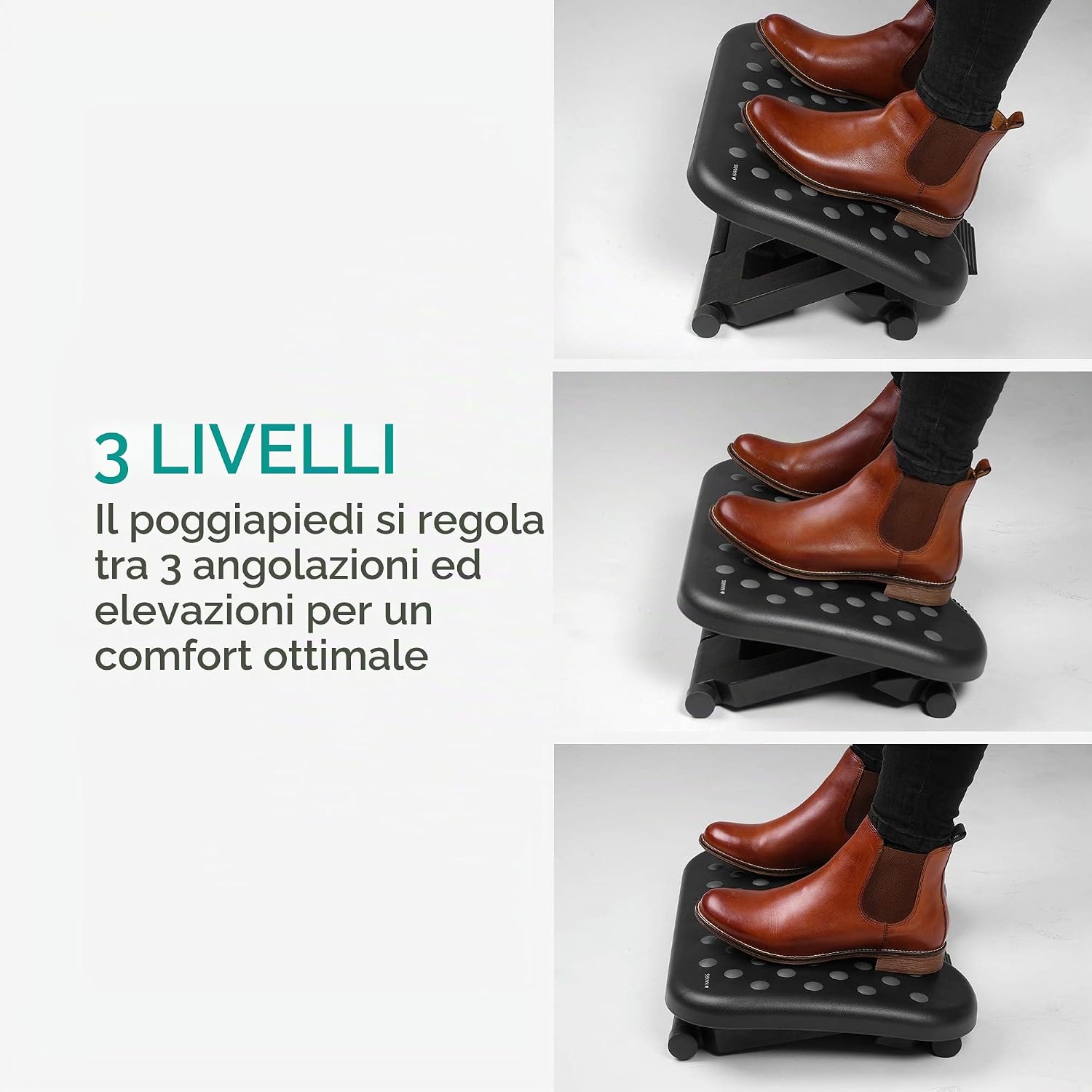
Image: Visual representation of the three adjustable height levels of the footrest, demonstrated with feet placed on the platform at each level.

Image: Side view illustrating the three height settings: 10.3 cm, 13.5 cm, and 16.8 cm.
Adjusting Tilt Angle
The footrest platform can be tilted between 0 and 25 degrees to provide optimal comfort and allow for natural leg movement. The tilt mechanism is free-floating, meaning it adjusts to your preferred angle as you rest your feet.
- Simply place your feet on the platform and apply gentle pressure to adjust the angle.
- The platform will tilt back and forth, allowing for dynamic movement and improved circulation.
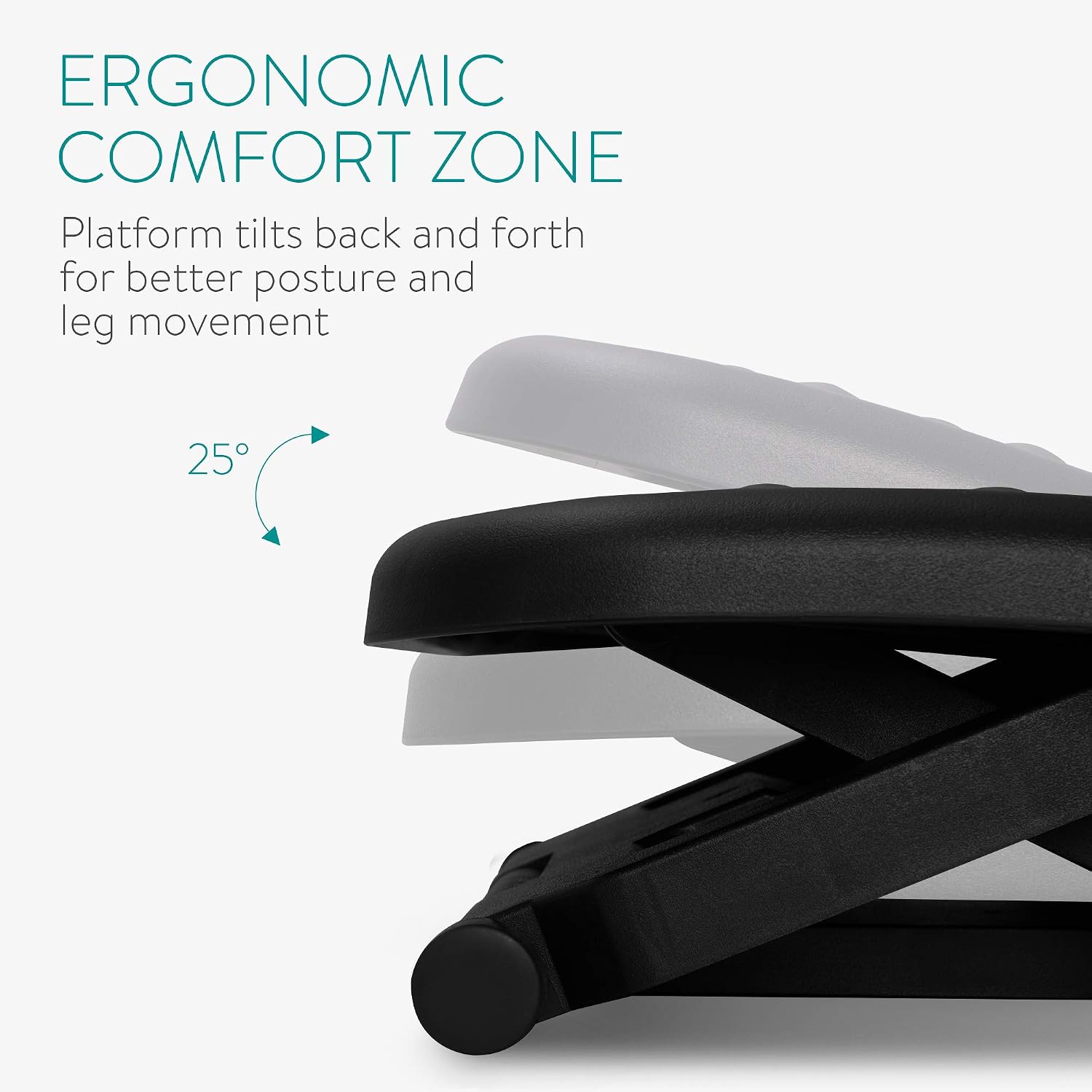
Image: Diagram illustrating the ergonomic tilt feature, showing the platform's ability to move between 0 and 25 degrees for comfort.
Maintenance
To ensure the longevity and proper functioning of your Navaris footrest, follow these simple maintenance guidelines:
- Cleaning: Wipe the footrest surface with a damp cloth and mild soap. Avoid abrasive cleaners or harsh chemicals that could damage the material.
- Drying: Ensure the footrest is completely dry before use to prevent slipping.
- Inspection: Periodically check the footrest for any signs of wear or damage, especially the adjustment mechanisms and rubber feet.
- Storage: Store in a cool, dry place away from direct sunlight and extreme temperatures when not in use for extended periods.
Troubleshooting
If you encounter any issues with your Navaris footrest, refer to the following common problems and solutions:
| Problem | Possible Cause | Solution |
|---|---|---|
| Footrest slides on the floor. | Rubber feet are dirty or worn; surface is too smooth. | Clean the rubber feet and the floor surface. Ensure the footrest is placed on a non-slip surface. |
| Difficulty adjusting height. | Mechanism is stiff or obstructed. | Ensure no debris is blocking the adjustment mechanism. Apply gentle, even pressure when adjusting. Do not force. |
| Footrest feels unstable. | Not placed on a flat surface; adjustment mechanism not fully engaged. | Relocate the footrest to a flat, stable surface. Verify that the height adjustment mechanism is fully locked into position. |
If the problem persists or if you encounter issues not listed here, please contact Navaris customer support.
Specifications
| Feature | Detail |
|---|---|
| Brand | Navaris |
| Model Number | 43040.19_m000612 |
| Material | HIPS Plastic |
| Color | Dark Grey |
| Product Dimensions (L x W x H) | 35L x 28.5W x 16.8H cm (approx. 13.8L x 11.2W x 6.6H inches) |
| Footrest Surface Dimensions | 43.7 x 33 cm (approx. 17.2 x 13 inches) |
| Adjustable Height Levels | 3 levels (e.g., 10.3 cm, 13.5 cm, 16.8 cm) |
| Tilt Angle | 0 - 25 degrees (free-floating) |
| Maximum Weight Capacity | 100 kg (220 lbs) |
| Style | Ergonomic |

Image: Top-down view showing the surface dimensions of the footrest.
Warranty and Support
Navaris products are designed and manufactured to high-quality standards. For information regarding warranty coverage, please refer to the warranty card included with your purchase or visit the official Navaris website.
For technical support, troubleshooting assistance, or to inquire about replacement parts, please contact Navaris customer service through their official website or the retailer where you purchased the product. Please have your model number (43040.19_m000612) ready when contacting support.
Online Resources: You can often find additional support and FAQs on the Navaris Brand Store.
Video Resources
No official product videos from the seller were provided in the product data for embedding in this manual.