
Introduction
Thank you for purchasing the ZENY 5-Drawer Mobile File Cabinet. This manual provides detailed instructions for assembly, operation, maintenance, and troubleshooting to ensure safe and efficient use of your new cabinet. Please read this manual thoroughly before assembly and retain it for future reference.
Safety Information
- Always assemble the cabinet on a soft, clean surface to prevent scratches.
- Ensure all parts are present before beginning assembly. Contact customer support if any parts are missing or damaged.
- Do not overtighten screws, as this may damage the material.
- Keep small parts and packaging materials away from children and pets.
- Distribute weight evenly across drawers to prevent tipping.
- Lock casters when the cabinet is in a stationary position to prevent unintended movement.
Package Contents
Before assembly, verify that all components listed below are included in your package:
- Top Panel
- Bottom Panel
- Side Panels (2)
- Drawer Fronts (5)
- Drawer Side Panels (10)
- Drawer Back Panels (5)
- Drawer Bottom Panels (5)
- Back Panel
- Drawer Slides (10 pairs)
- Casters (4, 2 lockable)
- Assembly Hardware (screws, dowels, cam locks, etc.)
- Assembly Tool (Hex Key/Screwdriver)
Setup and Assembly
Follow these steps carefully for proper assembly. It is recommended to have two people for assembly.
Step 1: Prepare the Workspace and Identify Parts
Unpack all components and lay them out on a clean, soft surface. Identify each part using the provided parts list and diagrams. Ensure all hardware is accounted for.
Step 2: Attach Drawer Slides to Side Panels
Attach the inner sections of the drawer slides to the designated holes on the cabinet's side panels using the appropriate screws. Ensure they are oriented correctly for smooth drawer operation.
Step 3: Assemble the Drawers
For each of the five drawers:
- Connect the drawer side panels to the drawer back panel using dowels and cam locks.
- Slide the drawer bottom panel into the grooves.
- Attach the drawer front panel, ensuring it is flush and secure.
- Attach the outer sections of the drawer slides to the assembled drawer sides.

Image: View of the cabinet with drawers open, illustrating the ball bearing slides for smooth operation.
Step 4: Assemble the Main Cabinet Frame
Connect the side panels to the top and bottom panels using dowels and cam locks. Ensure the grooves for the back panel are aligned. Secure the back panel into place.
Step 5: Install Casters
Attach the four casters to the bottom panel of the cabinet using the provided screws. Ensure the two lockable casters are positioned at the front for easy access.

Image: Diagram highlighting key product features, including 360-degree rotatable and lockable casters, easy-to-clean surface, and the 5-tier large capacity drawer design.
Step 6: Insert Drawers
Carefully slide each assembled drawer into its corresponding slot in the cabinet frame, aligning the drawer slides. Push firmly until the drawers are fully seated.

Image: The ZENY 5-Drawer Mobile File Cabinet positioned next to a bed in a bedroom, showcasing its compact design and versatility.
Operating Instructions
Using the Drawers
The cabinet features five smooth-gliding drawers with ball-bearing sliders. To open a drawer, gently pull the integrated handle. To close, push the drawer firmly until it is fully recessed. Avoid forcing drawers open or closed.

Image: A single drawer pulled open, revealing a book and a remote control stored inside, demonstrating practical storage space.

Image: Two drawers partially open, showing folded clothing items neatly stored, highlighting the cabinet's capacity for various items.
Using the Casters
The cabinet is equipped with four casters for mobility. Two of these casters are lockable. To move the cabinet, unlock the front casters by flipping the lever. To secure the cabinet in place, engage the locks on the front casters.
Maintenance
Cleaning
To clean the cabinet, simply wipe surfaces with a damp cloth. Avoid using harsh chemicals or abrasive cleaners, as these may damage the finish. Dry immediately with a clean, soft cloth.
General Care
- Periodically check all screws and fittings to ensure they remain tight. Retighten as necessary.
- Avoid exposing the cabinet to direct sunlight or extreme temperature changes, which can cause warping or fading.
- Do not place hot items directly on the cabinet surface without protection.
Troubleshooting
Drawers do not slide smoothly:
- Check alignment: Ensure drawer slides are correctly aligned and securely fastened to both the drawer and the cabinet frame.
- Obstructions: Look for any debris or objects obstructing the drawer slides.
- Overload: Ensure drawers are not overloaded beyond their weight capacity (22 lbs per drawer).
Cabinet is wobbly:
- Tighten hardware: Verify that all assembly screws and cam locks are fully tightened.
- Level surface: Ensure the cabinet is placed on a flat, level surface.
- Caster locks: Make sure the lockable casters are engaged if the cabinet is intended to be stationary.
Missing or damaged parts:
- Contact ZENY customer support with your model number and a description of the issue.
Specifications
| Model Number | ZENY2451 |
| Brand | ZENY |
| Color | Black |
| Material | Engineered Wood (MDF) |
| Overall Dimensions (D x W x H) | 15.75" x 18.9" x 26.3" |
| Item Weight | 55 pounds |
| Number of Drawers | 5 |
| Drawer Load Capacity (each) | Up to 22 lbs |
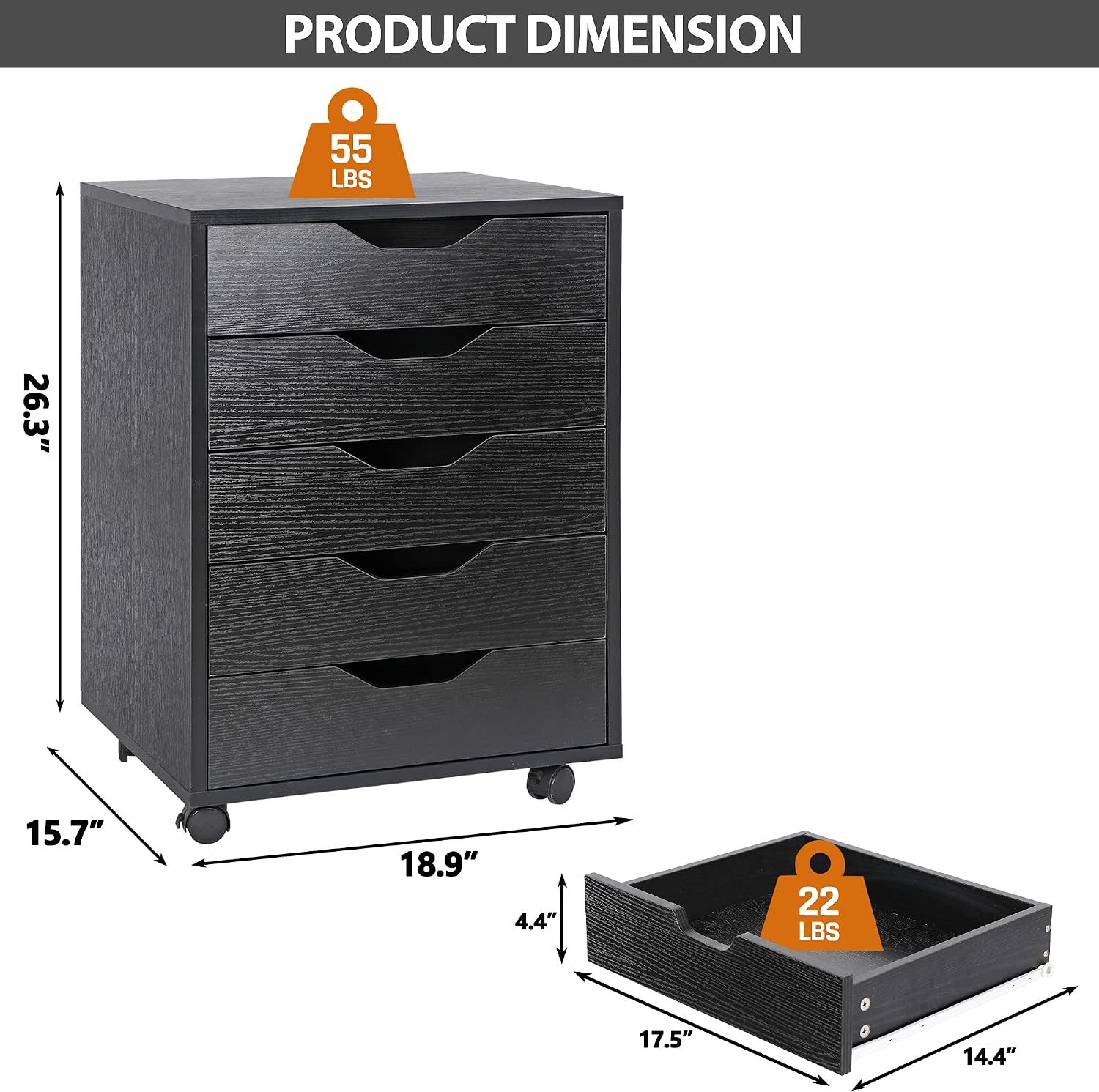
Image: Detailed diagram showing the overall dimensions of the cabinet (26.3" H x 18.9" W x 15.7" D) and individual drawer dimensions, along with weight capacities.
Warranty and Support
For warranty information, replacement parts, or technical support, please contact ZENY customer service. Refer to your purchase documentation for specific contact details or visit the official ZENY website.