
1. Important Safety Instructions
Please read all instructions carefully before using this projector and retain them for future reference. Improper operation may result in electric shock, fire, or other hazards.
- Power Supply: Ensure the projector is connected to a power source that matches the voltage specified on the device.
- Ventilation: Do not block the ventilation openings. Ensure adequate space around the projector for proper airflow to prevent overheating.
- Cleaning: Unplug the projector before cleaning. Use a soft, dry cloth. Do not use liquid or aerosol cleaners.
- Water and Moisture: Do not expose the projector to rain, moisture, or any liquids.
- Placement: Place the projector on a stable, flat surface. Avoid placing it in direct sunlight or near heat sources.
- Servicing: Do not attempt to repair this product yourself. Refer all servicing to qualified service personnel.
2. Package Contents
Verify that all items listed below are included in your package. If any items are missing or damaged, please contact customer support.
- VIVIMAGE C580 Projector
- HDMI Cable
- AV Cable
- User's Manual
- RCA Male to 2 Female Splitter
- Power Cable (2 meters)
- Remote Control
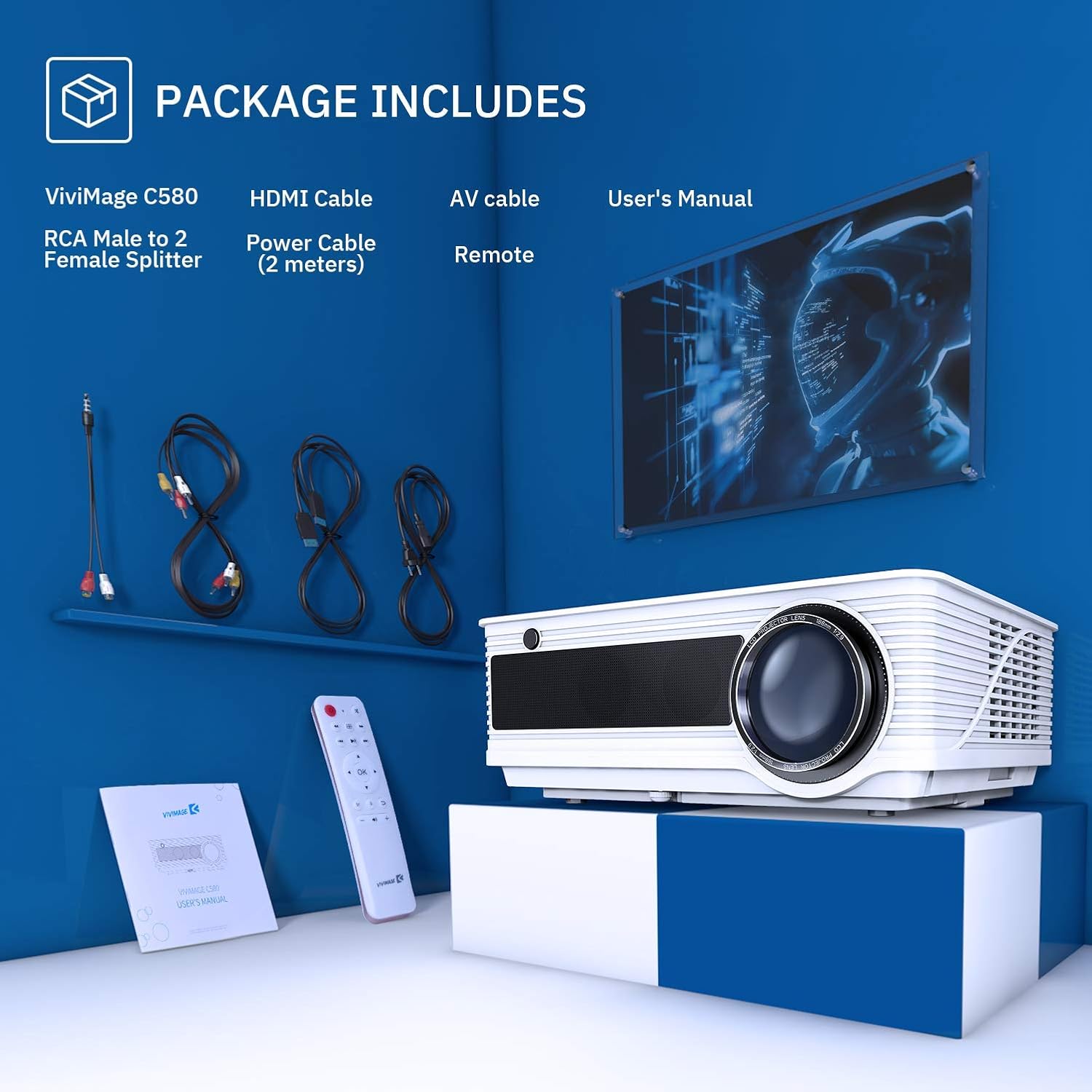
Image: The VIVIMAGE C580 projector and its included accessories, such as the HDMI cable, AV cable, power cable, remote control, and user manual.
3. Product Overview
The VIVIMAGE C580 is a home theater projector designed to deliver a clear visual experience. It features a native resolution of 1280 x 800 and a contrast ratio of 4000:1. The projector is equipped with various input ports for broad compatibility with multimedia devices.
Input/Output Ports
- Power Input: For connecting the power cable.
- USB Port: For connecting USB drives.
- VGA Port: For connecting to computers.
- TV Port: For TV signal input.
- HDMI Port: For connecting to various HDMI-enabled devices.
- Audio Port: For external audio output.

Image: The rear panel of the VIVIMAGE C580 projector showing its various input ports (USB, VGA, TV, HDMI, Audio) connected to devices like a laptop, Fire TV Stick, and game console.
4. Setup
4.1 Placement
Position the projector on a stable surface or mount it to the ceiling using the dedicated mount hole on the bottom. The projection distance can range from 1.5 meters to 5.6 meters, yielding a display size from 44 inches to 200 inches.

Image: A VIVIMAGE C580 projector mounted on a ceiling, projecting a large image onto a screen, illustrating the immersive experience and projection distance/size capabilities.
4.2 Power Connection
Connect the provided power cable to the projector's power input port and then plug the other end into a wall outlet.
4.3 Connecting Devices
The VIVIMAGE C580 projector is compatible with a wide range of multimedia devices. Use the appropriate cable (e.g., HDMI, AV, USB) to connect your device to the projector.
- HDMI: Connect to laptops, Amazon Fire TV Stick, PS4, Xbox, Blu-ray/DVD players.
- USB: Connect USB drives for media playback.
- VGA: Connect to desktop computers.
- AV: Connect to older devices using the RCA Male to 2 Female Splitter.
5. Operating the Projector
5.1 Power On/Off
Press the power button on the projector or the remote control to turn the unit on or off.
5.2 Focus Adjustment
To achieve a clear image, manually rotate the focus ring located on the projector lens until the image appears sharp.
5.3 Keystone Correction
If the projected image appears trapezoidal, adjust the ±15° keystone correction ring manually to square the image.

Image: Close-up views of the projector's manual focus ring and keystone correction mechanism, demonstrating how to adjust them for a clear and properly shaped image.
5.4 Source Selection
Use the 'Source' button on the remote control or projector to select the desired input source (e.g., HDMI1, HDMI2, USB, VGA, AV).
5.5 Audio Output
The projector features dual stereo speakers for integrated audio. For external audio, connect speakers or a sound system to the audio output port.

Image: A VIVIMAGE C580 projector highlighting its built-in speakers, indicating its capability to produce sound directly.
6. Maintenance
6.1 Cleaning the Lens
Use a soft, lint-free cloth specifically designed for optical lenses to gently wipe the projector lens. Avoid touching the lens with bare hands.
6.2 Cooling System
The VIVIMAGE C580 features an upgraded cooling system designed to optimize heat dispersion. Regularly check and clean the air filter to ensure efficient cooling and prevent dust buildup.

Image: An exploded view diagram of the VIVIMAGE C580 projector's internal cooling system, showing the fan and heat sinks, with a close-up of the removable air filter.
6.3 Lamp Life
The projector lamp has an extended lifespan of up to 60,000 hours under normal operating conditions. Proper ventilation and maintenance contribute to maximizing lamp longevity.

Image: A VIVIMAGE C580 projector lens with an overlay indicating an extended lamp life of 60,000 hours.
7. Troubleshooting
If you encounter issues with your VIVIMAGE C580 projector, refer to the following common problems and solutions:
- No Power: Ensure the power cable is securely connected to both the projector and the power outlet. Try a different outlet.
- No Image: Check the input source selection. Ensure the connected device is powered on and outputting a signal. Verify all cables are securely connected.
- Blurry Image: Adjust the focus ring until the image is sharp. Ensure the projection distance is within the recommended range.
- Trapezoidal Image: Adjust the keystone correction ring to square the image.
- No Sound: Check the projector's volume settings and the connected device's volume. Ensure external speakers are properly connected if used.
- Remote Control Not Working: Replace the batteries in the remote control. Ensure there are no obstructions between the remote and the projector's IR receiver.
8. Specifications
Key technical specifications for the VIVIMAGE C580 Projector:
| Feature | Specification |
|---|---|
| Brand | VIVIMAGE |
| Model Name | C580 |
| Display Resolution | 1280 x 800 |
| Native Resolution | 1280 x 800 |
| Display Type | LCD |
| Image Contrast Ratio | 4000:1 |
| Lamp Life | Up to 60,000 hours |
| Projection Distance | 1.5m to 5.6m |
| Projection Size | 44" to 200" |

Image: A visual comparison demonstrating the brightness and contrast capabilities of the VIVIMAGE C580 projector, indicating 4000 Lux and a 4000:1 contrast ratio.
9. Warranty and Support
This product is offered as an Amazon Renewed item. Amazon Renewed products are professionally inspected and tested to work and look like new. They are eligible for replacement or refund under the Amazon Renewed Guarantee if you are not satisfied with your purchase.
For further assistance, troubleshooting, or warranty claims, please refer to the Amazon Renewed Guarantee details or contact Amazon customer support directly.
