
1. Introduction
The Cecotec TotalPure Connected Max is a versatile 3-in-1 device designed to enhance your indoor environment. It functions as a powerful fan, an efficient heater, and an air purifier, all integrated into one unit. This device features a high-efficiency HEPA filter capable of capturing harmful particles from the air, ensuring a cleaner breathing environment. For convenience, it offers Wi-Fi control via a smartphone application, alongside an intuitive LED display and remote control. A replacement high-efficiency filter is included with the product.

Image 1.1: The Cecotec TotalPure Connected Max device positioned in a modern living room setting.
2. Safety Instructions
Please read these safety instructions carefully before using the device to prevent damage or injury. Keep this manual for future reference.
- Ensure the device is placed on a stable, flat surface to prevent tipping.
- Do not cover the air inlets or outlets during operation.
- Keep the device away from water or other liquids. Do not operate with wet hands.
- Unplug the device before cleaning or performing any maintenance.
- Do not insert objects into any openings.
- This appliance is not intended for use by persons (including children) with reduced physical, sensory or mental capabilities, or lack of experience and knowledge, unless they have been given supervision or instruction concerning use of the appliance by a person responsible for their safety.
- Children should be supervised to ensure that they do not play with the appliance.
- If the power cord is damaged, it must be replaced by the manufacturer, its service agent, or similarly qualified persons to avoid a hazard.
3. Product Components
The Cecotec TotalPure Connected Max includes the following main components:
- Main Unit (Fan, Heater, Purifier)
- Power Cable
- Remote Control
- High-Efficiency HEPA Filter (pre-installed)
- Additional Replacement HEPA Filter
- User Manual

Image 3.1: Overview of the Cecotec TotalPure Connected Max unit.
4. Setup
- Unpacking: Carefully remove the device and all accessories from the packaging. Retain packaging for future transport or storage.
- Placement: Place the device on a firm, level surface. Ensure there is adequate space around the unit for proper airflow (at least 30 cm from walls or furniture).
- Power Connection: Plug the power cable into a suitable electrical outlet. The device will enter standby mode.
- Filter Installation: The HEPA filter is typically pre-installed. If not, refer to the Maintenance section for filter installation instructions.
- Wi-Fi Setup (Optional):
- Download the Cecotec smartphone application from your device's app store.
- Follow the in-app instructions to connect your TotalPure Connected Max to your home Wi-Fi network.

Image 4.1: Smartphone with the Cecotec application for Wi-Fi control.
5. Operating Instructions
5.1. Controls
The device can be controlled via the integrated touch panel on the LED display, the included remote control, or the Cecotec smartphone application.

Image 5.1: Detail of the touch control panel.
5.2. Power On/Off
- Press the power button on the touch panel, remote control, or app to turn the device on or off.
- A main power switch is also located on the side of the unit for complete power disconnection.
5.3. Operating Modes
The TotalPure Connected Max offers three primary operating modes:
- Fan Mode: Provides cooling airflow with 9 speed settings (Sleep to Turbo).
- Heating Mode: Delivers warmth with 4 heat settings (Eco, Low, Medium, High). The thermostat allows temperature selection between 1°C and 30°C.
- Air Purifier Mode: Operates the high-efficiency filter to clean the air. This function can run independently or in conjunction with fan/heating modes.
To switch between modes, use the dedicated buttons on the touch panel, remote control, or the smartphone app.
5.4. Speed and Temperature Adjustment
- Fan Speed: Select from 9 speeds, including Sleep (minimum speed), Turbo (maximum speed), and a dedicated Silent speed.
- Heating Temperature: In heating mode, use the controls to set your desired room temperature between 1°C and 30°C. The device's thermostat will maintain this temperature.
5.5. Oscillation Function
Activate the 80° oscillation function to distribute air or heat more widely across the room. This can be controlled via the remote or app.

Image 5.2: Top view of the device, illustrating its compact design and potential for oscillation.
5.6. Timer Function
The integrated timer allows you to set the device to operate for a specific duration, up to 8 hours. The remaining time will be displayed on the LED screen.
6. Maintenance
6.1. Cleaning the Exterior
- Always unplug the device before cleaning.
- Wipe the exterior surfaces with a soft, damp cloth. Do not use abrasive cleaners or solvents.
- Ensure no water enters the device's internal components.
6.2. Filter Replacement
The device uses a high-efficiency HEPA13 filter. Regular replacement is crucial for optimal air purification performance. A replacement filter is included with your purchase.
- Power Off: Ensure the device is unplugged from the power outlet.
- Access Filter Compartment: Locate the filter compartment, typically at the base of the unit. Follow the instructions in the diagram (if available in the full manual) to open it.
- Remove Old Filter: Carefully remove the used HEPA filter. Dispose of it according to local regulations.
- Install New Filter: Insert the new HEPA13 filter into the compartment, ensuring it is correctly seated.
- Close Compartment: Securely close the filter compartment cover.
- Reset Filter Indicator (if applicable): If your device has a filter replacement indicator, consult the full manual or app for instructions on how to reset it.

Image 6.1: High-efficiency HEPA filter for the TotalPure Connected Max.
7. Troubleshooting
If you encounter issues with your Cecotec TotalPure Connected Max, refer to the table below for common problems and solutions.
| Problem | Possible Cause | Solution |
|---|---|---|
| Device does not turn on. | No power supply; Main switch off. | Check power cord connection; Ensure main power switch is on. |
| Weak airflow/heating. | Blocked air inlets/outlets; Dirty filter. | Clear any obstructions; Clean or replace the HEPA filter. |
| Wi-Fi connection issues. | Incorrect Wi-Fi password; Device too far from router; App issues. | Verify Wi-Fi credentials; Move device closer to router; Restart app/device. |
| Device makes unusual noise. | Obstruction inside; Unstable placement. | Unplug and check for foreign objects; Ensure stable placement. |
If the problem persists after attempting these solutions, please contact Cecotec customer support.
8. Specifications
| Model Number | 05299 |
| Product Dimensions (L x W x H) | 106.7 x 28.5 x 29.5 cm |
| Weight | 4.4 Kilograms |
| Heating Power | 2000 W |
| Ventilation Power | 45 W |
| Power Source | Electric Cord |
| Control Method | Remote Control, Touch Control, Wi-Fi App |
| Filter Type | HEPA13 |
| Oscillation | 80° |
| Timer | Up to 8 hours |
| Temperature Range (Heating) | 1°C to 30°C |
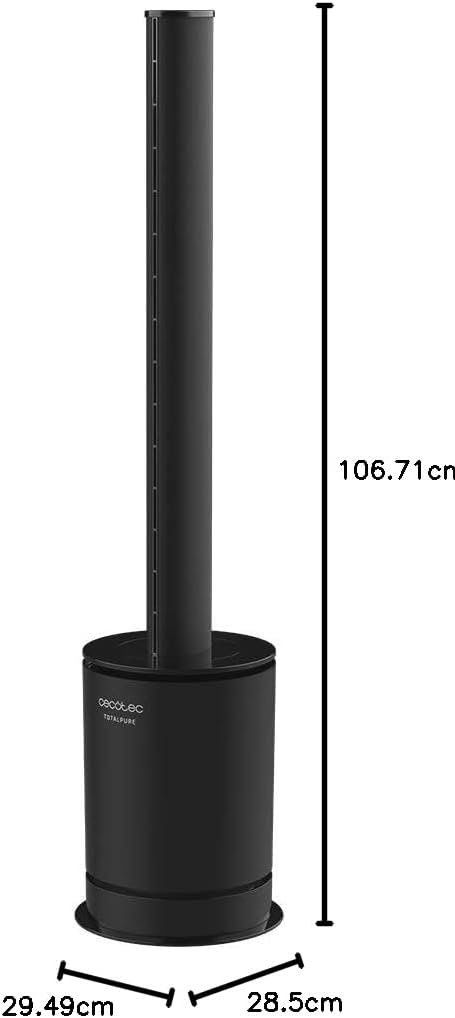
Image 8.1: Product dimensions diagram.
9. Warranty and Support
Cecotec products are manufactured to high-quality standards. For information regarding warranty coverage, spare parts availability, or technical support, please refer to the official Cecotec website or contact their customer service department.
- Spare Parts Availability in EU: 10 Years
- Manufacturer: Cecotec
For the most up-to-date contact information and support resources, please visit www.cecotec.com.
