
SCHWAIGER 716474
SCHWAIGER 716474 Portable Dual Screen DVD Player User Manual
Model: 716474
Introduction
This manual provides detailed instructions for the setup, operation, and maintenance of your SCHWAIGER 716474 Portable Dual Screen DVD Player. Please read this manual thoroughly before using the device to ensure proper functionality and safety.
The SCHWAIGER 716474 is designed as a portable DVD/CD player with a 10-inch LCD screen, ideal for car entertainment with its dual-screen setup. It features an integrated rechargeable battery, USB and SD card slots, and includes all necessary accessories for installation and use.
Package Contents
Please verify that all items listed below are included in your package:
- DVD Player with 10-inch screen (main unit)
- Second 10-inch screen (slave unit)
- AV Cable for connecting the two screens
- AC Power Adapter
- Car Cigarette Lighter Adapter
- Remote Control with CR 2025 battery
- Mounting Straps for headrest attachment
- User Manual (this document)

Figure 1: Complete package contents of the SCHWAIGER 716474 Portable Dual Screen DVD Player.
Safety Instructions
- Do not expose the device to rain or moisture.
- Do not disassemble the device. Refer all servicing to qualified personnel.
- Keep the device away from direct sunlight and heat sources.
- Ensure proper ventilation to prevent overheating.
- Use only the provided power adapters.
- Keep small parts and batteries out of reach of children.
Setup
1. Charging the Device
The main DVD player unit has an integrated rechargeable battery. Before first use, fully charge the device using the provided AC power adapter or car cigarette lighter adapter.
- Connect the AC power adapter to the DC IN port on the main unit and plug it into a wall outlet.
- Alternatively, connect the car cigarette lighter adapter to the DC IN port and plug it into your vehicle's 12V power socket.
- The charging indicator light will illuminate during charging and turn off or change color when fully charged.
2. Connecting the Dual Screens
To enjoy movies on both screens, connect the main DVD player unit to the second screen using the supplied AV cable.
- Locate the AV OUT port on the main DVD player unit.
- Locate the AV IN port on the second screen.
- Connect one end of the AV cable to the AV OUT port of the main unit and the other end to the AV IN port of the second screen.

Figure 2: Side view of the main unit with connection ports.
3. Mounting in a Vehicle
Both monitors can be securely attached to the headrests of the front seats using the provided mounting straps. Alternatively, they can be placed on a flat surface using their integrated stands.
- Thread the mounting straps through the designated slots on the back of each monitor.
- Wrap the straps around the vehicle's headrest posts and secure them tightly.
- Adjust the screen angle for optimal viewing.
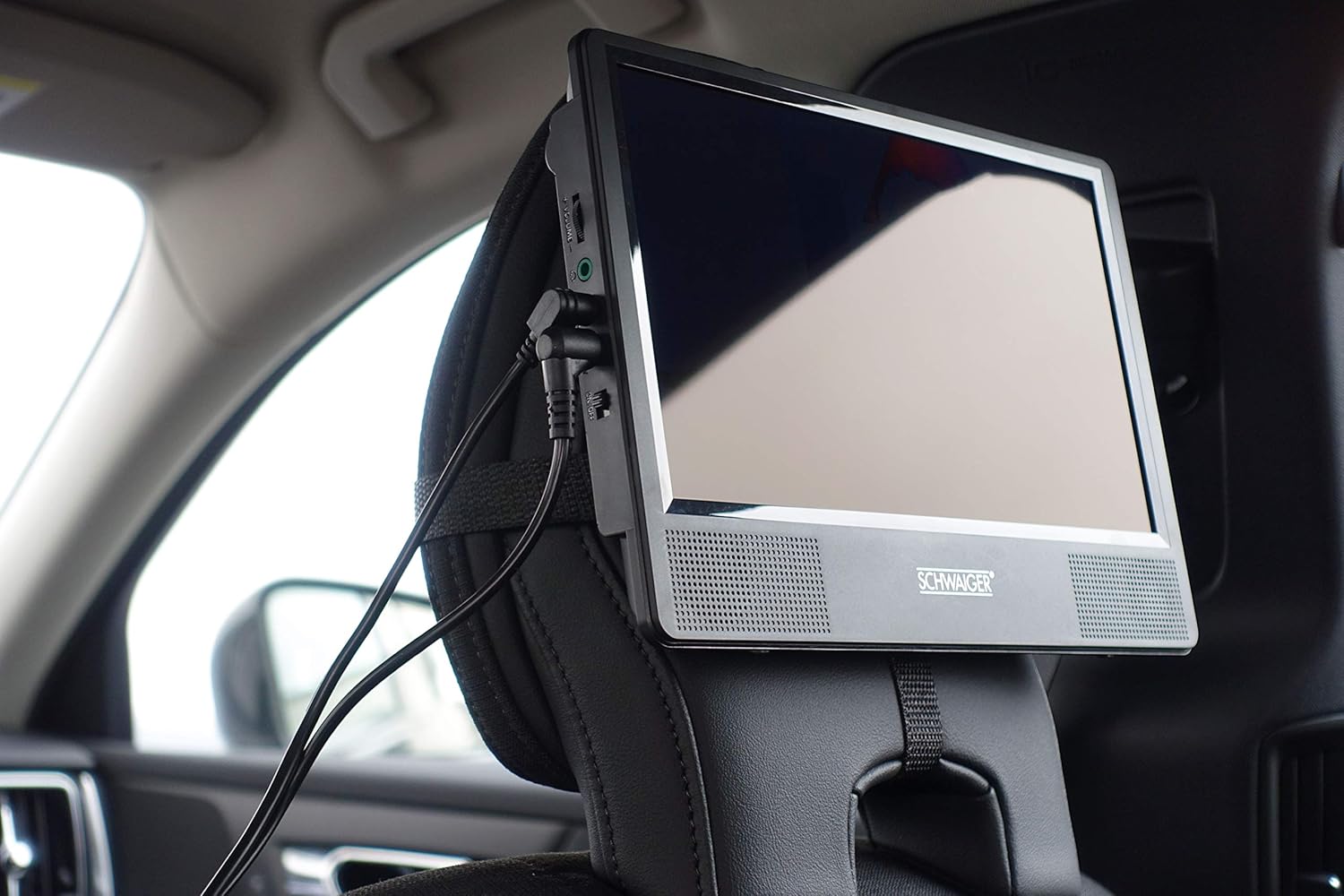
Figure 3: Monitor mounted on a car headrest.

Figure 4: Monitor with integrated kickstand.
Operating Instructions
1. Powering On/Off
- To power on the device, slide the ON/OFF switch to the ON position.
- To power off, slide the switch to the OFF position.
2. Playing DVDs/CDs
- Open the disc tray on the main DVD player unit.
- Carefully place a DVD or CD onto the spindle, label side up.
- Close the disc tray. The device will automatically begin reading the disc.
- Use the controls on the device or the remote control to navigate menus, play, pause, stop, and skip tracks/chapters.
3. Using USB and SD Card Slots
The main unit supports media playback from USB drives and SD cards.
- Insert a USB flash drive into the USB port or an SD card into the SD slot.
- The device should automatically detect the media. If not, use the MODE button on the device or remote to select the correct input source (USB/SD).
- Navigate through your media files using the directional buttons and ENTER button on the remote control.
4. Remote Control Functions
The included remote control provides full functionality for operating the DVD player. Ensure the CR 2025 battery is correctly inserted.

Figure 5: Remote control for the DVD player.
5. Volume Control
Adjust the volume using the VOL+ and VOL- buttons on the device or the remote control.

Figure 6: Front panel controls of the main unit.
Maintenance
- Cleaning: Use a soft, dry cloth to clean the screens and exterior of the device. Do not use liquid cleaners or abrasive materials.
- Disc Care: Handle discs by their edges. Keep them clean and free of scratches. Store discs in their cases when not in use.
- Battery: To prolong battery life, avoid fully discharging the battery frequently. If storing the device for an extended period, charge it to about 50% every few months.
- Storage: Store the device in a cool, dry place away from extreme temperatures and direct sunlight.
Troubleshooting
| Problem | Possible Cause | Solution |
|---|---|---|
| Device does not power on. | Battery is depleted; Power adapter not connected or faulty. | Charge the battery; Ensure power adapter is securely connected and functional. |
| Second screen shows no image. | AV cable not connected properly; Incorrect input source selected. | Check AV cable connection between main and second unit; Ensure main unit is playing content. |
| Disc does not play or skips. | Disc is dirty or scratched; Disc format not supported. | Clean the disc with a soft cloth; Try a different disc; Refer to specifications for supported formats (CD, DVD, VCD). |
| No sound. | Volume is too low or muted; Headphones connected. | Increase volume; Check mute setting; Disconnect headphones if sound is desired from speakers. |
| Remote control not working. | Battery is dead or incorrectly inserted; Obstruction between remote and device. | Replace battery (CR 2025); Ensure clear line of sight to the device's IR receiver. |
Specifications
- Brand: SCHWAIGER
- Model Number: 716474
- Screen Size: 254 Millimeters (10 inches)
- Display Type: LCD
- Display Resolution: 720x480
- Media Type: CD, DVD, VCD
- Connectivity Technology: USB, Composite Video Output
- Total USB Ports: 1
- Compatible Devices: Headphones, Projector, Audio Amplifier, Mobile Phone, Television, Speaker
- Battery Composition: Lithium-ion (1 included)
- Color: Black
- Product Dimensions: 34L x 252W x 179H millimeters
Warranty and Support
SCHWAIGER GmbH provides a warranty for this product. For specific warranty terms and conditions, please refer to the documentation included with your purchase or visit the official SCHWAIGER website. In case of technical issues or questions, please contact SCHWAIGER customer support.
Manufacturer: Schwaiger GmbH
Contact Information: Please refer to the contact details provided on the product packaging or the official SCHWAIGER website for customer service.
Related documents716474


Ask a question about this manual
Ask about setup, troubleshooting, compatibility, parts, safety, or missing instructions. Manuals+ will review the question and use this page’s manual context to help answer it.