
1. Introduction
This manual provides detailed instructions for the installation, operation, and maintenance of your ExpertPower 3000W Pure Sine Wave Inverter Charger. This device converts 12V DC battery power to 110V AC household power, suitable for a wide range of applications. It features an integrated charger and an automatic transfer switch for seamless power management.
Key Features:
- Wide-Spectrum Battery Compatibility: Supports AGM, Wet, Gel, and LiFePO4 batteries with 8 selectable profiles.
- Integrated 30A Transfer Switch: Provides UPS functionality with an industry-leading 5ms automatic switch between shore power and battery power.
- Intelligent CPU with LCD Display: Offers a clear user interface for system status, priority mode, frequency, error codes, battery voltage, and load information.
- High Efficiency: Operates at 90-99% efficiency.
- Power-Save Mode: Consumes a maximum of 10W with no load.
- Convenient Prioritization: Allows automatic switching between shore power and battery power, and can be used for shore-power-only maintenance.
- Remote Smart Controller: Includes a 26ft controller for adjusting settings from a distance.
- Robust Construction: Features a steel-hardened iron case, copper terminals, and a double ball-bearing fan for efficient cooling.
- Comprehensive Protection: Built-in safeguards against overloading, overcharging, overheating, deep discharge, and short circuits.
2. Safety Information
Please read and understand all safety instructions before installing or operating the ExpertPower 3000W Pure Sine Wave Inverter Charger. Failure to follow these instructions may result in electrical shock, fire, serious injury, or property damage.
General Safety Precautions:
- Ensure proper ventilation around the inverter to prevent overheating.
- Always connect the ground wire to a proper earth ground.
- Do not expose the inverter to rain, moisture, or corrosive environments.
- Keep flammable materials away from the inverter.
- Only qualified personnel should perform installation and wiring.
- Disconnect all power sources (AC and DC) before performing any maintenance or wiring.
- Use appropriate circuit breakers and fuses for both AC and DC connections.
Integrated Protection Features:
The inverter charger is equipped with multiple protection mechanisms to ensure safe operation:
- Short Circuit Protection: Prevents damage from direct shorts.
- Over Current Protection: Safeguards against excessive current draw.
- Over Voltage Protection: Protects against input voltage spikes.
- Overload Protection: Shuts down the unit if output load exceeds capacity.
- Over Temperature Protection: Activates cooling or shuts down if internal temperature is too high.
- Under Voltage Protection: Prevents battery over-discharge.
- Over Charge Protection: Prevents battery damage from excessive charging.

Image: Diagram illustrating the comprehensive safety features of the ExpertPower 3000W Inverter Charger, including protection against short circuits, over current, over voltage, overload, over temperature, under voltage, and overcharge.
3. Product Overview and Components
The ExpertPower 3000W Pure Sine Wave Inverter Charger is designed for robust performance and ease of use. Familiarize yourself with its physical components and display.

Image: Front view of the ExpertPower 3000W Pure Sine Wave Inverter Charger, showing the AC outlets, AC input/output terminals, DC battery terminals, and LCD display.
Front and Back Panel Connections:
- Battery Terminals (DC+ / DC-): Front-facing terminals for direct battery wiring.
- Smart Ventilation System: Automatically engages fans for over-temperature protection and heat dissipation.
- AC Terminals (L, N, E): Line, Neutral, and Earth connections for single-phase AC input (grid/shore power) and AC output (load).
- AC Outlets: Standard AC receptacles for connecting devices.
- Remote Switch Port: Connection for the optional 26ft Smart Controller.
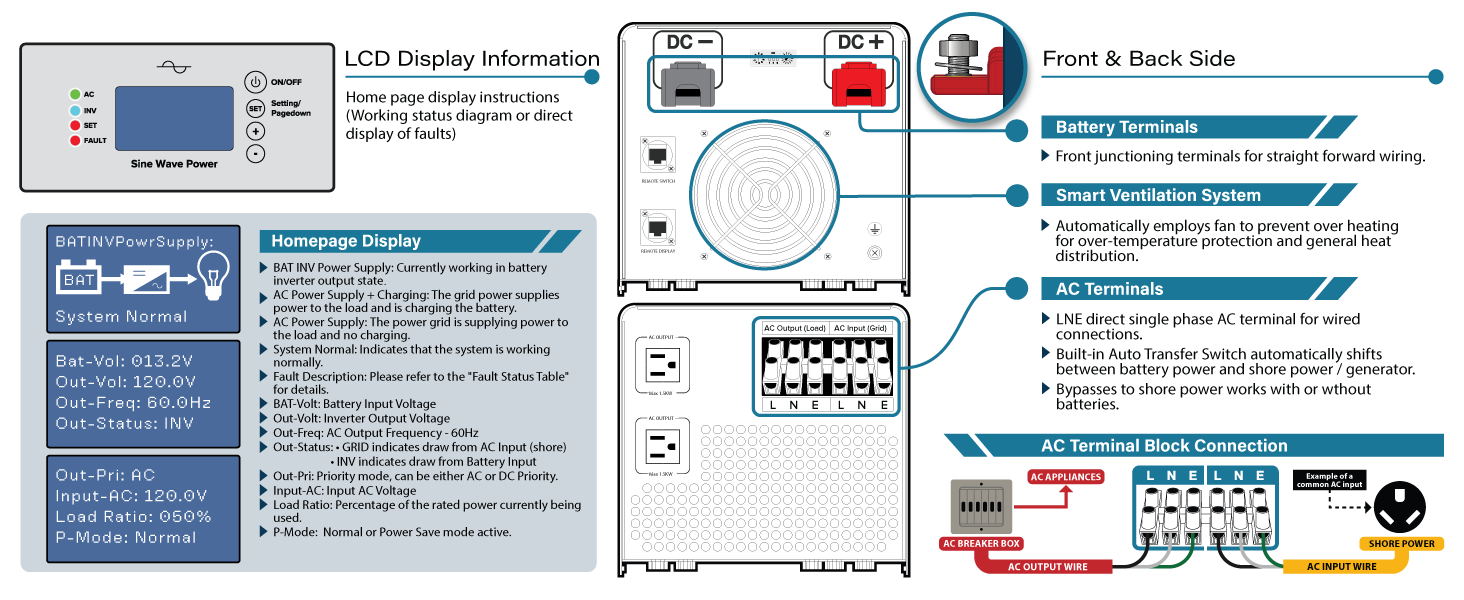
Image: Detailed diagram showing the front and back connections of the inverter, including battery terminals, AC terminals, and a breakdown of the LCD display information.
LCD Display Information:
The LCD provides real-time operational status. Key indicators include:
- BAT/INV/PowerSupply: Indicates battery, inverter, or power supply status.
- System Normal: Confirms normal operation.
- Bat-Vol: Battery voltage.
- Out-Vol: Output AC voltage.
- Out-Freq: Output frequency.
- Out-Status: Indicates if power is from inverter (INV) or grid (GRID).
- Out-Pri: Output priority mode (AC or DC).
- Input-AC: Input AC voltage.
- Load Ratio: Percentage of rated power currently in use.
- P-Mode: Normal or Power Save mode active.
Smart Controller:
The included 26ft Smart Controller allows for remote monitoring and adjustment of inverter settings. It features an ON/OFF switch and status indicators.

Image: Diagram showing the inverter's LED indicators and alarms, alongside the wall-mountable remote switch panel with its ON/OFF switch and status indicators.
4. Setup and Installation
Proper installation is critical for the safe and efficient operation of your inverter charger. Follow these guidelines carefully.
Mounting:
Mount the inverter in a dry, well-ventilated area, away from direct sunlight, heat sources, and flammable materials. Ensure sufficient clearance around the unit for airflow.
DC Battery Connection:
- Ensure the inverter is OFF and all AC and DC power sources are disconnected.
- Connect the positive (+) battery cable to the DC+ terminal on the inverter and the positive terminal of your battery bank.
- Connect the negative (-) battery cable to the DC- terminal on the inverter and the negative terminal of your battery bank.
- Use appropriately sized cables (refer to specifications for recommended gauge) and ensure all connections are tight.
- Install a DC fuse or circuit breaker between the battery bank and the inverter for protection.
AC Wiring (Input and Output):
The inverter features an AC terminal block for hardwiring AC input (shore power/grid) and AC output (to loads).
- Ensure the inverter is OFF and all AC and DC power sources are disconnected.
- Connect the AC input (shore power or generator) to the 'AC Input (grid)' terminals (L, N, E).
- Connect your AC loads (appliances, distribution panel) to the 'AC Output (load)' terminals (L, N, E).
- Ensure proper grounding for all AC connections.
- Install appropriate AC circuit breakers for both input and output lines.

Image: An RV wiring diagram illustrating how the ExpertPower Inverter Charger integrates into a complete power system, connecting to solar panels, batteries, shore power, and AC loads.
5. Operating Instructions
Once installed, configure and operate your inverter charger using the physical switches and the remote controller.
Physical Switch Settings:
On the side of the inverter, there are switches for battery type selection and priority settings.

Image: Diagram showing the physical switches on the inverter for selecting battery type (e.g., LiFePO4, SLA, GEL) and setting the priority mode (DC or AC), along with the charge current adjustment dial.
- Battery Selector (SW1): Choose the appropriate setting for your battery chemistry (e.g., LiFePO4, SLA, Flooded Lead Acid, GEL). Refer to the inverter's label or manual for specific switch positions.
- Priority Switch (SW2, SW3):
- DC Priority: The inverter will primarily draw power from the batteries. When battery voltage drops, it will switch to AC input (shore power) to charge batteries and power loads.
- AC Priority: The inverter will primarily use AC input (shore power) to power loads and charge batteries. It will only switch to battery power if AC input is lost.
- Power-Save Mode: Activates low power consumption when no load is detected.
- Charge Current Setting Dial: Adjust the charging current output from 25% to 100%. Set to 0% to turn off charging.
Starting the Inverter:
- Ensure all DC and AC connections are secure.
- Turn on the DC breaker connected to your battery bank.
- Press the ON/OFF button on the inverter or the remote controller. The LCD display should illuminate, indicating system status.
Using the Auto Transfer Switch:
The built-in transfer switch automatically manages power flow between your battery bank and an external AC source (like shore power or a generator).
- When AC input is present and active, the inverter will pass through the AC power to your loads and, if configured, charge your batteries.
- If AC input is interrupted, the inverter will automatically switch to battery power within 5ms, providing uninterrupted power to your connected devices.
- When AC input is restored, the system will seamlessly switch back to AC input.
6. Maintenance
Regular maintenance ensures the longevity and optimal performance of your ExpertPower Inverter Charger.
- Cleaning: Periodically clean the exterior of the inverter with a dry, soft cloth. Ensure ventilation openings are free from dust and debris. Do not use liquid cleaners.
- Connections: Annually check all DC and AC connections for tightness. Loose connections can cause overheating and poor performance.
- Battery Health: Monitor your battery bank's health according to the battery manufacturer's recommendations. Ensure proper charging cycles are maintained.
- Environment: Ensure the inverter remains in a cool, dry, and well-ventilated environment.
7. Troubleshooting
This section provides solutions to common issues you might encounter. For more complex problems, contact ExpertPower customer support.
Common Issues and Solutions:
- Inverter Not Turning On:
- Check DC battery connections for tightness and proper polarity.
- Verify battery voltage is within the operating range (e.g., above 10.5V for 12V systems).
- Check DC fuse or circuit breaker.
- Ensure the ON/OFF switch is in the 'ON' position.
- No AC Output:
- Check if the inverter is displaying an error code (refer to the LCD display section).
- Reduce the connected load; the inverter may be in overload protection.
- Check AC output circuit breakers.
- If using AC priority, ensure AC input (shore power) is present and stable.
- Batteries Not Charging:
- Ensure AC input (shore power) is connected and active.
- Check the charge current setting dial; ensure it's not set to 0%.
- Verify the battery type setting matches your battery chemistry.
- Check for any error codes related to charging.
- Overload Alarm:
- Reduce the total wattage of connected appliances.
- Some appliances have high startup (surge) power; try connecting them one at a time.
- Over Temperature Alarm:
- Ensure adequate ventilation around the inverter.
- Clean any dust or obstructions from the fan and vents.
- Reduce the load on the inverter.
8. Specifications
Technical specifications for the ExpertPower 3000W Pure Sine Wave Inverter Charger (Model IVOCH3KW).

Image: A table detailing the technical specifications of the ExpertPower 3000W Pure Sine Wave Inverter Charger, including voltage, power, efficiency, and dimensions.
| Parameter | Value |
|---|---|
| Rated Input Voltage | 12VDC; 110 - 130VAC |
| Rated Output Voltage | 110V / 120V / 130VAC |
| Output Voltage Range | ±4% rms |
| Nominal Output Frequency | 60 ± 0.3Hz |
| Continuous Power | 3000W |
| Peak/Surge Power | 9000W |
| Efficiency | >90% |
| Idle Power Consumption | 90W (Normal Mode); Max. 10W (Power-Save Mode) |
| Wave Type | Pure Sine Wave |
| Battery Charger | 60A |
| Battery Type Compatibility | LiFePO4 / AGM / SLA / Gel |
| Dimensions (L x W x H) | 19.25 x 8.75 x 7.43 inches |
| Weight | 47.75 lbs |
| Safety Certification | UL2743 / CE / EMC / FCC |
9. Warranty and Support
ExpertPower products are designed for reliability and performance. For warranty information, technical support, or service inquiries, please contact ExpertPower directly.
You can visit the official ExpertPower website for more information and support resources: www.expertpower.us


