
1. Introduction
The Metrel MI 3394 MultiTesterXA is a portable instrument designed for electrical safety testing and CE certification of electrical appliances, machines, and switchboards. It features an intuitive touch screen display for easy test selection and execution. The instrument supports PASS/FAIL evaluation based on defined test limits and allows for storage of test results.
2. Safety Information
Always observe general safety precautions when working with electrical equipment. Failure to follow these guidelines may result in injury or damage to the instrument.
- Ensure the instrument is in good working condition before each use.
- Do not operate the device in wet conditions or explosive atmospheres.
- Use only original Metrel accessories and test leads.
- Follow all local and national electrical safety regulations.
- Disconnect power to the device under test before connecting or disconnecting test leads, unless specifically instructed otherwise for a particular test.
- High voltage tests can be dangerous. Exercise extreme caution and ensure proper isolation and grounding.
- Refer to the full instruction manual (provided on CD) for detailed safety guidelines.
3. Package Contents
Verify that all items listed below are present in your package.
- Instrument MI 3394 CE MultiTesterXA
- HV test lead 5m, without pistols, 2 pcs, S 2073
- Continuity test lead, 2.5 m, 2 pcs
- Continuity test lead, red, 1.5 m
- Insulation test lead, red, 2.5 m
- Insulation test lead, black, 2.5 m
- Crocodile clip, black, 3 pcs
- Crocodile clip, red, 2 pcs
- Discharge time cable
- Mains cable
- Bag for accessories
- Calibration certificate
- RS 232 cable
- USB cable
- CD with instruction manual (full version)
- Metrel ES Manager BASIC license
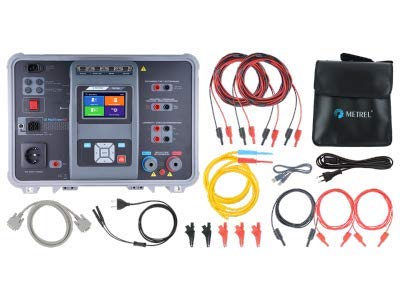
Image: The Metrel MI 3394 MultiTesterXA shown with all standard included accessories, including various test leads, crocodile clips, cables, and a carrying bag.
4. Product Overview
The MI 3394 MultiTesterXA is housed in a robust case, designed for portability and protection. The main unit features a central touch screen display and various connection ports for different tests.
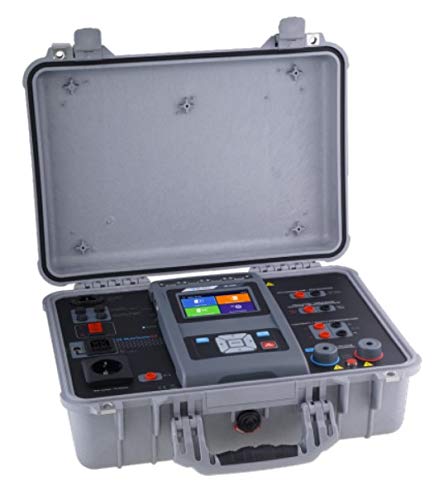
Image: The Metrel MI 3394 MultiTesterXA instrument opened in its protective carrying case, showing the main unit and various connection points.
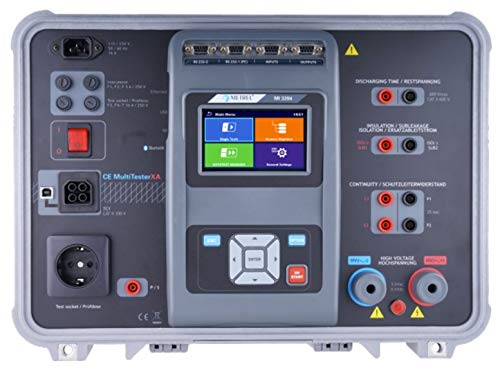
Image: A detailed top-down view of the Metrel MI 3394 MultiTesterXA's control panel, highlighting the touch screen, navigation buttons, and various input/output terminals for different test functions.

Image: An overview of the Metrel MI 3394 MultiTesterXA's key features, measuring functions, and compliance standards.
Key Components
- Touch Screen Display: Central interface for test selection, parameter setting, and result display.
- Navigation Buttons: For menu navigation and selection.
- Test Socket / Probbene: For connecting devices under test.
- Discharging Time / Restspannung: Terminals for discharge time measurements.
- Insulation / Isolationswiderstand: Terminals for insulation resistance tests.
- Continuity / Schutzleiterwiderstand: Terminals for continuity tests.
- High Voltage / Hochspannung: Terminals for high voltage tests.
- Communication Ports: RS 232, USB for PC connection and data transfer.
Key Features
- Data Management: User-friendly data management facility and state-of-the-art memory organizer.
- Multiple Test Terminals: Enables choice between single tests or auto-sequences.
- Support for Test Adapter: A 1460 XA CE ADAPTER enables execution of auto tests from a single test terminal.
- MicroSD: Supports MicroSD memory card (8 GB supplied) up to 32 GB.
- Programmable High Voltage (AC + DC) test.
- 4-wire continuity test.
- PASS/FAIL evaluation of test results.
- Creation of structure with dedicated tests.
5. Setup
Initial Power-Up
- Connect the mains cable to the instrument and a suitable power outlet.
- Press the power button to turn on the device.
- The instrument will boot up and display the main menu on the touch screen.
- Follow on-screen prompts for initial language and date/time settings if required.
Connecting Test Leads
Connect the appropriate test leads for the desired measurement function to the corresponding terminals on the instrument. Ensure all connections are secure.
- For High Voltage tests, use the dedicated HV test leads.
- For Continuity tests, use the continuity test leads.
- For Insulation Resistance tests, use the insulation test leads.
6. Operating Instructions
The MI 3394 MultiTesterXA offers a range of testing functions accessible via the touch screen interface.
Navigating the Menu
Use the touch screen to select desired test functions. The main menu typically presents options such as:
- Single Tests
- Auto Tests
- Memory
- Settings
Performing a Test
- From the main menu, select the desired test function (e.g., "High Voltage", "Continuity", "Insulation").
- Connect the device under test (DUT) to the appropriate terminals using the correct test leads.
- Set the test parameters (e.g., voltage, current, time) as required for the specific test and standard.
- Initiate the test by pressing the "START" button on the screen or physical button.
- Observe the test results on the display. The instrument will typically provide a PASS/FAIL indication.
- Disconnect the DUT after the test is complete.
- Save the test results to memory if desired.
Measuring Functions
The MI 3394 MultiTesterXA is capable of performing the following measurements:
- High Voltage: Programmed (AC/DC) and burn test (optional A 1560).
- Continuity Tests: Including 4-wire continuity test.
- Insulation Resistance Measurement.
- Leakage Current: Substitute, Differential, Touch, and PE-leakage current.
- Discharge Time.
- Functional Test: Measures power (P/S/Q), voltage, current, cos fi, frequency, ThdU, ThdI, PF.
7. Maintenance
Cleaning
Clean the instrument's casing and display with a soft, damp cloth. Do not use abrasive cleaners or solvents.
Calibration
Regular calibration is essential to ensure the accuracy of measurements. Refer to the calibration certificate for recommended intervals. Contact an authorized Metrel service center for calibration.
Battery Care
If the instrument is battery-powered, ensure proper charging and storage to prolong battery life. Avoid deep discharge.
8. Troubleshooting
This section addresses common issues you might encounter. For more complex problems, refer to the full instruction manual or contact Metrel support.
- Instrument does not power on:
- Check if the mains cable is securely connected.
- Ensure the power outlet is functional.
- If battery-powered, check battery charge level.
- Test fails unexpectedly:
- Verify that the DUT is correctly connected.
- Check test lead integrity.
- Review test parameters and limits.
- Ensure the DUT is in a safe state for testing.
- Inaccurate readings:
- Check if the instrument is due for calibration.
- Ensure test leads are not damaged or improperly connected.
- Verify environmental conditions are within specified operating ranges.
9. Technical Specifications
The following table outlines the key technical specifications of the Metrel MI 3394 MultiTesterXA.

Image: A detailed table presenting the technical specifications of the Metrel MI 3394 MultiTesterXA, including measuring ranges, resolutions, and accuracies for various functions like HV, continuity, insulation, and leakage current tests.
| Feature | Value |
|---|---|
| Brand | Metrel |
| Model | MI 3394 ST CE MultiTesterXA |
| Power Source | Battery Powered |
| Specification Met | CE, CSA |
| Display | 4.3" colour LCD display with touch screen |
| Communication | RS232, USB and Bluetooth |
| Memory | 32 GB (internal), MicroSD support (up to 8 GB supplied) |
For detailed measurement ranges, resolutions, and accuracies, please refer to the technical specification sheet provided with the instrument or the image above.
10. Warranty and Support
Warranty Information
The Metrel MI 3394 MultiTesterXA comes with a 2-year (24-month) warranty from the manufacturer. Please retain your proof of purchase for warranty claims.
Customer Support
For technical assistance, service, or calibration, please contact your authorized Metrel distributor or visit the official Metrel website.
Manufacturer: Metrel
Website: www.metrel.si
11. Optional Accessories
Enhance the functionality of your MI 3394 MultiTesterXA with these optional accessories.

Image: A table listing various optional accessories available for the Metrel MI 3394 MultiTesterXA, including their order numbers and descriptions, such as adapters, test leads, and remote controls.
- A 1428: SanDisk MicroSD card reader
- A 1060: Two way mains adapter
- A 1460: XA CE adapter supports Auto tests
- S 1058: Continuity test lead, 50 m, 2 pcs
- A 1495: Remote control pedal
- S 1072: Continuity test lead with 2 wire adaptor clip, 2.5 m, set of 2 pcs
- A 1496: Warning lamp / 2 LED's signal tower with buzzer
- A 1497: Warning lamp / 4 LED's signal tower with buzzer
- P 1101: Lizenzschluessel fuer Advanced Metrel ES Manager


