

1. Introduction and Overview
The Metrel MI 2892 Power Master is a sophisticated hand-held three-phase power quality analyzer designed for comprehensive analysis of electrical installations. It features a large, easy-to-read graphical color display that allows users to quickly identify harmonics, phasors, and waveform anomalies.
This instrument is suitable for both long-term recording and troubleshooting power quality issues in three-phase and single-phase power distribution systems. Its user-friendly interface, including handy Quick Set buttons, facilitates faster data overview and efficient troubleshooting. The accompanying PC software, PowerView3, provides detailed analysis of recorded data, direct reading from the microSD memory card, and enables the creation of professional test reports.
2. Included Equipment
The standard set of the MI 2892 Power Master includes the following components:
- Instrument Power Master unit
- Test probes (brown, black, grey, green, blue), 5 pieces
- Crocodile clips (brown, black, grey, green, blue), 5 pieces
- Voltage measurement leads (brown, black, grey, green, blue), 5 pieces
- Labels for color coding
- Temperature probe
- microSD memory card 8.0GB
- microSD card reader
- PC SW PowerView3 software
- RS232, USB, and Ethernet patch cables
- Power supply adapter
- 1.2 V NiMH rechargeable batteries, 6 pieces
- Professional protective waterproof carrying case
- Instruction manual (this document)
- Calibration certificate
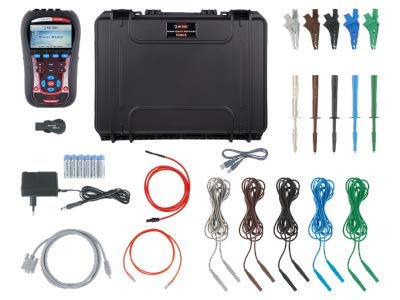
The Metrel MI 2892 Power Master kit, showing the main unit, various test leads, probes, clips, power adapter, and accessories neatly organized within its protective carrying case.
3. Key Features and Capabilities
The MI 2892 Power Master offers a comprehensive set of features for detailed power quality analysis:
- Voltage Measurement: TRMS, peak, crest factor (4-channel).
- Current Measurement: TRMS, peak, crest factor (4-channel).
- Power Analysis: Active, reactive, apparent power measurements fully compliant with IEEE 1459 (active, non-active, fundamental, harmonic, load unbalance) and classic (vector or arithmetic) methods.
- VFD (Variable Frequency Drives) Analysis: Includes unbalance and flicker measurement.
- Harmonic Analysis: Harmonic and interharmonic analysis up to 50th harmonics, including THD measurement.
- Energy Measurement: Active, reactive, generated, and consumed energy.
- Event Recording: Capturing and recording of power supply events such as shutdowns, interruptions, swells, and dips.
- Inrush Current Monitoring: Inrush currents monitoring and recording, with waveform/inrush displaying, snapshot, and recording capabilities.
- Transient Recording: Transients recording with a sampling frequency of 49 kSamples/sec.
- Compliance: Full compliance with power quality standard IEC 61000-4-30 Class A. Complete power quality analysis according to EN 50160, including signalling and interharmonics.
- Memory: Support for microSD memory card (8GB supplied) up to 32GB.
- Input Channels: 4-voltage channels with a wide measurement range (0 ... 1000 Vrms, CAT III / 1000 V) and 4-current channels with automatic clamp recognition and on-instrument range selection.
- Smart Clamp Detection: Automatic Smart Clamp detection and Smart Clamp range selection.

A technical overview sheet for the Metrel MI 2892 Power Master, highlighting its key measuring functions, features, applications, and compliance standards.
4. Setup
Before operating the MI 2892 Power Master, ensure proper setup:
- Battery Installation: Insert the six 1.2 V NiMH rechargeable batteries into the designated compartment. Ensure correct polarity.
- Power Connection: Connect the power supply adapter to the instrument and a suitable power outlet to charge the batteries or power the device directly.
- Memory Card: Insert the supplied 8GB microSD memory card into the card slot. This card is essential for data logging and recording.
- Probe and Lead Connection: Connect the voltage measurement leads, test probes, and crocodile clips to the appropriate input terminals on the MI 2892. Use the provided color-coding labels to ensure correct phase connections (brown, black, grey, green, blue).
- Current Clamp Connection (Optional): If using current clamps (not included in standard set, but supported), connect them to the current input channels. The instrument supports automatic clamp recognition.
- Initial Power On: Press the power button to turn on the instrument. The display will show the startup screen.
Always refer to the detailed diagrams in the full instruction manual for specific connection points and safety guidelines.
5. Operation
Operating the MI 2892 Power Master involves navigating its user interface and utilizing its measurement capabilities:
- Display Navigation: Use the directional buttons and the ENTER button to navigate through menus and select options on the color display.
- Quick Set Buttons: Utilize the dedicated Quick Set buttons (F1, F2, F3, F4) for rapid access to frequently used functions and data overviews.
- Measurement Modes: Select the desired measurement mode (e.g., Voltage, Current, Power, Harmonics, Flicker) from the main menu.
- Connecting to System: Carefully connect the probes and leads to the electrical system under test, ensuring all safety precautions are followed.
- Data Recording: Initiate long-term recordings or event capturing as required. The instrument will store data on the microSD card.
- Real-time Monitoring: Observe real-time measurements, waveforms, and phasor diagrams on the display.
- Data Transfer: After measurements, transfer recorded data to a PC using the supplied USB, RS232, or Ethernet cables for detailed analysis with PowerView3 software.
For detailed instructions on specific measurement setups and advanced functions, consult the comprehensive user manual.
6. Maintenance
Proper maintenance ensures the longevity and accuracy of your MI 2892 Power Master:
- Cleaning: Clean the instrument's casing and display with a soft, dry cloth. Do not use abrasive cleaners or solvents. Ensure all ports are free of dust and debris.
- Battery Care: Regularly charge the NiMH rechargeable batteries. If the instrument will not be used for an extended period, remove the batteries to prevent leakage. Replace batteries when their performance degrades.
- Storage: Store the instrument and its accessories in the professional protective waterproof carrying case when not in use. Store in a dry environment, away from extreme temperatures and direct sunlight.
- Calibration: The instrument comes with a calibration certificate. Regular recalibration by an authorized service center is recommended to maintain measurement accuracy, typically annually or as per your quality system requirements.
- Firmware Updates: Check the Metrel website periodically for firmware updates for the MI 2892 and PowerView3 software. Keeping the software updated ensures optimal performance and access to new features.
7. Troubleshooting
This section addresses common issues you might encounter:
- Instrument Does Not Power On:
- Check if batteries are properly inserted and charged.
- Ensure the power supply adapter is correctly connected and providing power.
- Verify the power button is fully pressed.
- No Measurement Readings:
- Ensure test leads and probes are securely connected to both the instrument and the circuit under test.
- Verify that the correct measurement mode is selected.
- Check for damaged leads or probes.
- Data Not Saving to SD Card:
- Ensure the microSD card is properly inserted.
- Check if the card is full; if so, transfer data and clear space or use a new card.
- Verify the card is not write-protected.
- Try reformatting the card (this will erase all data).
- Software Connection Issues (PowerView3):
- Ensure the correct communication cable (USB, RS232, Ethernet) is connected between the instrument and the PC.
- Verify that the correct communication port is selected in the PowerView3 software.
- Check if instrument drivers are correctly installed on the PC.
- Disable any firewalls or antivirus software that might block the connection temporarily for testing.
If issues persist, refer to the detailed troubleshooting section in the full instruction manual or contact Metrel technical support.
8. Specifications
Key technical specifications for the Metrel MI 2892 Power Master:
| Parameter | Value |
|---|---|
| Voltage Measurement Range | 0 ... 1000 Vrms (CAT III / 1000 V) |
| Current Channels | 4 channels with automatic clamp recognition |
| Sampling Frequency (Transients) | 49 kSamples/sec |
| Harmonic Analysis | Up to 50th harmonics, THD measurement |
| Memory | microSD card (8GB supplied, supports up to 32GB) |
| Display | Large graphical color display |
| Compliance | IEC 61000-4-30 Class A, EN 50160 |
| Power Supply | 1.2 V NiMH rechargeable batteries (6 pcs), AC adapter |
| Dimensions | Approx. 230 x 140 x 80 mm (based on typical handheld PQA size) |
| Weight | Approx. 1.0 kg (based on typical handheld PQA weight) |

A detailed technical specifications sheet for the Metrel MI 2892 Power Master, outlining various measurement functions, input ranges, recorder capabilities, and general device characteristics.
9. PC Software: PowerView3
The PowerView3 PC software is an integral part of the MI 2892 Power Master system, providing powerful tools for data analysis and report generation.
- Data Download: Facilitates easy download of recorded data from the MI 2892 to your computer.
- Detailed Analysis: Offers advanced analytical capabilities for recorded power quality data, including graphical representations of waveforms, trends, harmonics, and events.
- Report Generation: Enables automatic creation of professional test reports based on the analyzed data, compliant with various standards.
- Direct Reading: Supports direct reading of data from the microSD memory card.
- Long-term Records: Optimized for analysis of extensive long-term recordings.
- User Interface: Features a user-friendly interface with quick buttons and customizable views.
- Data Management: Allows for organized data management, including filtering and grouping of data by quantity or phase.

An image displaying the user interface of the Metrel PowerView3 PC software, showing various data analysis graphs and options, alongside ordering information for different MI 2892 sets.
10. Warranty and Support
The Metrel MI 2892 Power Master comes with a 2-year (24-month) warranty from the manufacturer, covering defects in materials and workmanship under normal use.
For technical support, service, or warranty claims, please contact Metrel customer service or an authorized Metrel distributor. Ensure you have your instrument's serial number and proof of purchase available when contacting support.
For the most up-to-date contact information and support resources, please visit the official Metrel website.
Note: Warranty terms and conditions may vary by region. Always refer to the official warranty statement provided with your product.


