
Introduction
The iDance DL6-OCTO Disco Ball is a portable, rechargeable lighting device designed to create dynamic light shows. It features multiple colored lights and various light show programs, making it suitable for various entertainment settings. This manual provides essential information for the safe and effective use of your DL6-OCTO Disco Ball.
Product Features
- Wireless operation for flexible placement.
- Six different colored lights project patterns onto walls.
- Up to 4 hours of continuous playback on a single charge.
- Features 10 distinct light show programs.
- Lightweight and portable design.
- Ability to synchronize lights with music.
Safety Warnings
Attention: Please read and follow all safety instructions carefully before use to prevent injury or damage to the device.
- Do not expose the device to water or excessive moisture.
- Avoid direct eye exposure to the light source.
- Keep out of reach of small children.
- Use only the specified charging cable and power adapter.
- Do not attempt to open or repair the device yourself. Refer all servicing to qualified personnel.
- Ensure proper ventilation during operation.
Setup
- Unpacking: Carefully remove the DL6-OCTO Disco Ball from its packaging. Retain packaging for future storage or transport.
- Initial Charge: Before first use, fully charge the device using the provided charging cable. Connect the cable to the charging port on the device and a suitable USB power source. The charging indicator light will show the charging status.
- Placement: Place the Disco Ball on a stable, flat surface. For optimal light projection, position it in a central location within the desired area.
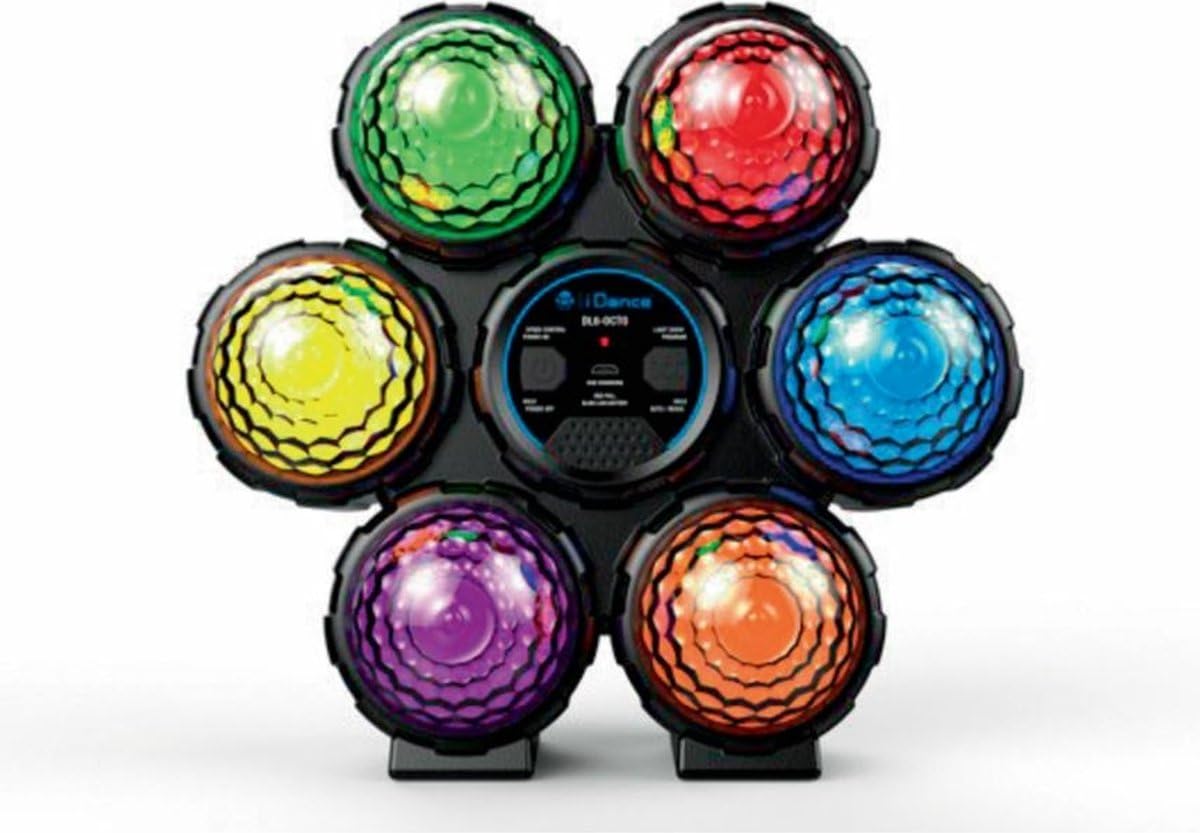
Image: The iDance DL6-OCTO Disco Ball, showcasing its six distinct colored light domes (green, red, blue, orange, purple, yellow) arranged around a central control panel. The device is designed for portable use.
Operating Instructions
- Power On/Off: Press and hold the Power button located on the central control panel to turn the device on or off.
- Select Light Show Program: Use the "Light Show Program" button to cycle through the 10 available light show patterns. Each press will advance to the next program.
- Music Synchronization: The DL6-OCTO can synchronize its light effects with music. Ensure music is playing at a sufficient volume nearby for the device to detect audio and adjust its light patterns accordingly.
- Recharging: When the battery is low, the indicator light will signal. Connect the device to a power source using the provided USB cable to recharge.
Maintenance
- Cleaning: Use a soft, dry cloth to clean the exterior of the Disco Ball. Do not use abrasive cleaners or solvents.
- Storage: Store the device in a cool, dry place away from direct sunlight and extreme temperatures when not in use.
- Battery Care: To prolong battery life, avoid fully discharging the battery frequently. Recharge the device periodically even if not in use for extended periods.
Troubleshooting
- Device not turning on:
Ensure the device is fully charged. Connect it to a power source and allow it to charge for at least 30 minutes before attempting to power on again.
- Lights not working:
Check if the device is powered on. Cycle through the light show programs to ensure a program is selected. If issues persist, try recharging the device.
- Music synchronization not responsive:
Ensure music is playing at a sufficient volume close to the device. The device uses an internal microphone to detect audio.
Specifications
| Feature | Detail |
|---|---|
| Model Number | DL6-OCTO |
| Dimensions (L x W x H) | 22.5 x 10.5 x 24.5 cm |
| Weight | 480 grams |
| Recommended Age | 5 months and up |
| Main Material | Plastic |
| Color | Multicolor |
| Battery Type | Lithium-ion (1 included) |
| Light Source Type | Light Emitting Diode (LED) |
| Number of Light Sources | 6 |
| Light Features | Color changing, lighting effects, remote control compatible (remote not specified as included) |
| Max Playback Time | Up to 4 hours |
| Light Show Programs | 10 |
Warranty and Support
Information regarding specific warranty terms and customer support contact details is not provided in the product description. Please refer to the product packaging or the manufacturer's official website for detailed warranty information and support options.
For general inquiries, you may visit the iDance Audio website.
