
1. Introduction
Thank you for choosing the EarFun Air Pro Wireless Earbuds. This manual provides detailed instructions for setting up, operating, and maintaining your earbuds to ensure optimal performance and longevity. Please read this manual thoroughly before use and retain it for future reference.
2. Package Contents
Verify that all items listed below are present in your package:
- EarFun Air Pro Wireless Earbuds
- Charging Case
- USB-C Charging Cable
- Eartips (various sizes)
- User Manual (this document)
3. Product Overview
Familiarize yourself with the components of your EarFun Air Pro earbuds and charging case.

Image 3.1: EarFun Air Pro Wireless Earbuds and their charging case. The earbuds are black with a metallic accent, and the charging case is a sleek black oval shape with the EarFun logo.
3.1 Earbud Components
- Touch Control Area: For managing playback, calls, and modes.
- Microphones: Multiple microphones for active noise cancellation and clear calls.
- Ear Tip: Silicone tips for comfort and passive noise isolation.
- Charging Contacts: Located at the bottom of each earbud.
3.2 Charging Case Components
- Earbud Slots: Magnetic slots for securing and charging earbuds.
- Charging Indicator: LED light indicating charging status.
- USB-C Port: For charging the case.
4. Setup
4.1 Initial Charging
- Remove the protective film from the charging contacts on both earbuds.
- Place the earbuds into the charging case.
- Connect the USB-C cable to the charging port on the case and to a power source.
- Allow approximately 1.5 hours for a full charge of the earbuds and case. The indicator light on the case will show charging status.
4.2 Pairing with a Device
- Ensure the earbuds are fully charged.
- Open the charging case. The earbuds will automatically enter pairing mode, indicated by a flashing LED on one of the earbuds.
- On your device (smartphone, tablet, etc.), enable Bluetooth.
- Search for "EarFun Air Pro" in the list of available Bluetooth devices and select it to connect.
- Once connected, a voice prompt will confirm successful pairing.
Note: The earbuds will automatically reconnect to the last paired device when removed from the case, if Bluetooth is enabled on the device.
4.3 Selecting Ear Tips
Choosing the correct ear tip size is crucial for comfort, sound quality, and effective noise cancellation. Experiment with the included ear tips to find the best fit for your ears. A good seal will provide better bass response and noise isolation.
5. Operating Instructions
5.1 Touch Controls
The EarFun Air Pro earbuds feature intuitive touch controls on the outer surface of each earbud.

Image 5.1: A person demonstrating the use of touch controls on the EarFun Air Pro earbuds. The image highlights the tap control functionality for changing modes or managing music.
| Action | Function |
|---|---|
| Single Tap (Left/Right) | Play/Pause Music, Answer/End Call |
| Double Tap (Right) | Next Track |
| Double Tap (Left) | Previous Track |
| Triple Tap (Left) | Cycle ANC/Transparency/Normal Mode |
| Triple Tap (Right) | Activate Voice Assistant |
| Press and Hold (Left/Right) | Reject Call |
5.2 Active Noise Cancellation (ANC) and Transparency Mode
The EarFun Air Pro features QuietSmart Technology for active noise cancellation up to 38dB, and a Transparency Mode.
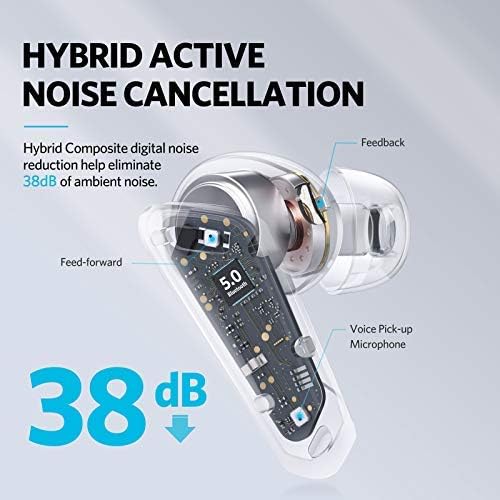
Image 5.2: A cutaway diagram of an earbud illustrating the components involved in Hybrid Active Noise Cancellation, showing feed-forward and feedback microphones, and a voice pick-up microphone, indicating a noise reduction of 38dB.
- ANC Mode: Reduces ambient noise, ideal for noisy environments.
- Transparency Mode: Allows you to hear your surroundings while listening to audio, enhancing situational awareness.
- Normal Mode: Standard audio playback without noise cancellation or transparency.
Cycle through these modes by triple-tapping the left earbud.
5.3 Single Earbud Mode
Either earbud can be used independently. Simply remove one earbud from the case and leave the other in, or place one back into the case during use. The active earbud will automatically switch to mono mode.
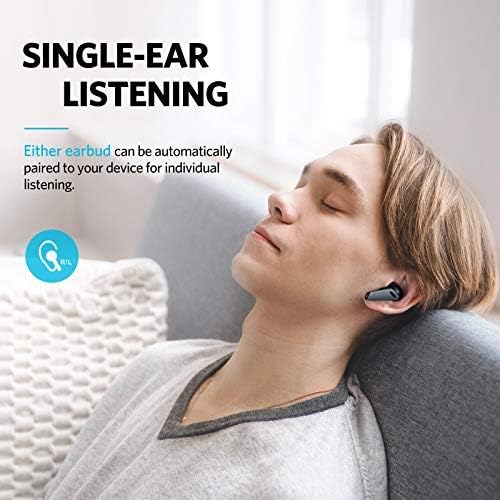
Image 5.3: A person relaxing on a couch, listening to music with only one EarFun Air Pro earbud in their ear, demonstrating the single-ear listening feature.
5.4 In-Ear Detection
The earbuds feature in-ear detection. Removing an earbud from your ear will automatically pause playback, and reinserting it will resume playback.

Image 5.4: A man holding one EarFun Air Pro earbud after removing it from his ear, while the other remains in his ear, illustrating the in-ear detection technology that pauses music when an earbud is removed.
5.5 Making and Receiving Calls
The EarFun Air Pro earbuds utilize 6-microphone Environment Noise Cancellation (ENC) technology for clear calls.
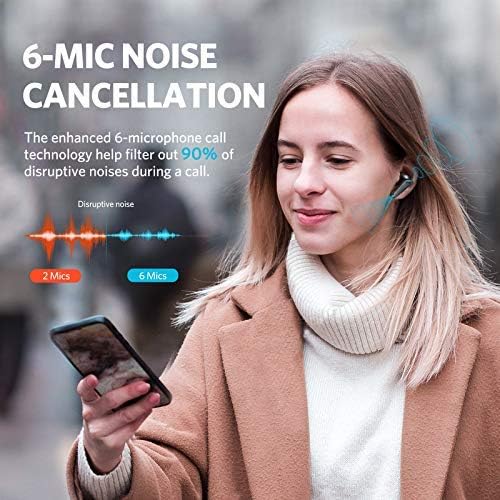
Image 5.5: A woman smiling and holding a smartphone to her chest while wearing EarFun Air Pro earbuds, illustrating the 6-mic noise cancellation feature for calls, with a graphic showing noise reduction.
- Answer/End Call: Single tap either earbud.
- Reject Call: Press and hold either earbud.
6. Maintenance
6.1 Cleaning
- Regularly clean the earbuds, ear tips, and charging contacts with a soft, dry, lint-free cloth.
- Remove ear tips and clean them with mild soap and water if necessary, ensuring they are completely dry before reattaching.
- Avoid using harsh chemicals or abrasive materials.
6.2 Storage
- When not in use, always store the earbuds in their charging case to protect them and keep them charged.
- Store in a cool, dry place, away from extreme temperatures and direct sunlight.
6.3 Water Resistance
The EarFun Air Pro earbuds are IPX5 water-resistant, meaning they can withstand sweat and light splashes. They are not designed for swimming or submersion in water. Ensure earbuds are dry before placing them back in the charging case.
7. Troubleshooting
| Problem | Possible Solution |
|---|---|
| Earbuds not pairing |
|
| No sound from one earbud |
|
| Poor sound quality/weak bass |
|
| Earbuds not charging |
|
8. Specifications
| Feature | Detail |
|---|---|
| Model | TW302 |
| Bluetooth Version | 5.0 |
| Connectivity Technology | Bluetooth |
| Active Noise Cancellation | Up to 38dB (QuietSmart Technology) |
| Microphones | 6-Mic ENC for calls |
| Drivers | Dual 10mm Composite Dynamic Drivers |
| Playtime (Earbuds) | Up to 9 hours (Normal Mode), 7 hours (ANC Mode) |
| Total Playtime with Case | Up to 32 hours |
| Charging Time | Approx. 1.5 hours (earbuds and case) |
| Charging Port | USB-C |
| Water Resistance | IPX5 (Sweat & Water Resistant) |
| Control Type | Touch Control |
| Special Features | In-ear Infrared Detection, Transparency Mode, Single Earbud Mode, Voice Assistant Activation |
| Maximum Operating Distance | 15 Metres |
| Item Weight | 53 Grams |
9. Warranty and Support
EarFun products are designed and manufactured to the highest quality standards. For detailed warranty information, product registration, or technical support, please visit the official EarFun website or contact their customer service directly. Keep your purchase receipt as proof of purchase for warranty claims.
Official Website: www.myearfun.com


