
Saphe 2012
Saphe Drive Mini Speed Camera Detector User Manual
Model: 2012
Introduction
The Saphe Drive Mini is an intelligent traffic alarm designed to enhance road safety by providing timely warnings about speed cameras and hazards. It connects automatically to your smartphone via Bluetooth and features a clear color display for easy information access. This manual provides comprehensive instructions for setting up, operating, maintaining, and troubleshooting your device.
Key Features
- Avoid Fines: Utilizes one of the largest traffic communities in Europe, reliably warning you about upcoming speed cameras and hazards.
- Stay Safe: Intuitive color display with easy-to-read symbols indicates traffic and camera data, along with precise distances.
- Automatic Start: Connects automatically to the Saphe Link app via Bluetooth every time you approach your car.
- Long-lasting Battery: The lithium-ion rechargeable battery provides approximately 2 months of use on a single charge.
What's in the Box
- 1 x Saphe Drive Mini Speed Camera Detector
- 2 x Saphe Drive Mini Mounts
- 1 x Saphe Drive Mini Adhesive Pad
- (Note: Charging cable sold separately)

Figure 1: Contents of the Saphe Drive Mini package, showing the device, mounting kits, and adhesive tape.
Setup
1. Initial Charging
The Saphe Drive Mini features a long-lasting lithium-ion rechargeable battery. While the charging cable is sold separately, ensure your device is fully charged before first use for optimal performance. A full charge typically lasts about 2 months.
2. Mounting the Device
Use the provided mounts and adhesive pad to securely attach your Saphe Drive Mini within your vehicle. Choose a location that offers clear visibility of the display without obstructing your view of the road. Common mounting locations include the dashboard or windshield.

Figure 2: The Saphe Drive Mini device, ready for mounting.

Figure 3: Example of the Saphe Drive Mini mounted on a car dashboard for optimal visibility.
3. Connecting to the Saphe Link App
- Download the "Saphe Link" app from your smartphone's app store (available for iOS and Android).
- Once installed, open the app and ensure Bluetooth is enabled on your smartphone.
- Follow the on-screen instructions within the app to pair your Saphe Drive Mini.
- The device is designed to automatically connect to your phone every time you approach your car after initial setup.
Operating Instructions
1. Automatic Operation
Once paired with the Saphe Link app, your Saphe Drive Mini will automatically activate when you start your vehicle and your smartphone is nearby with the app running in the background. No manual intervention is typically required for daily use.
2. Understanding the Display
The intuitive color display provides clear visual warnings and information:
- Alarm Type: An icon indicating the type of alert (e.g., speed camera, hazard).
- Distance to Alarm: Shows the remaining distance in meters or kilometers to the detected event.
- Speed Limit: Displays the current speed limit for the road section you are on.

Figure 4: Key elements of the Saphe Drive Mini's display.
3. Reporting Speed Cameras and Hazards
The Saphe Drive Mini allows users to contribute to the traffic community by reporting new speed cameras or hazards with a simple button press:
- To report a speed camera, press the button on the right side of the device.
- To report an accident or hazard, press the button on the left side of the device.

Figure 5: How to report speed cameras and accidents using the device buttons.
4. Types of Alerts
The device is capable of warning you about various traffic events, indicated by specific icons on the display:
- Mobile speed camera
- Fixed speed camera
- Average speed camera
- Traffic light camera
- Accident
- Car on shoulder
- Danger
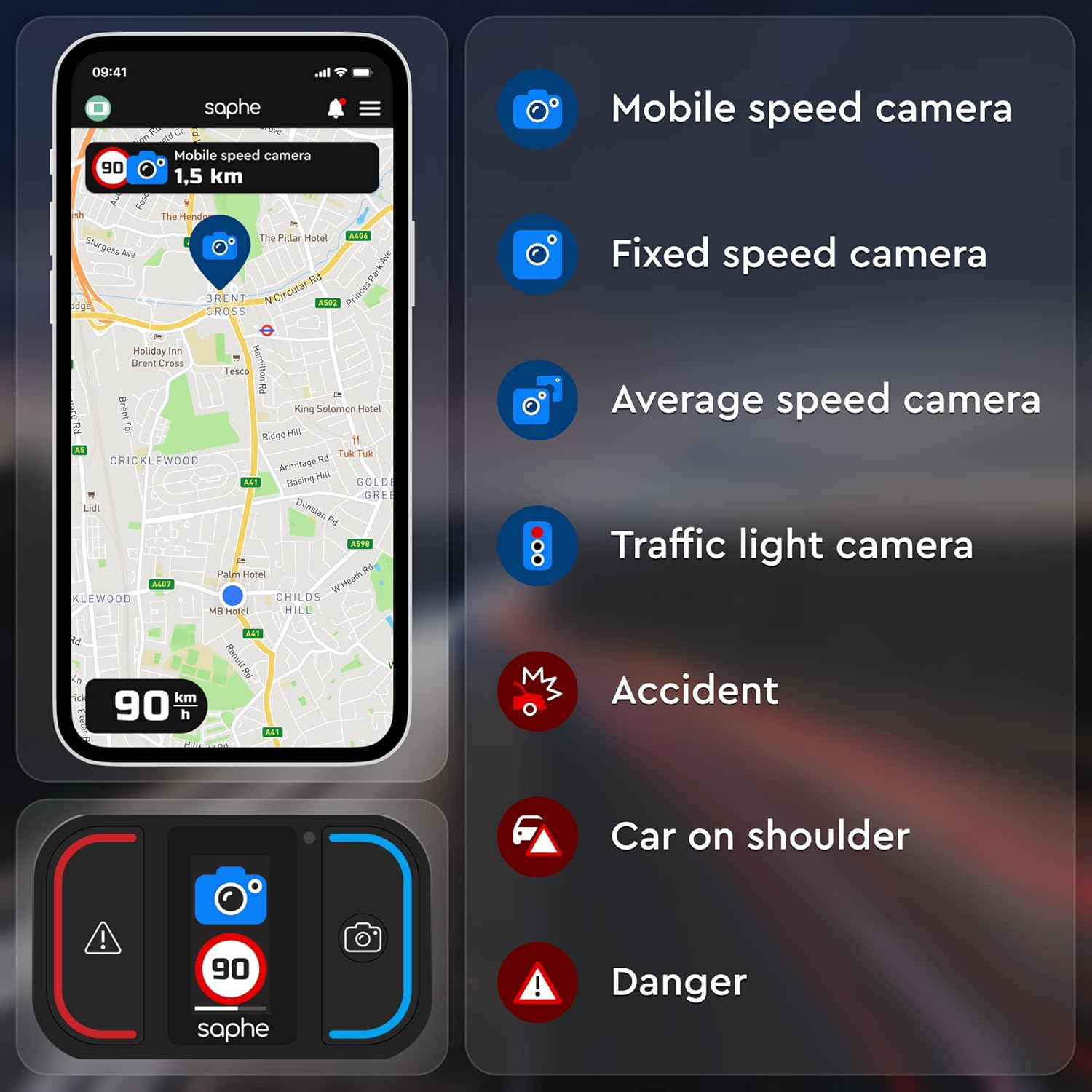
Figure 6: Visual representation of different alert types on the Saphe Drive Mini.
Maintenance
1. Battery Management
The device's lithium-ion battery lasts approximately 2 months on a single charge. Recharge the device using a compatible charging cable (sold separately) when the battery indicator shows low power. Avoid completely depleting the battery for optimal lifespan.
2. Cleaning
To clean your Saphe Drive Mini, gently wipe the device with a soft, dry cloth. Avoid using abrasive cleaners, solvents, or excessive moisture, as these can damage the device or its display.
Troubleshooting
Device Not Connecting / Automatic Start Failure
- Ensure Bluetooth is enabled on your smartphone.
- Verify the Saphe Link app is running in the background and has necessary permissions (e.g., location services).
- Check if the device battery is sufficiently charged.
- Restart both the Saphe Drive Mini (by turning off and on your phone's Bluetooth) and your smartphone.
- If the issue persists, try re-pairing the device with the app.
Inaccurate or Missing Alerts
- Ensure your Saphe Link app is updated to the latest version.
- Check your phone's GPS signal and location services settings for accuracy.
- Note that the accuracy and coverage of mobile speed trap alerts rely on real-time user reports within the Saphe community.
Display Issues (Frozen, Errors)
- If the display is frozen or showing errors, try restarting the device by toggling your phone's Bluetooth off and then back on.
- Ensure the device is not exposed to extreme temperatures.
Battery Draining Quickly
- Ensure the device is fully charged using a compatible power source.
- Minimize background app usage on your phone if it affects Bluetooth connection stability, as constant re-connection attempts can drain battery.
- If the issue persists after a full charge and troubleshooting, contact Saphe support.
Specifications
| Feature | Detail |
|---|---|
| Brand | Saphe |
| Model Number | 2012 |
| Product Dimensions | 5.95 x 3.6 x 1.55 cm |
| Weight | 70 g |
| Batteries | 1 Lithium Ion battery required |
| ASIN | B08J3V6778 |
| Date First Available | 23 Sept. 2021 |
| Manufacturer | Saphe |
| Compatible Devices | Smartphone (via Bluetooth) |
Warranty and Support
For detailed warranty information, product registration, and technical support, please visit the official Saphe website or contact their customer service directly. It is recommended to keep your proof of purchase for any warranty claims.
Manufacturer: Saphe
Website: www.saphe.com (Please verify the official website for your region)
Important Safety Information
- Always prioritize safe driving practices. Do not operate the device in a way that distracts you from the road.
- Ensure the device is securely mounted and does not obstruct your view or interfere with vehicle controls.
- Adhere to all local traffic laws and regulations. The Saphe Drive Mini is a driving aid and does not replace responsible driving.
- Do not expose the device to extreme temperatures, direct sunlight for prolonged periods, or moisture.
- Keep the device out of reach of children.
Related documents2012


Ask a question about this manual
Ask about setup, troubleshooting, compatibility, parts, safety, or missing instructions. Manuals+ will review the question and use this page’s manual context to help answer it.