
Introduction
The Midland MH-Pro USB is a motorcycle USB charger and universal smartphone holder designed for secure and rapid charging during travel. It provides a 5V output, allowing convenient smartphone charging on the go. Constructed from durable aluminum, it securely fits handlebars with diameters from 22 to 32 mm, ensuring a firm grip even on uneven roads. With IP65 certification, the MH-Pro USB is resistant to weather conditions, protecting your device from rain and dust, making it suitable for outdoor use. The included handlebar attachment and Allen key facilitate easy and secure installation on motorcycles, bicycles, and other vehicles with varying handlebar sizes.
Safety Information
- Ensure the holder is securely mounted to the handlebar before placing any device.
- Verify that your smartphone is firmly secured in the holder before riding.
- Do not attempt to operate or adjust the holder or your phone while the vehicle is in motion.
- Ensure proper wiring connection to avoid electrical shorts or damage to your vehicle's electrical system.
- The product is IP65 rated for water and dust resistance; however, avoid submerging it in water.
- Keep the USB port covered when not in use to maintain water resistance.
Package Contents
Please check that all the following items are included in your package:
- Midland MH-Pro USB Phone Holder with integrated charger
- Handlebar mount (compatible with 22-32 mm diameter handlebars)
- Silicone safety grid
- Allen key
Setup and Installation
- Choose Mounting Location: Select a suitable position on your motorcycle or bicycle handlebar (22-32 mm diameter) that does not obstruct your view or vehicle controls.
- Attach Handlebar Mount:
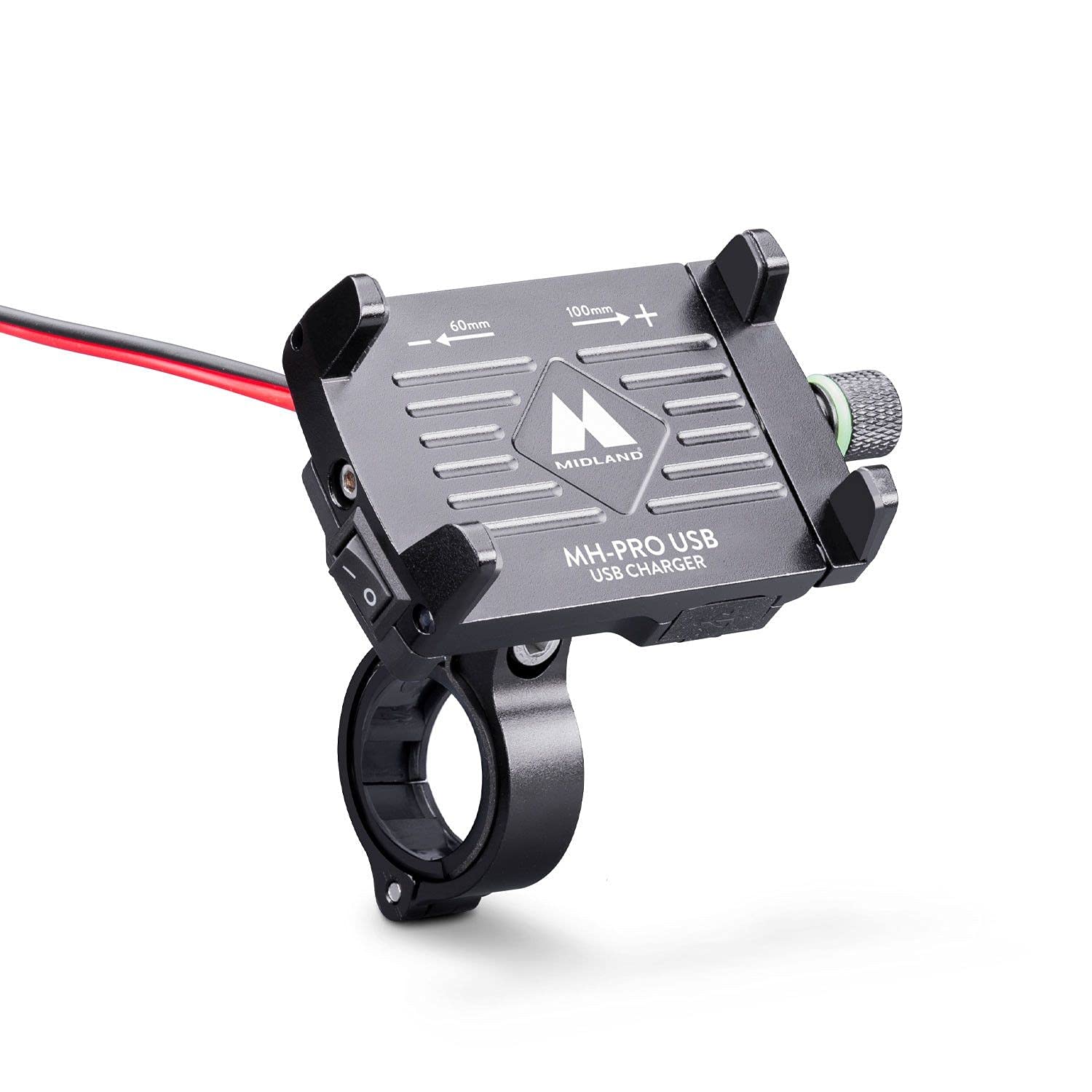
This image shows the Midland MH-Pro USB phone holder, made of aluminum, with its adjustable arms, handlebar clamp, and integrated USB charging port and power switch. The red and black power cables are visible.
Unscrew the handlebar clamp using the provided Allen key. Place the clamp around the chosen section of the handlebar and re-tighten the screws until the mount is secure. Ensure it is tight enough to prevent rotation but do not overtighten.
This image provides a side perspective of the Midland MH-Pro USB holder with a phone, highlighting the robust aluminum construction, the adjustable ball joint for positioning, and the secure handlebar attachment mechanism.
- Adjust Holder Angle: Loosen the adjustment knob on the ball joint to set the desired viewing angle for the phone holder. Tighten the knob firmly once the angle is set.
- Connect Power Cables: The holder has red (+) and black (-) power cables. Connect these directly to your vehicle's 12V power source (e.g., battery terminals or an ignition-switched circuit). Ensure correct polarity to prevent damage. It is recommended to install an inline fuse (not included) for protection.
Operating Instructions
- Insert Smartphone: Loosen the screw mechanism on the side of the holder to expand the arms. Carefully place your smartphone into the holder, ensuring it is centered. Tighten the screw mechanism until the phone is held firmly in place.
- Apply Silicone Safety Grid: For added security, stretch the silicone safety grid over the corners of your smartphone and the holder.
- Activate Charging: Locate the power switch on the side of the holder. Flip the switch to the 'ON' position to activate the USB charging port. Connect your smartphone's USB charging cable to the holder's USB port.

A smartphone is shown securely mounted in the Midland MH-Pro USB holder, illustrating how a device fits. The phone screen indicates it is actively charging via the integrated USB port.
- Power Off: When charging is not required, flip the power switch to the 'OFF' position to conserve vehicle battery power.
Maintenance
- Cleaning: Wipe the holder with a soft, damp cloth. Do not use abrasive cleaners or solvents.
- Check Connections: Periodically inspect all mounting screws and electrical connections to ensure they remain tight and secure.
- USB Port Cover: Always ensure the USB port cover is properly sealed when not in use to maintain IP65 water resistance.
Troubleshooting
- Phone not charging:
- Ensure the power switch on the holder is in the 'ON' position.
- Check the electrical connections to your vehicle's power source for proper contact and polarity.
- Verify that your USB charging cable is functional and correctly inserted into both the holder and your phone.
- Check for any blown fuses in your vehicle's electrical system or an inline fuse you may have installed.
- Phone not held securely:
- Ensure the screw mechanism is fully tightened to grip the phone.
- Make sure the silicone safety grid is correctly applied over the phone and holder corners.
- Verify that the handlebar mount is securely fastened and not loose.
- Holder is loose or rotates on handlebar:
- Tighten the screws on the handlebar clamp using the Allen key.
- Ensure the handlebar diameter is within the specified 22-32 mm range.
Specifications
| Brand | Midland |
| Model Number | C1490 |
| Compatible Devices | Mobile phones (up to 6.7 inches) |
| Handlebar Diameter | 22-32 mm |
| Material | Aluminum |
| Color | Black |
| Total USB Ports | 1 |
| Output Voltage | 5 Volts |
| Rated Current | 4.8 Amps |
| Power Source | USB Charger (vehicle 12V input) |
| Connectivity Technology | USB |
| IP Rating | IP65 (Water and Dust Resistant) |
| Weight | 212 Grams |
| Certifications | CE, RoHS |
Warranty and Support
This Midland MH-Pro USB product comes with a 24-month warranty from the date of purchase, covering manufacturing defects. Please retain your proof of purchase for warranty claims.
For technical support, warranty service, or further inquiries, please contact Midland customer service through their official website or the retailer where the product was purchased. Provide your model number (C1490) and a detailed description of the issue when seeking support.