
WiMiUS H7
WiMiUS H7 Trail Camera User Manual
Model: H7
1. Introduction
The WiMiUS H7 Trail Camera is a high-performance device designed for wildlife monitoring, hunting, home security, and surveillance applications. Featuring 16MP still image resolution and 1080P HD video recording, it captures clear and detailed footage. Its infrared night vision capabilities ensure effective monitoring in low-light conditions, while the motion-activated sensor and waterproof design (IP66) make it suitable for various outdoor environments.

Figure 1.1: Front view of the WiMiUS H7 Trail Camera, showcasing its camouflage design and main components.
2. Product Components
Familiarize yourself with the key components of your WiMiUS H7 Trail Camera:
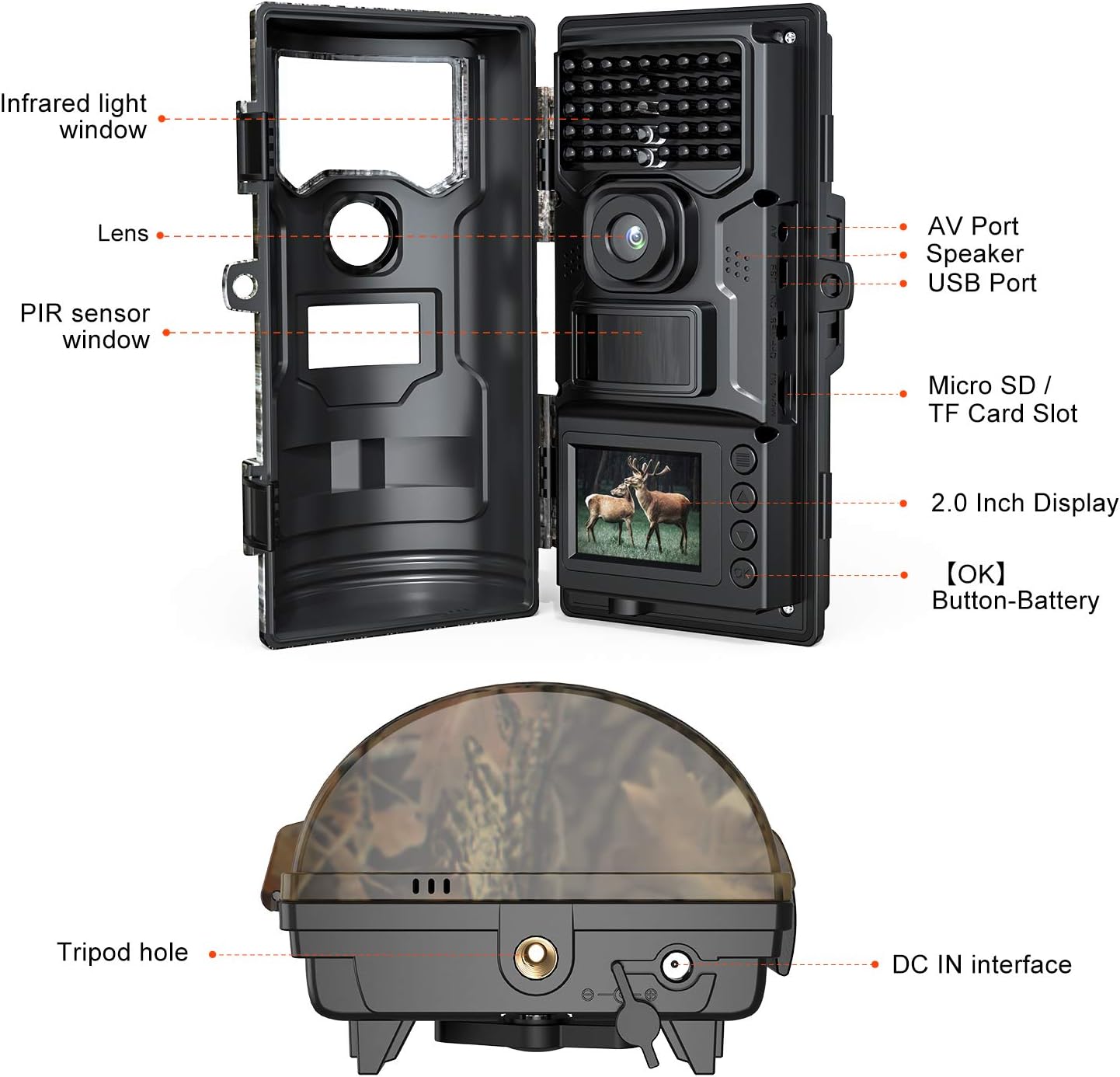
Figure 2.1: Detailed diagram illustrating the various parts of the WiMiUS H7 Trail Camera, including the infrared light window, lens, PIR sensor window, AV port, speaker, USB port, Micro SD/TF card slot, 2.0 inch display, [OK] button, battery compartment, tripod hole, and DC IN interface.
- Infrared Light Window: Houses the IR LEDs for night vision.
- Lens: The primary camera lens for capturing images and videos.
- PIR Sensor Window: Passive Infrared sensor for motion detection.
- AV Port: For connecting to an external display.
- Speaker: For audio playback.
- USB Port: For connecting to a computer for data transfer.
- Micro SD / TF Card Slot: Insert your memory card here.
- 2.0 Inch Display: For viewing settings, images, and videos.
- [OK] Button: For confirming selections.
- Battery Compartment: Located inside, for power supply.
- Tripod Hole: For mounting the camera on a tripod.
- DC IN Interface: For external power supply.
3. Setup Guide
3.1. Power Supply
The camera can be powered by AC/DC adapter or batteries. For optimal performance, especially in cold weather, it is recommended to use high-quality AA batteries (not included) or an external 6V DC power source.
- Open the camera casing.
- Insert 4 or 8 AA batteries into the battery compartment, ensuring correct polarity (+/-).
- Alternatively, connect a 6V DC power adapter to the DC IN interface.
3.2. Inserting the SD Card
A Micro SD (TF) card is required to store photos and videos. The camera supports up to 32GB SD cards (Class 10 or higher recommended).
- Locate the Micro SD / TF Card Slot inside the camera.
- Insert the SD card with the metal contacts facing down until it clicks into place.
- To remove, gently push the card in until it springs out.
3.3. Mounting the Camera
The camera can be mounted using the included strap or a tripod.
- Strap Mounting: Thread the strap through the slots on the back of the camera and secure it around a tree or pole.
- Tripod Mounting: Screw the camera onto a standard tripod using the tripod hole at the bottom.

Figure 3.1: The WiMiUS H7 Trail Camera demonstrating its IP66 waterproof rating while mounted on a tree during rainfall, suitable for outdoor use.
4. Operating Instructions
4.1. Powering On/Off
- To power on, slide the mode switch from OFF to TEST or ON.
- In TEST mode, you can access the menu, view photos/videos, and adjust settings.
- In ON mode, the camera will enter motion detection standby after a few seconds.
- To power off, slide the mode switch to OFF.
4.2. Menu Settings
In TEST mode, press the MENU button to access settings. Use the UP/DOWN buttons to navigate and OK to confirm.
| Setting | Description |
|---|---|
| Mode | Select Photo, Video, or Photo+Video. |
| Photo Resolution | Set image resolution (e.g., 16MP, 12MP, 8MP). |
| Video Resolution | Set video resolution (e.g., 1080P, 720P). |
| PIR Sensitivity | Adjust motion sensor sensitivity (High, Medium, Low). |
| PIR Interval | Set delay between detections. |
| Time Lapse | Enable time-lapse shooting for specific intervals. |
| Date & Time | Set the current date and time. |
| Format SD Card | Erase all data on the SD card. |

Figure 4.1: An image demonstrating the camera's incredible trigger sensitivity, capable of capturing fast-moving subjects like a cheetah with a 0.5s trigger speed and 90° PIR detection angle.

Figure 4.2: A collage showing the camera's ability to capture clear images both during the day (deer) and at night using infrared night vision (lions), with timestamps and temperature readings.
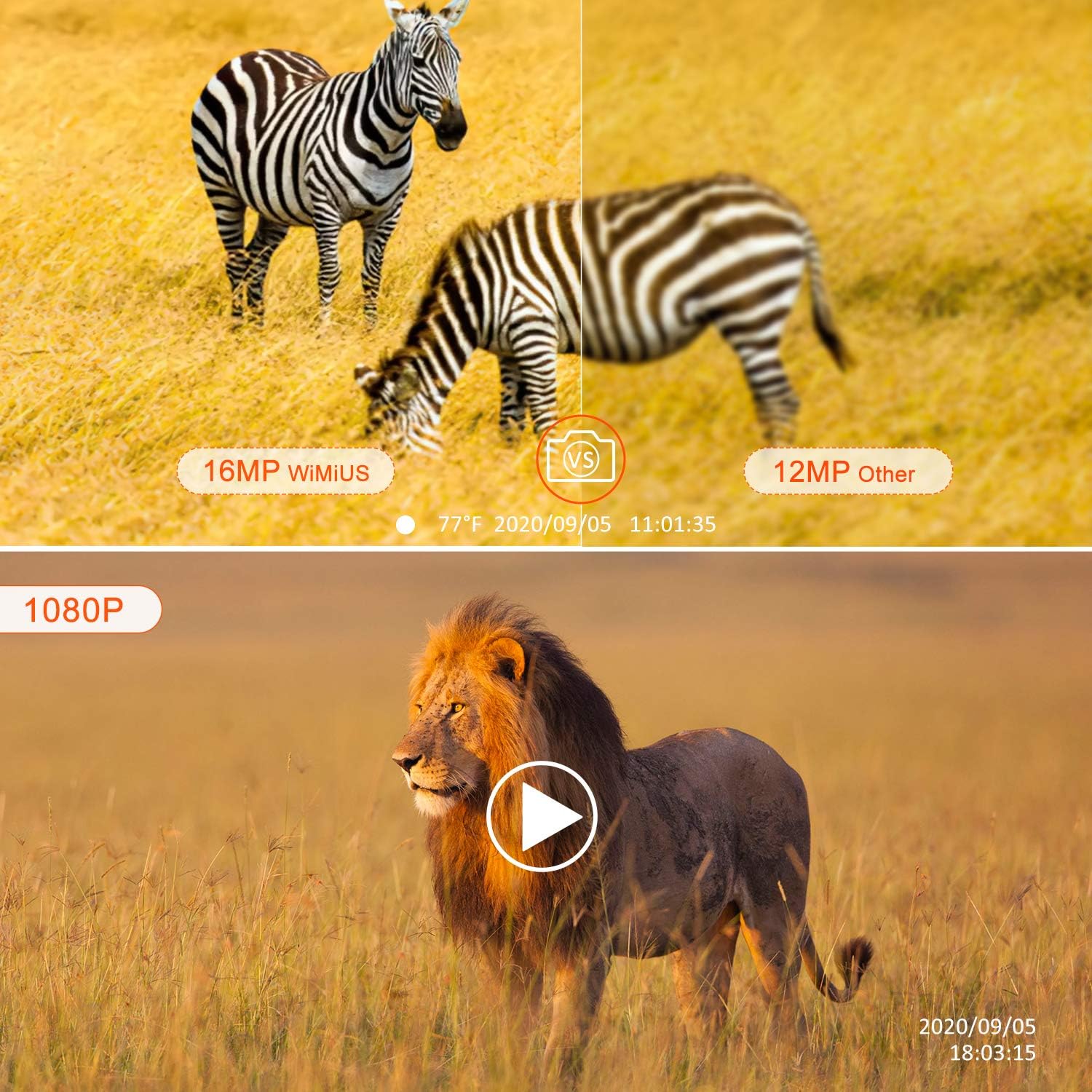
Figure 4.3: This image illustrates the superior 16MP image quality of the WiMiUS camera compared to a 12MP alternative, and highlights its 1080P video recording capability with a play button overlay on a lion video scene.
5. Maintenance
Proper maintenance ensures the longevity and optimal performance of your trail camera.
- Cleaning: Use a soft, dry cloth to clean the lens and PIR sensor window. Avoid abrasive cleaners.
- Battery Care: Remove batteries if the camera will not be used for an extended period to prevent leakage.
- Storage: Store the camera in a cool, dry place away from direct sunlight when not in use.
- Waterproof Seal: Periodically check the rubber seal around the camera casing to ensure it is free from debris and properly seated to maintain its IP66 waterproof rating.
6. Troubleshooting
If you encounter issues with your WiMiUS H7 Trail Camera, refer to the following common problems and solutions:
| Problem | Possible Cause / Solution |
|---|---|
| Camera not powering on | Check battery polarity. Replace with fresh batteries. Ensure external power supply is connected correctly. |
| No photos/videos captured | Ensure SD card is inserted and formatted. Check PIR sensitivity and interval settings. Verify camera is in ON mode. |
| Poor image/video quality | Clean the lens. Adjust resolution settings. Ensure sufficient lighting for night vision (if applicable). |
| PIR sensor not detecting motion | Increase PIR sensitivity. Ensure no obstacles are blocking the sensor. Test detection range. |
| Camera freezes | Remove batteries and reinsert. Format the SD card. Update firmware if available (check manufacturer's website). |
7. Specifications
Detailed technical specifications for the WiMiUS H7 Trail Camera:
- Effective Still Resolution: 16 MP
- Effective Video Resolution: 1080 Pixels
- Video Capture Format: MOV
- Field Of View: 120 Degrees
- Flash Memory Type: SD (supports up to 32GB)
- Water Resistance Level: Waterproof (IP66)
- Light Source Type: Infrared (Night Vision)
- Alert Type: Motion Only
- Connectivity Technology: USB, Wi-Fi (for smartphone connection)
- Power Source: AC/DC, Battery (AA)
- Item Weight: 1.28 pounds
- Package Dimensions: 7.05 x 4.09 x 4.09 inches
- Manufacturer: WiMiUS
- Date First Available: November 17, 2020

Figure 7.1: This image showcases the versatile applications of the WiMiUS H7 Trail Camera, including farm security, home security, wildlife monitoring, hunting, and plant observation.
8. Warranty and Support
For warranty information and technical support, please refer to the official WiMiUS website or contact their customer service directly. Keep your purchase receipt as proof of purchase for any warranty claims.
Official WiMiUS Store: Visit the WiMiUS Store on Amazon
Related documentsH7

Ask a question about this manual
Ask about setup, troubleshooting, compatibility, parts, safety, or missing instructions. Manuals+ will review the question and use this page’s manual context to help answer it.