
Introduction
The LeadsaiL Wireless Slim Cordless Mouse (Model LX005) provides a comfortable and efficient navigation experience for your computer. Featuring 2.4GHz wireless technology, adjustable DPI settings, and silent click buttons, this optical mouse is designed for various computing environments, from laptops to desktops and MacBooks.
Its ergonomic design ensures maximum hand comfort, while the durable construction guarantees long-lasting use. The compact and portable size makes it an ideal accessory for users on the go.

Image: LeadsaiL Wireless Slim Cordless Mouse (Blue) and its USB receiver.
What's in the Box
- 1 x LeadsaiL Wireless Mouse
- 1 x USB Nano Receiver
- 1 x User Manual
Note: 1 AA battery is required and not included in the package.
Setup
- Insert Battery: Open the battery compartment cover located on the underside of the mouse. Insert one AA battery, ensuring correct polarity. Close the cover securely.
- Locate USB Nano Receiver: The USB Nano Receiver is stored within the battery compartment for convenience during transport. Gently remove it from its slot.
- Connect Receiver: Plug the USB Nano Receiver into an available USB port on your computer (laptop, desktop, or MacBook). Your operating system should automatically detect and install the necessary drivers.
- Power On Mouse: Locate the ON/OFF switch on the underside of the mouse. Slide the switch to the "ON" position. The optical sensor light will illuminate.
- Test Connection: Move the mouse to confirm cursor movement on your screen. If the mouse does not respond, ensure the receiver is securely plugged in and the mouse is powered on.
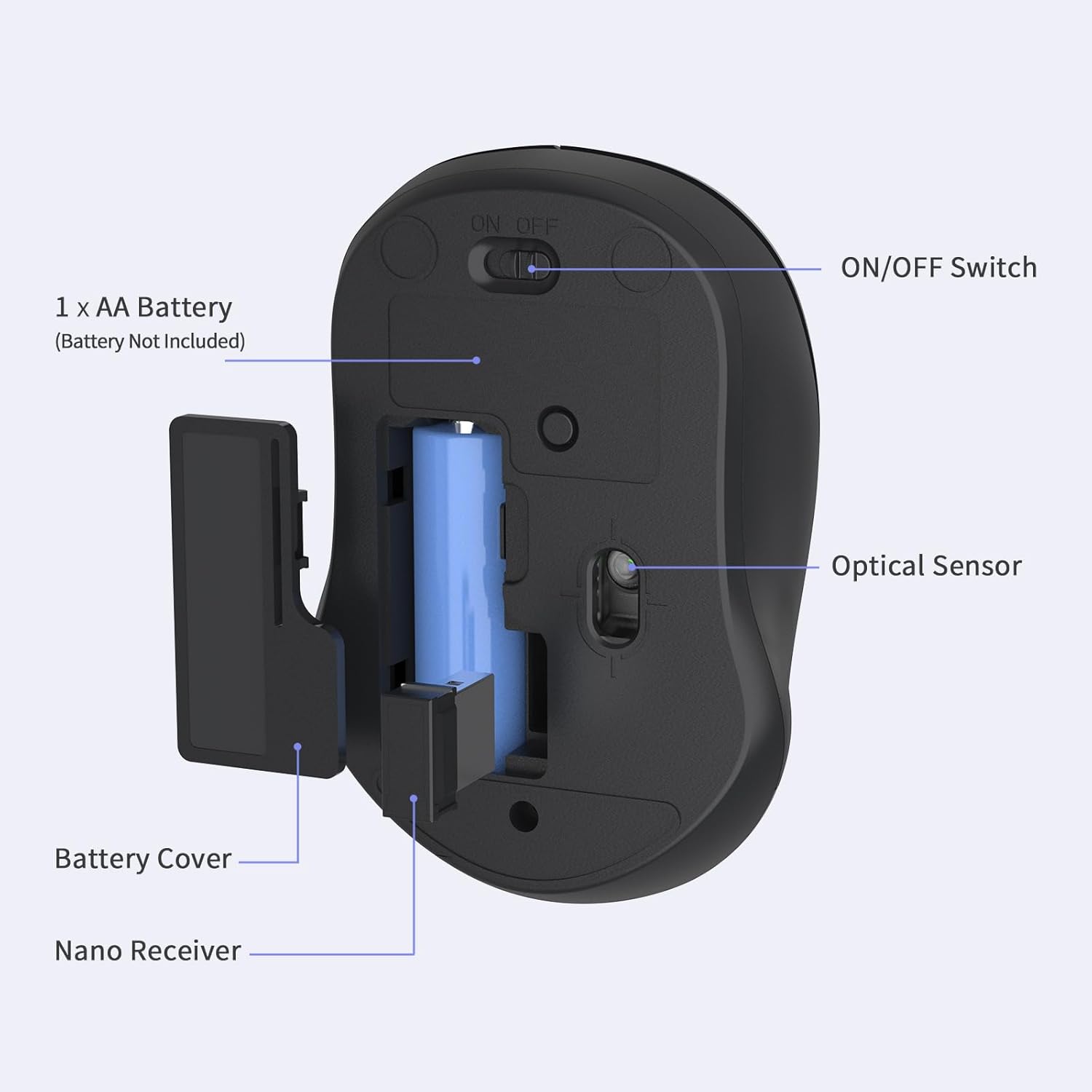
Image: Underside view of the mouse, highlighting the battery compartment, USB receiver storage, ON/OFF switch, and optical sensor.
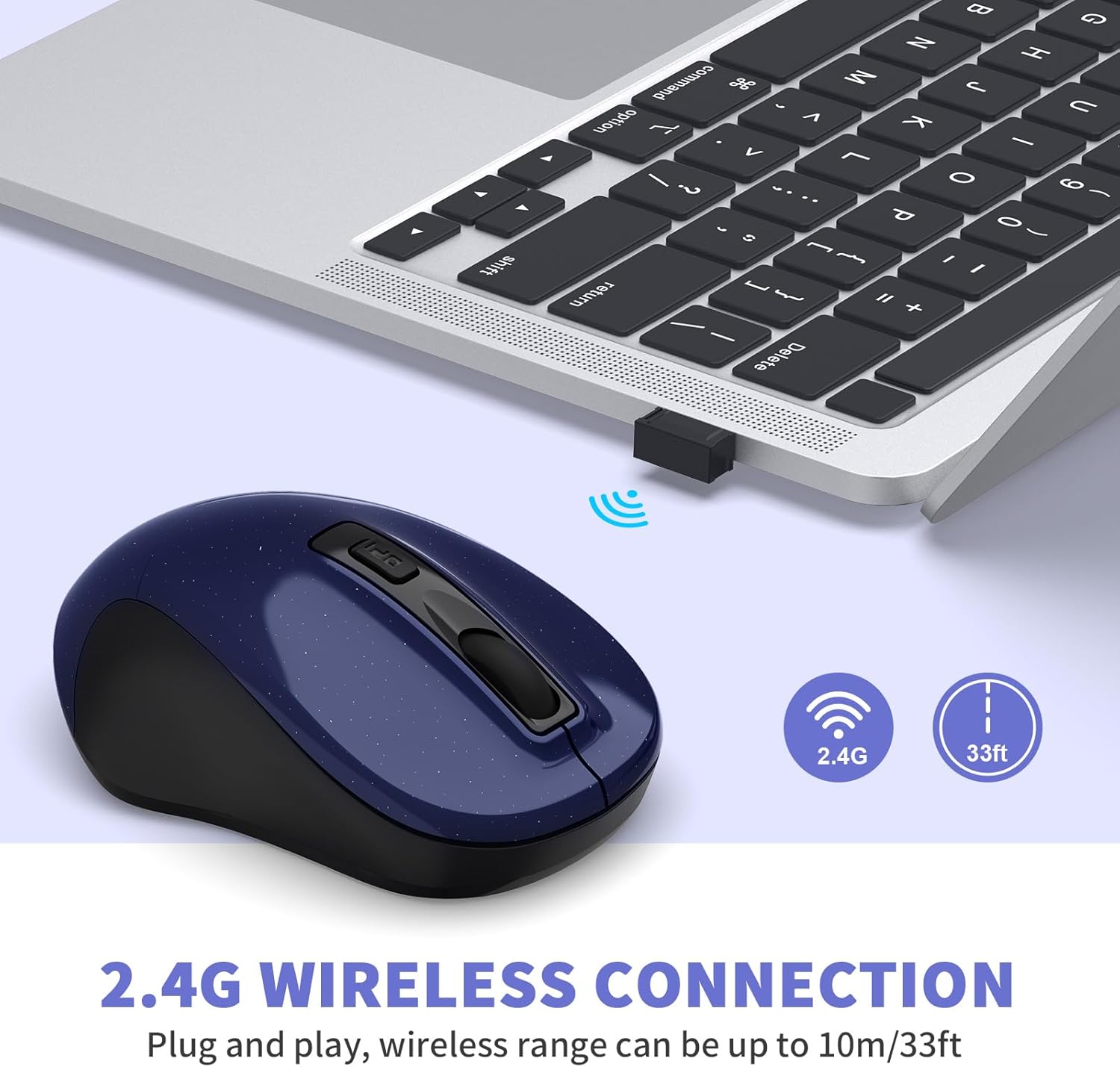
Image: The mouse in use, demonstrating the 2.4G wireless connection with the USB receiver plugged into a laptop.
Operating Instructions
Adjusting DPI Sensitivity
The mouse features 3 adjustable DPI levels (800, 1200, 1600) to customize cursor sensitivity. To change the DPI, press the DPI switch button located behind the scroll wheel. Each press cycles through the available DPI settings.

Image: Illustration of the 3-level adjustable DPI feature (800, 1200, 1600) and the DPI switch button.
Silent Click Feature
The mouse is designed with silent click buttons, reducing noise during use. This feature allows for focused work without disturbing others in quiet environments.

Image: Demonstrating the silent click feature, ideal for quiet environments.
Scroll Wheel Functionality
The sturdy scroll wheel with a rubberized surface allows for smooth and precise vertical scrolling, facilitating navigation through documents and web pages.
Power Saving Mode
To conserve battery life, the mouse will automatically enter sleep mode after 15 minutes of inactivity. To wake the mouse, simply press any button.
Ergonomic Design
The slim shape, sweat-resistant, and skin-friendly finish provide maximum comfort and support during extended use. Thoughtful contours and finger rests enhance the overall hand-feeling.

Image: Highlighting the ergonomic design for comfortable grip and the mouse's strong durability.
Official Product Video
Video: An official LeadsaiL video demonstrating the features and quiet operation of the wireless computer mouse.
Maintenance
Battery Replacement
When the mouse performance degrades or stops responding, it may be time to replace the AA battery. Open the battery compartment, remove the old battery, insert a new AA battery with correct polarity, and close the cover.
Cleaning
To clean the mouse, use a soft, dry cloth. For stubborn dirt, a slightly damp cloth can be used, ensuring no moisture enters the internal components. Avoid using harsh chemicals or abrasive cleaners.
Storing the USB Receiver
When transporting the mouse or not using it for an extended period, store the USB Nano Receiver in its dedicated slot within the battery compartment to prevent loss.
Troubleshooting
- Mouse not responding:
- Ensure the mouse is powered on (ON/OFF switch).
- Check if the AA battery is correctly inserted and has sufficient charge. Replace if necessary.
- Verify the USB Nano Receiver is securely plugged into a working USB port on your computer. Try a different USB port.
- Restart your computer.
- Erratic cursor movement:
- Ensure the mouse is used on a clean, non-reflective surface. A mouse pad is recommended.
- Clean the optical sensor on the underside of the mouse with a soft cloth.
- Adjust the DPI setting using the DPI switch button to find a suitable sensitivity.
- Connection issues/Interference:
- Move the mouse closer to the USB Nano Receiver. The effective range is up to 15 meters (50 feet).
- Avoid using the mouse near other wireless devices that might cause interference.
Specifications
| Feature | Description |
|---|---|
| Model Number | LX005 |
| Connectivity Technology | 2.4GHz Wireless (USB Receiver) |
| Movement Detection Technology | Optical |
| DPI Levels | 800, 1200, 1600 (Adjustable) |
| Buttons | 4 Buttons (Left, Right, Scroll Wheel, DPI Switch) |
| Special Features | Ergonomic Design, Lightweight, Portable, Silent Clicks |
| Power Source | 1 x AA Battery (not included) |
| Product Dimensions | 4.33 x 2.36 x 1.57 inches (11 x 6 x 4 cm) |
| Item Weight | 3.2 ounces (90.7 grams) |
| Compatibility | Windows XP, Windows, Windows Vista, Mac OS X, Windows 2000 Server |

Image: LeadsaiL Wireless Mouse with key dimensions indicated.
Warranty and Support
For warranty information and customer support, please refer to the documentation included with your product packaging or visit the official LeadsaiL website. You may also contact the seller directly for assistance.


