
1. Introduction
The D-Link DGS-1520-28MP is a 28-Port Power over Ethernet (PoE) Switch designed for small to medium-sized businesses (SMBs) requiring advanced networking capabilities. This Layer 3 Stackable Smart Managed Switch features twenty PoE Gigabit Ethernet ports, four 2.5GBase-T PoE ports, two 10GBase-T ports, and two 10G SFP+ ports, offering a total PoE budget of 370 Watts. It supports stacking up to eight switches with 80 Gbps stacking bandwidth and includes Zero Touch Provisioning for simplified multi-site network deployments. This manual provides essential information for the proper installation, configuration, and maintenance of your DGS-1520-28MP switch.
2. Safety Information
Please read and understand all safety instructions before installing or operating this device. Failure to do so may result in injury or damage to the equipment.
- Ensure the power supply voltage matches the device's requirements.
- Do not block ventilation openings. Maintain adequate airflow around the device.
- Avoid placing the device in direct sunlight, near heat sources, or in areas with high humidity or extreme temperatures.
- Use only the power adapter and cables provided or recommended by D-Link.
- Do not attempt to open or repair the device yourself. Refer all servicing to qualified personnel.
- Ground the device properly to prevent electrical shock.
3. Package Contents
Verify that your package contains the following items:
- D-Link DGS-1520-28MP 28-Port PoE Switch
- Power Supply
- Quick Installation Guide (QIG)
If any items are missing or damaged, please contact your local D-Link reseller for assistance.
4. Product Overview
The DGS-1520-28MP is a robust network switch designed for high-performance and flexible network deployments. Below are images illustrating the device's physical features and ports.
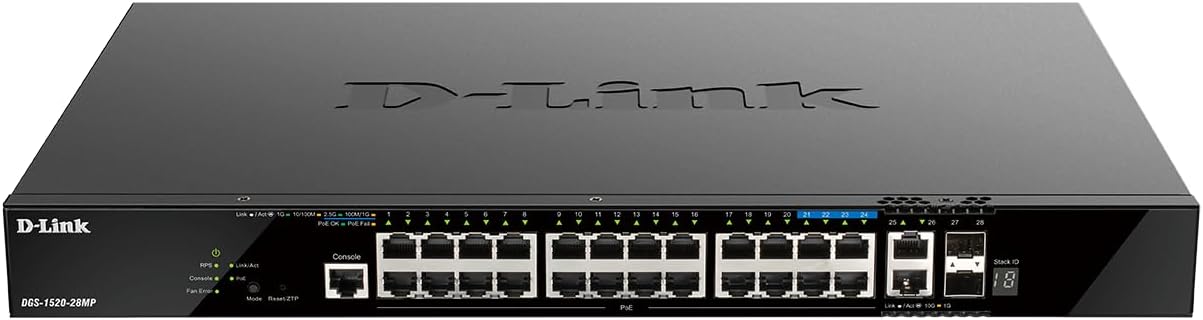
Figure 4.1: Front View of DGS-1520-28MP Switch
This image shows the front panel of the DGS-1520-28MP switch, featuring 20 Gigabit PoE ports, 4x 2.5GBase-T PoE ports, 2x 10GBase-T ports, 2x 10G SFP+ ports, and LED indicators for status and activity.

Figure 4.2: Side View of DGS-1520-28MP Switch
This image displays the side panel of the DGS-1520-28MP switch, highlighting its ventilation design for efficient heat dissipation.
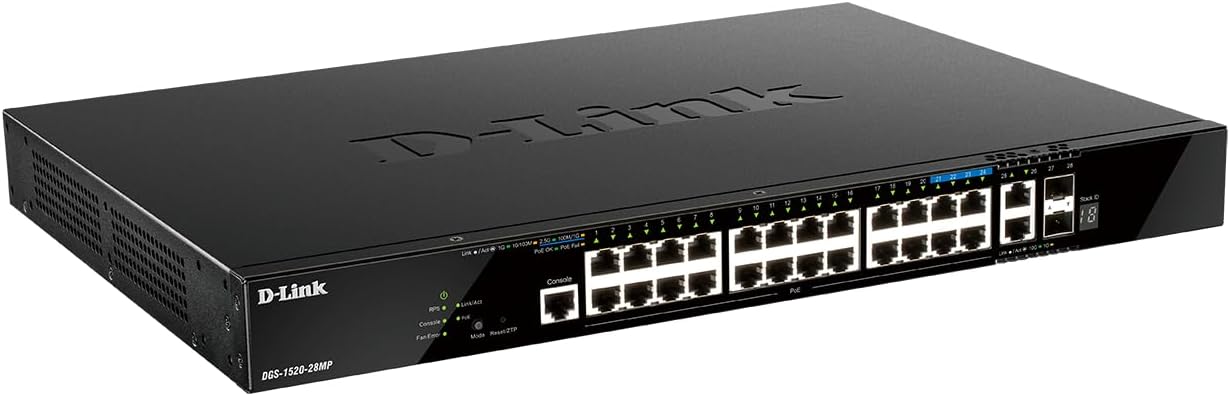
Figure 4.3: Back View of DGS-1520-28MP Switch
This image illustrates the rear panel of the DGS-1520-28MP switch, showing the power input and grounding screw.

Figure 4.4: Detailed Port View of DGS-1520-28MP Switch
A closer look at the various ports on the DGS-1520-28MP, including the 20 Gigabit PoE ports, 4x 2.5GBase-T PoE ports, 2x 10GBase-T ports, and 2x 10G SFP+ ports, along with their respective status LEDs.
5. Setup
Follow these steps for the initial setup of your DGS-1520-28MP switch:
- Unpack the Switch: Carefully remove the switch and all accessories from the packaging.
- Mounting (Optional): The switch can be placed on a desktop or rack-mounted. Ensure proper ventilation regardless of placement.
- Connect Power: Connect the provided power cord to the switch's power input and then to a suitable power outlet.
- Power On: The switch will power on automatically. Observe the power LED to ensure it indicates normal operation.
- Connect Devices: Connect your network devices (computers, printers, access points, IP cameras) to the available Ethernet ports using standard Ethernet cables. For PoE-enabled devices, connect them to the PoE ports.
- Uplink Connection: Connect one of the 10GBase-T or 10G SFP+ ports to your core network or another switch for uplink connectivity.
- Initial Configuration: Refer to the Quick Installation Guide for initial IP address access and basic configuration steps. The switch supports Zero Touch Provisioning for effortless deployment.
6. Operating the Switch
The DGS-1520-28MP is a Smart Managed switch offering a range of features for efficient network management.
- Layer 3 Features: The switch supports advanced Layer 3 features including OSPF, RIP/RIPng, IGMP v1/v2/v3, MLD v1/v2, and PIM-SM/DM/SSM for robust routing and multicast management.
- Power over Ethernet (PoE): The 20 Gigabit PoE ports and 4x 2.5GBase-T PoE ports provide power to connected devices such as Wi-Fi 6 access points, IP cameras, and VoIP phones, simplifying deployment and reducing cabling.
- 10 Gigabit Connectivity: Utilize the 10GBase-T and 10G SFP+ ports for high-speed uplinks or stacking multiple DGS-1520 series switches to achieve up to 80 Gbps stacking bandwidth.
- Smart Management: Access the switch's web-based Graphical User Interface (GUI) for comprehensive configuration and monitoring. This allows for multi-site management and advanced network settings.
- Zero Touch Provisioning (ZTP): For large-scale deployments, ZTP automates the configuration process, reducing manual intervention and deployment time.
- Stacking: The DGS-1520 series supports physical stacking, allowing multiple switches to operate as a single logical unit, simplifying management and increasing network resilience.
7. Maintenance
Regular maintenance ensures optimal performance and longevity of your DGS-1520-28MP switch.
- Firmware Updates: Periodically check the D-Link support website for the latest firmware updates. Applying updates can improve performance, add new features, and fix security vulnerabilities.
- Cleaning: Keep the switch clean and free of dust. Use a soft, dry cloth to wipe the exterior. Do not use liquid or aerosol cleaners. Ensure ventilation openings are clear.
- Cable Management: Ensure all network cables are neatly organized and securely connected. Avoid sharp bends or kinks in cables.
- Environmental Monitoring: Monitor the operating environment to ensure it remains within the recommended temperature and humidity ranges (Upper Temperature Rating: 40 Degrees Celsius).
- Backup Configuration: Regularly back up the switch's configuration settings to prevent data loss in case of an unexpected event.
8. Troubleshooting
This section provides solutions to common issues you might encounter with your DGS-1520-28MP switch.
- No Power: If the power LED is off, ensure the power cord is securely connected to both the switch and the power outlet. Verify the power outlet is functional.
- No Network Connectivity: Check the link/activity LEDs on the connected ports. If a LED is off, verify the Ethernet cable connection and ensure the connected device is powered on and functioning correctly.
- PoE Device Not Powering On: Ensure the device is PoE compatible and connected to a PoE port. Check the PoE status LED for the port. Verify the total PoE budget (370 Watts) is not exceeded.
- Slow Network Performance: Check for network congestion. Ensure cables are in good condition and meet specifications. Verify port speed settings in the switch's management interface.
- Cannot Access Management Interface: Verify the switch's IP address and your computer's IP settings. Ensure there are no IP conflicts on the network. Try resetting the switch to factory defaults if access is completely lost (refer to the QIG for reset procedures).
9. Specifications
| Feature | Specification |
|---|---|
| Model Number | DGS-1520-28MP |
| Number of Ports | 28 (20x PoE Gigabit, 4x 2.5GBase-T PoE, 2x 10GBase-T, 2x 10G SFP+) |
| PoE Budget | 370 Watts |
| Data Transfer Rate | 10 Gigabits Per Second (max) |
| Interface Type | PoE, SFP |
| Layer Features | Layer 3 (OSPF, RIP/RIPng, IGMP v1/v2/v3, MLD v1/v2, PIM-SM/DM/SSM) |
| Management | Smart-Managed, Web GUI, Zero Touch Provisioning |
| Item Weight | 9.8 pounds |
| Product Dimensions | 17.3 x 12.25 x 1.73 inches |
| Upper Temperature Rating | 40 Degrees Celsius |
| Voltage | 220V |
10. Official Product Videos
Watch these official videos for additional information and visual guidance on D-Link switches and related technologies.
D-Link Gigabit Smart Managed and Surveillance Switches
This video provides an overview of D-Link's Gigabit Smart Managed and Surveillance Switches, highlighting their features and applications in various network environments.
11. Warranty and Support
D-Link products are backed by a limited warranty. For specific warranty terms and conditions, please refer to the warranty card included with your product or visit the official D-Link website.
For technical support, product documentation, and software/firmware downloads, please visit the D-Link support portal. You can also contact D-Link customer service for assistance with installation, troubleshooting, or product inquiries.
D-Link Support: www.dlink.com/support


