
KingHome KHD50BWP
KingHome 50-Pint Dehumidifier User Manual
Model: KHD50BWP
Introduction
This manual provides important information regarding the safe operation, maintenance, and troubleshooting of your KingHome 50-Pint Dehumidifier. Please read it thoroughly before using the appliance and retain it for future reference.
The KingHome 50-Pint Dehumidifier is designed to efficiently remove excess moisture from the air in spaces up to 4500 square feet, improving air quality and comfort. It features a built-in vertical pump for continuous drainage, an LED display, multiple fan speeds, and a timer function.
Important Safety Information
Always follow basic safety precautions when using electrical appliances to reduce the risk of fire, electric shock, and injury to persons.
- Ensure the unit is placed on a level, stable surface.
- Do not operate the dehumidifier with a damaged cord or plug.
- Keep the air inlet and outlet grilles clear of obstructions.
- Do not insert fingers or foreign objects into the grilles.
- Unplug the unit before cleaning or performing any maintenance.
- This appliance is for residential use only.
Product Overview
Familiarize yourself with the components of your KingHome 50-Pint Dehumidifier.

Figure 1: Front view of the KingHome 50-Pint Dehumidifier, showing the air intake grille and the water tank with a visible water level indicator.
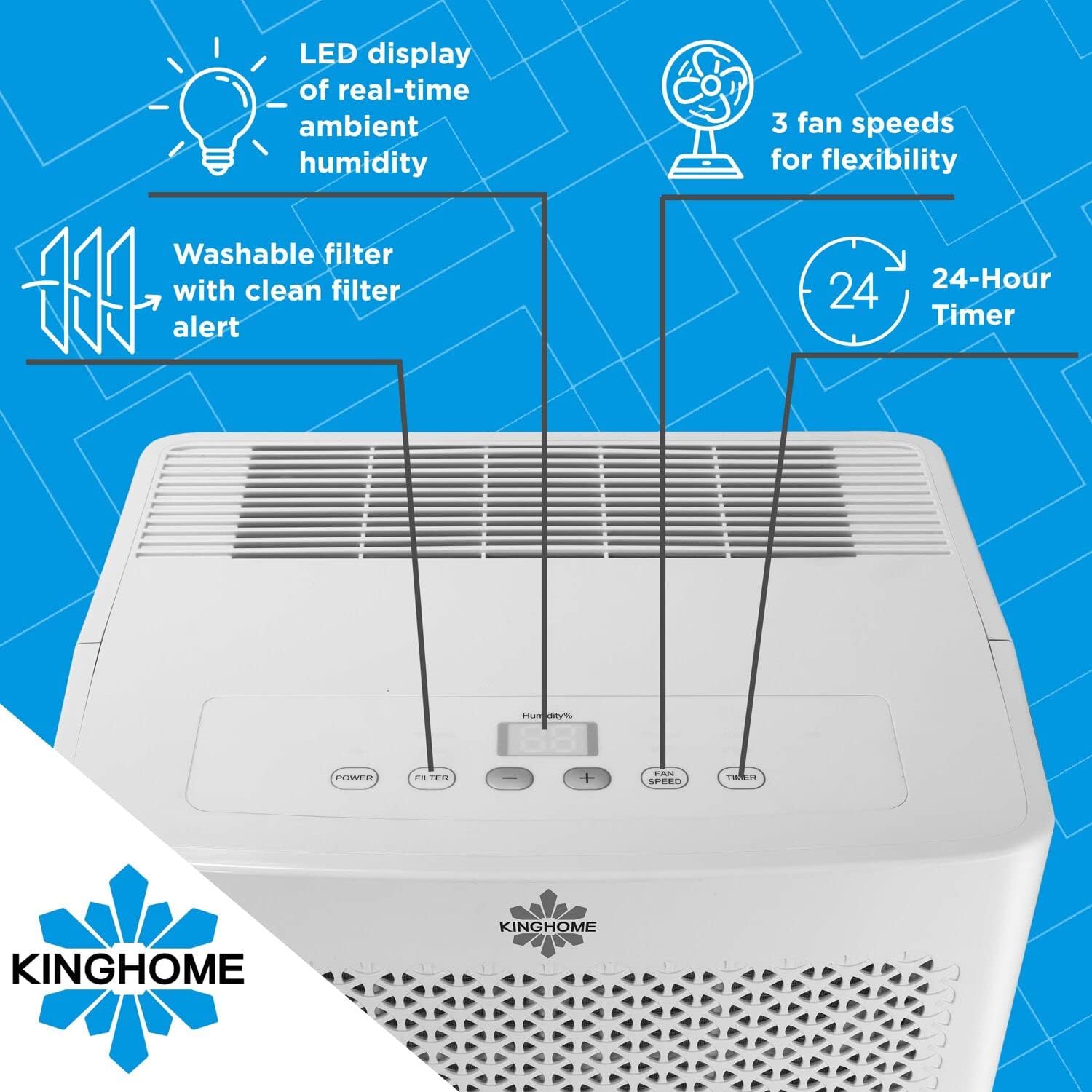
Figure 2: Close-up of the top control panel, highlighting the LED display for real-time ambient humidity, power button, filter alert, humidity adjustment buttons, fan speed button, and 24-hour timer button.

Figure 3: Diagram illustrating the dimensions of the dehumidifier: approximately 14.8 inches wide, 11.4 inches deep, and 24 inches high.
Setup and Installation
Unpacking
- Carefully remove the dehumidifier from its packaging.
- Remove all packing materials, including any tape or protective films.
- Inspect the unit for any shipping damage. If damaged, do not operate and contact customer support.
Placement
- Place the dehumidifier on a firm, level surface that is strong enough to support the unit with a full water tank.
- Ensure there is at least 8 inches (20 cm) of space around the unit for proper air circulation. Do not block the air inlet or outlet.
- Avoid placing the unit near heat sources or in direct sunlight.
Power Connection
- Plug the power cord into a grounded electrical outlet. Ensure the voltage matches the rating label on the back of the unit.
Drainage Options
Your KingHome dehumidifier offers two drainage methods: manual emptying of the water tank or continuous drainage using the built-in pump.
Manual Drainage (Water Tank)
- The unit will automatically stop operating when the water tank is full and an alert will sound.
- Carefully pull out the front-removable water tank using its built-in pull-up handle.
- Empty the water, then reinsert the tank firmly into the unit.
Continuous Drainage (Built-in Pump)
For continuous operation without emptying the tank, use the built-in vertical pump.
- Locate the external drain connector on the back of the unit.
- Connect a standard garden hose (not included) to the external drain connector.
- Route the hose to a suitable drain location, such as a sink or out a window, ensuring the hose is sloped downwards to allow for gravity drainage. The built-in pump will lift water vertically if needed.
- Ensure the hose is securely connected to prevent leaks.

Figure 4: Image showing a garden hose connected to the external drain connector on the side of the dehumidifier for continuous water removal.

Figure 5: Illustrative diagram demonstrating the continuous draining setup, where a garden hose is connected to the unit and directs water to an external drain point.
Operating Instructions
Control Panel Functions
- Power Button: Turns the unit ON or OFF.
- Humidity Setting Buttons (+/-): Adjusts the desired humidity level from 30% to 90% relative humidity (RH) in 5% increments. The LED display shows the real-time ambient humidity.
- Fan Speed Button: Cycles through 3 fan speeds (Low, Medium, High) for flexible operation.
- Timer Button: Sets the auto-on or auto-off timer for up to 24 hours.
- Filter Alert: Illuminates when the air filter needs cleaning.
Initial Operation
- Plug in the dehumidifier.
- Press the Power button to turn the unit on.
- Use the +/- buttons to set your desired humidity level. A lower setting will result in more moisture removal.
- Select your preferred fan speed using the Fan Speed button.
- The unit will begin to operate and display the current room humidity.
Intelligent Memory Function
The unit is equipped with an intelligent memory function that saves your last settings (humidity level, fan speed, timer) after a power outage. When power is restored, the dehumidifier will resume operation with these saved settings.
Maintenance
Regular maintenance ensures optimal performance and extends the lifespan of your dehumidifier.
Cleaning the Air Filter
The dehumidifier features a washable and reusable air filter. A "Filter Alert" light on the control panel will indicate when cleaning is required.
- Turn off the dehumidifier and unplug it from the power outlet.
- Locate the air filter, typically behind the front grille.
- Carefully remove the filter.
- Wash the filter with warm, soapy water. Rinse thoroughly.
- Allow the filter to air dry completely before reinstalling. Do not use a dryer or direct heat.
- Reinsert the dry filter into the unit.
- Plug in the unit and press the "Filter" button (if available) or power on to reset the filter alert.
Cleaning the Unit Exterior
- Wipe the exterior of the unit with a soft, damp cloth.
- Do not use harsh chemicals, abrasive cleaners, or solvents.
Long-Term Storage
- Empty the water tank and ensure all internal components are dry.
- Clean the air filter.
- Store the unit upright in a cool, dry place, away from direct sunlight.
Troubleshooting Guide
Before contacting customer support, please refer to the following table for common issues and their solutions.
| Problem | Possible Cause | Solution |
|---|---|---|
| Dehumidifier does not turn on. | No power; Power cord not plugged in; Circuit breaker tripped. | Ensure unit is plugged into a live outlet; Check circuit breaker; Try a different outlet. |
| Unit is running but not collecting water. | Room humidity is too low; Temperature is too low; Air filter is clogged; Air inlet/outlet blocked. | Increase desired humidity setting; Ensure room temperature is above 41°F (5°C); Clean air filter; Clear obstructions. |
| Water tank is full, but unit continues to run. | Water tank not properly seated; Float switch malfunction. | Remove and reinsert water tank firmly; Contact customer support if issue persists. |
| Unit is noisy. | Unit not on a level surface; Air filter clogged; Loose parts. | Place on a level surface; Clean air filter; Check for loose components. |
| Continuous drain pump not working. | Hose kinked or blocked; Hose not properly connected; Pump malfunction. | Check hose for kinks or blockages; Ensure secure connection; Contact customer support. |
Specifications
| Feature | Detail |
|---|---|
| Brand | KingHome |
| Model Name | KingHome Energy Star 50-Pint Dehumidifier for a Room up to 4500 Sq. Ft., KHD50BW |
| Model Number | KHD50BWP |
| Dehumidification Capacity | 50 Pints per Day |
| Recommended Coverage Area | Up to 4500 Square Feet |
| Water Tank Capacity | 15 Pints |
| Product Dimensions (D x W x H) | 11.4"D x 14.8"W x 24"H |
| Item Weight | 22 pounds |
| Number of Speeds | 3 |
| Wattage | 770 watts |
| Operation Mode | Continuous |
| Special Features | Built-In Pump, Continuous Draining, Digital Display, Portable, Timer, Water Level Indicator, Washable Filter |
| Refrigerant Type | R410A |
| Energy Star Rated | Yes |
Warranty and Support
Warranty Information
This KingHome dehumidifier includes a manufacturer's warranty. Please refer to the warranty card included with your product for specific terms, conditions, and duration of coverage. Retain your proof of purchase for warranty claims.
Customer Support
For technical assistance, troubleshooting beyond this guide, or warranty inquiries, please contact KingHome customer support. Contact details are typically provided in the included manual or on the manufacturer's official website.
When contacting support, please have your model number (KHD50BWP) and purchase date available.
Related documentsKHD50BWP


Ask a question about this manual
Ask about setup, troubleshooting, compatibility, parts, safety, or missing instructions. Manuals+ will review the question and use this page’s manual context to help answer it.