1. Introduction
Thank you for choosing the PURLINE HOTI M100 Ceramic Split Heater. This manual provides essential information for the safe and efficient use of your new appliance. Please read it thoroughly before installation and operation, and keep it for future reference.
The HOTI M100 is designed to provide quick and effective heating for small rooms, offering comfort with its silent operation and elegant black glass facade. It features smart controls including Wi-Fi connectivity and a remote control for convenient use.

Image 1.1: The PURLINE HOTI M100 heater installed on a wall, showcasing its sleek design in a living room setting.
2. Safety Instructions
Always follow basic safety precautions when using electrical appliances to reduce the risk of fire, electric shock, and injury.
- Read all instructions before using this heater.
- Do not use this heater outdoors or in wet locations.
- Do not use this heater in bathrooms, laundry areas, or similar indoor locations.
- Keep combustible materials, such as furniture, pillows, bedding, papers, clothes, and curtains at least 1 meter (3 feet) from the front of the heater and away from the sides and rear.
- Do not insert or allow foreign objects to enter any ventilation or exhaust opening as this may cause an electric shock or fire, or damage the heater.
- To prevent a possible fire, do not block air intakes or exhaust in any manner. Do not use on soft surfaces, like a bed, where openings may become blocked.
- This heater is hot when in use. To avoid burns, do not let bare skin touch hot surfaces.
- Always unplug the heater when not in use.
- Do not operate any heater with a damaged cord or plug or after the heater malfunctions, has been dropped or damaged in any manner.
- Connect to properly grounded outlets only.
3. Package Contents
Please check the package contents upon unpacking:
- PURLINE HOTI M100 Ceramic Split Heater
- Remote Control
- Mounting Hardware (screws, wall anchors)
- User Manual (this document)
4. Product Overview
Familiarize yourself with the components of your PURLINE HOTI M100 heater.

Image 4.1: Front view of the heater, showing the digital display and air outlet.
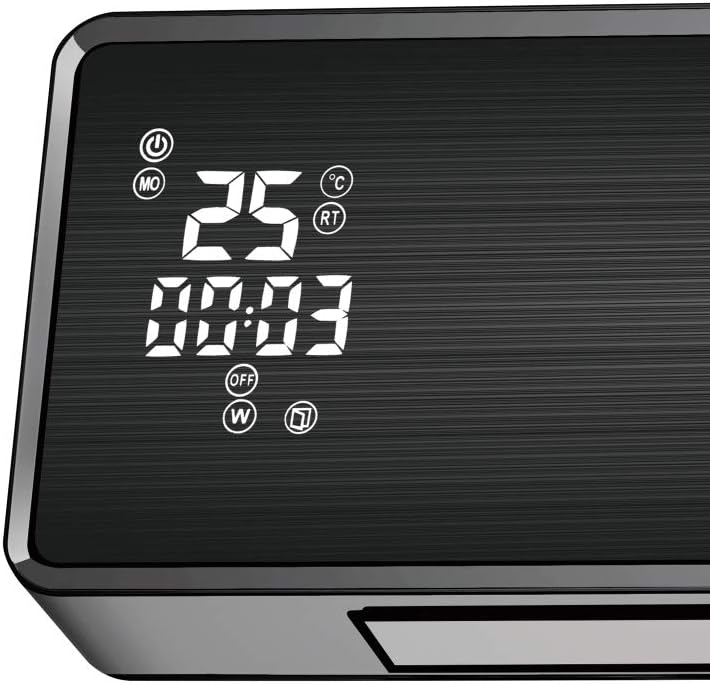
Image 4.2: Detailed view of the digital display, showing temperature, time, and mode indicators.
4.1 Remote Control
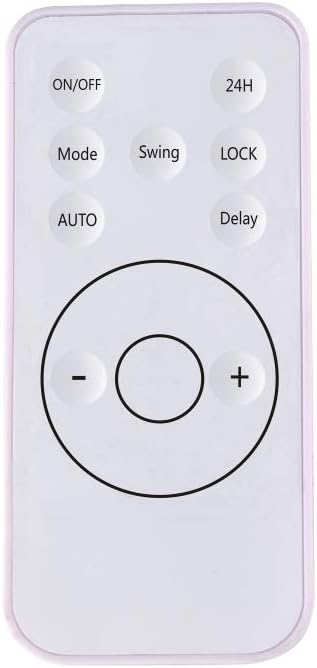
Image 4.3: The remote control unit for operating the heater.
- ON/OFF: Power button.
- Mode: Cycles through heating modes.
- Swing: Activates/deactivates oscillating slats.
- 24H: Sets the 24-hour timer.
- LOCK: Child lock function.
- AUTO: Automatic mode.
- Delay: Delay timer function.
- +/-: Adjusts temperature or timer settings.
5. Installation
The PURLINE HOTI M100 is designed for wall mounting. Ensure the installation location is suitable and follows all safety guidelines.
5.1 Wall Mounting
- Choose a suitable wall location, ensuring there is sufficient clearance around the heater (at least 1 meter from combustible materials).
- Mark the drilling points on the wall using the provided template or by measuring the mounting holes on the back of the heater.
- Drill holes at the marked positions and insert the wall anchors.
- Secure the mounting bracket (if separate) or the heater directly to the wall using the provided screws.
- Ensure the heater is securely fastened and level.
- Plug the heater into a grounded electrical outlet.
6. Operation
The heater can be operated via the remote control or through a Wi-Fi enabled smart application.
6.1 Basic Operation (Remote Control)
- Power On/Off: Press the ON/OFF button on the remote control or the heater's control panel.
- Adjust Temperature: Use the + and - buttons to set the desired temperature. The digital display will show the set temperature.
- Select Mode: Press the Mode button to cycle through available heating modes (e.g., High, Low, Eco).
- Oscillation (Swing): Press the Swing button to activate or deactivate the oscillating slats for better air distribution.

Image 6.1: The heater highlighting its remote control capability.
6.2 Wi-Fi Control
The PURLINE HOTI M100 can be controlled via a smart application on your mobile phone or tablet. Refer to the separate Wi-Fi setup guide for detailed instructions on connecting your device to the app.
- Download the official PURLINE smart app from your device's app store.
- Follow the in-app instructions to pair your heater with your Wi-Fi network.
- Once connected, you can control all functions and settings remotely.
6.3 Special Features
- Window Open Function: The heater automatically stops heating if it detects a sudden drop in temperature (e.g., when a window is opened). You can manually restart it if needed.
- Weekly Programmer: Use the remote control or the smart app to set a weekly operating schedule, allowing you to program specific on/off times and temperature settings for each day of the week.
7. Maintenance
Regular maintenance ensures optimal performance and longevity of your heater.
7.1 Cleaning
- Always unplug the heater from the power outlet and allow it to cool down completely before cleaning.
- Wipe the exterior surfaces with a soft, damp cloth. Do not use abrasive cleaners or solvents.
- Ensure no water enters the interior of the heater.
- Clean the air intake and exhaust vents regularly with a vacuum cleaner or a soft brush to remove dust and debris.
7.2 Storage
If storing the heater for an extended period, unplug it, clean it thoroughly, and store it in a cool, dry place, preferably in its original packaging.
8. Troubleshooting
If you encounter issues with your heater, refer to the following common problems and solutions:
| Problem | Possible Cause | Solution |
|---|---|---|
| Heater does not turn on. | No power supply; Power button not pressed; Overheat protection activated. | Check power cord and outlet; Press ON/OFF button; Unplug, wait 30 min, then plug in. |
| Heater not producing heat. | Incorrect mode selected; Temperature setting too low; Window open function activated. | Select heating mode; Increase temperature setting; Close windows/doors or manually restart. |
| Remote control not working. | Batteries depleted; Obstruction between remote and heater. | Replace batteries; Remove any obstructions. |
| Wi-Fi connection issues. | Incorrect Wi-Fi password; Router too far; App not updated. | Verify Wi-Fi credentials; Move heater closer to router; Update app to latest version. |
If the problem persists after trying these solutions, please contact customer support.
9. Specifications
| Feature | Specification |
|---|---|
| Model Number | HOTI M100 |
| Brand | PUR LINE |
| Type | Ceramic Split Heater |
| Color | Black (Glass Facade) |
| Power Output | 2000W |
| Voltage | 230 Volts |
| Dimensions (L x W x H) | 55 x 13 x 19 cm |
| Weight | 3 Kilograms |
| Number of Speeds | 3 |
| Special Features | Wi-Fi Control, Window Open Function, Oscillating Slats, Remote Control, Weekly Programmer |
| Mounting Type | Wall Mount |
| Indoor/Outdoor Use | Indoor |
10. Warranty and Support
For warranty information and customer support, please refer to the documentation provided with your purchase or visit the official PUR LINE website. Keep your proof of purchase for any warranty claims.
If you require technical assistance or have questions not covered in this manual, please contact PUR LINE customer service.


