
ANCEL VD500, PB100
Ancel VD500 OBD2 Scanner and PB100 Automotive Power Circuit Probe Tester User Manual
Model: VD500 & PB100
1. Introduction
This manual provides detailed instructions for the safe and effective operation of your ANCEL VD500 OBD2 Scanner and ANCEL PB100 Automotive Power Circuit Probe Tester. Please read this manual thoroughly before using the devices to ensure proper functionality and to prevent damage to the tools or your vehicle.
2. Product Overview
The ANCEL VD500 is a diagnostic scan tool designed for VAG group vehicles (Volkswagen, Audi, Skoda, Seat) and general OBDII/EOBD compliant vehicles. The ANCEL PB100 is an automotive power circuit probe tester for diagnosing electrical systems.
2.1 Package Contents
Your package should include the following items:
- 1 x ANCEL VD500 OBD2 Code Reader
- 1 x ANCEL PB100 Automotive Power Circuit Probe Tester
- 1 x USB Cable (for VD500 software upgrades)
- 1 x User Manual (this document)
- 1 x Dust-proof bag (for VD500)
- 1 x Packing box

Image: Contents of the ANCEL VD500 and PB100 package, including the VD500 scanner, PB100 circuit probe, USB cable, user manual, and dust-proof bag.
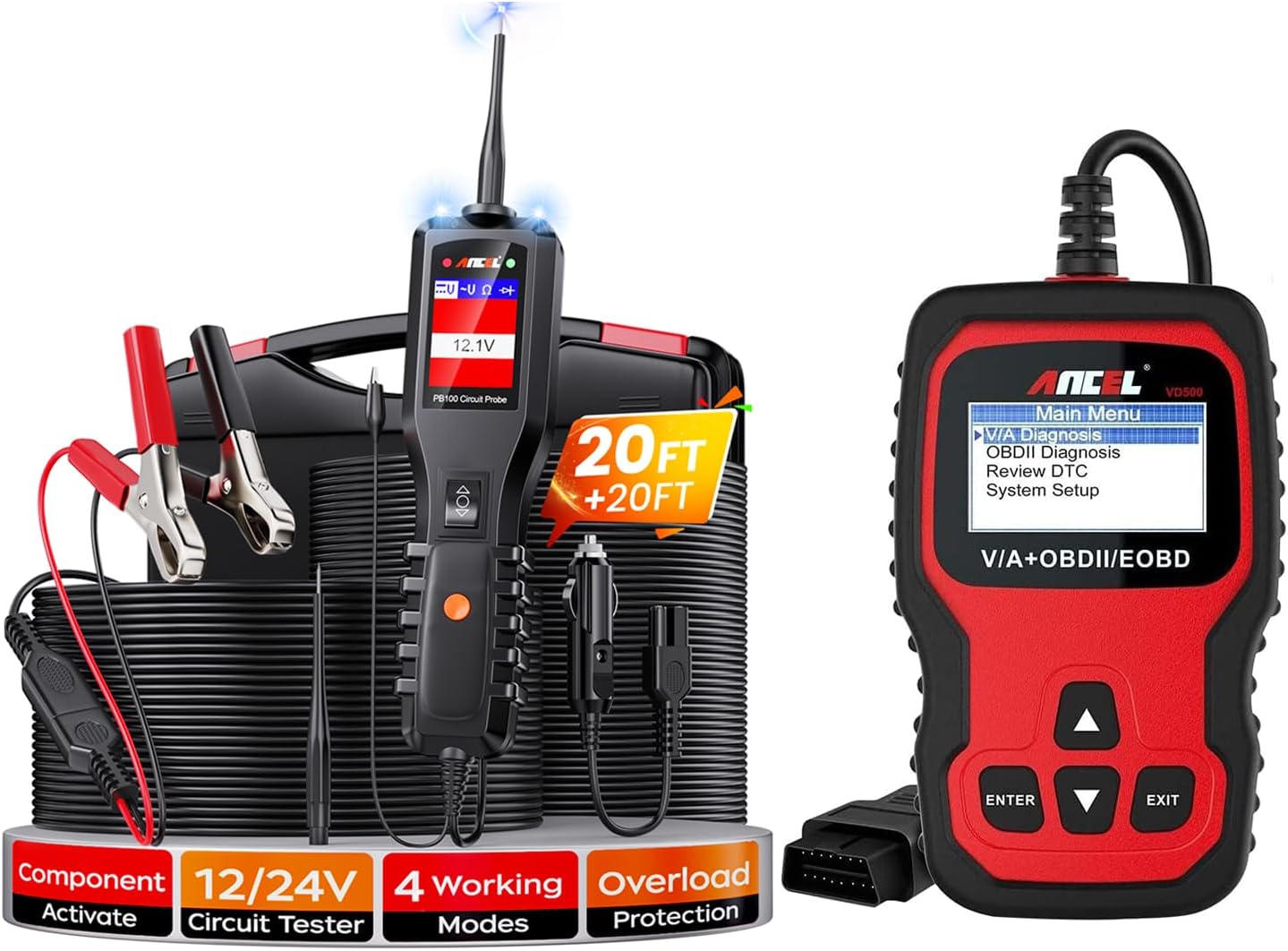
Image: The ANCEL VD500 OBD2 Scanner (right) and the ANCEL PB100 Automotive Power Circuit Probe Tester (left) with its accessories.
3. Setup and Initial Use
3.1 ANCEL VD500 Setup
- Locate your vehicle's 16-pin OBDII diagnostic port. This is usually located under the dashboard on the driver's side.
- Ensure the vehicle's ignition is in the OFF position.
- Connect the VD500's OBDII cable to the vehicle's OBDII port.
- Turn the vehicle's ignition to the ON position (engine can be off). The VD500 will power on automatically.
- Select your desired language from the system settings if not already set.

Image: The ANCEL VD500 supports multiple languages, including Chinese, English, Spanish, German, French, and Italian.
3.2 ANCEL PB100 Setup
- Connect the PB100's power clips (red to positive, black to negative) to the vehicle's 12V or 24V battery.
- The PB100 will power on and display the battery voltage.
- Ensure the probe tip is clean and free from debris before use.
4. Operating Instructions
4.1 ANCEL VD500 Operation
The VD500 offers comprehensive diagnostic capabilities for VAG vehicles and standard OBDII functions for most cars.
4.1.1 VAG System Diagnosis
For Volkswagen, Audi, Skoda, and Seat vehicles, the VD500 can access various control modules:
- Engine System
- Transmission
- ABS System
- SRS System (Airbag)
- TPMS System (Tire Pressure Monitoring)
- HVAC (Heating, Ventilation, Air Conditioning)
- Immobilizer System
- Headlight System
- ESP System (Electronic Stability Program)
- Windows System
- SAS System (Steering Angle Sensor)
- Voltage Detection
- And more, depending on the vehicle model.

Image: The ANCEL VD500 provides comprehensive system diagnosis for VAG group vehicles, covering various modules like Engine, ABS, SRS, and more.
4.1.2 Special Functions for VAG Vehicles
The VD500 supports specific maintenance functions for VAG models:
- Brake Pad (EPB) Reset: Used when replacing brake pads on vehicles with electronic parking brakes.
- Oil Service Reset: Resets the oil service light after an oil change.
- Throttle Position Adaptation: Adapts the throttle body after cleaning or replacement.

Image: Special diagnostic functions of the ANCEL VD500 for VAG vehicles, including EPB reset, oil service reset, and throttle position adaptation.
4.1.3 OBDII/EOBD Functions (for Most Cars)
For general OBDII compliant vehicles (1996 and newer in the US, 2000/2001 and newer in Europe/Asia), the VD500 performs standard OBDII functions:
- Read Fault Codes: Displays Diagnostic Trouble Codes (DTCs) and their descriptions.
- Erase Fault Codes: Clears DTCs from the vehicle's computer and turns off the Malfunction Indicator Lamp (MIL).
- Read Live Data: Shows real-time data stream from various sensors.
- I/M Readiness: Checks the readiness of emission-related monitors.
- Read Vehicle Information: Retrieves VIN, Cal ID, and CVN.
- O2 Sensor Test: Retrieves O2 sensor monitor test results.
- On-Board Monitor Test: Retrieves results for emission-related powertrain components.
- Component Test: Allows testing of specific components.

Image: The ANCEL VD500 performing OBDII functions, showing the menu for reading and erasing fault codes, which can turn off the Malfunction Indicator Lamp (MIL).
4.2 ANCEL PB100 Operation
The PB100 is a versatile circuit tester with multiple working modes:
- Voltage & Polarity Test: Quickly identifies positive, negative, and open circuits.
- Continuity Test: Checks for continuity in wires, fuses, and switches.
- Component Activation: Safely activates components like motors, lights, and relays directly from the battery.
- Ground Test: Helps locate short circuits to ground.
- Overload Protection: Built-in circuit breaker protects the tool from current overloads.
Refer to the PB100's dedicated mini-manual (if included) for detailed instructions on each test mode.
5. Maintenance and Updates
5.1 General Care
- Keep the devices clean and dry. Use a soft, damp cloth to wipe surfaces.
- Avoid exposing the devices to extreme temperatures, humidity, or direct sunlight.
- Store the devices in their dust-proof bag or original packaging when not in use.
- Do not attempt to disassemble or repair the devices yourself.
5.2 Software Updates (VD500)
The ANCEL VD500 offers free lifetime software updates to ensure compatibility with new vehicle models and to add new features. To update the software:
- Visit the official ANCEL website (www.anceltech.com).
- Navigate to the 'Download Center' or 'Support' section.
- Download the latest update software and drivers for the VD500.
- Install the software on your computer.
- Connect the VD500 to your computer using the provided USB cable.
- Follow the on-screen instructions in the update software to complete the process.
Note: Do not connect the USB cable during vehicle diagnosis; it is solely for software upgrades.

Image: The ANCEL VD500 supports free lifetime system and language updates, accessible via the ANCEL official website's download center.
6. Troubleshooting
6.1 ANCEL VD500 Troubleshooting
- Device does not power on: Ensure the OBDII cable is securely connected to the vehicle's port and the vehicle's ignition is ON. Check the vehicle's battery voltage.
- Communication error: Verify the vehicle is OBDII compliant (1996+ US, 2000/2001+ EU/Asia). Check for loose connections. Try another vehicle if possible.
- Screen frozen: Disconnect the device from the vehicle, wait a few seconds, and reconnect.
- Incorrect language: Navigate to System Setup and select the correct language.
6.2 ANCEL PB100 Troubleshooting
- Device does not power on: Ensure the power clips are securely connected to the vehicle battery terminals (red to positive, black to negative). Check battery voltage.
- Circuit breaker trips: This indicates an overload. Disconnect the probe from the circuit, allow the breaker to reset (usually automatically), and re-evaluate the circuit for shorts or excessive current draw before retesting.
- Inaccurate readings: Ensure the probe tip and battery connections are clean and free of corrosion.
7. Specifications
7.1 ANCEL VD500 Specifications
- Display: Backlit LCD
- Operating Voltage: 9-18V DC (via OBDII port)
- Operating Temperature: 0 to 60°C (32 to 140°F)
- Storage Temperature: -20 to 70°C (-4 to 158°F)
- Dimensions: Approximately 4.7in (Height) x 0.8in (Thickness) (refer to packaging image for visual)
- Protocols: J1850 PWM, J1850 VPW, ISO9141, KWP 2000, CAN
7.2 ANCEL PB100 Specifications
- Operating Voltage: 8-30V DC
- Overload Protection: 8A (Automatic reset)
- Cable Length: Approximately 20ft (main cable) + 20ft (extension cable)
- Operating Temperature: 0 to 50°C (32 to 122°F)
8. Vehicle Compatibility
8.1 ANCEL VD500 Compatibility
The VD500 supports all OBD interface 16PIN voltage 12V vehicles. Specifically, it offers enhanced diagnostics for VAG group vehicles and standard OBDII functions for most other brands.
VAG Group Compatibility (2000-2019 models, check specific models for newer/older):
- Volkswagen: Sedan all series (2000-2019), Commercial vehicle series (Caddy, Pickup, Transporter, Multivan, TGE).
- Audi: All series (2000-2019).
- Skoda: All series (2000-2019).
- Seat: All series (2000-2019).
- Bentley: Continental GT, Supersports, Flying Spur, Bentayga, Mulsanne, Brooklands, Azure (various years).
- Lamborghini: URUS, Gallardo, Aventador (various years).
- Bugatti: Veyron, Chiron (various years).
Note: Vehicle OBDII port must be 16PIN. For specific model year compatibility, it is recommended to inquire in advance.

Image: The ANCEL VD500 is compatible with a wide range of VAG group vehicles, including specific models from Volkswagen, Audi, Skoda, Seat, Bentley, Lamborghini, and Bugatti.
8.2 ANCEL PB100 Compatibility
The PB100 is compatible with 12V and 24V automotive electrical systems.
9. Warranty and Support
ANCEL products typically come with a manufacturer's warranty. Please refer to the warranty card included in your product packaging or visit the official ANCEL website for detailed warranty information and customer support contacts.
For technical assistance or inquiries, you can visit the ANCEL support page or contact their customer service directly.
Related documentsVD500, PB100


Ask a question about this manual
Ask about setup, troubleshooting, compatibility, parts, safety, or missing instructions. Manuals+ will review the question and use this page’s manual context to help answer it.