
1. Product Overview
The Artemide Surf Micro LED Wall Lamp is a contemporary lighting fixture designed by Neil Poulton. This wall-mounted lamp features a sleek, curved body crafted from extruded painted aluminum, providing indirect illumination. It integrates a 26W LED light source with a 3000K color temperature and 0-10V dimming capability, suitable for various indoor environments.
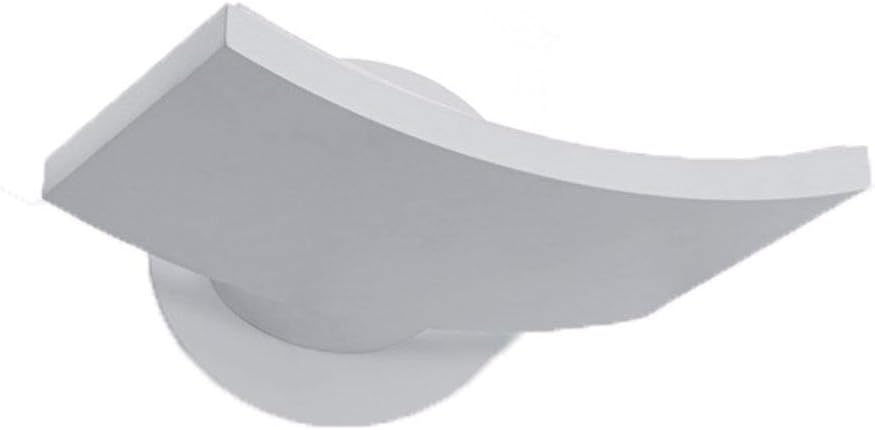
Figure 1: Front view of the Artemide Surf Micro LED Wall Lamp, showcasing its curved design and white finish.
2. Safety Instructions
Read all instructions carefully before installation and use. Retain this manual for future reference.
- Electrical Installation: Installation must be performed by a qualified electrician in accordance with all applicable local and national electrical codes.
- Power Disconnection: Always disconnect power at the circuit breaker or fuse box before installing, servicing, or cleaning the fixture.
- Voltage Compatibility: Ensure the supply voltage (120-277V) matches the fixture's requirements.
- Fixture Integrity: Do not modify the fixture. Any modifications may void the warranty and create safety hazards.
- Heat: The LED light source generates heat. Allow the fixture to cool before handling.
- Cleaning: Use a soft, dry cloth for cleaning. Avoid abrasive cleaners or solvents.
3. Package Contents
Verify that all components are present before beginning installation:
- Artemide Surf Micro LED Wall Lamp fixture
- Mounting hardware (screws, anchors)
- Installation instructions (this manual)
4. Setup and Installation
Professional installation by a licensed electrician is strongly recommended for this hardwired fixture.
- Prepare the Installation Area:
- Turn off power at the main circuit breaker or fuse box.
- Ensure the junction box (J-Box) has a minimum depth of 1.5 inches (38mm) to accommodate the integrated driver.
- Mount the Fixture:
- Secure the mounting bracket (if separate) to the junction box using the provided screws.
- Connect the electrical wires (live, neutral, ground, and 0-10V dimming wires) from the fixture to the corresponding wires in the junction box according to local electrical codes. Ensure all connections are secure.
- Carefully attach the lamp body to the mounting bracket, ensuring it is flush and securely fastened to the wall.
- Final Check:
- Verify all connections are correct and secure.
- Restore power at the circuit breaker.

Figure 2: The Artemide Surf Micro LED Wall Lamp installed on a wall, demonstrating its upward light distribution.
5. Operating Instructions
The Artemide Surf Micro LED Wall Lamp is designed for use with a 0-10V dimming system. It also features touch control and remote control capabilities as per specifications.
- Power On/Off: Once installed and wired correctly, the lamp will turn on when power is supplied to the circuit.
- Dimming Control (0-10V): Connect the fixture to a compatible 0-10V dimmer switch. Adjust the dimmer to control the light output from 0% to 100%.
- Touch Control: If equipped, gently touch the designated area on the fixture to cycle through brightness levels or power on/off. Refer to specific touch control instructions if provided separately with the product.
- Remote Control: If a remote control is included, follow its specific instructions for pairing and operation to adjust brightness and power.
6. Maintenance
Minimal maintenance is required for the Artemide Surf Micro LED Wall Lamp.
- Cleaning: Ensure power is off before cleaning. Wipe the fixture with a soft, dry, lint-free cloth. Do not use abrasive cleaners, solvents, or polishes as these can damage the finish.
- LED Light Source: The integrated LED light source is designed for long life (50,000 hours) and is not user-replaceable. If the LED fails, contact qualified service personnel.
7. Troubleshooting
If the lamp is not functioning correctly, refer to the following common issues and solutions:
| Problem | Possible Cause | Solution |
|---|---|---|
| Lamp does not light up. | No power supply; loose wiring; faulty switch/dimmer. | Check circuit breaker. Verify all electrical connections are secure. Test switch/dimmer for functionality. |
| Lamp flickers or dims inconsistently. | Incompatible dimmer; loose dimming wires; electrical interference. | Ensure 0-10V dimmer is compatible. Check dimming wire connections. Consult an electrician if interference is suspected. |
| Lamp is not dimming. | Incorrect 0-10V wiring; non-0-10V dimmer used. | Verify 0-10V wiring connections. Ensure a compatible 0-10V dimmer is installed. |
If troubleshooting steps do not resolve the issue, contact Artemide customer support or a qualified electrician.
8. Specifications
| Feature | Detail |
|---|---|
| Brand | Artemide |
| Model Number | 1646018ADIMTV |
| Design | Neil Poulton |
| Material | Extruded painted aluminum body, Glass shade |
| Color | White |
| Light Source Type | Integrated LED (24W C.O.B.) |
| Power Consumption | 26W |
| Delivered Lumens | 2137lm |
| Light Output Ratio | 82.19lm/W |
| CCT (Correlated Color Temperature) | 3000K |
| CRI (Color Rendering Index) | >80 |
| Life Expectancy | 50,000 Hours |
| Control Type | Dimmable 0-10V, Touch, Remote Control |
| Input Voltage | 120-277V |
| Integrated Driver | Yes, in J-Box (minimum depth 1.5 inches / 38mm) |
| Mounting Type | Wall Mount |
| Item Weight | 3.44 pounds (1.56 kg) |
| Package Dimensions | 11.75 x 11.55 x 3.75 inches (29.8 x 29.3 x 9.5 cm) |
9. Warranty and Support
For warranty information and technical support, please refer to the documentation provided with your purchase or visit the official Artemide website. Keep your proof of purchase for warranty claims.
Manufacturer: Artemide
Date First Available: September 10, 2020


