
Reboot CUT50D
Reboot Plasma Cutter Machine CUT50D User Manual
Model: CUT50D | Brand: Reboot
Introduction
This user manual provides essential information for the safe and effective operation and maintenance of your Reboot Plasma Cutter Machine CUT50D. Please read this manual thoroughly before operating the machine to ensure proper usage and to prevent injury or damage.

Figure 1: Reboot Plasma Cutter Machine CUT50D
Setup and Connections
Before operating the plasma cutter, ensure all connections are secure and the machine is placed on a stable, level surface. The CUT50D supports automatic dual voltage input (110/120V and 220/240V).
Front Panel Overview
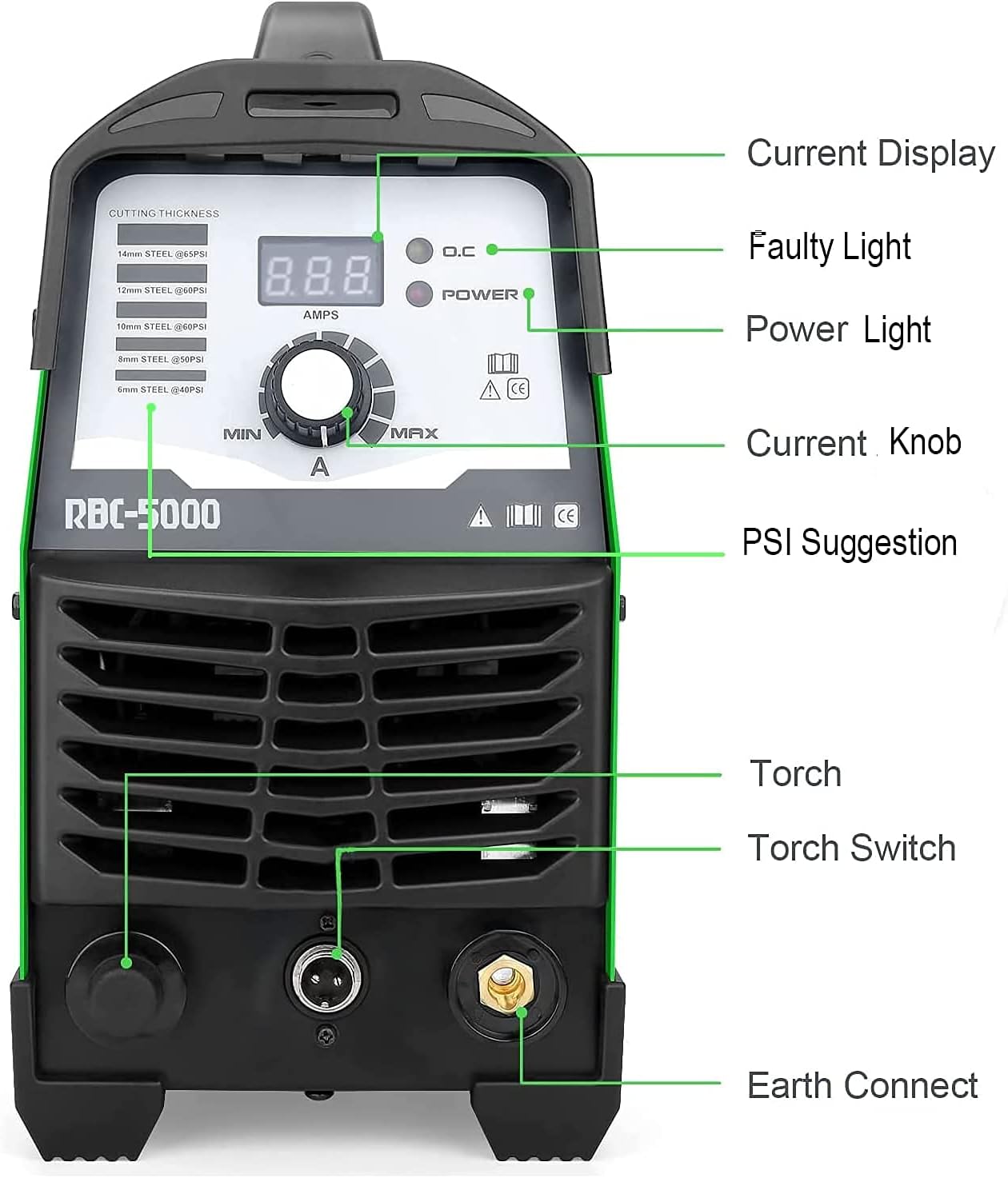
Figure 2: Front Panel Controls and Indicators
- Current Display: Shows the current amperage setting.
- Faulty Light (O.C): Illuminates to indicate an overcurrent or fault condition.
- Power Light: Indicates the machine is powered on.
- Current Knob: Adjusts the output amperage.
- PSI Suggestion: Recommended air pressure settings for various cutting thicknesses.
- Torch Connection: Port for connecting the plasma torch.
- Torch Switch: Connector for the torch trigger cable.
- Earth Connect: Terminal for connecting the ground clamp.
Rear Panel and Air Connections

Figure 3: Rear Panel with Air Regulator and Power Switch
- Air Pressure Adjusting: Knob to set the air pressure.
- Air Pressure Gauge: Displays the current air pressure.
- Hose Connection Port (AIR IN): Connects to your air compressor.
- Waterproof Switch: Main power switch.
- Input Cable: Power input cable.
Connecting the Machine
- Connect the plasma torch to the front panel's Torch Connection port and the Torch Switch connector.
- Attach the ground clamp cable to the Earth Connect terminal on the front panel.
- Connect an air compressor to the Hose Connection Port (AIR IN) on the rear panel. Ensure the air pressure is set according to the material thickness you intend to cut (refer to PSI Suggestion on the front panel).
- Plug the power input cable into a suitable 110/120V or 220/240V power outlet. The machine automatically detects the voltage. For 220V, a 30A breaker is suggested; for 110V, a 50A breaker is suggested.
- Turn on the Waterproof Switch on the rear panel. The Power Light on the front panel should illuminate.
Operating Instructions
The Reboot CUT50D Plasma Cutter is designed for cutting various metals including stainless steel, alloy, aluminum, mild steel, and carbon steel. It is suitable for automotive, ducting work, repair/maintenance, metal processing, and manufacturing applications.
Cutting Capabilities
The machine offers excellent cutting performance across a range of thicknesses:
- 1/2 inch (12mm) clean cutting and 3/4 inch (19mm) severance cutting under 220/240V.
- 2/5 inch (10mm) severance cutting under 110/120V.
- Recommended air pressure: 60 PSI.

Figure 4: Visual Guide to Cutting Thicknesses
Cutting Procedure
- Ensure proper safety gear is worn, including a welding helmet, gloves, and protective clothing.
- Secure the workpiece to be cut and attach the ground clamp firmly to it.
- Adjust the current knob on the front panel to the desired amperage based on the material type and thickness.
- Set the air pressure using the regulator on the rear panel to the recommended PSI.
- Position the plasma torch nozzle close to the starting point of the cut.
- Press the torch trigger to initiate the plasma arc. Move the torch steadily along the desired cut line.
- After releasing the torch trigger, the machine will continue blowing air for approximately 3 seconds to cool down the torch head and consumables, extending their lifespan.
Demonstration Videos
Cutting 3/5" (16mm) Plates
This video demonstrates the Reboot CUT50D plasma cutter's ability to cut through 3/5 inch (16mm) thick metal plates with precision.
Maximum Cutting 4/5" (20mm)
Observe the machine's capability to achieve a maximum cut of 4/5 inch (20mm) on various metals.
Cutting 2/5" (10mm) Plates
This video showcases the plasma cutter's performance when cutting 2/5 inch (10mm) thick plates.
Maintenance
Regular maintenance ensures the longevity and optimal performance of your plasma cutter.
- Consumables: Regularly inspect the torch consumables (electrode, nozzle, swirl ring, shield cup) for wear and replace them as needed. Worn consumables can affect cut quality and machine performance.
- Air Filter/Regulator: Check the air filter/regulator for moisture and debris. Drain any accumulated water and clean or replace the filter element periodically to ensure clean, dry air supply to the torch.
- Cooling: Ensure the machine's cooling vents are clear of obstructions to prevent overheating. The internal fan should operate freely.
- Cables and Connections: Inspect all cables and connections for damage, fraying, or loose contacts. Repair or replace any damaged components immediately.
- General Cleaning: Keep the machine clean and free of dust and metal particles. Use a dry cloth to wipe down the exterior.
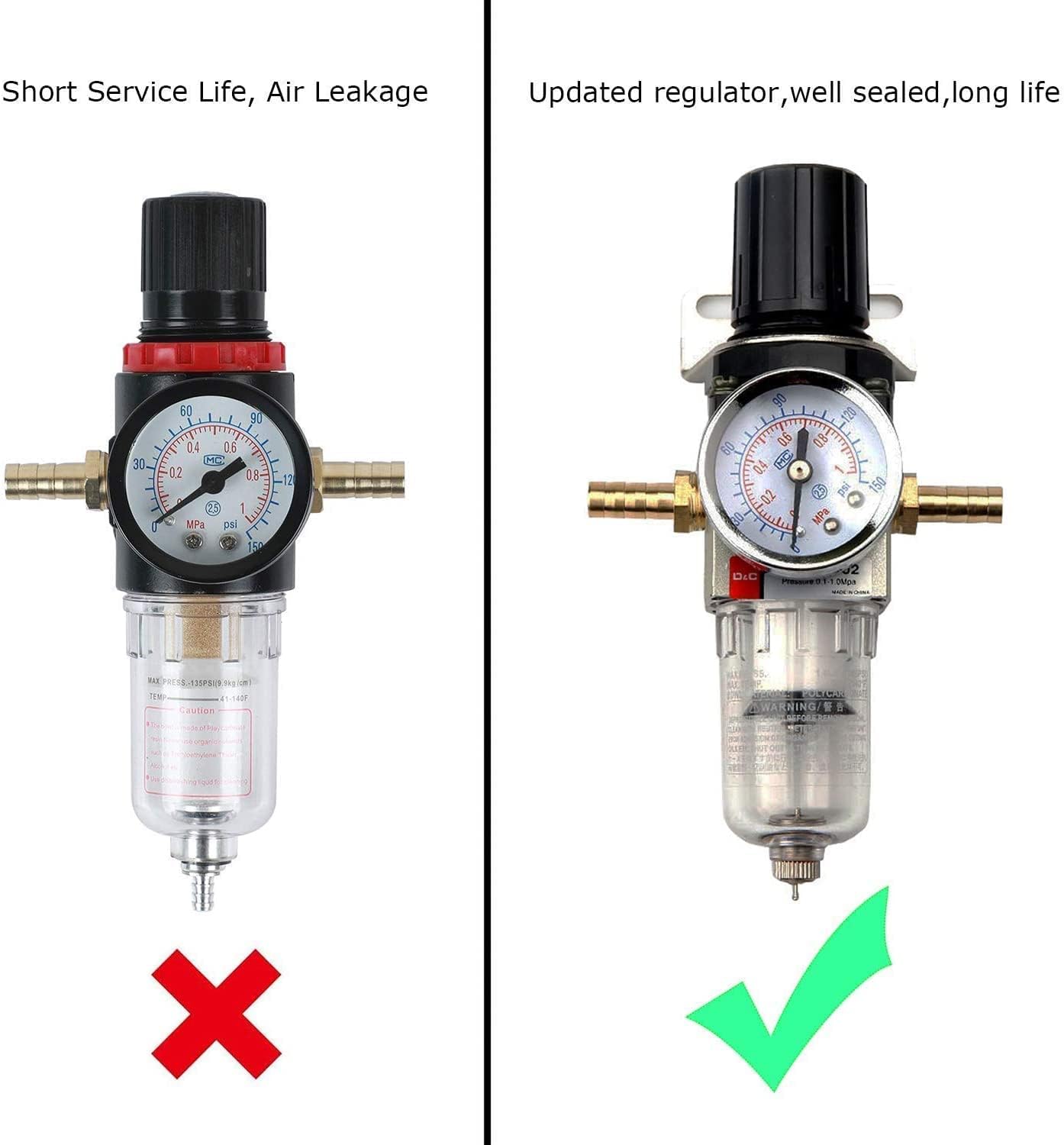
Figure 5: Updated Regulator for Improved Performance and Longevity
Troubleshooting
This section provides solutions to common issues you might encounter.
| Problem | Possible Cause | Solution |
|---|---|---|
| No arc when trigger is pressed | No power, loose connections, worn consumables, insufficient air pressure. | Check power supply and circuit breaker. Ensure all cables are securely connected. Inspect and replace worn torch consumables. Verify air pressure is set correctly. |
| Poor cut quality / Rough edges | Incorrect amperage or air pressure, worn consumables, torch too far from workpiece, travel speed too fast/slow. | Adjust amperage and air pressure according to material. Replace worn consumables. Maintain proper torch standoff distance. Adjust travel speed for optimal cut. |
| Overcurrent (O.C.) light on | Overload, short circuit, internal fault. | Reduce amperage or cutting load. Check for short circuits in cables or torch. If problem persists, contact customer support. |
| Machine not powering on | No power supply, main switch off, internal fuse. | Verify power outlet is active. Ensure main power switch is ON. Check internal fuses (if accessible and safe to do so, otherwise contact support). |
Specifications
| Feature | Detail |
|---|---|
| Manufacturer | Reboot-USA |
| Model Number | plasma cutting equipment 50 Amp (RBC5000D) |
| Item Weight | 18.44 pounds |
| Product Dimensions | 14.17 x 6.3 x 12.2 inches |
| Color | Green |
| Material | Stainless Steel |
| Power Source | DC |
| Voltage | 110/220 Volts (Automatic Dual Voltage) |
| Cord Length | 5 Meters |
| Included Components | PT31 Plasma Torch |
| Cutting Current | 50 Amp |
| Ideal Clean Cut (220/240V) | 1/2 inch (12mm) |
| Severance Cut (220/240V) | 3/4 inch (19mm) |
| Severance Cut (110/120V) | 2/5 inch (10mm) |
| Recommended Air Pressure | 60 PSI |
Warranty and Support
Reboot offers a 1-year limited warranty on this plasma cutter. This warranty covers manufacturing defects and ensures free consumables guarantee. For any assistance or warranty claims, please contact Reboot customer support. Local support is available to assist you.
For further information or support, please visit the official Reboot store: Reboot Store on Amazon.
Related documentsCUT50D


Ask a question about this manual
Ask about setup, troubleshooting, compatibility, parts, safety, or missing instructions. Manuals+ will review the question and use this page’s manual context to help answer it.