
Raptor Series RB-0101-BK
Raptor Series RB-0101-BK Installation Manual
Model: RB-0101-BK
Brand: Raptor Series
Introduction
This manual provides detailed instructions for the installation and care of your Raptor Series RB-0101-BK Slide Track Bracket Kits. These kits are designed to facilitate the mounting of Raptor Series side steps on 2015-2022 Chevy Colorado/GMC Canyon Extended Cab/Crew Cab models.
The bracket kits feature heavy-duty, high-carbon steel construction, ensuring durability and a secure fit. Installation is designed to be quick and straightforward, often requiring no drilling.
Safety Information
Please read all safety warnings and instructions carefully before beginning installation. Always wear appropriate personal protective equipment, such as safety glasses and gloves, during installation.

WARNING:
This product and/or related accessories can expose you to chemicals and/or components which are known to the State of California to cause cancer and birth defects or other reproductive harm.
For more information go to www.P65Warnings.ca.gov
What's In The Box
Your Raptor Series RB-0101-BK kit includes the following components:
- Heavy-duty, E-coated steel brackets (vehicle-specific)
- Mounting bolts
- Washers
- Nuts
- Installation hardware
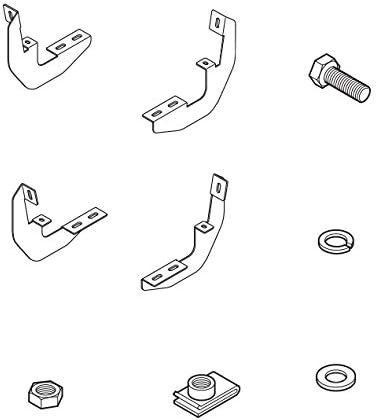
Figure 1: Included components of the RB-0101-BK bracket kit.

Figure 2: Packaging for the Raptor Series RB-0101-BK Slide Track Bracket Kits.
Setup and Installation
The installation of the Raptor Series RB-0101-BK bracket kit is designed to be quick and easy. In most cases, no drilling is required as the brackets utilize existing factory mounting points on your vehicle's frame.
Required Tools (Not Included):
- Standard wrench set
- Socket wrench set
- Torque wrench (recommended for proper tightening)
- Safety glasses
- Gloves
Installation Steps:
- Prepare Vehicle: Park your vehicle on a level surface and engage the parking brake. For safety, it is recommended to disconnect the negative terminal of the battery.
- Identify Mounting Locations: Locate the factory mounting points on the vehicle's frame, typically along the rocker panel area. Refer to your vehicle's owner's manual or a vehicle-specific installation guide if unsure.
- Attach Brackets: Align the Raptor Series brackets with the identified mounting points. Secure them using the provided bolts, washers, and nuts. Hand-tighten all hardware initially.
- Install Side Steps (Sold Separately): Once all brackets are loosely attached, position your Raptor Series side steps onto the brackets. Secure the side steps to the brackets using the appropriate hardware (typically included with the side steps).
- Final Tightening: Once all components are in place and aligned, progressively tighten all hardware to the manufacturer's recommended torque specifications. Start from the front of the vehicle and work your way back. Ensure all connections are secure.
- Inspect: After tightening, visually inspect all connections to ensure proper installation and stability.
For detailed vehicle-specific instructions, please refer to the installation guide provided with your Raptor Series side steps or visit the Raptor Series website.
Operating
The Raptor Series RB-0101-BK is an installation bracket kit and does not have operational functions in itself. Once installed, it serves as a secure mounting foundation for compatible Raptor Series side steps, enabling safe and convenient entry and exit from your vehicle.
Ensure that any side steps mounted to these brackets are used according to their own manufacturer's guidelines and weight limits.
Maintenance
To ensure the longevity and performance of your Raptor Series bracket kit, follow these maintenance guidelines:
- Regular Inspection: Periodically inspect all mounting hardware for tightness. Vibrations from driving can sometimes loosen bolts over time. Re-tighten as necessary.
- Cleaning: Clean the brackets with mild soap and water. Avoid harsh chemicals or abrasive cleaners that could damage the E-coating.
- Corrosion Prevention: The brackets are E-coated for superior strength and corrosion resistance. However, in harsh environments (e.g., areas with road salt), regular cleaning can help prevent long-term corrosion.
- Damage Check: If the vehicle is involved in an accident or if the brackets sustain any impact, inspect them for damage, bends, or cracks. Replace any damaged components immediately.
Troubleshooting
If you encounter issues during or after installation, consider the following:
- Brackets Don't Fit:
- Verify that the RB-0101-BK model is correct for your vehicle's year, make, and model (2015-2022 Chevy Colorado/GMC Canyon Extended Cab/Crew Cab).
- Ensure you are attempting to install the brackets on the correct side of the vehicle (driver vs. passenger) and in the correct orientation.
- Loose or Rattling Side Steps:
- Check all mounting bolts on both the brackets to the vehicle frame and the side steps to the brackets. Re-tighten to specifications.
- Ensure all washers and nuts are correctly installed.
- Missing Hardware:
- Carefully check the packaging and surrounding area.
- Contact Raptor Series customer support for replacement parts if necessary.
If problems persist, please contact Raptor Series customer support for assistance.
Specifications
| Attribute | Detail |
|---|---|
| Model Number | RB-0101-BK |
| Brand | Raptor Series |
| Manufacturer | RAPTOR |
| Material | Heavy-duty, high-carbon steel (E-coated) |
| Product Dimensions | 13 x 13 x 4 inches |
| Item Weight | 1 pounds |
| Exterior Finish | Machined |
| Compatibility | 2015-2022 Chevy Colorado/GMC Canyon Extended Cab/Crew Cab |
Warranty Information
The Raptor Series RB-0101-BK Slide Track Bracket Kits come with a Limited 1 Year Manufacturer Warranty.
This warranty covers defects in materials and workmanship under normal use. For specific terms, conditions, and to file a warranty claim, please refer to the official Raptor Series warranty policy available on their website or contact their customer support.
Support
For further assistance, technical support, or inquiries regarding your Raptor Series RB-0101-BK bracket kit, please contact Raptor Series customer service.
You can often find contact information, FAQs, and additional resources on the official Raptor Series website. Please have your product model number (RB-0101-BK) and purchase details ready when contacting support.
Visit the Raptor Series Store on Amazon: Raptor Series Store
Related documentsRB-0101-BK

Ask a question about this manual
Ask about setup, troubleshooting, compatibility, parts, safety, or missing instructions. Manuals+ will review the question and use this page’s manual context to help answer it.