
1. Product Overview
The USX MOUNT Universal Soundbar Mount is designed to securely attach your soundbar either above or below your television. This mount offers a versatile and space-saving solution, ensuring your soundbar moves with your TV for optimal audio experience. It features adjustable components and a robust design to accommodate various soundbar and TV configurations.

Image: The soundbar mount is shown attached to a TV, demonstrating its ability to move in conjunction with the television, whether the TV is on a wall mount or stand.
2. What's in the Box
Verify that all components listed below are present and undamaged before proceeding with installation.
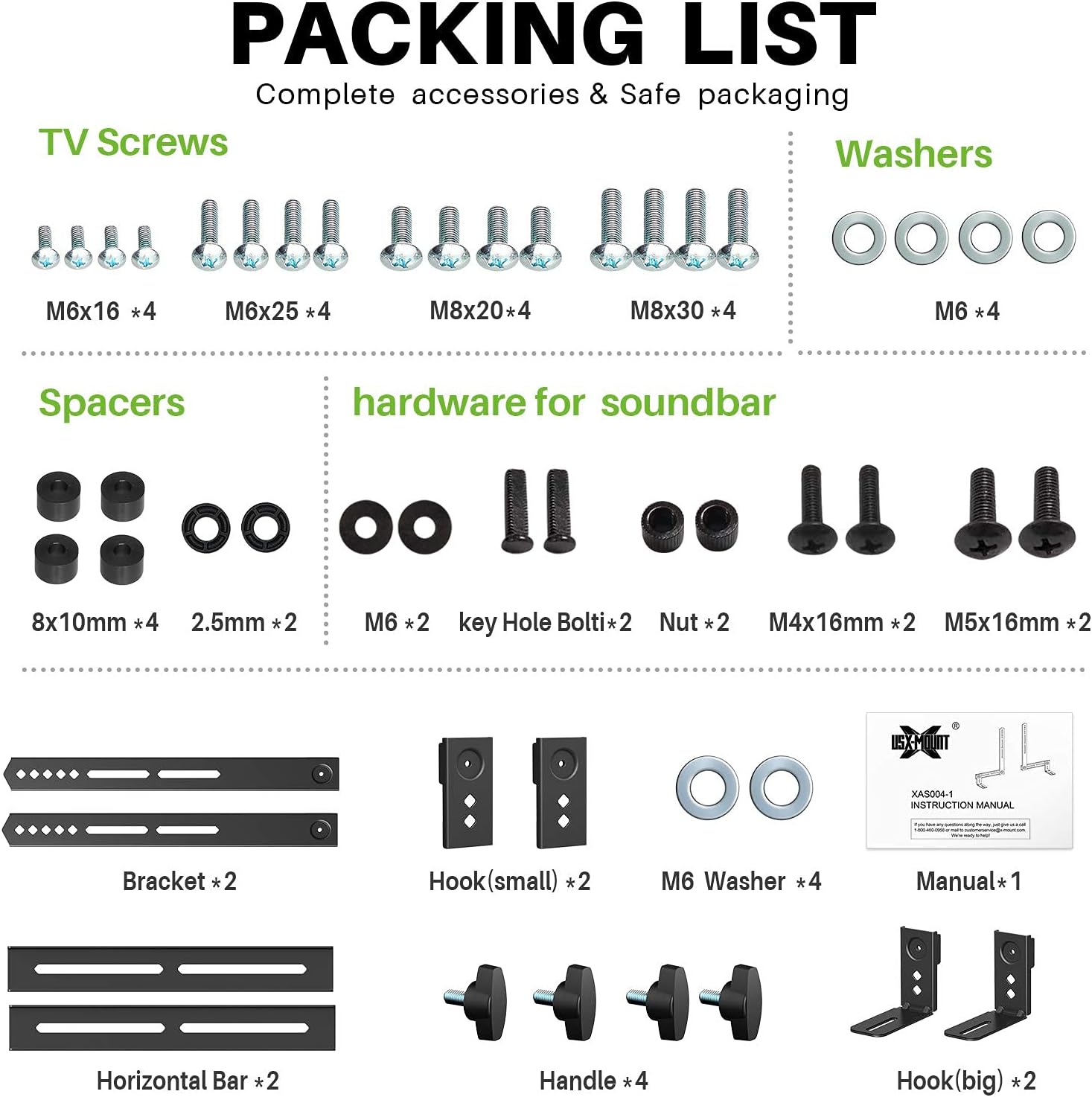
Image: A comprehensive layout of all parts included in the package, such as TV screws (M6x16, M6x25, M8x20, M8x30), washers, spacers, hardware for soundbars (M6, keyhole bolts, nuts, M4x16mm, M5x16mm), brackets, hooks (small and big), horizontal bars, handles, and the instruction manual.
Included Components:
- Soundbar Brackets (2)
- Horizontal Bars (2)
- Small Hooks (2)
- Large Hooks (2)
- Handles (4)
- Assorted TV Screws (M6x16, M6x25, M8x20, M8x30)
- Washers (M6)
- Spacers (8x10mm, 2.5mm)
- Soundbar Hardware (M6, Keyhole Bolts, Nuts, M4x16mm, M5x16mm)
- Instruction Manual (1)
3. Compatibility and Features
Compatibility:
- Soundbar Weight Capacity: Supports soundbars up to 13.2 lbs (6 kg).
- Soundbar Mounting Holes: Compatible with most soundbars featuring back or bottom mounting holes.
- TV VESA Compatibility: Fits most TVs with horizontal VESA patterns ranging from 75mm to 600mm.

Image: A diagram illustrating the compatible VESA hole patterns for TVs (up to 600mm horizontal) and the adjustable range for soundbar mounting holes (up to 8 inches from center to each side).

Image: Visual representation of different soundbar mounting options, including key holes, back screw holes, and bottom holes, highlighting the mount's universal design.
Key Features:
- Adjustable Design: Two flexible arms allow for height adjustment, and the hanging hooks can slide left/right for precise centering.
- Lockable Hooks: Features two movable solid base holders that securely fasten soundbars with back or bottom holes, preventing movement.
- Versatile Mounting: Can be installed above or below the TV, adapting to various setups.

Image: Detailed views of the lockable and movable hooks, demonstrating how they secure the soundbar using either back or bottom holes, with tool-free adjustment knobs.
4. Installation Guide
Follow these steps carefully to ensure a secure and proper installation of your USX MOUNT Soundbar Mount.
Pre-Installation Checks:
Before beginning installation, confirm the following:
- Check Soundbar Weight: Ensure your soundbar weighs no more than 13.2 lbs (6 kg).
- Check TV Horizontal VESA: Verify your TV's horizontal VESA mounting holes are between 75mm and 600mm.
- Check Soundbar Hole Distance: Confirm the distance between your soundbar's mounting holes is within the adjustable range of the mount.

Step 1: Check Soundbar Weight

Step 2: Check TV Horizontal VESA

Step 3: Check Soundbar Hole Distance
Installation Steps:
The installation process involves three main steps:
- Pre-assemble Soundbar Brackets: Assemble the soundbar brackets according to the diagrams.
- Attach Brackets to TV: Secure the assembled soundbar brackets to the back of your TV using the appropriate VESA holes. For the top pair of holes, spacers may be required (included).
- Attach and Lock Base Holders: Attach the soundbar to the base holders and lock them in place. No drilling into the wall is required.

Image: A visual guide showing the three main installation steps: 1. Pre-assembling the soundbar brackets, 2. Attaching the soundbar bracket to the TV bracket, and 3. Attaching and locking the base holders.
Official Installation Video (Model XAS004):
Video: This official installation video for the XAS004 Soundbar Mount demonstrates the assembly and attachment process. It covers attaching the soundbar bracket to the TV (without a TV wall mount) from 0:32 to 0:48, and attaching the soundbar bracket to the TV (for different types of TV wall mounts) from 0:48 to 1:20.
Installation Examples:

Image: Examples of the soundbar mount in use, showing a soundbar positioned below a wall-mounted TV and another positioned above a TV placed on a media console.
5. Specifications
| Specification | Detail |
|---|---|
| Product Dimensions | 16.66 x 3.39 x 1.7 inches |
| Item Weight | 3.34 pounds |
| ASIN | B08HQP57VZ |
| Item Model Number | Soundbar Mount |
| Color | Black |
| Manufacturer | X-MOUNT LIMITED |
| Compatible Devices | Soundbars |
| Mounting Type | Soundbar Mount, Speaker |
| Special Features | Universal |
6. Troubleshooting
If you encounter issues during installation or use, consider the following common points:
- Soundbar Not Fitting: Double-check the weight capacity (max 13.2 lbs) and the type/distance of your soundbar's mounting holes (back or bottom).
- TV VESA Incompatibility: Ensure your TV's horizontal VESA pattern is within the 75-600mm range.
- Stability Issues: Confirm all screws and knobs are tightened securely. The lockable hooks are designed to prevent swinging and sliding.
- Cable Management: Utilize the space behind the TV and mount to conceal cables for a clean setup.
For further assistance, please refer to the support information below.
7. Warranty and Support
USX MOUNT provides a 10-year friendly US-Based customer service. If you have any questions or require assistance with your soundbar mount, please contact our support team.
To help our engineers simulate the installation for your specific setup, please provide the following information:
- Complete TV model.
- Complete soundbar model.
- The distance between the two mounting holes on the bottom or back of your soundbar.


