
Introduction
The Zomee Z2 Double Electric Breast Pump is designed to support mothers with efficient and comfortable breast milk expression. This manual provides detailed instructions for the safe and effective use, assembly, operation, cleaning, and maintenance of your Zomee Z2 breast pump.

Image: The Zomee Z2 Double Electric Breast Pump, featuring the main control unit and two milk collection bottles with breast shields.
Important Safety Information
Please read all instructions before using the Zomee Z2 Double Electric Breast Pump. Failure to follow these instructions may result in electric shock, fire, or serious injury.
- Always keep the pump unit and electrical components dry.
- Do not immerse the pump unit in water or other liquids.
- Use only the original power adapter and USB-C charging cable provided.
- Keep out of reach of children.
- Inspect all pump parts before each use for damage or wear. Replace any damaged parts immediately.
- This device is for personal use and should not be shared.
- Consult a healthcare professional if you experience pain or discomfort during pumping.
What's in the Box
Your Zomee Z2 Double Electric Breast Pump package includes the following components:

Image: A visual representation of all items included in the Zomee Z2 Double Electric Breast Pump package.
- (1) Z2 Double Electric Breast Pump Unit
- (1) Lanyard
- (1) USB-C Power Cable
- (1) AC Adapter (120-240V)
- (2) Breast Shield Bodies
- (2) Diaphragms
- (2) Diaphragm Cap Covers
- (4) Duckbill Valves
- (2) 21mm Breast Shields
- (2) 24mm Breast Shields
- (2) Standard Neck Adapters
- (2) 26" Tubes
- (2) 140ml Zomee Bottles
- (2) Bottle Caps + Nipples
Product Overview and Controls
Familiarize yourself with the Zomee Z2 pump unit and its intuitive controls.
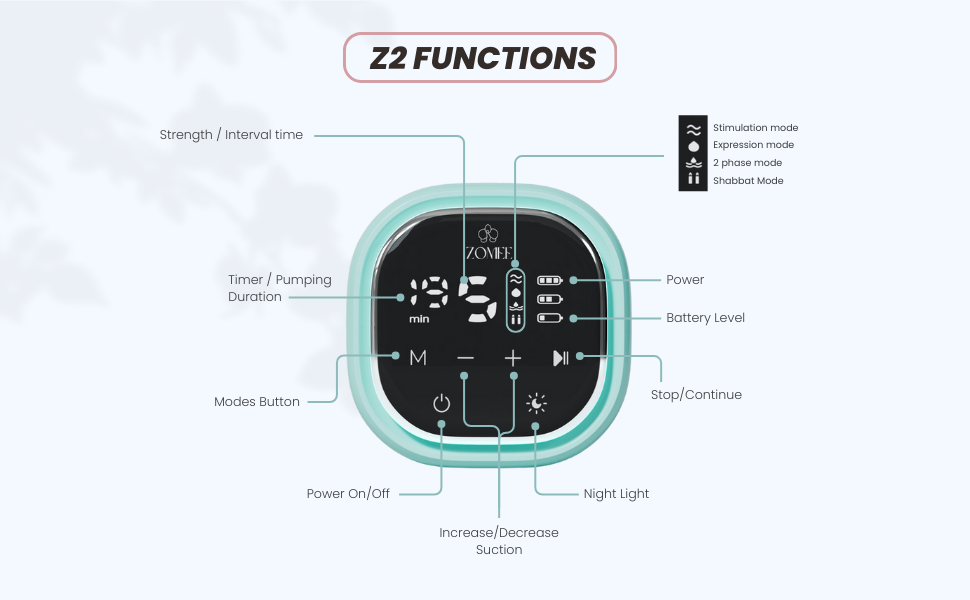
Image: A detailed diagram of the Zomee Z2 control panel, clearly labeling the Power On/Off, Mode, Suction adjustment, Start/Pause, and Nightlight buttons, along with indicators for timer, strength, and battery level.
- Power On/Off Button: Press to turn the pump on or off.
- Mode Button (M): Cycles through Stimulation, Expression, and 2-Phase modes.
- Increase/Decrease Suction Buttons (+/-): Adjusts the vacuum level (9 levels available).
- Start/Pause Button: Initiates or pauses the pumping session.
- Nightlight Button: Activates or deactivates the integrated nightlight.
- LCD Screen: Displays pumping duration, current mode, suction level, and battery status.
Setup and Assembly
Before first use, sterilize all parts that come into contact with breast milk. Refer to the "Cleaning and Maintenance" section for detailed instructions.
- Assemble Breast Shield Kit:
- Insert a duckbill valve firmly into the bottom of the breast shield body.
- Place a diaphragm onto the top of the breast shield body, ensuring a tight seal.
- Secure the diaphragm with the diaphragm cap cover.
- Attach the appropriate size breast shield (21mm or 24mm) to the breast shield body.
- Screw a 140ml Zomee bottle onto the assembled breast shield body.
- Connect Tubing:
- Connect one end of a 26" tube to the port on the diaphragm cap cover.
- Connect the other end of the tube to one of the ports on the Z2 pump unit.
- For double pumping, repeat for the second breast shield kit and the second port on the pump unit.
- Charging the Pump:
- Connect the USB-C power cable to the pump unit and the AC adapter.
- Plug the AC adapter into a power outlet. The battery indicator on the LCD screen will show charging status.
- A full charge provides approximately 2+ hours of pumping time. The pump can be used while charging.
Operating Instructions
The Zomee Z2 offers three pumping styles and nine suction levels for a personalized experience.
Getting Started
- Ensure all parts are clean, dry, and correctly assembled.
- Center your nipple in the breast shield tunnel.
- Press the Power On/Off button to turn on the pump.
- The pump will start in the last used mode and suction level, or a default setting.
Pumping Modes
Press the Mode (M) button to cycle through the following modes:
- Stimulation Mode: A faster, lighter suction pattern designed to initiate milk let-down. Use this mode for the first 2-3 minutes of your pumping session.
- Expression Mode: A slower, stronger suction pattern for efficient milk expression once let-down has occurred.
- 2-Phase Mode: Mimics a baby's natural feeding pattern, alternating between stimulation and expression phases. This mode automatically alternates expression between breasts to increase stimulation and express more milk.
Adjusting Suction Level
Use the +/- buttons to adjust the vacuum strength. There are 9 suction levels. Start with a comfortable low level and gradually increase until you find the most effective and comfortable setting for milk flow.
Single or Double Pumping
The Z2 pump can be used for single or double pumping. If using for single pumping, ensure the unused port on the pump unit is securely capped or blocked to maintain vacuum.
Hands-Free Operation
The Zomee Z2 is designed for hands-free use, allowing for mobility during pumping sessions.

Image: A user demonstrating hands-free pumping with the Zomee Z2, utilizing collection cups for discretion and mobility.
- Wear a supportive pumping bra to hold the breast shields in place.
- The compact pump unit can be worn around the neck with the included lanyard or placed in a pocket.
Nightlight Function
Press the Nightlight button to activate a soft light, useful for nighttime pumping sessions without disturbing others.
Ending a Pumping Session
When finished, press the Power On/Off button to turn off the pump. Carefully remove the breast shields from your breasts and detach the bottles to store your milk.
Cleaning and Maintenance
Proper cleaning and maintenance are crucial for hygiene and the longevity of your breast pump. All parts that come into contact with breast milk must be cleaned and sterilized after each use.
Disassembly
Before cleaning, disassemble all parts that come into contact with breast milk: breast shields, breast shield bodies, duckbill valves, diaphragms, diaphragm caps, bottles, bottle caps, and nipples.
Cleaning Instructions
- Rinse: Rinse all disassembled parts under cool running water to remove any milk residue.
- Wash: Wash parts in warm, soapy water using a clean brush dedicated for pump parts. Ensure all milk film is removed. The hygienic anti-backflow system helps maintain freshness.
- Rinse Again: Rinse thoroughly under clean running water.
- Sterilize (First Use & Daily):
- Boiling: Place parts in a pot of boiling water for 5 minutes.
- Steam Sterilizer: Use a microwave or electric steam sterilizer according to manufacturer instructions.
- Air Dry: Place cleaned and sterilized parts on a clean paper towel or drying rack in an area free from dust and pests. Do not use a cloth towel as it may transfer germs.
Important: Do not wash or sterilize the pump motor unit or tubing. If milk gets into the tubing, replace it immediately. Wipe the pump motor unit with a clean, damp cloth.
Troubleshooting
If you encounter issues with your Zomee Z2 breast pump, refer to the following common problems and solutions:
| Problem | Possible Cause | Solution |
|---|---|---|
| No suction or weak suction |
|
|
| Pump not turning on |
|
|
| Pain or discomfort during pumping |
|
|
If the problem persists, please contact Zomee customer support.
Specifications
- Model: Z2
- Brand: Zomee
- Operation Mode: Electric
- Pumping Styles: Stimulation, Expression, 2-Phase
- Suction Levels: 9
- Power Source: Battery Powered, Corded Electric (USB-C)
- Battery Life: Approximately 2+ hours per charge
- Bottle Capacity: 140ml (4.7 oz) per bottle
- Material: BPA Free Plastic, Food-Grade Silicone
- Product Dimensions: 4 x 4 x 3.99 inches (Pump Unit)
- Product Weight: 2 Pounds (Pump Unit)
- Manufacturer: Zomee
Warranty and Support
The Zomee Z2 Double Electric Breast Pump comes with a 2-year warranty covering manufacturing defects. This warranty applies to the pump motor unit and its accessories.
For warranty claims, technical support, or any questions regarding your Zomee Z2 breast pump, please contact Zomee customer service. Keep your proof of purchase for warranty validation.
Manufacturer: Zomee
Legal Disclaimer: Statements regarding dietary supplements have not been evaluated by the FDA and are not intended to diagnose, treat, cure, or prevent any disease or health condition.


