
1. Introduction
This manual provides essential information for the safe and efficient operation, installation, and maintenance of your Candy Smart Pro CSOW4965 TWE/1-S washer dryer. Please read these instructions carefully before using the appliance and keep them for future reference. Proper use and care will ensure optimal performance and extend the lifespan of your appliance.
2. Safety Information
Always adhere to the following safety guidelines to prevent personal injury or damage to the appliance.
2.1 General Safety
- This appliance can be used by children aged 8 years and above and persons with reduced physical, sensory or mental capabilities or lack of experience and knowledge if they have been given supervision or instruction concerning use of the appliance in a safe way and understand the hazards involved.
- Children should be supervised to ensure that they do not play with the appliance.
- Cleaning and user maintenance shall not be made by children without supervision.
- Do not allow children to play with the appliance or climb inside the drum.
- Keep packaging materials away from children.
2.2 Electrical Safety
- Ensure the appliance is connected to a properly grounded electrical outlet.
- Do not use extension cords or multiple adapters.
- If the power cord is damaged, it must be replaced by the manufacturer, its service agent, or similarly qualified persons to avoid a hazard.
2.3 Water Safety
- Ensure water inlet and drain hoses are securely connected to prevent leaks.
- Do not operate the appliance if there is a visible water leak.
3. Installation and Setup
Proper installation is crucial for the performance and safety of your washer dryer.
3.1 Unpacking and Transport Bolts
Before using the appliance, remove all transport bolts located at the rear of the machine. These bolts secure the drum during transit and must be removed to prevent damage during operation. Keep the bolts for future transport if needed.
3.2 Positioning
Place the washer dryer on a firm, level surface. Adjust the leveling feet to ensure the appliance is stable and does not wobble. Proper leveling reduces vibration and noise during operation.
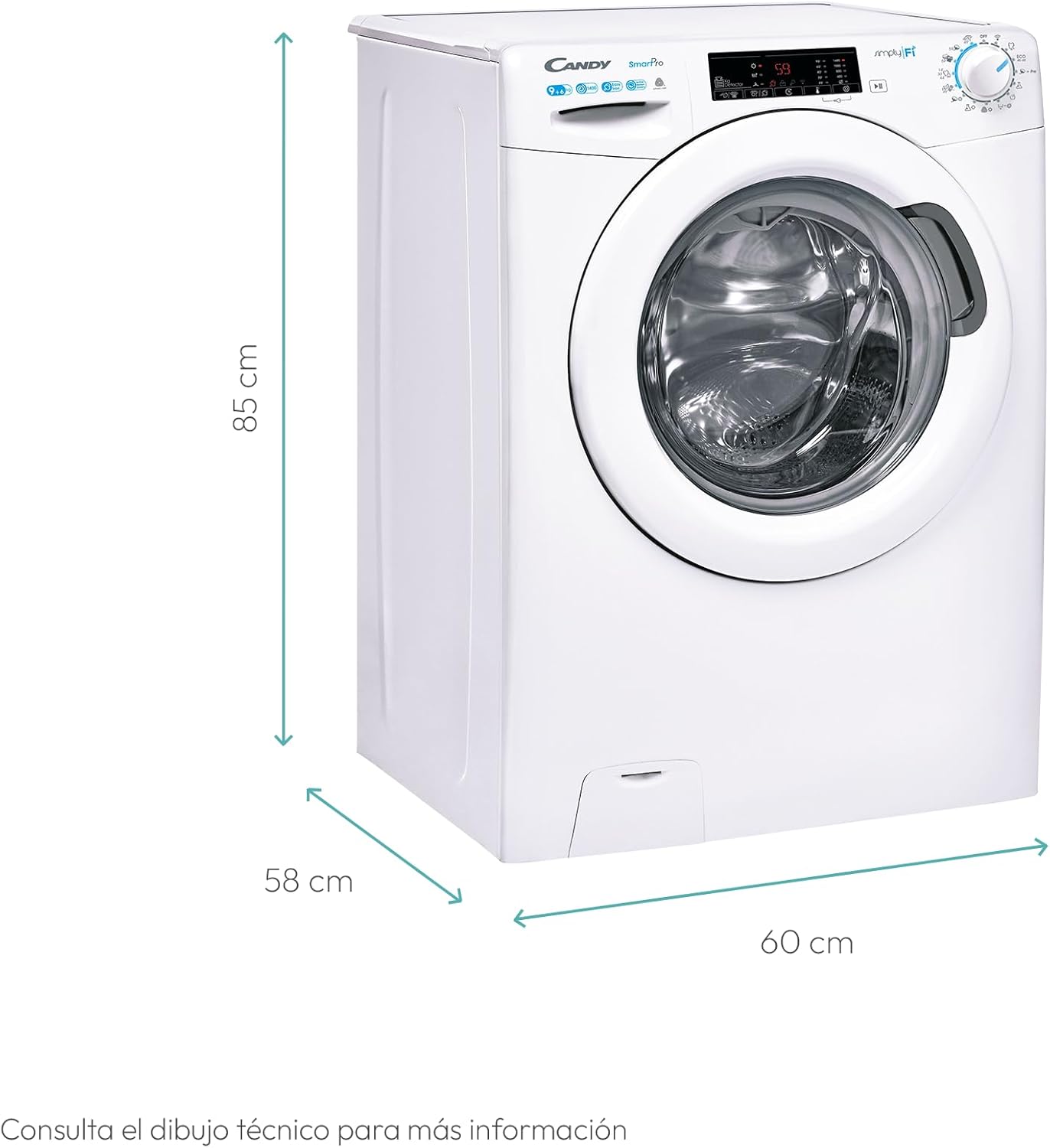
Image: The dimensions of the Candy Smart Pro CSOW4965 TWE/1-S washer dryer are 85 cm (height), 60 cm (width), and 58 cm (depth). Ensure adequate space for installation and ventilation.
3.3 Water Connection
Connect the water inlet hose to a cold water tap with a 3/4-inch thread. Ensure the connection is tight to prevent leaks. Position the drain hose into a suitable drain pipe or sink, ensuring it is securely fixed and allows for proper drainage.
3.4 Electrical Connection
Plug the appliance into a grounded electrical outlet. The voltage and frequency must match the specifications on the appliance's rating plate.
3.5 Initial Use
Before the first wash, run a short cycle without laundry and detergent to clean the drum and remove any manufacturing residues.
4. Operating Instructions
Familiarize yourself with the control panel and available programs for optimal washing and drying results.

Image: The Candy Smart Pro CSOW4965 TWE/1-S washer dryer features a prominent control panel with a digital display and rotary knob, a large front-loading door, and a detergent dispenser drawer.
4.1 Control Panel Overview
The control panel consists of a program selector knob, a digital display, and touch-sensitive buttons for various functions and settings. The display shows program duration, selected options, and error codes.
4.2 Loading Laundry
Open the door and load laundry into the drum. Do not overload the machine; ensure there is enough space for the clothes to tumble freely. For washing, the maximum capacity is 9 kg, and for drying, it is 6 kg.

Image: Key features of the washer dryer include a 9 kg washing capacity and 6 kg drying capacity, 7 rapid wash programs for quick cycles, and Wi-Fi connectivity for smart control.
4.3 Detergent Dispenser
Pull out the detergent drawer. Add appropriate amounts of detergent to the main wash compartment, fabric softener to the softener compartment, and pre-wash detergent (if applicable) to the pre-wash compartment. Refer to detergent packaging for dosage recommendations.
4.4 Program Selection
Turn the program selector knob to choose the desired wash or dry program. The appliance offers 15 wash cycles and 6 dry cycles, including 7 rapid programs for quick washing. The digital display will show the estimated duration for the selected program.
4.5 Special Functions
- Steam Function: Reduces wrinkles and refreshes clothes.
- Active Motion System: Enhances washing performance by increasing detergent action.
- Wi-Fi Connectivity: Connect the appliance to the Candy simply-Fi app for remote control, guided washing, tips, and usage statistics. This feature allows for advanced control and monitoring.

Image: The Candy simply-Fi app provides advanced user experience, offering remote control, a wide range of washing and drying programs, functions, tips, and usage statistics for your appliance.
4.6 Starting a Cycle
After selecting the program and any desired options, press the Start/Pause button to begin the cycle. The appliance will automatically proceed through the selected wash and/or dry phases.
4.7 End of Cycle
At the end of the cycle, the appliance will signal with an audible alert and/or a message on the display. Open the door and remove the laundry promptly to prevent wrinkles and odors.
5. Maintenance and Cleaning
Regular maintenance ensures the longevity and efficiency of your washer dryer.
5.1 Cleaning the Exterior
Wipe the exterior surfaces with a soft, damp cloth. Do not use abrasive cleaners or solvents.
5.2 Cleaning the Detergent Dispenser
Periodically remove the detergent drawer and rinse it under running water to remove any detergent residue. Clean the housing of the drawer with a brush.
5.3 Cleaning the Door Seal
After each wash, wipe the rubber door seal to remove any lint, dirt, or moisture. This prevents mold growth and unpleasant odors.
5.4 Cleaning the Filter
Locate the filter at the bottom front of the appliance. Place a shallow container underneath to catch any residual water. Unscrew the filter cover and carefully remove the filter. Clean any lint or debris from the filter and its housing. Reinsert and tighten the filter cover.
5.5 Descaling
Depending on water hardness in your area, periodic descaling may be necessary. Use a suitable descaling product designed for washing machines and follow the product's instructions.
5.6 Winter Storage
If the appliance is to be stored in an unheated area during winter, drain all water from the hoses and pump to prevent freezing and damage.
6. Troubleshooting
Before contacting customer service, try the following solutions for common issues.
| Problem | Possible Cause | Solution |
|---|---|---|
| Appliance does not start | No power supply; Door not closed properly; Program not selected. | Check power plug and fuse; Ensure door is firmly closed; Select a program and press Start. |
| Excessive vibration/noise | Transport bolts not removed; Appliance not level; Uneven laundry load. | Remove transport bolts; Adjust leveling feet; Redistribute laundry in the drum. |
| Poor washing results | Incorrect detergent dosage; Overloading; Wrong program selected. | Adjust detergent amount; Reduce laundry load; Select appropriate program for fabric type. |
| Laundry not drying properly | Overloading for drying; Lint filter clogged; Incorrect drying program. | Reduce laundry load for drying; Clean the lint filter; Select a suitable drying program. |
| Water leaks | Loose hose connections; Detergent drawer overflow. | Tighten water inlet/drain hoses; Do not overfill detergent drawer. |
If the problem persists after trying these solutions, please refer to the full user manual or contact Candy customer support.
7. Specifications
Key technical specifications for the Candy Smart Pro CSOW4965 TWE/1-S washer dryer.
| Specification | Value |
|---|---|
| Model Number | CSOW4965 TWE/1-S (31010442) |
| Washing Capacity | 9 kg |
| Drying Capacity | 6 kg |
| Maximum Spin Speed | 1400 RPM |
| Dimensions (H x W x D) | 85 x 60 x 58 cm |
| Weight | 67 kg |
| Energy Efficiency Class (Wash/Dry) | E |
| Voltage | 230 V (AC) |
| Drum Material | Stainless Steel |
| Number of Wash Cycles | 15 |
| Number of Dry Cycles | 6 |
| Included Components | Washer dryer, Power cable, Drain hose |

Image: The energy label provides detailed information on the appliance's energy consumption (66 kWh/100 cycles for wash, 377 kWh/100 cycles for wash+dry), water consumption, and noise levels. More details can be found on the EPREL database.
8. Warranty and Support
Your Candy Smart Pro CSOW4965 TWE/1-S washer dryer comes with a manufacturer's warranty. Please refer to the warranty card included with your purchase for specific terms and conditions. For technical assistance, spare parts, or service requests, please contact Candy customer support. Ensure you have your model number and purchase date available when contacting support.


