
ESR wxcd_yscx_car_bk
ESR MagSafe Car Mount Charger User Manual
Model: wxcd_yscx_car_bk
Introduction
Thank you for choosing the ESR MagSafe Car Mount Charger. This 15W magnetic wireless car charger is designed for convenience and efficiency, providing fast charging and a secure hold for your compatible smartphone while on the go. This manual provides essential information for setup, operation, and maintenance of your device.
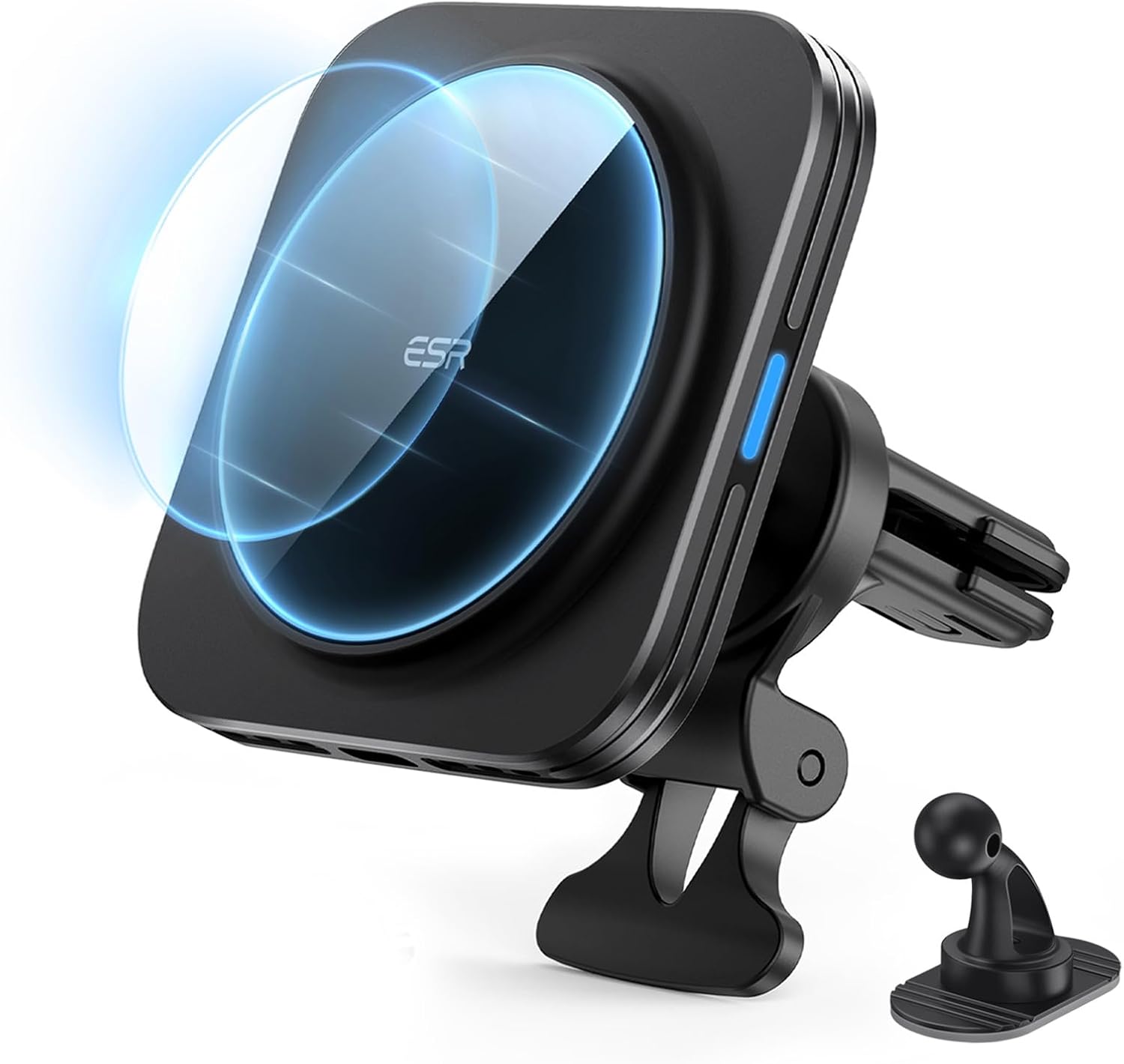
Image: ESR MagSafe Car Mount Charger with included accessories.
What's Included
- HaloLock Magnetic Wireless Car Charger
- Air Vent Clamp
- Dashboard Anchor
- 3.3 ft (1 m) USB-A to USB-C Cable
- Manual
Note: Car charging adapter is not included and an 18W QC adapter is required for fast charging.
Features
- Fast Charging: Intelligent heat management allows for charging speeds nearly identical to official MagSafe chargers.
- Secure Magnetic Lock: Powerful magnets with 1,400 g of holding force and a non-slip silicone ring ensure your phone stays securely in place.
- Versatile Mounting: Includes options for both air vent and dashboard mounting.
- Ready for Navigation: Easily switch between portrait and landscape orientations for optimal viewing.
- Stable Vent Mount: Strong vent clip and support arm provide enhanced mounting stability.

Image: Key features of the ESR MagSafe Car Mount Charger.
Compatibility
This charger is compatible with:
- iPhone 16/15/14/13/12 series (with a magnetic case)
- Samsung Galaxy S25 Ultra/S25+/S25 (with a magnetic case)
For optimal performance and secure attachment, it is recommended to use official MagSafe cases or ESR HaloLock magnetic cases. Not compatible with Motorola, OnePlus, and Google phones.

Image: Device compatibility overview.
Setup Instructions
Mounting Options
Your ESR MagSafe Car Mount Charger offers two primary mounting options: air vent and dashboard.

Image: Mounting options for the car charger.
Air Vent Mounting
- Fully slide the air vent clamp onto an air vent blade.
- Ensure the support arm rests securely on or below the vent for enhanced stability.

Image: Air vent installation steps.
Dashboard Mounting
- Wipe the dashboard surface clean of any dust or debris.
- Remove the protective film from the dashboard anchor's adhesive.
- Firmly press the dashboard anchor to attach it to the desired location on your dashboard.
Note: The dashboard anchor cannot be reused once removed.

Image: Dashboard anchor installation steps.
Power Connection
Connect the provided 3.3 ft (1 m) USB-A to USB-C cable to the charger and plug the USB-A end into an 18W QC compatible car charging adapter (not included). Ensure the adapter is securely plugged into your vehicle's power outlet.
Operating Instructions
Attaching Your Phone
Once the charger is securely mounted and powered, simply bring your compatible MagSafe-enabled phone (or phone with a magnetic case) close to the charging surface. The powerful magnets will automatically align and secure your phone, initiating wireless charging.

Image: Secure magnetic attachment.
Adjusting Viewing Angle and Orientation
The charger features a 360-degree ball-joint for angle adjustment, allowing you to position your phone for optimal viewing. You can also rotate your phone 360 degrees to switch between portrait and landscape orientations as needed for navigation or media consumption.

Image: Flexible viewing angles and orientation.
Maintenance
- Keep the charging surface clean and free of dust or debris to ensure optimal charging performance. Use a soft, dry cloth for cleaning.
- Avoid exposing the charger to extreme temperatures or direct sunlight for prolonged periods.
- Do not attempt to disassemble or repair the device yourself. Contact customer support for assistance.
Troubleshooting
Phone Not Charging
- Ensure the USB-C cable is securely connected to both the charger and the car adapter.
- Verify that your car adapter is an 18W QC compatible adapter and is properly plugged into your vehicle's power outlet.
- Check if your phone is correctly aligned on the magnetic charging surface.
- Confirm that your phone or phone case is MagSafe compatible.
Mount is Unstable
- For air vent mounting, ensure the clamp is fully engaged with a vent blade and the support arm is resting firmly.
- For dashboard mounting, ensure the surface was clean and dry before applying the anchor. The dashboard anchor is designed for single use.
- Verify that your phone and case combination does not exceed the recommended weight for the mount.
Specifications
| Attribute | Value |
|---|---|
| Product Dimensions | 3.15 x 3.15 x 1.26 inches |
| Item Weight | 5.1 ounces |
| Model Number | wxcd_yscx_car_bk |
| Color | Black |
| Connectivity Technologies | USB |
| Special Features | Power in a snap, MagSafe supported, Wireless Charging |
| Mounting Type | Vent |
Warranty and Support
ESR provides complete customer support, including detailed setup videos and FAQs. Your product is covered by a comprehensive 12-month protection plan and lifetime support. For personalized help, please refer to the contact information provided with your purchase or visit the official ESR website.
Related documentswxcd_yscx_car_bk


Ask a question about this manual
Ask about setup, troubleshooting, compatibility, parts, safety, or missing instructions. Manuals+ will review the question and use this page’s manual context to help answer it.