
1. Product Overview
The XDUOO XD-05 Basic is a portable Hi-Fi headphone amplifier and digital-to-analog converter (DAC) designed to enhance audio quality for various devices. It features an ES9018K2M audio processor and XMOS XU208 for high-resolution audio playback, supporting PCM up to 384kHz and DSD up to DSD256. Its versatile connectivity and robust output power make it suitable for a wide range of headphones and audio sources, including PCs, gaming consoles, and mobile devices.
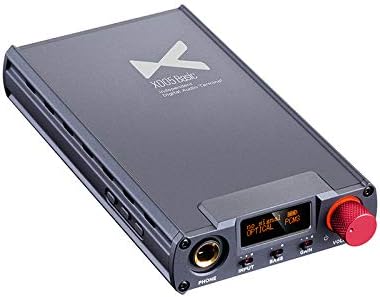
Figure 1: Front view of the XDUOO XD-05 Basic Headphone Amplifier, showcasing its compact design, display screen, volume knob, and input/output ports.
2. Package Contents
Please verify that all items listed below are included in your package:
- XD-05 Basic Unit x1
- TYPE-C USB Cable x1
- TYPE-C TO TYPE-C USB OTG Cable x1
- TYPE-C TO MICRO USB OTG Cable x1
- USB A to Type-C plug x1
- 6.5 to 3.5mm Headphone Plug Adapter x1
- Silicone Foot Pads x10
- Magic Velcro x1
- User Manual x1
3. Key Features
The XD-05 Basic offers a range of features designed for an enhanced audio experience:
- Powerful Audio Output: Delivers high-quality audio and video performance with its compact form, compatible with various devices including desktops, notebooks, tablets, and smartphones.
- Immersive Sound: Utilizes professional digital and analog audio circuits to create surround sound effects for headphones and active speakers, ideal for gaming and multimedia.
- Flexible Headphone Matching: Features an on-demand output design to match different impedance headsets, optimizing volume and reducing distortion.
- Bass Boost Function: Hardware physics switch for significant bass enhancement, providing impactful sound effects for movies and games.
- Audio Upscaling: Improves low bit rate music quality through hardware SRC function, upscaling audio files to 48KHz/96KHz/192KHz for optimized detail and natural sound.

Figure 2: Diagram illustrating the key features of the XD-05 Basic, including 500mW output power, personal sound enhancement, HiFi Audio DAC, easy operation, unrestricted connections, XMOS XUF208, extendable Bluetooth 5.0 (with optional XD-05BL), PCM384, DSD256, and DXD384 support.
4. Setup and Connectivity
4.1 Initial Setup
- Unpack the XD-05 Basic unit and all included accessories.
- Apply the silicone foot pads to the bottom of the unit if using on a desktop to prevent scratching and provide stability.
- Ensure the unit is charged before first use. Connect the TYPE-C USB Cable to the unit and a USB power source. The charging indicator will show status.
4.2 Connecting to Devices
The XD-05 Basic supports various input methods for different devices:
Connecting to PS4 and PC:
- PS4: Connect via Optical Input for audio. Use a Type-C USB cable for power if needed. Connect your headset to the headphone output.
- PC: Connect via Type-C USB for both audio and power. Alternatively, use Linear Input for analog audio. Connect your headset to the headphone output.
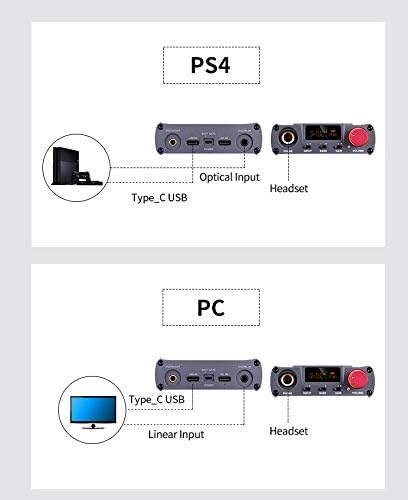
Figure 3: Connection diagrams for PS4 (Optical Input) and PC (Type-C USB or Linear Input) with the XD-05 Basic.
Connecting to Nintendo Switch and X-BOX:
- Nintendo Switch: Connect via Type-C USB for audio. Alternatively, use Linear Input for analog audio. Connect your headset to the headphone output.
- X-BOX: Connect via Optical Input for audio. Use a Type-C USB cable for power if needed. Connect your headset to the headphone output.

Figure 4: Connection diagrams for Nintendo Switch (Type-C USB or Linear Input) and X-BOX (Optical Input) with the XD-05 Basic.
5. Operating Instructions
5.1 Power On/Off
- To power on, press and hold the power button (usually integrated with the volume knob) until the display illuminates.
- To power off, press and hold the power button again until the display turns off.
5.2 Volume Control
- Rotate the large knob on the front panel clockwise to increase volume and counter-clockwise to decrease volume.
- Start with a low volume level and gradually increase to a comfortable listening level to prevent hearing damage.
5.3 Input Selection
- Press the "INPUT" button to cycle through available input sources (e.g., USB, Optical, Coaxial, AUX IN). The selected input will be displayed on the screen.
5.4 Gain Setting
- The XD-05 Basic offers multiple gain levels (+6dB/9dB/16dB). Use the "GAIN" switch to select the appropriate gain for your headphones.
- Lower gain is suitable for sensitive headphones, while higher gain provides more power for demanding, high-impedance headphones.
5.5 Bass Boost
- Toggle the "BASS" switch to enable or disable the bass boost function (0/+6 dB).
- Engage the bass boost for a more impactful low-frequency response, particularly beneficial for certain music genres or gaming.
6. Maintenance
- Cleaning: Use a soft, dry cloth to wipe the exterior of the unit. Do not use liquid cleaners or abrasive materials.
- Storage: Store the unit in a cool, dry place away from direct sunlight, extreme temperatures, and high humidity.
- Battery Care: For optimal battery life, avoid fully discharging the unit frequently. If storing for extended periods, charge the battery to approximately 50% every few months.
- Avoid Obstruction: Ensure ventilation holes are not blocked to prevent overheating.
7. Troubleshooting
| Problem | Possible Cause | Solution |
|---|---|---|
| No sound output | Incorrect input selected; Volume too low; Headphone not connected properly; Device not sending audio. | Verify input selection; Increase volume; Ensure headphone plug is fully inserted; Check audio settings on source device. |
| Distorted sound | Volume too high; Incorrect gain setting; Damaged audio cable; Source audio quality is poor. | Reduce volume; Adjust gain setting; Try a different audio cable; Check source audio file/stream quality. |
| Unit does not power on | Battery is depleted; Power button not pressed correctly. | Charge the unit using the provided USB cable; Press and hold the power button firmly. |
| Connectivity issues (e.g., USB not recognized) | Incorrect cable; Driver issues (for PC); Source device compatibility. | Ensure correct USB cable is used (e.g., OTG for mobile); Install necessary drivers for PC (if applicable); Try a different USB port or device. |
8. Technical Specifications
| Parameter | Value |
|---|---|
| Audio Processor | ES9018K2M |
| Gain | +6dB/9dB/16dB |
| Signal to Noise Ratio (SNR) | 115dB |
| BASS Upgrade | 0/+6 dB |
| Frequency Response (USB/FIBER/COAXIAL) | 20Hz ~ 20 kHz (±0.5 dB) |
| Frequency Response (AMP) | 10 Hz~60kHz (±0.5dB) |
| Harmonic Distortion (USB/Coaxial/Optical Fiber) | 0.0025%@1kHz |
| Harmonic Distortion (AUX IN) | 0.0018%@1kHz |
| Maximum Output Power | 500mW (32Ω load) |
| Resolution | ≥75dB |
| Charging Time (Fast Charge 1.2A) | ≤5 hours |
| Charging Time (Slow Charge 500MA) | ≤11 hours |
| Endurance Time (USB IN) | ≥9h |
| Endurance Time (AUX IN) | ≥16H |
| Endurance Time (Coaxial/Optical Fiber) | ≥12H |
| USB Support Sampling Rate (PCM) | 16-32bit/44.1-384kHz |
| USB Support Sampling Rate (DSD) | DOP/NATIVE mode, DSD64-256 |
| USB Support Sampling Rate (DXD) | 24-32 bit/352.8-384kHz |
| Optical Fiber/COAXIAL Support Sampling Rate (PCM) | 16-24 bit/44.1-192 Khz |
| Applicable System | Win 7, Win 8, Win 10, Mac OS X, IOS, Android |
| Model Name | XD-05 Basic |
| Connectivity Technology | Digital and Analog |
| Item Weight | 1.12 pounds |
| Manufacturer | XDUOO |
| UPC | 791270537074 |
9. Warranty and Support
For warranty information and technical support, please refer to the official xDuoo website or contact your authorized dealer. Keep your purchase receipt as proof of purchase for warranty claims.
