
1. Introduction
Thank you for purchasing the Casio IQ-1106J Radio Wave Wall Clock. This clock features an analog display within an octagonal wooden frame, designed to provide accurate timekeeping through radio wave reception. This manual will guide you through the installation, operation, and maintenance of your new clock.
Key Features:
- Radio Wave Reception: Automatically adjusts time for precision.
- Analog Display: Classic and easy-to-read time presentation.
- Octagonal Wooden Frame: Adds a warm and elegant touch to any room.
- Step Second Hand: Provides clear second-by-second movement.

Image: Close-up view of the clock face, highlighting the warm wooden frame and the step second hand movement.
2. Package Contents
Please ensure all the following items are included in your package:
- Casio IQ-1106J Wall Clock
- AA Alkaline Battery (x1)
- Wall Mounting Screws
- Hanging Hardware
- Instruction Manual (this document)
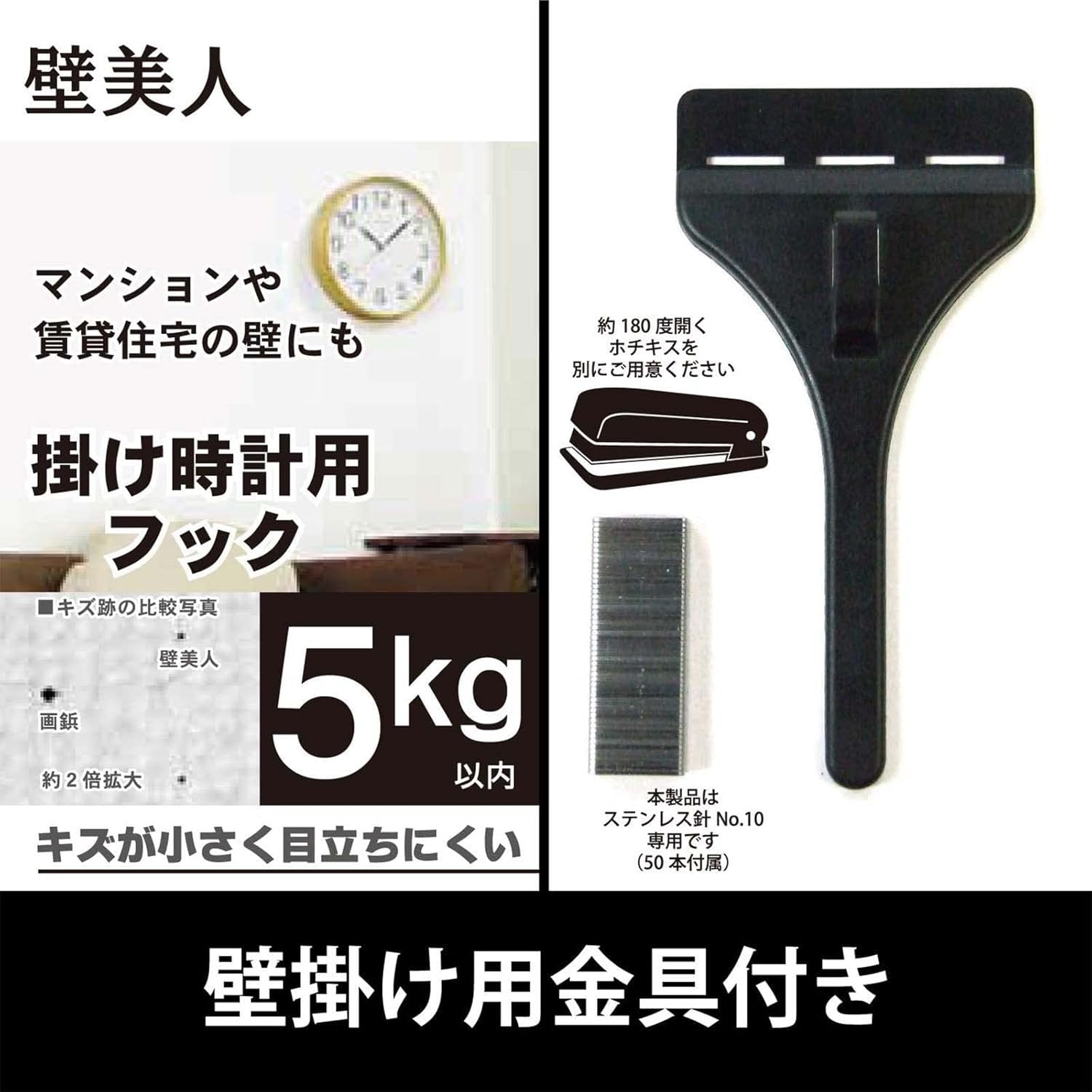
Image: The included wall hanging hardware, designed for secure installation.
3. Safety Information
- Battery Safety: Use only the specified AA alkaline battery. Do not mix old and new batteries, or different types of batteries. Remove batteries if the clock will not be used for an extended period. Dispose of batteries according to local regulations.
- Mounting Safety: Ensure the wall surface is strong enough to support the clock's weight (approximately 940g) and the hanging hardware. Use appropriate tools and follow mounting instructions carefully to prevent the clock from falling.
- Placement: Avoid placing the clock in direct sunlight, near strong magnetic fields, or in areas with extreme temperatures or high humidity, as this may affect performance and longevity.
4. Setup
4.1 Battery Installation
- Locate the battery compartment on the back of the clock.
- Open the battery compartment cover.
- Insert one (1) AA alkaline battery, ensuring the positive (+) and negative (-) terminals are aligned correctly according to the diagram inside the compartment.
- Close the battery compartment cover securely.

Image: The rear view of the clock, indicating the battery compartment and control buttons.
4.2 Initial Time Setting and Radio Wave Reception
After installing the battery, the clock will automatically attempt to receive the time calibration signal. This process may take several minutes. Place the clock in an area with good signal reception, away from electronic devices that may cause interference.
- The clock hands will move to the 12 o'clock position and then begin searching for the radio signal.
- A radio wave reception lamp (if present, refer to the back of the clock) will indicate the status of the reception.
- Once the signal is successfully received, the clock will automatically set itself to the correct time.
4.3 Wall Mounting
Use the provided hanging hardware and screws to securely mount the clock on a wall.
- Choose a suitable location on a sturdy wall.
- Mark the desired position for the hanging hardware.
- Install the wall mounting screws and hanging hardware according to the instructions provided with the hardware, ensuring it is firmly secured. The hook can hold up to approximately 5kg.
- Carefully hang the clock onto the installed hardware, ensuring it is stable and level.
5. Operating Instructions
5.1 Radio Reception Function
The Casio IQ-1106J clock is equipped with a radio wave reception function to maintain accurate time.
- Automatic Reception: The clock will periodically attempt to receive the time calibration signal to ensure accuracy. This typically occurs overnight.
- Manual Reception: If you need to force a time adjustment, you can initiate manual reception. Refer to the buttons on the back of the clock (e.g., 'WAVE CEPTOR' or 'RECEIVE' button) and press it to start manual reception. The radio wave reception lamp will indicate the reception status.
- Radio Wave Reception ON/OFF Function: Some models may include a switch or button to enable or disable the radio wave reception. If you are in an area with poor reception or wish to conserve battery life, you may turn this function OFF. Remember to turn it ON for automatic time synchronization.

Image: The 'Wave Ceptor' feature, illustrating the clock's ability to receive radio signals for precise timekeeping.
5.2 Time Display
The clock features a clear analog display with hour, minute, and second hands. The time is automatically adjusted via radio wave reception, eliminating the need for manual time setting under normal operating conditions.
6. Maintenance
6.1 Cleaning
- Wipe the clock's surface with a soft, dry cloth.
- For stubborn dirt, lightly dampen the cloth with water and a mild detergent, then wipe dry immediately.
- Do not use abrasive cleaners, solvents, or chemical sprays, as these can damage the finish and internal components.
6.2 Battery Replacement
When the clock hands stop moving or the time becomes inaccurate despite good radio reception, it is likely time to replace the battery.
- Remove the clock from the wall.
- Open the battery compartment on the back.
- Remove the old AA alkaline battery.
- Insert a new AA alkaline battery, observing the correct polarity (+/-).
- Close the battery compartment and re-hang the clock. The clock will then attempt to receive the time signal.
7. Troubleshooting
| Problem | Possible Cause | Solution |
|---|---|---|
| Clock hands do not move or display incorrect time. | Low battery; Poor radio signal reception; Radio reception OFF. | Replace battery. Move clock to a location with better signal (e.g., near a window, away from electronics). Ensure radio reception function is ON. Initiate manual reception. |
| Radio wave reception lamp does not light up or flashes. | Weak or no radio signal. | Relocate the clock to an area with stronger signal. Wait for automatic reception or attempt manual reception. |
| Clock is losing or gaining time. | Interference with radio signal; Faulty battery; Malfunction. | Ensure clock is not near strong interference sources. Replace battery. If problem persists, contact customer support. |
8. Specifications
| Feature | Detail |
|---|---|
| Model Number | IQ-1106J |
| Product Dimensions (H x W x D) | Approx. 11.6 x 11.6 x 2.4 inches (29.5 x 29.5 x 6.0 cm) |
| Weight | Approx. 32.0 oz (940 g) |
| Materials | Wood, Resin, Glass |
| Display Type | Analog |
| Movement | Quartz |
| Power Source | 1 x AA Alkaline Battery |
| Special Features | Radio reception function (automatic/manual), Radio wave reception ON/OFF function, Radio wave reception lamp |
| Indoor/Outdoor Usage | Indoor |

Image: The clock displaying its physical dimensions and weight for reference.
9. Warranty and Support
Casio products are manufactured to high-quality standards. For information regarding warranty coverage, please refer to the warranty card included with your purchase or visit the official Casio website.
For further assistance, troubleshooting, or to inquire about replacement parts, please contact Casio customer support or visit the official Casio store online:
