1. Introduction
This manual provides detailed instructions for the installation, operation, and maintenance of your Caliber RMD033DAB-BT car radio. Please read this manual thoroughly before using the product to ensure proper operation and to prevent damage.
The Caliber RMD033DAB-BT is a 1-DIN car radio featuring FM and DAB+ tuners, Bluetooth connectivity for hands-free calling and audio streaming, USB, SD card, and AUX inputs. It delivers 4 x 55 Watts maximum power output.
2. Safety Information
- Ensure proper installation by a qualified professional to prevent electrical short circuits or damage.
- Do not operate the device in a manner that distracts you from driving. Always prioritize road safety.
- Avoid exposing the unit to moisture or extreme temperatures.
- Do not attempt to open or repair the unit yourself. Refer all servicing to qualified personnel.
- Keep the volume at a level that allows you to hear outside traffic sounds.
3. Package Contents
Verify that all items are present in the package:
- Caliber RMD033DAB-BT Car Radio
- Remote Control
- DAB+ Antenna
- ISO Connector
4. Product Overview
Familiarize yourself with the main components of your car radio.

Figure 1: Front panel of the Caliber RMD033DAB-BT car radio, showing the display, control knob, buttons for mode, clock, mute, band, AMS, track skip, and USB/AUX/SD ports.

Figure 2: Side view of the car radio, illustrating its compact 1-DIN form factor and the included mounting cage.

Figure 3: Rear panel of the car radio, showing the ISO connector, RCA output, and antenna input for DAB+.
5. Setup and Installation
5.1 Wiring Diagram
The unit uses a standard ISO connector for power and speaker connections. Refer to your vehicle's wiring diagram and the provided ISO connector for correct installation.
- Yellow Wire: Constant 12V (Battery)
- Red Wire: Switched 12V (Ignition/ACC)
- Black Wire: Ground
- Blue Wire: Power Antenna / Amplifier Remote Turn-On
- Speaker Wires: Connect to corresponding vehicle speakers (e.g., White/White-Black for Front Left, Grey/Grey-Black for Front Right, Green/Green-Black for Rear Left, Purple/Purple-Black for Rear Right).
5.2 DAB+ Antenna Installation
The included DAB+ antenna is crucial for receiving digital radio signals. Install it according to the following steps:
- Clean the chosen mounting surface on your windshield (typically upper corner).
- Carefully peel off the adhesive backing from the antenna.
- Attach the antenna firmly to the glass, ensuring no air bubbles.
- Route the antenna cable discreetly to the back of the car radio and connect it to the dedicated DAB+ antenna input.
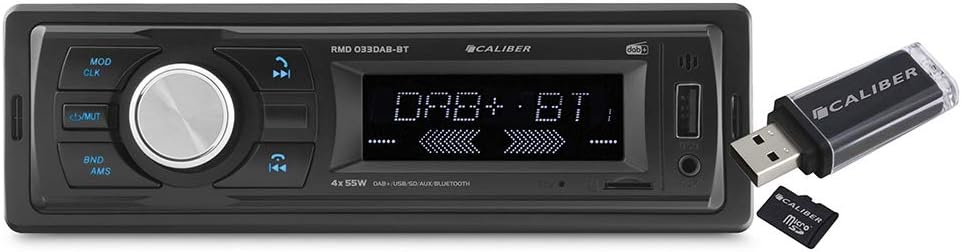
Figure 4: The Caliber RMD033DAB-BT car radio shown with the included DAB+ antenna, illustrating its connection point.
5.3 Mounting the Unit
The unit is designed for a standard 1-DIN opening. Use the supplied mounting cage and screws to secure the radio in the dashboard.
6. Operating Instructions
6.1 Basic Operation
- Power On/Off: Press the MOD/CLK button briefly to turn the unit on. Press and hold to turn off.
- Volume Control: Rotate the central knob to adjust the volume.
- Mute: Press the /MUTE button to mute or unmute the audio.
- Mode Selection: Press the MOD/CLK button repeatedly to cycle through available modes (FM, DAB+, Bluetooth, USB, SD, AUX).
- Clock Setting: Press and hold the MOD/CLK button to enter clock setting mode. Use the volume knob to adjust hours/minutes and press the knob to confirm.
6.2 Radio Operation (FM/DAB+)
- Band Selection: In radio mode, press the BND/AMS button to switch between FM1, FM2, FM3, DAB1, DAB2, DAB3 bands.
- Automatic Station Search: Press and hold the >>| or |<< buttons to automatically search for the next/previous strong station.
- Manual Tuning: Briefly press the >>| or |<< buttons to manually tune step-by-step.
- Store Presets: Tune to a desired station, then press and hold one of the numeric preset buttons (1-6) to save it.
- Recall Presets: Briefly press a numeric preset button (1-6) to recall a saved station.
- Automatic Memory Store (AMS): Press and hold the BND/AMS button to automatically scan and store the strongest stations to presets.
6.3 Bluetooth Operation
- Pairing:
- Ensure the car radio is in Bluetooth mode. The display will show "BT".
- On your mobile device, enable Bluetooth and search for available devices.
- Select "RMD033DAB-BT" from the list. If prompted for a PIN, enter "0000".
- Once paired, the display will show "CONNECTED".
- Hands-Free Calling:
- Answer Call: Press the Call button (green phone icon) on the unit or remote.
- End Call: Press the End Call button (red phone icon) on the unit or remote.
- Dialing: Initiate calls from your paired phone. Audio will automatically transfer to the car radio.
- Audio Streaming (A2DP):
- After successful pairing, select music on your mobile device. Audio will stream wirelessly to the car radio.
- Use the >>| and |<< buttons to skip tracks.
6.4 USB/SD/AUX Operation
- USB/SD Playback: Insert a USB drive into the USB port or an SD card into the SD slot. The unit will automatically switch to USB/SD mode and begin playback. Use the >>| and |<< buttons to navigate tracks.
- AUX Input: Connect an external audio device (e.g., MP3 player) to the 3.5mm AUX input using an audio cable. Select AUX mode using the MOD/CLK button.
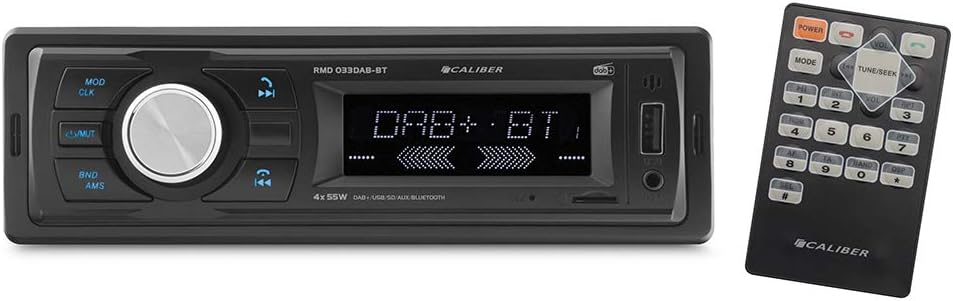
Figure 5: The car radio displaying its USB and SD card input slots, with a USB drive and SD card inserted for media playback.
6.5 Remote Control
The included remote control provides convenient access to various functions.
Figure 6: The Caliber RMD033DAB-BT car radio alongside its remote control, highlighting the various buttons for power, mode, volume, track skip, and numeric presets.
Refer to the remote control diagram (if available in physical manual) for specific button functions. Common functions include:
- Power On/Off
- Volume Up/Down
- Mode Selection
- Track Skip / Station Tune
- Numeric Presets (1-6)
- Mute
7. Maintenance
- Cleaning: Use a soft, dry cloth to clean the unit's surface. Do not use abrasive cleaners or solvents.
- Fuse Replacement: If the unit does not power on, check the fuse located at the rear of the unit. Replace it with a fuse of the same rating (e.g., 10A).
- Software Updates: Information not available.
8. Troubleshooting
| Problem | Possible Cause | Solution |
|---|---|---|
| No power | Blown fuse; Incorrect wiring; Loose connection | Check and replace fuse; Verify wiring connections; Ensure secure power connections. |
| No sound | Volume too low; Mute activated; Incorrect speaker wiring | Increase volume; Deactivate mute; Check speaker connections. |
| Poor radio reception (FM/DAB+) | Antenna not connected; Weak signal area; Damaged antenna | Ensure antenna is properly connected; Try scanning for stations in a different location; Inspect antenna for damage. |
| Bluetooth not connecting | Device not in pairing mode; Incorrect PIN; Already connected to another device | Ensure car radio is in BT mode and phone is searching; Enter "0000" if prompted; Disconnect from other devices. |
| USB/SD not playing | Unsupported file format; Corrupted media; Incorrect mode selected | Ensure files are MP3 format; Try a different USB/SD card; Select USB/SD mode. |
9. Specifications
| Feature | Specification |
|---|---|
| Model Number | RMD033DAB-BT |
| Brand | Caliber |
| Connectivity Technology | Bluetooth |
| Special Features | DAB+ Tuner, FM Tuner, Hands-free Calling, USB, SD, AUX |
| Max Power Output | 4 x 55 Watts |
| Form Factor | 1 DIN (Shallow depth: 35 mm) |
| Audio Output Mode | RCA |
| Color | Black |
| Compatible Devices | Speakers, Smartphones |
10. Warranty and Support
This product comes with a manufacturer's warranty of 2 years.
For technical support, warranty claims, or service inquiries, please contact your retailer or visit the official Caliber website. Please have your model number (RMD033DAB-BT) and proof of purchase ready.
Note: Availability of spare parts and software updates is not specified.


