
1. Introduction
Thank you for choosing Senso Wireless Earbuds. These True Wireless Stereo (TWS) earphones are designed for an active lifestyle, featuring a secure fit, high-quality audio, and sweatproof construction. This manual will guide you through the setup, operation, and maintenance of your new earbuds.
2. What's in the Box
- Senso Wireless Earbuds (Left and Right)
- Portable Charging Case
- USB Charging Cable
- User Guide
- Multiple Sizes of Ear Tips
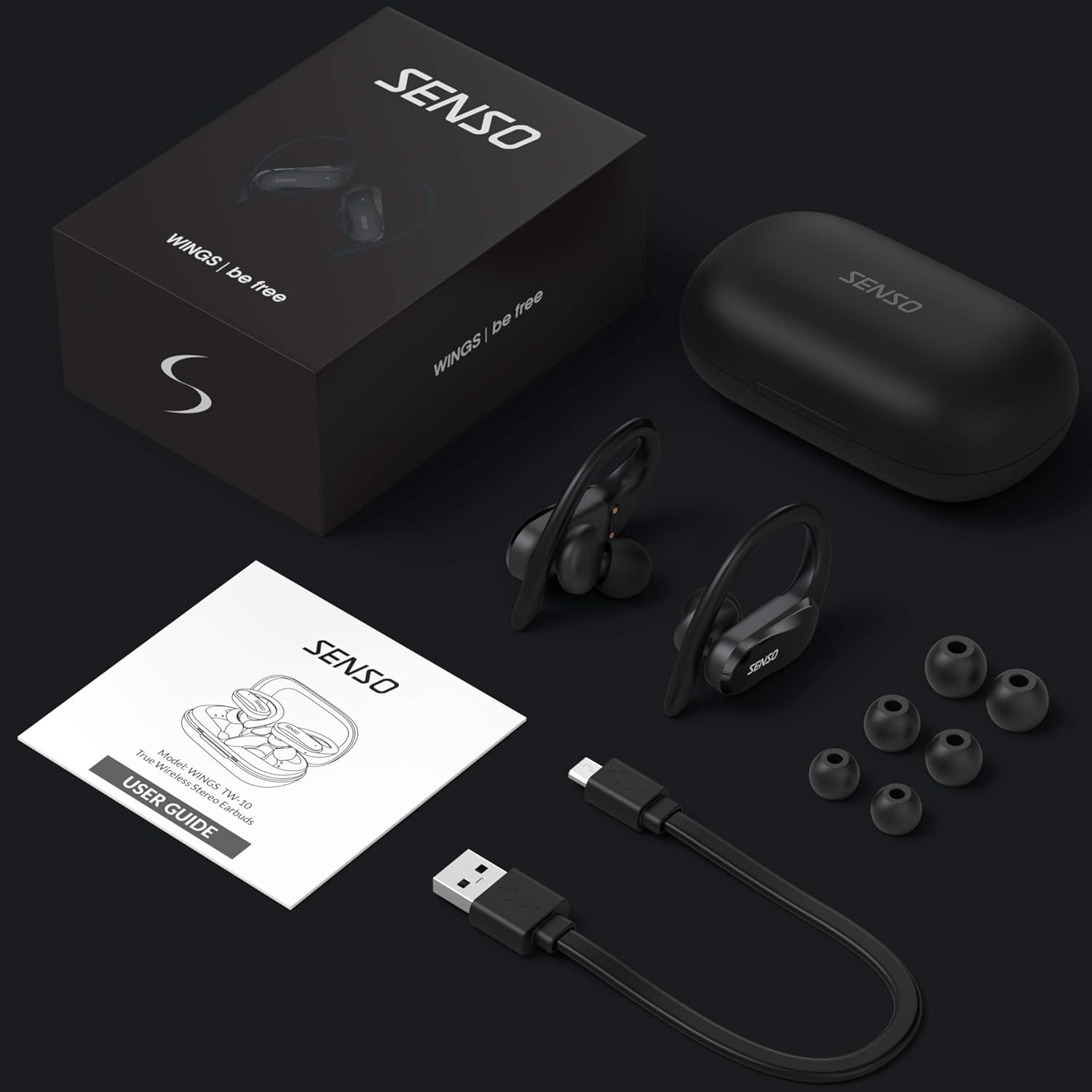
Image: The Senso Wireless Earbuds packaging, displaying the earbuds, charging case, user guide, USB charging cable, and various ear tip sizes.
3. Product Overview
The Senso Wings TW10 earbuds are designed for comfort and performance, featuring advanced audio technology and a durable build.

Image: An exploded view of the earbud, illustrating the 13mm dynamic driver responsible for delivering premium sound quality with intense bass and dynamic range.

Image: A detailed view of the earbud's internal circuitry, emphasizing the Bluetooth 5.0 chipset and CVC 8.0 Noise Cancellation Technology for stable connection and clear audio.

Image: Two scenarios demonstrating the earbuds' versatility: one earbud in use for mono mode (e.g., driving) and both earbuds for dual mode (e.g., binaural calls).

Image: The earbuds are shown resisting water splashes, indicating their IPX6 waterproof rating, suitable for sweat, water, and rain.
4. Setup
4.1 Charging the Earbuds and Case
Before first use, fully charge the earbuds and the charging case. Place the earbuds into the charging case. Connect the USB charging cable to the case and a power source. The indicator lights on the case will show the charging status.
4.2 Initial Pairing
- Ensure your earbuds are charged.
- Open the charging case. The earbuds will automatically power on and enter pairing mode.
- On your device (smartphone, tablet, etc.), enable Bluetooth.
- Search for available Bluetooth devices and select "SENSO Wings TW10" from the list.
- Once connected, you will hear an audio prompt, and the earbud indicator lights will change.

Image: The earbuds are shown connecting to a smartphone, demonstrating the simple and fast pairing process upon removal from the charging case.
Video: An official product video demonstrating the features and setup of the Senso WINGS Ultra Durable Premium Audio Wireless Earbuds.
5. Operating Instructions
5.1 Wearing the Earbuds
Place the earbuds in your ears and adjust the ear hooks for a secure and comfortable fit. The 60-degree twist lock system ensures they stay in place during physical activity.

Image: A user demonstrating the secure fit of the earbuds with the 60-degree twist lock system, ideal for sports and exercise.
5.2 Basic Controls
The earbuds feature touch-sensitive controls for media playback and call management. Refer to the detailed user guide included in the box for specific touch commands for functions such as play/pause, skip track, answer/end call, and voice assistant activation.
5.3 Mono or Dual Mode
You can use either earbud independently (mono mode) or both together (dual mode) for a stereo audio experience. This flexibility allows for awareness of your surroundings when needed.
5.4 Call Functions
Each earbud is equipped with a microphone, enabling binaural calls for clear communication. Use the touch controls to answer, end, or reject calls.
6. Maintenance
6.1 Cleaning
- Regularly clean the earbuds and charging case with a soft, dry, lint-free cloth.
- Remove ear tips and clean them with mild soap and water, then dry thoroughly before reattaching.
- Avoid using abrasive cleaners or solvents.
6.2 Storage
- Store the earbuds in their charging case when not in use to protect them and keep them charged.
- Keep the device in a cool, dry place, away from extreme temperatures and direct sunlight.
7. Troubleshooting
7.1 Pairing Issues
- Ensure both earbuds are fully charged.
- Turn off Bluetooth on your device, then turn it back on.
- Forget the device from your Bluetooth list and attempt to pair again.
- If only one earbud connects, try resetting the earbuds (refer to the full user guide for specific reset instructions).
7.2 No Sound or Low Volume
- Check the volume levels on both your device and the earbuds.
- Ensure the earbuds are properly seated in your ears.
- Clean any debris from the earbud speakers and ear tips.
7.3 Charging Problems
- Verify the charging cable is securely connected to both the case and the power source.
- Ensure the charging contacts on the earbuds and inside the case are clean and free of obstruction.
- Try a different charging cable or power adapter.
8. Specifications
| Feature | Detail |
|---|---|
| Model Name | Wings TW10 |
| Connectivity Technology | Bluetooth 5.0, Wireless |
| Wireless Communication Technology | Bluetooth |
| Noise Control | Active Noise Cancellation |
| Water Resistance Level | Waterproof (IPX6) |
| Battery Life (Earbuds) | 8 Hours |
| Total Playtime (with Case) | Up to 30 Hours |
| Audio Driver Size | 10 Millimeters |
| Impedance | 32 Ohms |
| Control Type | Media Control |
| Control Method | Remote |
| Ear Placement | In Ear |
| Form Factor | In Ear |
| Material | Silicone |
| Item Weight | 7 ounces |

Image: The earbuds and charging case illustrating the extended playtime: 6 hours for the earbuds and up to 30 hours total with the portable charging case.
9. Warranty and Support
Senso offers a standard warranty for its products. Additionally, you may be eligible for an extended warranty.
9.1 Extended Warranty
To convert to a two-year extended warranty, visit www.sensoshop.com/warranty. This must be claimed within 7 days of receiving your product.
9.2 Customer Support
For any product-related issues or inquiries, please contact Senso customer support. Details can be found on the warranty card included in your product packaging or on the official Senso website.
