1. Introduction
This manual provides instructions for the safe and effective operation of your Wintact WT323C Infrared Surface Thermometer. This device is designed for non-contact temperature measurement, contact temperature measurement via a Type-K thermocouple, and ambient environmental monitoring including humidity, air temperature, and dew point. It also features a mould risk detection function and a UV light.
2. Safety Information
WARNING: Laser Radiation
- Do not stare into the laser beam.
- Avoid direct eye exposure to the laser.
- Do not aim the laser at people or animals.
- Use caution when operating the laser in the presence of reflective surfaces.
General Safety Precautions:
- Do not use the device near explosive gas, vapor, or dust.
- Do not immerse the unit in water.
- Avoid dropping or subjecting the device to severe impact.
- Remove batteries if the device is not used for an extended period.
- This device is not intended for medical use or measuring human body temperature.
3. Product Features
- Dual Measurement Modes: Infrared for non-contact surface temperature and Type-K thermocouple for contact temperature.
- Wide Temperature Range: Infrared from -58℉ to 1202℉ (-50℃ to 650℃); Type-K from -40℉ to 932℉ (-40℃ to 500℃).
- High Accuracy: Up to ±1.5% for infrared measurements.
- Distance-to-Spot Ratio (D:S): 12:1 for precise targeting.
- Integrated Hygrometer: Measures ambient air temperature, relative humidity, and dew point.
- Mould Risk Detection: Tricolor light indication for dew point proximity.
- Adjustable Emissivity: From 0.1 to 1.0 for various surfaces.
- 9-Point Laser Pointer: For improved targeting accuracy.
- UV Light: For detecting leaks or stains.
- Backlit LCD Display: Multi-line display for clear readings.
- Convenience Functions: Data hold, low battery indicator, auto-off.
4. Components Overview
Familiarize yourself with the various parts of your Wintact WT323C thermometer:

Image 4.1: Labeled diagram showing the main components of the Wintact WT323C thermometer, including the humidity sensor, laser pointer, UV light, infrared sensor, K-type thermocouple socket, trigger, battery compartment, and control buttons.
- Humidity Sensor: Detects ambient relative humidity.
- Laser Pointer: Assists in targeting the measurement area.
- UV Light: Activated by a dedicated button for specific detection tasks.
- Infrared Sensor: Measures non-contact surface temperature.
- K-Type Thermocouple Socket: Port for connecting the external Type-K probe.
- Trigger: Activates measurement and laser.
- Battery Compartment: Houses the AAA batteries.
- Display: Shows all measurement readings and indicators.
- Mode Button: Cycles through different display modes and settings.
- °C/°F Button: Toggles between Celsius and Fahrenheit units.
- Laser/UV Button: Controls the laser pointer and UV light.
5. Setup
5.1 Battery Installation
- Locate the battery compartment cover on the handle of the thermometer.
- Slide the cover open.
- Insert two (2) 1.5V AAA batteries, ensuring correct polarity (+/-).
- Close the battery compartment cover securely.

Image 5.1: The Wintact WT323C thermometer shown with the included AAA batteries and Type-K thermocouple probe.
6. Operating Instructions
6.1 Power On/Off
- To power on the device, press the Trigger. The display will illuminate.
- The device features an automatic power-off function after approximately 30 seconds of inactivity to conserve battery life.
6.2 Unit Selection (°C/°F)
- Press the °C/°F button to toggle between Celsius and Fahrenheit temperature units.
6.3 Laser Pointer Control
- Press the Laser/UV button to turn the laser pointer on or off. The laser assists in targeting the measurement area.
6.4 UV Light Control
- Press and hold the Laser/UV button to activate the UV light. Release to turn it off.
6.5 Data Hold
- When the trigger is released after a measurement, the reading will automatically be held on the display.
7. Measurement Modes
7.1 Infrared (Non-Contact) Temperature Measurement
This mode measures the surface temperature of an object without physical contact.
- Point the infrared sensor towards the target surface.
- Press and hold the Trigger. The laser pointer will activate (if enabled) to indicate the measurement area.
- The surface temperature will be displayed on the screen.
- Release the Trigger to hold the reading.

Image 7.1: Illustration of the 12:1 Distance-to-Spot (D:S) ratio, indicating that the measurement area (spot) diameter increases with distance from the target. For example, at 12 inches, the spot diameter is 1 inch.
7.2 Type-K Thermocouple (Contact) Temperature Measurement
For accurate contact temperature measurements, use the included Type-K thermocouple probe.
- Insert the Type-K thermocouple probe into the dedicated socket on the side of the thermometer.
- Press the Mode button until the Type-K measurement mode is indicated on the display (often with a 'K' symbol).
- Place the tip of the thermocouple probe in direct contact with the surface or substance to be measured.
- The temperature reading from the thermocouple will be displayed.

Image 7.2: The Wintact WT323C thermometer using the Type-K thermocouple to measure the temperature of ice water, demonstrating contact measurement capability.
7.3 Ambient Temperature, Humidity, and Dew Point Measurement
The device continuously monitors ambient conditions.
- The ambient air temperature, relative humidity, and dew point temperature are displayed on the screen automatically.
- These readings are taken by the internal humidity sensor.

Image 7.3: The Wintact WT323C thermometer displaying ambient temperature, humidity, and dew point readings, shown in a greenhouse environment.
7.4 Mould Risk Detection
The thermometer provides a visual indication of mould risk based on the dew point.
- A tricolor LED light (green, yellow, red) indicates the proximity to the dew point.
- Green: Low risk, conditions are fine.
- Yellow: Near critical dew point, increased risk of mould growth.
- Red: High risk, conditions are conducive to mould growth.
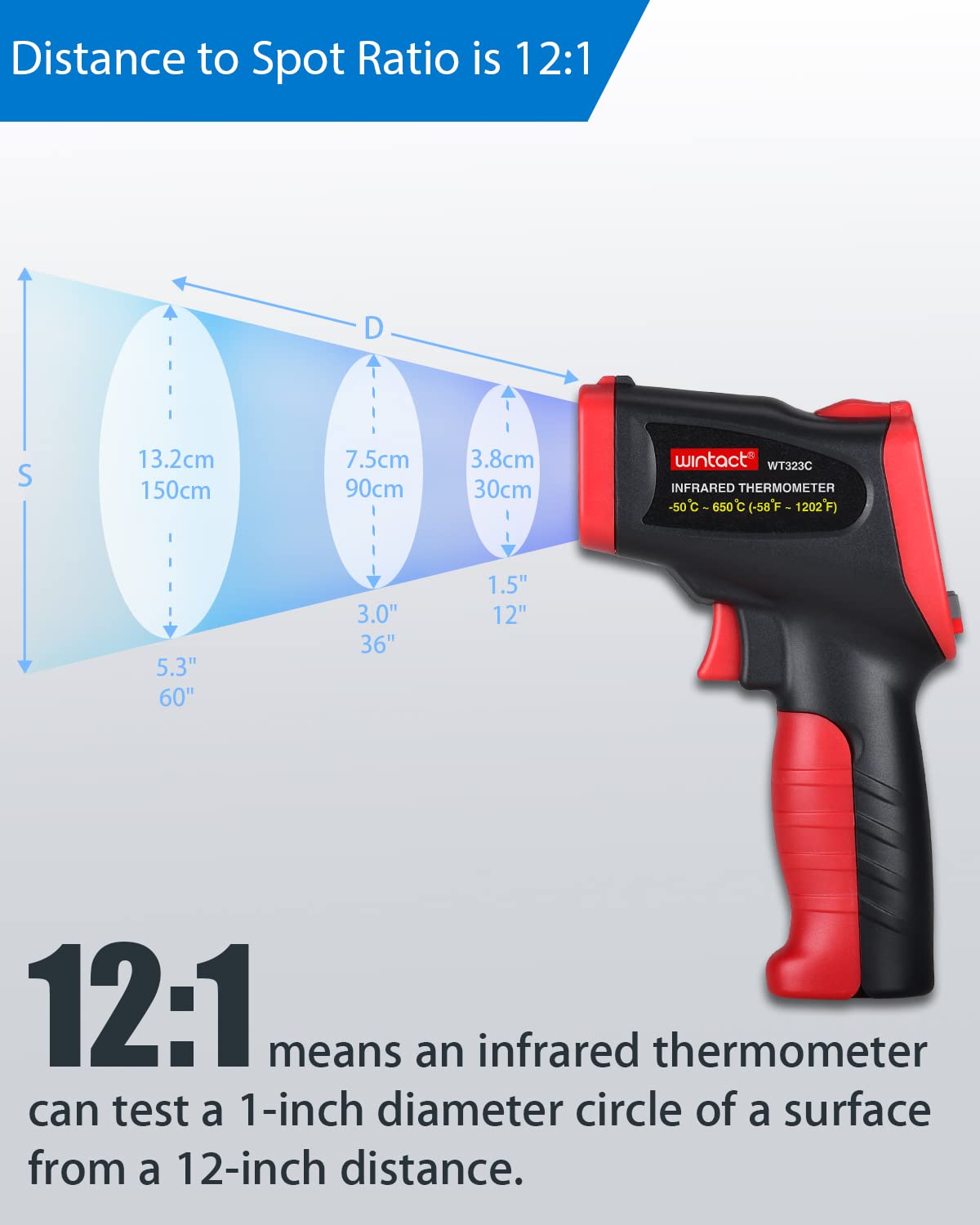
Image 7.4: The Wintact WT323C thermometer indicating mould risk on a wall corner, with the tricolor light showing a warning state.
8. Emissivity Adjustment
Emissivity (ε) is a measure of an object's ability to emit infrared energy. Different materials have different emissivity values. For accurate infrared temperature measurements, it is important to set the emissivity value on the thermometer to match the target material.
- The WT323C allows adjustment of emissivity from 0.1 to 1.0.
- To adjust emissivity, press the Mode button until the emissivity setting (ε) is displayed.
- Use the up/down arrow buttons (often integrated with °C/°F or Laser/UV buttons in mode settings) to change the value.
- Refer to a standard emissivity table for common materials if precise values are needed.
9. Maintenance
- Cleaning: Wipe the device clean with a soft, damp cloth. Do not use abrasive cleaners or solvents.
- Storage: Store the thermometer in a dry, cool place away from direct sunlight and extreme temperatures.
- Battery Replacement: Replace batteries when the low battery indicator appears on the display.
10. Troubleshooting
| Problem | Possible Cause | Solution |
|---|---|---|
| No display/Device won't turn on | Dead or incorrectly installed batteries. | Check battery polarity; replace with new AAA batteries. |
| Inaccurate infrared readings | Incorrect emissivity setting; distance too far; dirty sensor lens. | Adjust emissivity for the target material; ensure proper D:S ratio; clean the infrared sensor lens. |
| Inaccurate Type-K readings | Poor contact with surface; damaged probe. | Ensure firm contact; inspect probe for damage and replace if necessary. |
| Mould risk indicator always red/yellow | High ambient humidity or low surface temperature. | This indicates actual environmental conditions. Consider ventilation or dehumidification. |
11. Specifications
| Feature | Specification |
|---|---|
| Infrared Temperature Range | -58℉ to 1202℉ (-50℃ to 650℃) |
| Type-K Thermocouple Range | -40℉ to 932℉ (-40℃ to 500℃) |
| Ambient Temperature Range | -4℉ to 140℉ (-20℃ to 60℃) |
| Relative Humidity Range | 0.0% to 100% RH |
| Dew Point Temperature Range | 14℉ to 122℉ (-10℃ to 50℃) |
| Accuracy (Infrared) | ±1.5% or ±1.5℃/2℉ (whichever is greater) |
| Accuracy (Type-K) | ±2.5℃ or 0.75% rdg |
| Accuracy (Humidity) | ±5% RH |
| Distance to Spot Ratio (D:S) | 12:1 |
| Emissivity | Adjustable 0.1 to 1.0 |
| Response Time | < 500 ms |
| Power Supply | 2 x 1.5V AAA batteries |
| Auto-Off | Approx. 30 seconds |
| Product Dimensions | 4.28 x 1.93 x 6.96 inches |
| Weight | 8.82 ounces |
12. Warranty and Support
Wintact products are designed for reliability and performance. For specific warranty details or technical support, please refer to the warranty card included with your product or visit the official Wintact website. Keep your purchase receipt as proof of purchase for any warranty claims.


