
Introduction
Thank you for choosing the FULAIM WM300 2-Person UHF Wireless Headset Microphone System. This system is designed to provide high-quality audio transmission for various applications, including live performances, presentations, and recording. With its reliable UHF digital wireless signal and user-friendly features, the WM300 ensures clear and stable sound. This manual will guide you through the setup, operation, and maintenance of your new wireless microphone system.
Product Overview and Components
The FULAIM WM300 system includes two bodypack transmitters with headset microphones and a mini receiver with a 1/4" output. Below is an overview of the system and its main components.

Figure 1: Overview of the FULAIM WM300 Wireless Microphone System, showing two bodypack transmitters, two headset microphones, a mini receiver, and a 1/4" adapter.
Transmitter Function Description

Figure 2: Detailed view of the FULAIM WM300 bodypack transmitter, highlighting its antenna, microphone input, display, volume controls, power button, and Micro USB charging port.
- Antenna: For wireless signal transmission.
- Microphone input socket: Connects the headset microphone.
- Display: Shows channel, battery status, and volume level.
- Volume plus key: Increases the transmitter's output volume.
- Power button: Turns the transmitter on/off and can be used for channel selection.
- Volume down key: Decreases the transmitter's output volume.
- Micro USB 5V charging port: For recharging the internal battery.
Receiver Function Description

Figure 3: Detailed view of the FULAIM WM300 mini receiver, showing its antenna, Micro USB charging port, headphone monitor socket, power button, work indicator, and 6.5mm microphone output.
- Antenna: For wireless signal reception.
- Micro USB 5V charging port: For recharging the internal battery.
- Headphone monitor socket: For real-time audio monitoring.
- Power button: Turns the receiver on/off.
- Work indicator: LED light indicating operational status.
- 6.5mm microphone output: Connects to audio input devices.
What's in the Box
- FULAIM WM300 Receiver
- FULAIM WM300 Transmitters (x2 for 2-person system)
- Headset Microphones (x2 for 2-person system)
- USB Charging Cable
- 1/4" to 3.5mm Adapter
- User Manual (this document)
Setup Guide
Follow these steps to set up your FULAIM WM300 wireless microphone system.
1. Initial Charging
Before first use, ensure both the transmitters and the receiver are fully charged. Connect them to a 5V USB power source using the provided Micro USB cable. The charging indicator will typically change color or turn off when fully charged. A full charge provides up to four hours of battery life.
2. Connecting the Headset Microphone
Plug the 3.5mm jack of the headset microphone firmly into the microphone input socket on the bodypack transmitter.
3. Connecting the Receiver to an Audio Device
The receiver features a universal 1/4" plug. It can be directly connected to devices with a 1/4" MIC IN jack, such as amplifiers, mixers, PA speakers, or recorders. If your device has a 3.5mm MIC IN jack, use the included 1/4" to 3.5mm adapter.
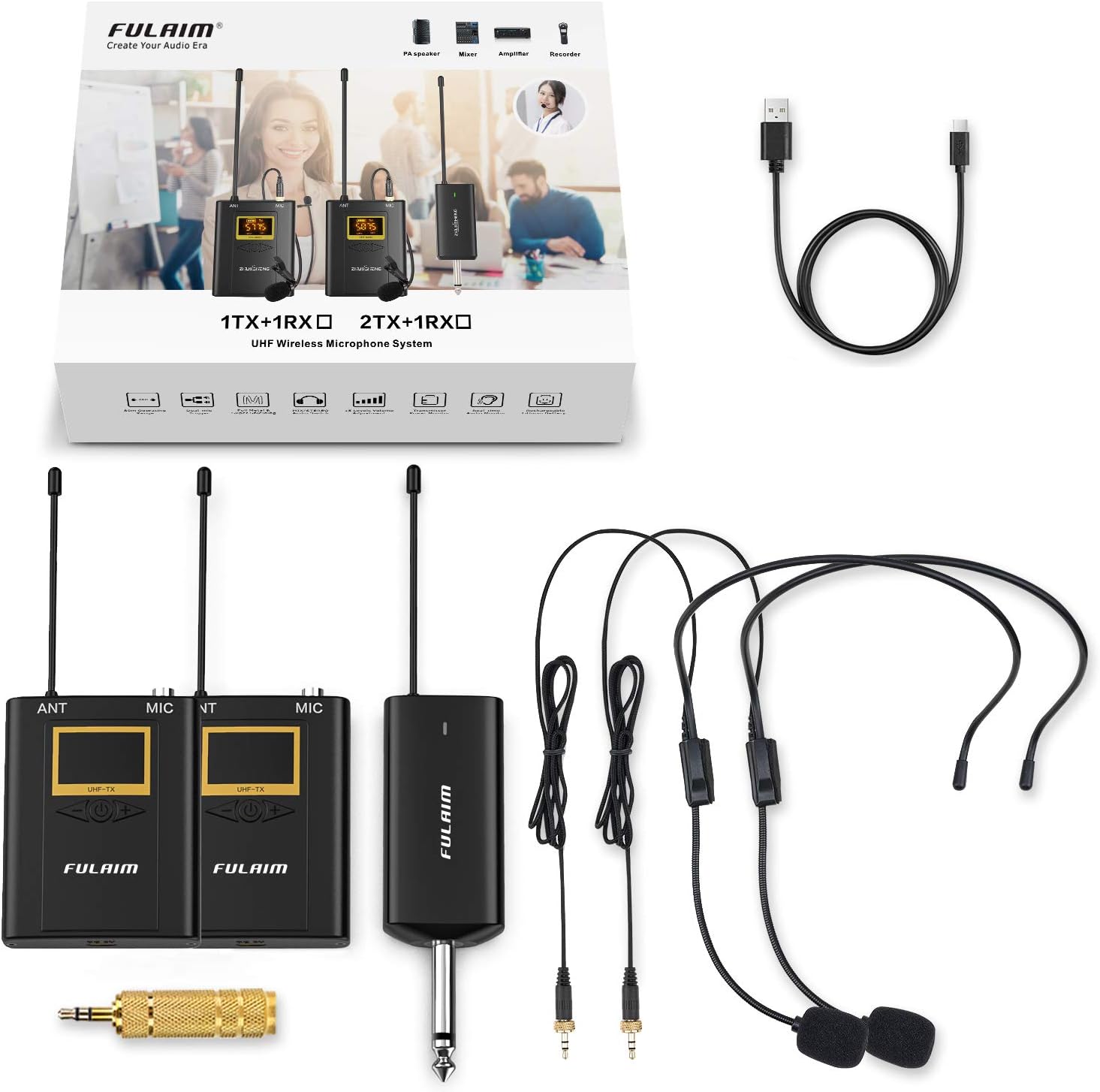
Figure 4: Diagram illustrating the FULAIM WM300 receiver's compatibility with 1/4" MIC jacks (e.g., Amplifier, Mixer, PA speaker, Recorder) and the use of the included adapter for 1/8" MIC jacks (e.g., PC, Camera). Note: Not compatible with soundbars or mini Bluetooth speakers.
Important: Ensure the audio input device's volume is set to a low level before connecting the receiver to avoid sudden loud noises.
Operating Instructions
1. Powering On/Off
- Transmitter: Press and hold the Power button for a few seconds until the display lights up. To turn off, press and hold the Power button again until the display turns off.
- Receiver: Press and hold the Power button for a few seconds until the work indicator light turns on. To turn off, press and hold the Power button again until the light turns off.
2. Automatic Pairing and Channel Selection
The FULAIM WM300 system features automatic connection. Once both the transmitter and receiver are powered on, they should automatically pair. If you experience interference or need to change channels:
- On the bodypack transmitter, briefly press the Power button to cycle through the 20 selectable UHF channels. The display will show the current channel.
- Select a channel that provides clear, interference-free audio. The receiver will automatically sync to the selected channel.
3. Adjusting Volume
The transmitter supports electronic volume control with up to 15 levels. Use the Volume Plus (+) and Volume Down (-) keys on the transmitter to adjust the microphone's output volume. Start with a lower volume and gradually increase it to a comfortable level on your connected audio device.
4. Monitoring Audio (Receiver)
You can monitor the audio output directly from the receiver by plugging headphones into the headphone monitor socket. This allows you to check the sound quality before it reaches your main audio system.
5. Operating Range and Battery Life
The system provides an operating range of up to 262 feet (80 meters) in open areas, allowing for freedom of movement. Both the transmitter and receiver are powered by internal lithium-ion polymer batteries, offering up to four hours of continuous use on a full charge. For extended use, they can be powered via external USB battery packs (available separately) through their Micro USB ports.

Figure 5: Illustration of the FULAIM WM300's 80-meter working distance and battery features, including 650mAh lithium battery for 6 hours continuous work (charging time 2 hours) and ability to use while charging.
Maintenance
Proper maintenance will extend the life of your FULAIM WM300 system.
- Cleaning: Use a soft, dry cloth to clean the surfaces of the transmitter and receiver. Do not use liquid cleaners or solvents.
- Storage: Store the system in a cool, dry place away from direct sunlight, extreme temperatures, and high humidity.
- Battery Care: For optimal battery life, avoid fully discharging the batteries frequently. If storing for a long period, charge the batteries to about 50% every few months.
- Handling: Handle the components with care. Avoid dropping or subjecting them to strong impacts.
Troubleshooting
If you encounter issues with your FULAIM WM300 system, refer to the following common problems and solutions.
| Problem | Possible Cause | Solution |
|---|---|---|
| No sound or low volume |
|
|
| Interference or static noise |
|
|
| Transmitter and receiver not pairing |
|
|
| Short battery life |
|
|
Specifications
| Brand | FULAIM |
| Model Number | WM300 |
| Connectivity Technology | Auxiliary |
| Connector Type | 3.5 mm Jack, USB |
| Number of Channels | 20 (UHF) |
| Frequency Range | 0.05 kHz - 18 kHz |
| Frequency Response | 18 KHz |
| Signal-to-Noise Ratio | 88 dB |
| Noise Level | 74 dB |
| Polar Pattern | Omnidirectional |
| Audio Sensitivity | 30 dB |
| Power Source | Electric (Internal Lithium Polymer Batteries) |
| Battery Life | Up to 4 hours (approx.) |
| Operating Range | Up to 262 feet (80 meters) |
| Item Weight | 1.21 pounds |
| Material | Foam (for pop shield) |
| UPC | 738634287121 |
Warranty and Support
FULAIM products are designed for reliability and performance. For any technical assistance, troubleshooting beyond this manual, or warranty inquiries, please contact FULAIM customer support through the retailer where you purchased the product or visit the official FULAIM website for contact information.
Please retain your proof of purchase for warranty claims.
Important Safety Information
- Do not expose the device to rain or moisture.
- Do not disassemble the device. Refer all servicing to qualified personnel.
- Keep the device away from heat sources and direct sunlight.
- Dispose of batteries responsibly according to local regulations.