
1. Product Overview
The WoneNice Barcode Scanner Bundle provides efficient and reliable barcode scanning solutions for various business environments, including retail, shops, and warehouses. This bundle includes two distinct scanners: the WN3300 USB Barcode Scanner and the WN2806G Barcode Scanner with an adjustable stand. Both scanners are designed for ease of use and broad compatibility.

Image: The WoneNice Barcode Scanner Bundle, featuring both the handheld WN3300 USB scanner and the WN2806G scanner with its adjustable stand.
Key Features:
- Plug and Play: Simple installation via USB port, no drivers required.
- Broad Compatibility: Works seamlessly with Windows, Mac, and Linux operating systems, and integrates with common software like Word and Excel.
- High Scanning Speed: Capable of 200 scans per second for efficient data capture.
- Versatile Decoding: Supports a wide range of 1D barcode symbologies including Code11, Code39, Code93, Code32, Code128, Coda Bar, UPC-A, UPC-E, EAN-8, EAN-13, JAN.EAN/UPC Add-on2/5 MSI/Plessey, Telepen, China Postal Code, Interleaved 2 of 5, Industrial 2 of 5, and Matrix 2 of 5.
- Configurable Options: Offers 300 configurable options for prefix, suffix, and termination strings to customize data output.
- Durable Design: Features a 2-meter (6ft) straight cable and is designed to withstand a 1.5m drop onto concrete.
- Regulatory Compliance: FCC and CE certified.
2. Package Contents
Please verify that all items listed below are included in your package:
- 1 x WoneNice WN3300 USB Barcode Scanner
- 1 x WoneNice WN2806G Barcode Scanner
- 1 x USB Cable for WN3300
- 1 x USB Cable for WN2806G
- 1 x Scanner Stand for WN2806G

Image: The WoneNice WN3300 USB Barcode Scanner, showing its ergonomic design and attached USB cable.

Image: The WoneNice WN2806G Barcode Scanner, shown with its dedicated adjustable stand and USB cable.
3. Setup Instructions
Both WoneNice barcode scanners are designed for simple plug-and-play operation, requiring no complex driver installations.
3.1 Connecting the Scanner
- Locate an available USB port on your computer (PC, laptop, or other compatible host device).
- Insert the USB cable from the barcode scanner into the USB port.
- The operating system will automatically detect and install the necessary drivers. This process usually takes a few seconds.
- Once installation is complete, the scanner is ready for immediate use.

Image: Illustration demonstrating the simple USB plug-and-play connection of the scanner to a laptop, highlighting its immediate usability.
3.2 System Compatibility
The WoneNice barcode scanners offer wide compatibility with various operating systems:
- Windows (XP, 7, 8, 10)
- Mac OS
- Linux
They are suitable for use with both laptops and desktop computers.

Image: Visual representation of the scanner's high compatibility across different operating systems, including various Windows versions, Mac OS, and Linux.
4. Operating the Scanners
The WoneNice barcode scanners support different scanning modes to suit your operational needs.
4.1 Manual Mode
In Manual Mode, the scanner's laser beam is activated only when the trigger button is pressed. This mode is ideal for precise, on-demand scanning.
- Hold the scanner comfortably in your hand.
- Point the laser beam at the barcode you wish to scan.
- Press and hold the trigger button to activate the laser.
- Ensure the laser line crosses the entire barcode for accurate reading.
- Release the trigger once the barcode is successfully read (indicated by a beep or light change).

Image: Depiction of the scanner being used in Manual Mode, where the user presses the trigger to activate the high-speed laser for accurate barcode reading.
4.2 Auto-Sensing Mode (for WN2806G with Stand)
The WN2806G scanner, when placed on its adjustable stand, can operate in Auto-Sensing Mode. In this mode, the scanning light remains off until a barcode is presented in front of the scanner. Once detected, the light automatically activates to read the barcode.
- Place the WN2806G scanner securely on its adjustable stand.
- Ensure the scanner is positioned to face the area where barcodes will be presented.
- Present a barcode within the scanner's field of view. The scanner will automatically detect the barcode and activate its laser to read it.

Image: Illustration showing the WN2806G scanner in Auto-Sensing Mode on its stand, where the scanning light automatically turns on when a barcode is presented.
4.3 Adjustable Stand (for WN2806G)
The WN2806G scanner comes with an adjustable stand, allowing for hands-free operation and secure storage when not in use. The stand can be adjusted to various angles to optimize scanning efficiency and user comfort.
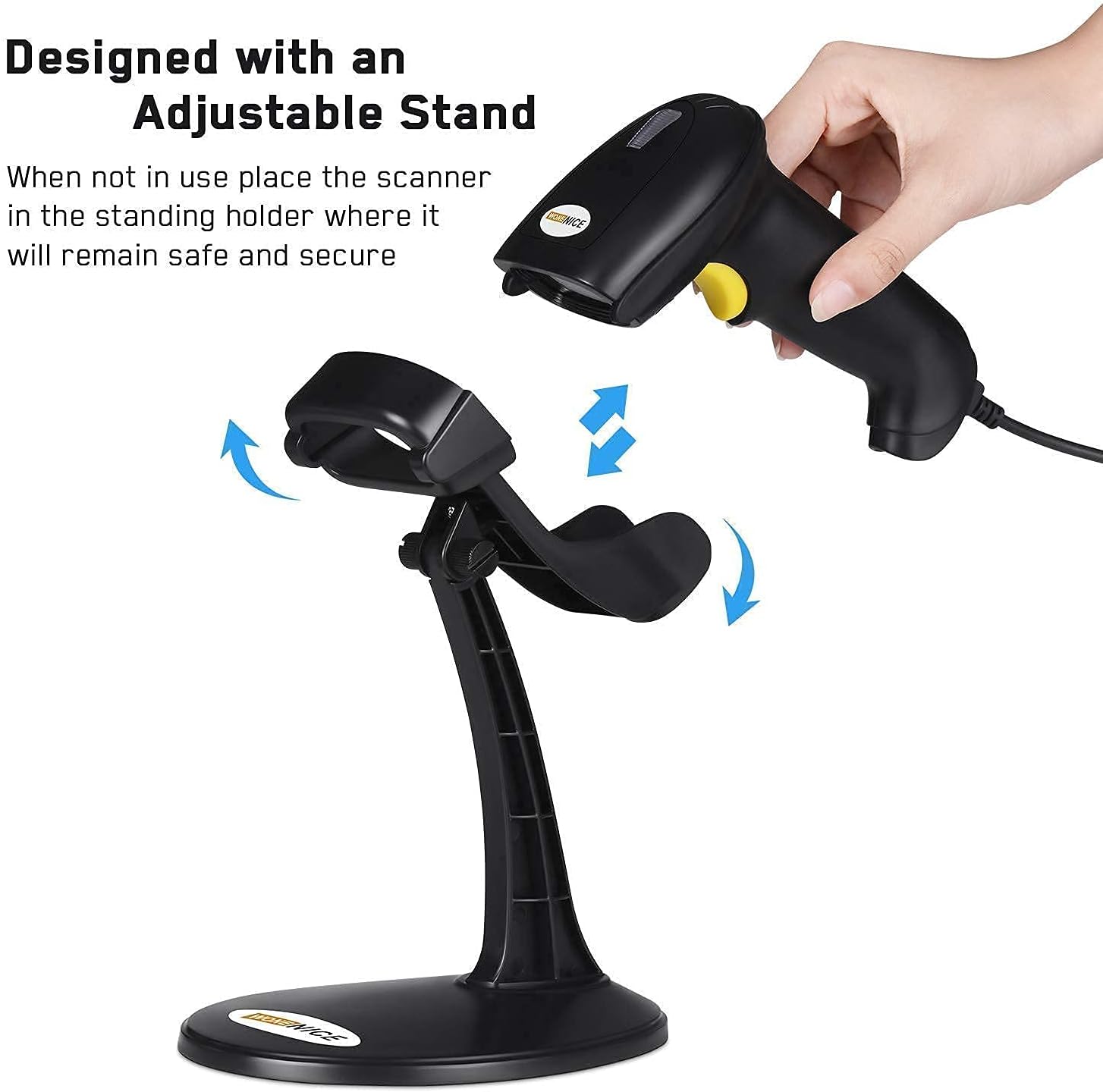
Image: Diagram illustrating the adjustable nature of the WN2806G scanner stand, allowing for flexible positioning and secure placement of the scanner.
5. Maintenance
Proper maintenance ensures the longevity and optimal performance of your WoneNice barcode scanners.
- Cleaning: Use a soft, dry, lint-free cloth to gently wipe the scanner's casing and scanning window. Avoid using abrasive cleaners, solvents, or excessive moisture, as these can damage the device.
- Storage: When not in use, store the scanners in a clean, dry environment, away from direct sunlight, extreme temperatures, and corrosive materials. Utilize the provided stand for the WN2806G to keep it secure.
- Cable Care: Avoid bending or twisting the USB cables excessively. Do not pull the cable to disconnect the scanner; always grasp the plug.
- Drop Protection: While designed to withstand drops, minimize impacts to prevent potential damage to internal components.
6. Troubleshooting
If you encounter issues with your WoneNice barcode scanners, refer to the following common troubleshooting steps:
| Problem | Possible Cause | Solution |
|---|---|---|
| Scanner not reading barcodes. |
|
|
| No data output after scanning. |
|
|
| Scanner not powering on. |
|
|
If the problem persists after attempting these solutions, please contact WoneNice customer support for further assistance.
7. Specifications
| Feature | Detail |
|---|---|
| Product Models | WN3300 USB Barcode Scanner, WN2806G Barcode Scanner with Stand |
| Connectivity Technology | USB Cable |
| Power Source | Corded Electric, USB Cable |
| Compatible Devices | Laptop, Desktop |
| Scanning Speed | 200 scans per second |
| Scanning Angle | Inclination angle 55°, Elevation angle 65° |
| Operational Light Source | Visible Laser 650-670nm |
| Decode Capability | Code11, Code39, Code93, Code32, Code128, Coda Bar, UPC-A, UPC-E, EAN-8, EAN-13, JAN.EAN/UPC Add-on2/5 MSI/Plessey, Telepen and China Postal Code, Interleaved 2 of 5, Industrial 2 of 5, Matrix 2 of 5 |
| Cable Type | 2M or 6ft straight cable |
| Shock Resistance | 1.5m drop on concrete surface |
| Regulatory Approvals | FCC, CE |
8. Warranty and Support
WoneNice products are designed for reliability and performance. For specific warranty information regarding your barcode scanner bundle, please refer to the documentation included with your purchase or visit the official WoneNice website.
If you require technical assistance, have questions about product functionality, or need to report an issue, please contact WoneNice customer support through the following channels:
- Official Website: Look for a "Support" or "Contact Us" section on the WoneNice official website.
- Email Support: Check your product packaging or the official website for a support email address.
- Online Resources: The WoneNice website may offer FAQs, driver downloads, and additional troubleshooting guides.
When contacting support, please have your product model numbers (WN3300, WN2806G) and a detailed description of your issue ready to facilitate a quicker resolution.


