
1. Introduction
The Skyshop C-240 Pro Internal USB/Solar TPMS (Tire Pressure Monitoring System) is designed to enhance driving safety by providing real-time monitoring of your vehicle's tire pressure and temperature. This system helps prevent tire-related accidents, improves fuel efficiency, and extends tire lifespan by ensuring optimal tire conditions. This manual provides detailed instructions for the proper installation, operation, and maintenance of your TPMS.
2. Safety Information
- Professional Installation: Internal sensors require professional installation by a qualified tire technician. Attempting self-installation without proper tools and expertise can lead to tire damage or improper sensor function.
- Tire Balance: After installing internal sensors, it is crucial to re-balance the tires to ensure proper vehicle handling and prevent vibrations.
- Regular Checks: While the TPMS provides real-time data, it is recommended to perform periodic manual tire pressure checks with a calibrated gauge.
- Operating Temperature: Do not expose the monitor or sensors to extreme temperatures outside the specified operating range (-40°C to 125°C for sensors, -20°C to 80°C for monitor).
- Power Source: Use only the provided USB cable for charging the monitor.
3. Package Contents
Please check the package for the following items:
- 1 x TPMS Monitor
- 4 x Internal Tire Sensors
- 1 x Anti-slip Sticky Mat
- 1 x USB Charging Cable
- 1 x Instruction Manual
- 4 x Screws (for sensor installation)

Image: Contents of the Skyshop C-240 Pro TPMS package, including the monitor, four internal sensors, USB cable, anti-slip mat, and manual.
4. Setup
4.1 Monitor Setup and Charging
- Place the TPMS monitor on your dashboard using the anti-slip sticky mat. Ensure it has clear access to sunlight for solar charging.
- Before first use, fully charge the monitor using the provided USB cable. Connect the Micro USB end to the monitor and the other end to a USB power source (e.g., car charger, computer USB port).
- To turn on the monitor, long press the left button. To turn off, long press the left button again.

Image: Illustration of the dual charging methods for the Skyshop C-240 Pro TPMS monitor, showing both solar charging via the top panel and USB charging via the Micro USB port.
4.2 Sensor Installation (Internal Type)
Important: Internal sensors must be installed by a professional tire shop. This system is suitable for alloy wheels. If your vehicle has normal steel rims, ensure the valve hole area is flat for proper installation. Consult a technician if unsure.

Image: Diagram illustrating supported rim types for Skyshop Internal TPMS. It shows that all alloy wheels are supported, and for normal steel rims, installation is possible if the valve hole area is flat, but not if it is round.
Installation Steps (to be performed by a professional):
- Turn on the TPMS monitor first before installing the sensors.
- Detach the tire from the wheel and deflate it completely.
- Loosen the tire bead and remove the original air valve.
- Install the internal sensor onto the valve stem hole from inside the rim. Ensure it is securely fastened with the provided screws.
- Inflate the tire to the standard pressure recommended by your vehicle manufacturer.
- Perform a balance running test to ensure the sensor and tire are properly balanced.
- Refit the tire to the vehicle.
After the sensors are installed, drive the vehicle. When the driving speed reaches approximately 9mph (15kph), the display will automatically update with the tire pressure and temperature data.
4.3 Sensor Pairing (if required)
Sensors are typically pre-paired at the factory. If a sensor needs to be re-paired or replaced, follow these steps:
- Press the 'SET' button 8 times to enter pairing mode. The display will indicate pairing status.
- Follow the on-screen prompts or consult the specific pairing instructions provided by the technician.
5. Operation
5.1 Display Overview
The monitor display shows real-time tire pressure and temperature for all four tires. It also indicates the battery status of the monitor.
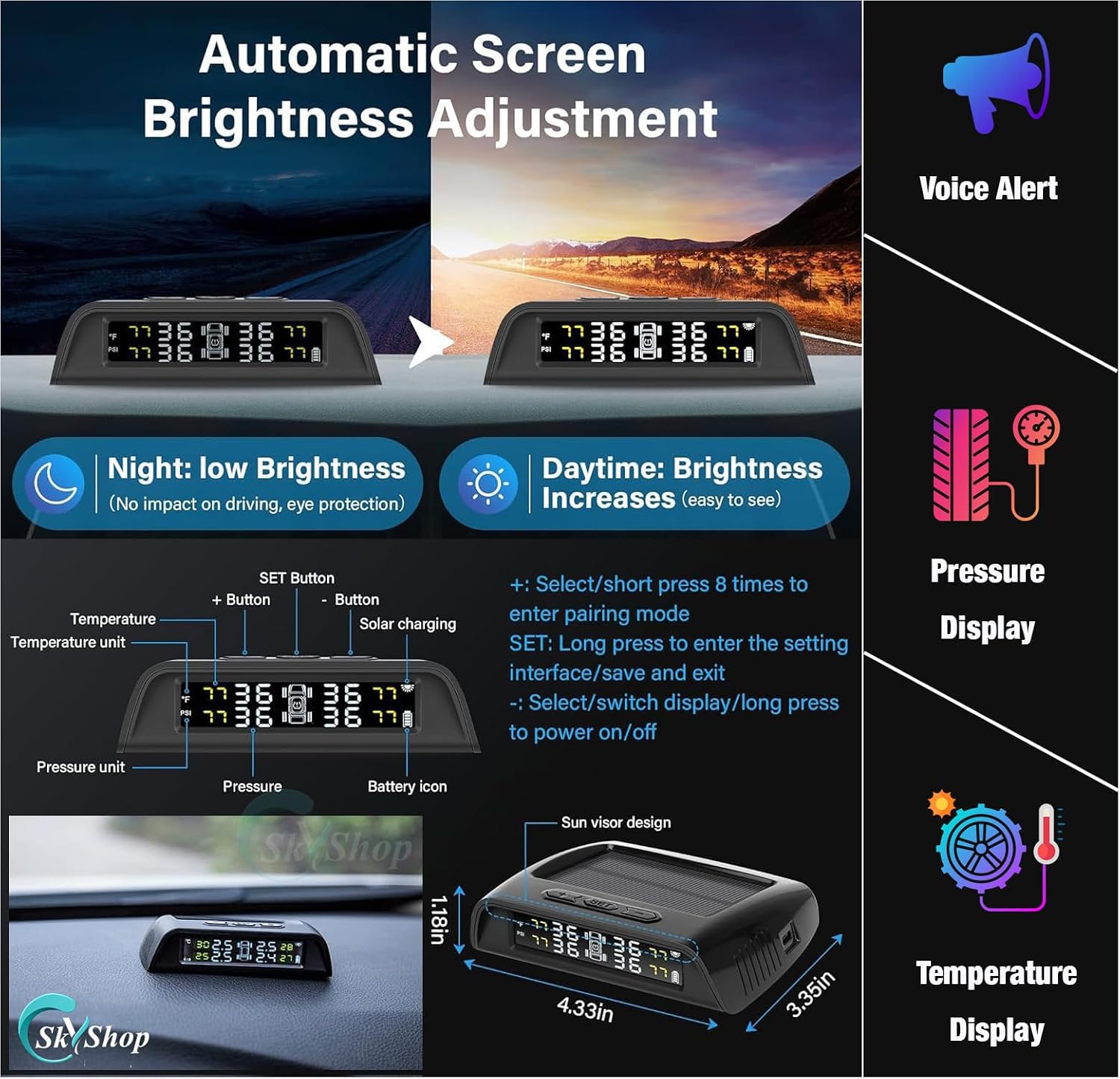
Image: Detailed view of the Skyshop C-240 Pro TPMS display, showing pressure and temperature readings, battery icon, and unit indicators. It also highlights the SET, +, and - buttons and their functions.
5.2 Button Functions
- SET Button: Short press to cycle through display information. Long press to enter the setting interface and save/exit settings.
- '+' Button: In setting mode, used to increase values or select options. Short press 8 times to enter pairing mode.
- '-' Button: In setting mode, used to decrease values or select options. Long press to power on/off the monitor.
5.3 Automatic Screen Brightness Adjustment
The monitor features an automatic brightness adjustment function for optimal visibility:
- Daytime: Brightness increases for clear visibility under strong light.
- Night: Brightness automatically lowers to prevent glare and ensure eye protection during low-light conditions.
5.4 Alarm Modes
The system provides 6 alarm modes to alert you to potential tire issues:
- Fast Leak Alarm
- Slow Leak Alarm
- High-Pressure Alarm
- High-Temperature Alarm
- Sensor Fault Alarm
- Sensor Battery Low Power Alarm
When an alarm sounds, press any button on the monitor to stop the audible alert.
5.5 Tire Position Rotation
If you rotate your tires, you do not need to physically change the sensor positions. The tire positions can be updated directly from the display settings. Refer to the monitor's settings menu or contact customer support for assistance with this procedure.
6. Maintenance
- Cleaning: Wipe the monitor with a soft, dry cloth. Avoid using abrasive cleaners or solvents.
- Battery Care: Ensure the monitor is regularly exposed to sunlight for solar charging or charged via USB to maintain battery health.
- Sensor Longevity: The internal sensors are designed for long-term use (up to 4-5 years). If a sensor's battery depletes or it becomes faulty, contact customer support for replacement options.
7. Troubleshooting
| Problem | Possible Cause | Solution |
|---|---|---|
| Monitor does not turn on | Low battery; Monitor off | Charge the monitor via USB or solar. Long press the '-' button to power on. |
| No tire data displayed | Sensors not installed; Vehicle not moving; Sensors not paired; Sensor battery low | Ensure sensors are professionally installed. Drive above 9mph (15kph). Re-pair sensors if necessary. Contact support for sensor battery issues. |
| Inaccurate readings | Sensor malfunction; Interference | Compare with a manual gauge. If discrepancy persists, contact customer support. |
| Alarm sounds frequently | Tire pressure/temperature outside safe limits; Alarm thresholds set incorrectly | Check tire pressure/temperature immediately. Adjust alarm thresholds in settings if needed. |
If you encounter issues not listed here or require further assistance, please contact Skyshop customer support.
8. Specifications
- Sensor Working Voltage: 2 - 3.6V
- Display Working Voltage: 3.5 - 5V
- Optional Pressure Units: Psi / Bar
- Optional Temperature Units: °C, °F
- Operating Frequency: 433.92MHz ± 20KHz
- Sensor Working Temperature: -40°C - 125°C
- Monitoring Temperature Scope: -40°C - 125°C
- Monitoring Pressure Scope: 0 - 6 Bar
- Pressure Accuracy: ± 0.1 Bar
- Item Weight: 180 Grams (approx. for entire package)
- Maximum Range: 15 Meters (between sensor and monitor)
9. Warranty and Support
Skyshop offers a 1-year replacement warranty on this product. An extended warranty may be available upon product registration or review. We provide lifetime product technical support for up to 5 years. If you require any assistance with installation or encounter any problems with your TPMS, please contact our technical customer care team.
Customer Care Hours: 11 AM to 8 PM (local time)
If any sensor or part is lost or damaged after the warranty period, please contact our technical customer care. We can provide replacement parts at competitive rates.
For additional support and video tutorials, visit the official Skyshop YouTube channel: Skyshop TPMS YouTube Channel