
Introduction
This manual provides essential instructions for the proper use, setup, operation, and maintenance of your Onyx A/M-24 Series Automatic/Manual Inflatable Life Vest. Please read this manual thoroughly before using the product to ensure your safety and the longevity of the device. This Personal Flotation Device (PFD) is designed to provide buoyancy in water, offering protection for adults in various marine environments.
This image shows two individuals wearing the Onyx A/M-24 Series inflatable life vests while operating a boat on the water. The vests are designed for comfort and safety during marine activities.
Safety Information
Your safety is paramount. Adhere to all warnings and instructions provided. This PFD is intended for adult use only. Regular inspection and proper maintenance are crucial for its reliable performance.
- Always inspect your PFD before each use for any signs of wear, damage, or improper arming.
- Ensure the CO2 cylinder is correctly installed and not expired.
- Familiarize yourself with both automatic and manual inflation methods before an emergency occurs.
- Do not use this PFD as a cushion or seat, as this can damage the inflation mechanism.
- This PFD is not a substitute for swimming ability. It is designed to provide buoyancy to a conscious person.
- Re-arm the PFD immediately after each inflation with an authentic Onyx re-arming kit.
Product Overview
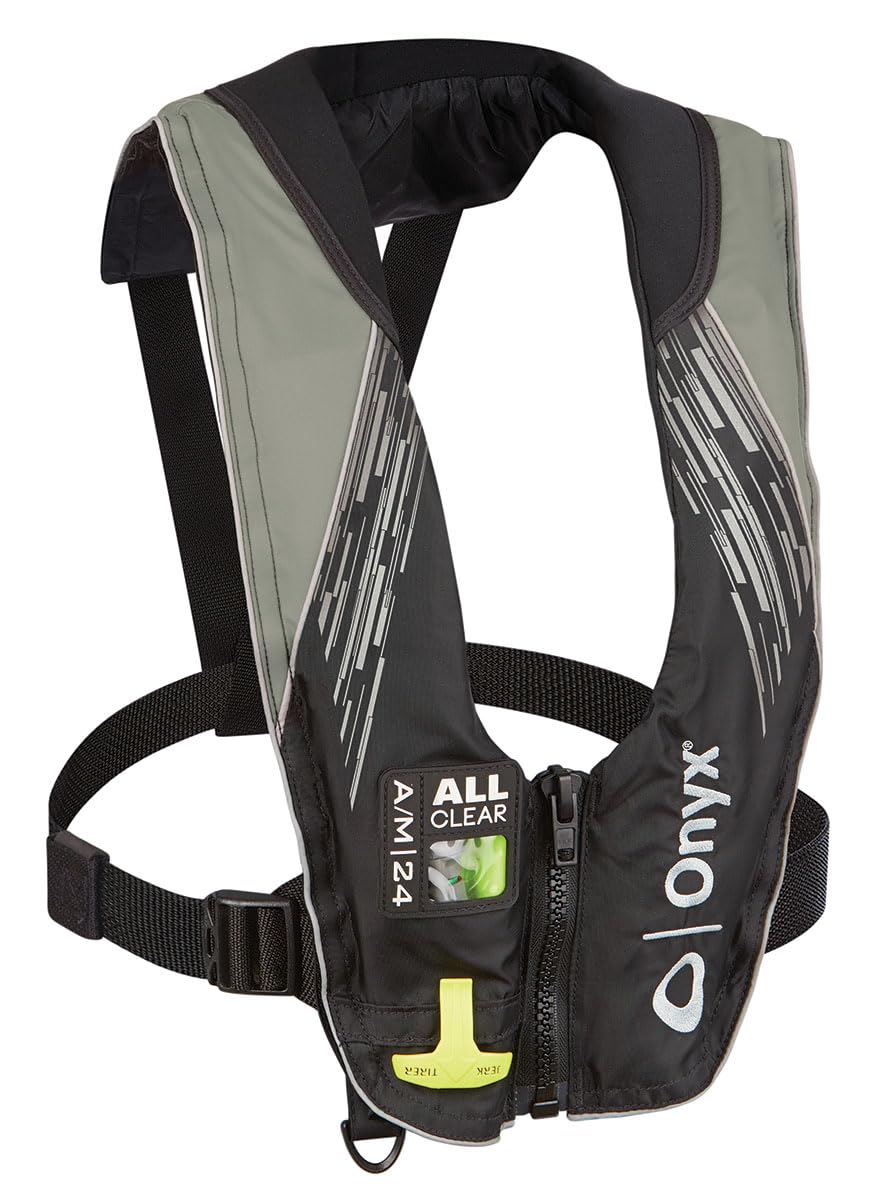
The Onyx A/M-24 Series Inflatable Life Vest is a versatile personal flotation device offering both automatic and manual inflation capabilities. It is designed for comfort and freedom of movement while providing reliable buoyancy when needed.
Key Components:
- Outer Shell: Durable fabric casing.
- Inflation Chamber: Internal bladder that inflates.
- Automatic Inflation Mechanism: Activates upon water immersion.
- Manual Inflation Handle: Pull cord for manual inflation.
- CO2 Cylinder: Provides gas for inflation.
- Oral Inflation Tube: For manual inflation by mouth or deflation.
- Indicator Window: Shows the status of the inflation mechanism (e.g., "ALL CLEAR" or "RED").
Setup and Initial Arming
Before first use, or after re-arming, ensure your PFD is correctly armed. Refer to the specific instructions provided with your re-arming kit for detailed steps, as mechanisms can vary slightly.
- Unfold the PFD: Lay the vest flat and open any covers to access the inflation mechanism.
- Check the CO2 Cylinder: Ensure the CO2 cylinder is the correct size and type for your PFD (24g for A/M-24 Series). Verify it is new and has not been punctured.
- Install the CO2 Cylinder: Screw the CO2 cylinder firmly into the inflation mechanism until hand-tight. Do not overtighten.
- Arm the Mechanism: Follow the instructions on the re-arming kit to properly reset the automatic firing pin and secure the bobbin (if applicable for automatic models). The indicator window should display "ALL CLEAR" or green, confirming it is armed and ready.
- Close the Cover: Securely close any covers or zippers on the PFD.
Note: If the indicator window shows "RED" or any other warning, the PFD is not properly armed or has been previously deployed. Do not use until correctly re-armed.
Operating Instructions
Wearing the PFD:
- Place the PFD over your head and secure all buckles and straps.
- Adjust the straps for a snug, comfortable fit. The vest should not ride up when you lift your arms.
Automatic Inflation:
The A/M-24 Series PFD is designed to inflate automatically upon immersion in water. The water-soluble bobbin dissolves, releasing a spring-loaded mechanism that punctures the CO2 cylinder.
- Ensure the PFD is properly armed before use.
- Upon entering the water, the vest will inflate within seconds.
Manual Inflation:
If automatic inflation fails or if you wish to inflate the vest manually, pull the red inflation handle firmly downwards.
- Locate the red manual inflation handle, typically found on the lower front of the vest.
- Pull the handle sharply downwards to activate the CO2 cylinder.
Oral Inflation/Deflation:
The oral inflation tube can be used to top off air in the chamber or to inflate the vest manually if the CO2 system is not armed or has been used.
- Locate the oral inflation tube, usually marked with a cap.
- Remove the cap and blow into the tube to inflate.
- To deflate, invert the cap and press down on the valve while squeezing air out of the chamber.
Maintenance
Regular Inspection:
Perform a visual inspection before each use and a more thorough inspection annually.
- Check Outer Shell: Look for tears, punctures, or excessive wear.
- Check Straps and Buckles: Ensure they are secure and undamaged.
- Check Inflation Mechanism: Verify the indicator window shows "ALL CLEAR" (green).
- Check CO2 Cylinder: Ensure it is firmly screwed in, not corroded, and has not been punctured. Check the expiration date if applicable.
- Check Oral Inflation Tube: Ensure the cap is present and the valve functions correctly.
Cleaning and Storage:
- Cleaning: Hand wash with mild soap and water. Rinse thoroughly with fresh water. Do not machine wash or dry clean.
- Drying: Hang to air dry completely in a well-ventilated area, away from direct sunlight or heat. Ensure the inflation chamber is dry before folding.
- Storage: Store in a cool, dry place, away from direct sunlight, chemicals, and sharp objects. Do not store compressed or folded tightly for extended periods.
Re-arming:
After each inflation, the PFD must be re-armed with an authentic Onyx re-arming kit (Model: 132200-701-004-21 uses a 24g CO2 cylinder and specific bobbin/components). Follow the instructions provided with the re-arming kit precisely.
Troubleshooting
| Problem | Possible Cause | Solution |
|---|---|---|
| PFD does not inflate automatically. |
|
|
| PFD does not inflate manually. |
|
|
| PFD leaks air after inflation. |
|
|
Specifications
| Model Number: | 132200-701-004-21 |
| Brand: | Onyx |
| Series: | A/M-24 Series |
| Type: | Automatic/Manual Inflatable Life Vest (PFD) |
| Intended User: | Adult (mixte adulte) |
| CO2 Cylinder Size: | 24g (specific to A/M-24 Series re-arming kits) |
| Material: | Plastic (referring to internal components/mechanism), Durable fabric outer shell |
| Color: | Grey |
| Dimensions (L x W x H): | 40.64 x 8.64 x 76.2 cm (16 x 3.4 x 30 inches) |
| Weight: | 816.47 grams (1.8 lbs) |
Warranty and Support
For warranty information, product support, or to purchase authentic re-arming kits, please contact Onyx Outdoor directly. Refer to the manufacturer's official website or product packaging for the most current contact details and warranty terms.
Manufacturer: Onyx Outdoor
It is recommended to register your product with Onyx Outdoor to receive updates and facilitate any warranty claims.