
1. Introduction
This user manual provides essential information for the safe and efficient operation of your Philips Audio HTL1020/94 Soundbar. Please read these instructions carefully before using the product and retain them for future reference.
The Philips HTL1020/94 is a 20W soundbar designed to enhance your audio experience with versatile connectivity options including Bluetooth 5.0, AUX, and USB. Its low-rise profile allows for flexible placement in various home entertainment setups.

Image 1.1: Front view of the Philips HTL1020/94 Soundbar.
2. Safety Information
Always follow basic safety precautions when using this product to reduce the risk of fire, electric shock, and personal injury.
- Do not expose the soundbar to rain or moisture.
- Do not block any ventilation openings.
- Ensure proper power supply voltage as indicated on the product.
- Keep the soundbar away from heat sources and direct sunlight.
- Only use attachments/accessories specified by the manufacturer.
3. What's in the Box
Carefully unpack the contents and ensure all items are present:
- Philips Audio HTL1020/94 Soundbar
- Power cord
- Quick Start Guide
- Remote Control
- User Manual (this document)
- Warranty Card
4. Product Overview
4.1. Controls and Indicators
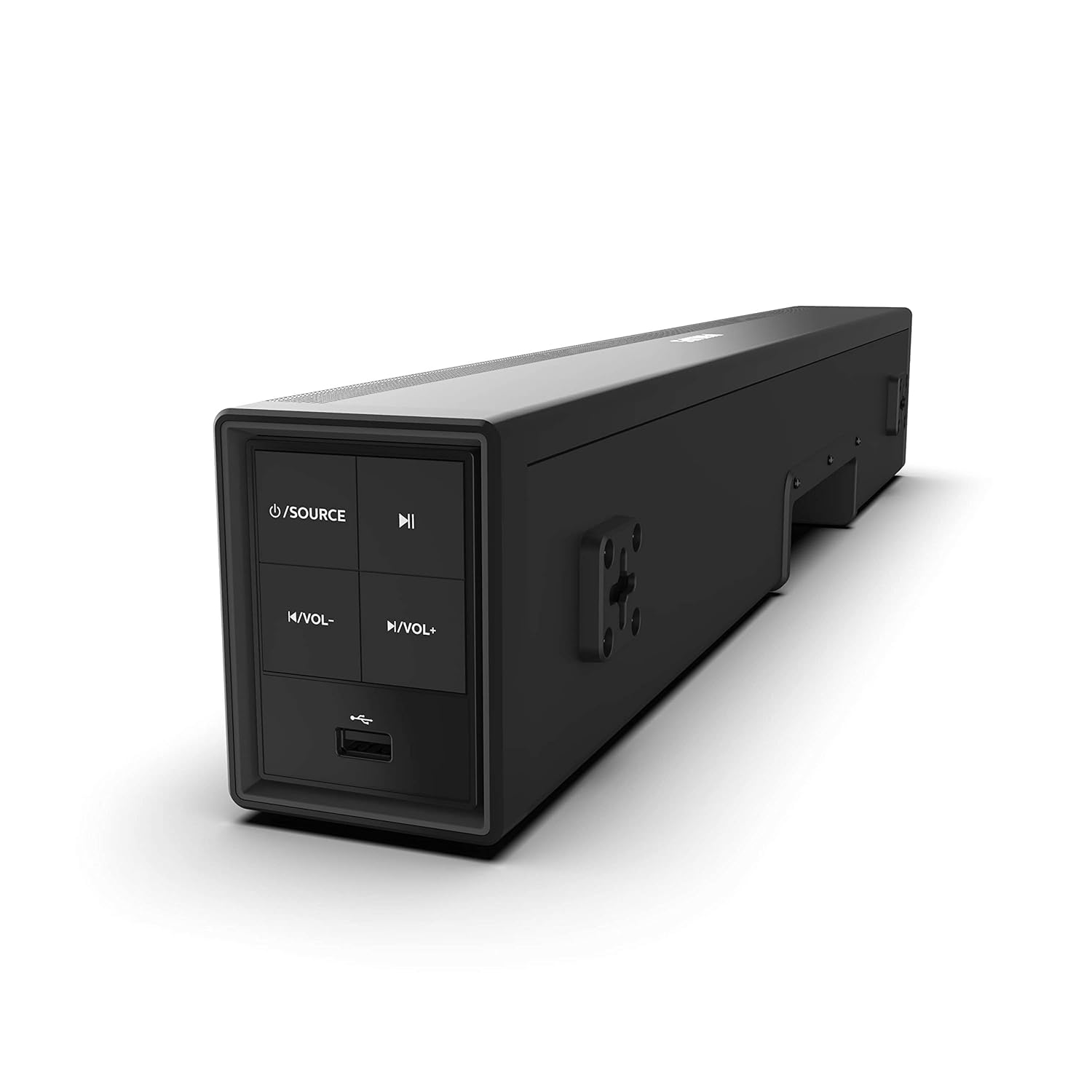
Image 4.1: Side panel controls of the Philips HTL1020/94 Soundbar.
- Power/Source Button: Press to turn on/off or switch input sources (Bluetooth, AUX, USB).
- Play/Pause Button: Controls media playback in Bluetooth or USB mode.
- Volume Down Button: Decreases the volume level.
- Volume Up Button: Increases the volume level.
- USB Port: For playing audio from USB storage devices.
4.2. Rear Panel Connections
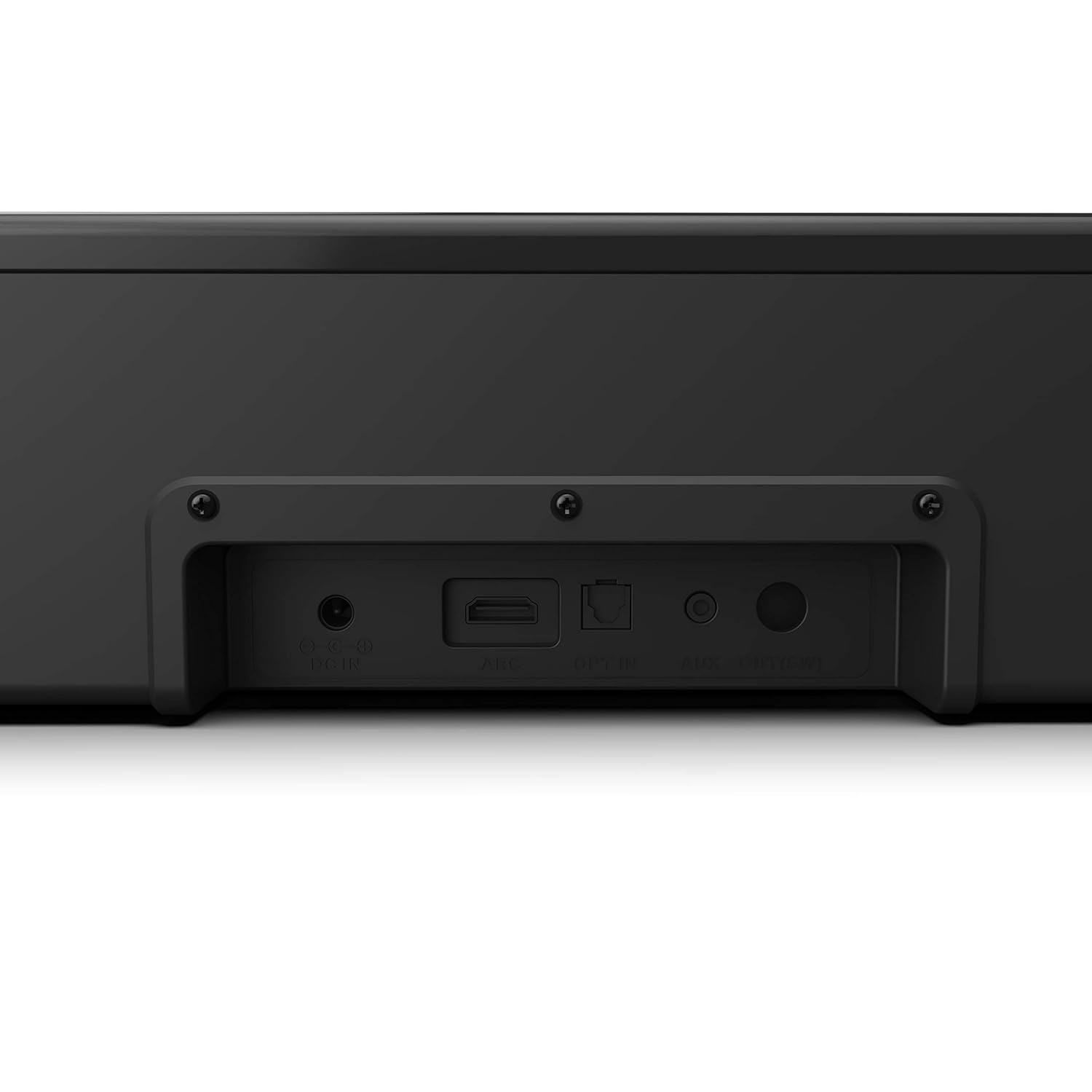
Image 4.2: Rear panel connections of the Philips HTL1020/94 Soundbar.
- DC IN: Connect the power adapter here.
- ARC (HDMI): Connect to a TV's HDMI ARC port for audio input.
- OPT IN: Connect to a TV or audio device's optical digital output.
- AUX IN: Connect to an audio device's analog output using a 3.5mm audio cable.
5. Setup and Installation
5.1. Placement
The soundbar can be placed on a tabletop or mounted on a wall. Ensure it is positioned centrally in front of your television for optimal sound distribution.
- Tabletop Placement: Place the soundbar on a stable, flat surface below your TV.
- Wall Mounting: Use appropriate wall mounting hardware (not included) and follow the instructions provided in the Quick Start Guide for secure installation.
5.2. Connecting to Power
- Connect the power cord to the DC IN port on the rear of the soundbar.
- Plug the other end of the power cord into a wall outlet.
5.3. Connecting Audio Sources
Choose one of the following methods to connect your audio source:
5.3.1. Bluetooth Connection
- Press the Power/Source button on the soundbar or remote control to select Bluetooth mode. The indicator light will flash.
- On your mobile device, enable Bluetooth and search for available devices.
- Select "Philips HTL1020/94" from the list.
- Once paired, the indicator light will stop flashing and remain solid.
5.3.2. AUX Connection
- Connect a 3.5mm audio cable (not included) from your audio device's headphone jack or AUX output to the AUX IN port on the soundbar.
- Press the Power/Source button to select AUX mode.
5.3.3. USB Connection
- Insert a USB storage device (e.g., USB flash drive) into the USB Port on the side panel of the soundbar.
- Press the Power/Source button to select USB mode. The soundbar will automatically begin playing compatible audio files.
5.3.4. HDMI ARC Connection
- Connect an HDMI cable (not included) from your TV's HDMI ARC port to the ARC port on the soundbar.
- Ensure your TV's HDMI ARC function is enabled in its settings.
- Press the Power/Source button to select ARC mode.
5.3.5. Optical Connection
- Connect an optical cable (not included) from your TV's optical digital output to the OPT IN port on the soundbar.
- Press the Power/Source button to select OPTICAL mode.
6. Operation
6.1. Power On/Off
Press the Power/Source button on the soundbar or the remote control to turn the unit on or off.
6.2. Source Selection
Repeatedly press the Power/Source button on the soundbar or the remote control to cycle through available input sources: Bluetooth, AUX, USB, ARC, Optical.
6.3. Volume Control
Use the Volume Up and Volume Down buttons on the soundbar or the remote control to adjust the audio level.
6.4. Bluetooth Pairing (Re-pairing)
If the soundbar is not automatically connecting to a previously paired device, or if you wish to pair a new device:
- Ensure the soundbar is in Bluetooth mode (indicator light flashing).
- On your device, go to Bluetooth settings and select "Philips HTL1020/94" to connect.
7. Maintenance
To ensure the longevity and optimal performance of your soundbar, follow these maintenance guidelines:
- Cleaning: Use a soft, dry cloth to clean the surface of the soundbar. Do not use liquid cleaners or abrasive materials.
- Ventilation: Keep the ventilation openings clear to prevent overheating.
- Storage: If storing the soundbar for an extended period, disconnect it from power and store it in a cool, dry place.
8. Troubleshooting
If you encounter issues with your soundbar, refer to the following common problems and solutions:
| Problem | Possible Cause | Solution |
|---|---|---|
| No power | Power cord not connected; Power outlet not active | Ensure power cord is securely connected; Test outlet with another device |
| No sound | Incorrect source selected; Volume too low; Cables not connected | Select correct input source; Increase volume; Check all audio cables |
| Bluetooth pairing fails | Soundbar not in pairing mode; Device too far; Interference | Ensure soundbar is in Bluetooth mode; Move device closer; Restart both devices |
| USB playback issues | Incompatible file format; USB device not recognized | Ensure audio files are compatible (e.g., MP3); Try a different USB device |
9. Specifications
Technical specifications for the Philips Audio HTL1020/94 Soundbar:
| Feature | Specification |
|---|---|
| Model Name | HTL1020/94 |
| Speaker Type | Soundbar |
| Audio Output Channels | 2.0 |
| Total Output Power | 20 Watts |
| Connectivity Technology | Bluetooth 5.0, AUX, USB, HDMI ARC, Optical |
| Control Method | Touch, Remote Control |
| Dimensions (LxWxH) | 60 x 15 x 9.2 cm |
| Item Weight | 2 kg |
| Power Source | Corded Electric |
| Signal-to-Noise Ratio | 55 dB |
| Included Components | Power cord, Quick Start Guide, Remote, User Manual, Warranty Card |
10. Warranty and Support
Your Philips Audio HTL1020/94 Soundbar comes with a 1-year warranty. Please refer to the included Warranty Card for detailed terms and conditions.
For technical support or service inquiries, please contact Philips Audio customer service. Contact information can typically be found on the Philips Audio official website or on your Warranty Card.


