
Introduction
The Coolpad Snap 3311A is an Android 4G LTE clamshell flip phone designed for ease of use and reliable communication. It features a large outer display, tactile buttons, a camera, FM radio, and a 3.5mm audio jack. This device also supports Wi-Fi mobile hotspot functionality and memory cards for expanded storage.
What's in the Box
- Coolpad Snap 3311A Device
- Charger
- 32 GB SD Card (pre-installed or included separately)
- Battery
Device Overview
Familiarize yourself with the physical components of your Coolpad Snap 3311A flip phone.

Figure 1: Front view of the Coolpad Snap 3311A, closed, displaying the outer screen with time and network status.
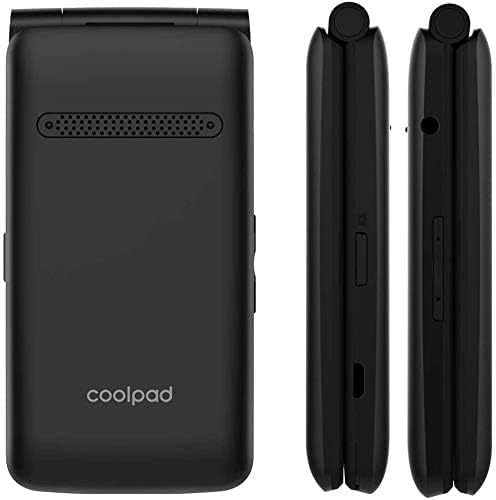
Figure 2: Back and side views of the device, highlighting the speaker, brand logo, and various side controls/ports.

Figure 3: Detailed side views illustrating the location of the volume buttons, Micro-USB charging port, and the combined SIM/SD card tray.
Setup
1. Install the Battery
- Remove the back cover of the phone.
- Align the battery contacts with the terminals inside the phone.
- Gently press the battery into place.
- Replace the back cover, ensuring it clicks securely.
2. Insert SIM Card and SD Card
The Coolpad Snap 3311A is unlocked for use with any GSM carrier. A SIM card is not included and must be obtained from your service provider. A 32 GB SD card is included with your purchase for expanded storage.
- Locate the SIM/SD card slot on the side of the phone (refer to Figure 3).
- Carefully open the slot cover.
- Insert your Nano-SIM card into the designated slot with the gold contacts facing down.
- Insert the 32 GB MicroSD card into its designated slot.
- Close the slot cover securely.
3. Charge the Battery
Before first use, fully charge the phone's battery.
- Connect the charger to the Micro-USB port on the phone.
- Plug the charger into a power outlet.
- The charging indicator will appear on the screen.
- Once fully charged, disconnect the charger.
4. Power On/Off
- To Power On: Press and hold the Power/End Call button until the screen lights up.
- To Power Off: Press and hold the Power/End Call button, then select 'Power off' from the options on the screen.
Operating Your Phone
Making and Receiving Calls
- To Make a Call: Open the flip, dial the number using the keypad, and press the Call button.
- To Answer a Call: Open the flip or press the Call button when the phone rings.
- To End a Call: Close the flip or press the Power/End Call button.
Sending Messages
Navigate to the Messaging application from the main menu to compose and send text messages (SMS) or multimedia messages (MMS).
Camera Functions
The phone features a 2+ megapixel camera capable of taking photos and recording video (CIF 352 x 288 resolution). Access the Camera application from the main menu to capture images or videos.
Connectivity
- Wi-Fi: Connect to available Wi-Fi networks via the Settings menu for internet access.
- Mobile Hotspot: Share your phone's 4G LTE data connection with other devices by enabling the Mobile Hotspot feature in Settings.
- Bluetooth: Pair with Bluetooth-enabled devices such as headsets or car kits through the Bluetooth settings.
Audio Features
The phone includes a 3.5mm audio jack for connecting headphones or external speakers. It also has an FM radio feature.
Accessibility
The Coolpad Snap 3311A is Hearing Aid Compatible and offers adjustable text size options in the display settings for enhanced readability.
Maintenance
Cleaning Your Device
Use a soft, lint-free cloth to gently wipe the phone's screen and body. Avoid using harsh chemicals or abrasive materials, as these can damage the device's surfaces.
Battery Care
- Avoid exposing the battery to extreme temperatures.
- Do not puncture or disassemble the battery.
- For optimal battery life, avoid frequently draining the battery completely before recharging.
Troubleshooting
If you encounter issues with your Coolpad Snap 3311A, refer to the following common solutions:
Phone Not Powering On
- Ensure the battery is properly installed and charged.
- Connect the phone to its charger and wait a few minutes before attempting to power on again.
No Network Connection
- Verify that your SIM card is correctly inserted.
- Check if your service plan is active with your carrier.
- Restart the phone.
- Ensure you are in an area with network coverage.
Battery Drains Quickly
- Reduce screen brightness.
- Close unused applications running in the background.
- Turn off Wi-Fi, Bluetooth, or Mobile Hotspot when not in use.
Cannot Connect to Wi-Fi
- Ensure Wi-Fi is enabled on your phone.
- Verify the Wi-Fi password is correct.
- Restart your Wi-Fi router.
Specifications
| Feature | Detail |
|---|---|
| Model Name | Snap 3311A |
| Operating System | Android |
| Wireless Carrier | Unlocked (GSM) |
| Cellular Technology | 4G LTE |
| Wireless Communication Technologies | Bluetooth, Cellular, Wi-Fi |
| Connectivity Technology | Wi-Fi |
| SIM Card Slot Count | Single SIM |
| Form Factor | Flip |
| Camera | 2+ Megapixel (Video: CIF 352 x 288) |
| Audio Jack | 3.5 mm |
| Connector Type | Micro USB |
| Battery Power Rating | 1250 mAh (Lithium Ion) |
| Memory Storage Capacity | 32 GB (SD Card included) |
| Item Weight | 8.4 ounces |
| Package Dimensions | 4.72 x 2.87 x 2.24 inches |
Warranty Information
This product is covered by a manufacturer's limited warranty. Please refer to the warranty card included with your purchase or visit the official Coolpad website for detailed terms and conditions regarding warranty coverage, duration, and claims procedures.
Support
For further assistance, technical support, or service inquiries, please contact Coolpad customer support. Contact information, including phone numbers and online resources, can typically be found on the official Coolpad website or in the documentation provided with your device.


