
1. Product Overview
The MTM Walkie Talkies XF-638 are designed for reliable two-way communication, featuring 22 channels, hands-free VOX operation, and a clear LCD display. These radios are suitable for various outdoor activities, family events, and general communication needs.

Image: MTM Walkie Talkies XF-638 4-pack in orange color, ready for use.
Component Identification
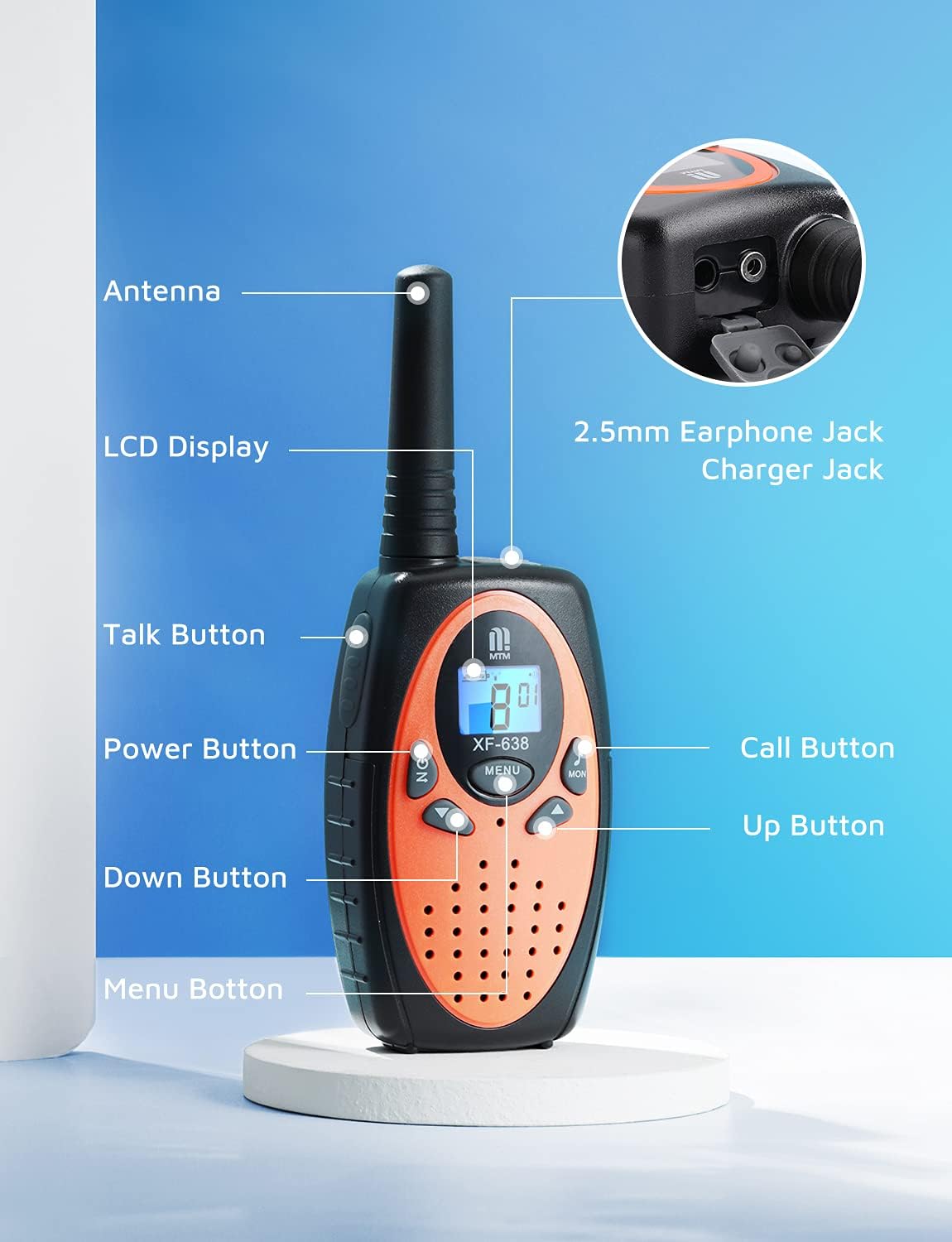
Image: Diagram illustrating the various parts and buttons of the MTM Walkie Talkie XF-638.
- Antenna: For transmitting and receiving signals.
- LCD Display: Shows channel, volume, battery status, and other indicators.
- Talk Button (PTT): Press and hold to transmit your voice.
- Power Button (ON/OFF): Long press to turn the unit on or off.
- Up/Down Buttons: Adjust volume, change channels, and navigate menu options.
- Menu Button: Access and confirm settings.
- Call Button: Sends a call tone to other radios on the same channel.
- MON Button: Activates the monitor function to listen for weak signals.
- 2.5mm Earphone Jack/Charger Jack: For connecting an external earphone/microphone or charging (if using rechargeable batteries, not included).
2. Setup
Battery Installation
Each MTM Walkie Talkie requires 3 AAA batteries (not included). Ensure correct polarity when inserting batteries.
- Locate the battery compartment cover on the back of the walkie talkie.
- Gently slide or unclip the cover to open the compartment.
- Insert 3 AAA batteries, matching the positive (+) and negative (-) terminals as indicated inside the compartment.
- Replace the battery compartment cover, ensuring it clicks securely into place.

Image: Rear view of the walkie talkie with the battery compartment open, showing where to insert 3 AAA batteries.
Belt Clip Attachment
Attach the included belt clip for convenient carrying.
- Align the belt clip with the designated slots on the back of the walkie talkie.
- Slide the clip downwards until it locks securely into place.

Image: A hiker wearing an MTM Walkie Talkie XF-638 attached to their backpack strap with a belt clip.
3. Basic Operation
Power On/Off
- To turn on: Press and hold the ON/OFF button until the LCD screen illuminates.
- To turn off: Press and hold the ON/OFF button until the LCD screen turns off.
Channel Selection
The MTM Walkie Talkies feature 22 channels. All radios must be on the same channel to communicate.
- Press the MENU button once. The channel number on the LCD will flash.
- Use the UP or DOWN buttons to select your desired channel (1-22).
- Press the MENU button again to confirm your selection.

Image: Close-up of the walkie talkie's LCD screen showing the current channel and battery level.
Volume Adjustment
Adjust the listening volume to a comfortable level.
- Press the UP button to increase the volume.
- Press the DOWN button to decrease the volume.

Image: Close-up of the walkie talkie's speaker area, indicating adjustable volume levels.
Transmitting and Receiving
- To transmit: Press and hold the Talk (PTT) button. Speak clearly into the microphone.
- To receive: Release the Talk (PTT) button.
Call Tone
- To send a call tone: Briefly press the Call button. This alerts other users on the same channel.
Monitor Function
- To activate: Press the MON button. This allows you to listen for weak signals on the current channel.
- To deactivate: Press the MON button again.
4. Advanced Features
VOX (Voice Operated Exchange)
VOX allows for hands-free communication. When activated, the radio automatically transmits when you speak and stops when you are silent.
- Press the MENU button multiple times until the VOX icon appears on the LCD.
- Use the UP or DOWN buttons to select a VOX sensitivity level (e.g., 1-3, with 3 being most sensitive) or turn VOX off.
- Press the MENU button to confirm.

Image: A mother and child communicating using walkie talkies, demonstrating long-range and potentially hands-free use.
Keypad Lock
The keypad lock prevents accidental changes to your settings.
- To lock: Press and hold the MENU button until a key icon appears on the LCD.
- To unlock: Press and hold the MENU button again until the key icon disappears.
Other Functions
- Auto Squelch System: Automatically mutes weak signals or background noise for clearer communication.
- Auto Memory Function: Remembers your last used channel and settings.
- Auto Scan Function: Scans all channels for active transmissions.
- Auto Power Saving: Extends battery life by entering a low-power mode during periods of inactivity.
- Low Battery Alert: An icon on the LCD display indicates when batteries are low and need replacement.
- Headset Option: Compatible with headsets via the 2.5mm earphone jack for private listening and hands-free talking.

Image: Top view of the walkie talkie showing the 2.5mm earphone jack and charger port.
5. Range and Usage
The MTM Walkie Talkies XF-638 offer a communication range of up to 3 miles in open fields. The actual range can vary significantly based on terrain, weather conditions, and obstructions.

Image: Graphic illustrating the long-range capability of the MTM Walkie Talkies.
Factors Affecting Range:
- Terrain: Open areas provide maximum range. Hills, dense foliage, and urban environments with buildings can significantly reduce range.
- Obstructions: Metal structures, vehicles, and large buildings can block or weaken signals.
- Weather: Heavy rain or fog can interfere with signal transmission.
Recommended Usage Scenarios:
- Outdoor adventures like camping, hiking, and fishing.
- Family events and activities where staying connected is important.
- Emergency preparedness.

Children playing outdoors with walkie talkies.

Adults using walkie talkies while kayaking.

Restaurant staff using walkie talkies for coordination.
6. Maintenance
- Cleaning: Wipe the radio with a soft, damp cloth. Do not use harsh chemicals or abrasive cleaners.
- Battery Care: Remove batteries if the radio will not be used for an extended period to prevent leakage.
- Storage: Store the walkie talkie in a cool, dry place away from direct sunlight and extreme temperatures.
7. Troubleshooting
| Problem | Possible Cause | Solution |
|---|---|---|
| No power | Batteries are dead or incorrectly installed. | Replace batteries or ensure correct polarity. |
| Poor reception/short range | Obstructions (buildings, hills), low battery, incorrect channel/privacy code. | Move to an open area, replace batteries, verify channel and privacy code settings. |
| Cannot transmit | Keypad locked, low battery, not on the same channel. | Unlock keypad, replace batteries, ensure both radios are on the same channel. |
| Interference | Other radios on the same channel or nearby electronic devices. | Change to a different channel or use privacy codes. Move away from interfering devices. |
8. Specifications
| Feature | Detail |
|---|---|
| Brand | MTM |
| Model Number | XF-638 |
| Number of Channels | 22 |
| Frequency Range | 462 to 467 MHz |
| Talking Range Maximum | Up to 3 miles (in open fields) |
| Special Features | Keypad Lock, Long Range, VOX, Auto Squelch, LCD Display |
| Power Source | 3 x AAA batteries (not included) |
| Water Resistance Level | Waterproof (as per specifications, but general care is advised) |
| FCC ID | 2AN6WXF-638 |
9. Warranty and Support
MTM provides comprehensive support for your walkie talkies.
- Warranty: Enjoy a 1-year quality warranty from the date of purchase.
- Technical Support: Lifetime email support is available for any questions or issues you may encounter.
- Contact: If you are not satisfied with your MTM product or require assistance, please contact us. We aim to respond to customer inquiries within 24 hours.
For support, please refer to your order details to find contact information or visit the official MTM store page.