
1. Product Overview
The Ledlenser P4R Work is a compact and powerful rechargeable penlight designed for professional use. Its slim and lightweight construction, combined with an end cap switch and pocket clip, makes it a practical tool for various tasks. The torch features an Advanced Focus System for versatile lighting and a Magnetic Charge System for convenient recharging.
Key Features:
- Ultra Compact Design: Approximately 6 inches in length, providing significant light output in a small form factor.
- Advanced Focus System: Allows seamless transition between a focused spot beam and a wide flood beam.
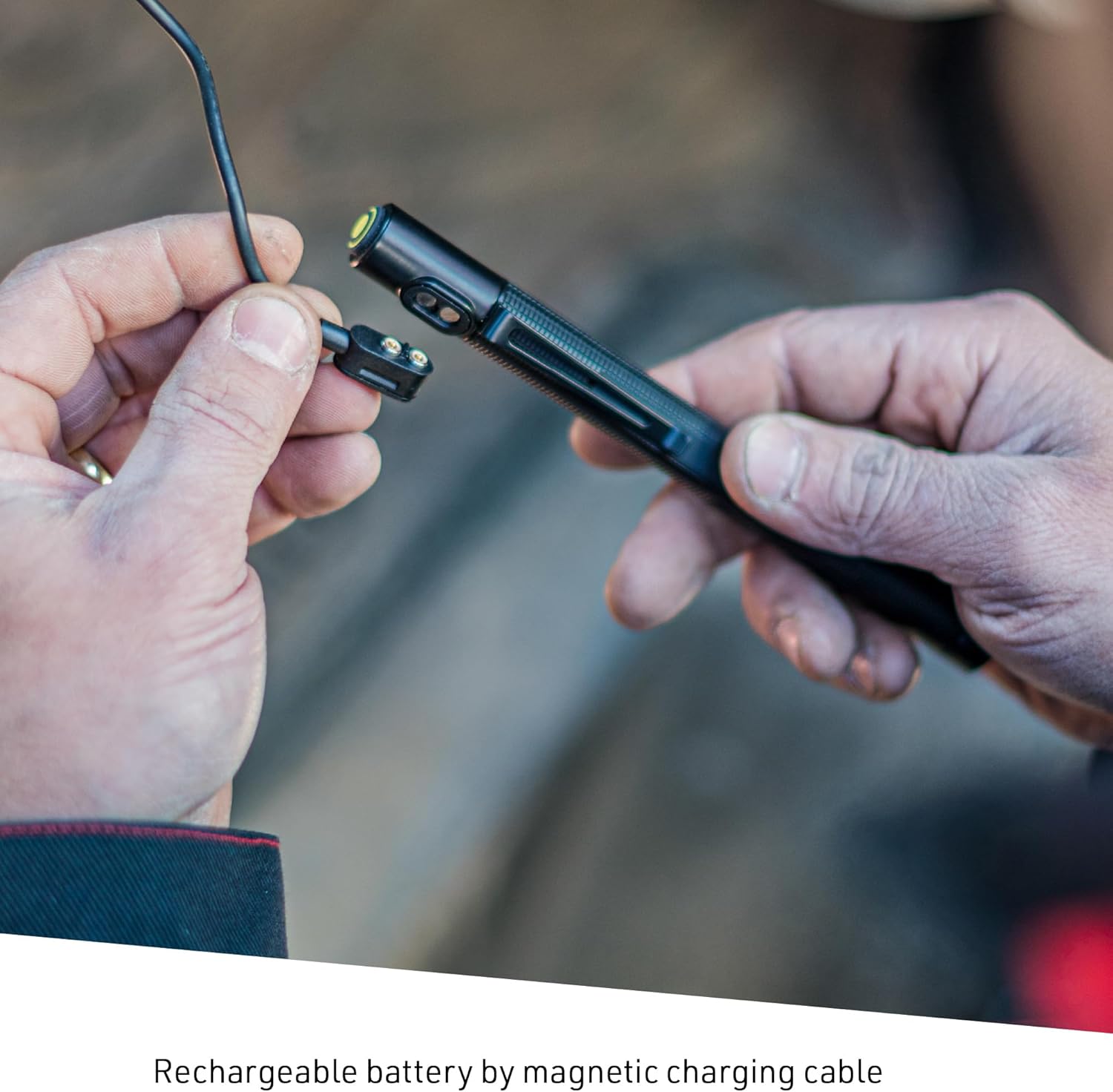
- Magnetic Charge System: Ensures easy and secure recharging of the internal battery.
- Quality Light Output: Neutral white beam (CRI 80) with multiple brightness levels.
- Durable Construction: Made from aluminum, designed for reliability in work environments.


2. Setup
2.1 Battery Installation
The P4R Work torch uses a rechargeable Lithium-Ion battery. Ensure the battery is inserted with the correct polarity.
- Unscrew the tail cap of the torch.
- Insert the Lithium-Ion battery with the positive (+) end facing towards the head of the flashlight (towards the LED). The end of the battery with the plastic ring and +/- contact goes toward the back end.
- Screw the tail cap back on securely.

2.2 Initial Charging
Before first use, fully charge the torch. The Magnetic Charge System provides a convenient way to do this.
- Connect the magnetic charging cable to a USB power source (e.g., wall adapter, computer USB port).
- Attach the magnetic end of the cable to the charging port on the torch. The magnet will ensure a secure connection.
- The charge status indicator (located near the tail cap) will illuminate to show charging progress. Refer to Section 4.1 for indicator details.
- Once fully charged, disconnect the cable.
3. Operating Instructions
3.1 Power On/Off and Light Modes
The P4R Work torch features an end cap switch for operation and cycling through light modes.
- To Turn On: Press the end cap switch once. The torch will typically activate in its highest brightness mode (Power).
- To Cycle Modes: While the torch is on, press the end cap switch repeatedly to cycle through the available brightness levels: Power (170 lumens) → Mid Power (70 lumens) → Low Power (15 lumens).
- To Turn Off: From any mode, press and hold the end cap switch for approximately 1 second, or cycle through all modes until the light turns off. Note: The torch does not retain the last brightness level used; it will typically start in Power mode.

3.2 Advanced Focus System
The Advanced Focus System allows you to adjust the light beam from a broad floodlight to a concentrated spot beam.
- While the torch is on, gently twist the head of the flashlight.
- Twist clockwise for a focused spot beam, ideal for long-distance illumination.
- Twist counter-clockwise for a wide flood beam, suitable for illuminating a larger area up close.

4. Maintenance
4.1 Charging and Battery Status
Regular charging ensures optimal performance. The torch features a battery and charge status display.
- Charging: When connected to the magnetic charger, the indicator light will show charging status.
- Battery Status: The indicator light also provides information on the current battery level when the torch is in use or recently turned off.

4.2 Cleaning
- Wipe the exterior of the torch with a soft, damp cloth.
- Keep the magnetic charging contacts clean and free of debris to ensure a reliable connection.
- If the lens focus design collects dirt, use a soft cloth or cotton swab to carefully clean the lens area. Avoid abrasive materials.
4.3 Battery Care
- Avoid fully discharging the battery frequently to prolong its lifespan.
- Store the torch in a cool, dry place when not in use for extended periods.
5. Troubleshooting
If you encounter issues with your Ledlenser P4R Work torch, refer to the following common problems and solutions:
- Torch does not turn on:
- Ensure the battery is correctly installed with the proper polarity.
- Charge the battery fully using the magnetic charging system.
- Check the end cap switch for any obstructions or damage.
- Torch does not charge:
- Verify the magnetic charging cable is securely connected to both the torch and the USB power source.
- Clean the magnetic charging contacts on both the torch and the cable to ensure good conductivity.
- Try a different USB power source or charging cable.
- Light beam is inconsistent or has dark spots:
- Ensure the Advanced Focus System is fully adjusted to either a spot or flood setting. Intermediate settings may show minor artifacts.
- Clean the lens and the focusing mechanism to remove any dirt or debris that might interfere with the beam.
- Torch does not remember last brightness setting:
- This model is designed to typically start in its highest brightness mode. This is normal operation and not a defect.
- Difficulty cycling through modes:
- Ensure the end cap switch is pressed firmly and released.
- If the torch was recently turned off, allow a few seconds before turning it back on to ensure the mode cycle resets.
6. Specifications
| Feature | Specification |
|---|---|
| Model Number | 880527 |
| Light Source Type | LED |
| Material | Aluminum |
| Brightness (Max) | 170 Lumens |
| Brightness (Mid) | 70 Lumens |
| Brightness (Low) | 15 Lumens |
| Run Time (Max Brightness) | 1.25 hours |
| Run Time (Low Brightness) | 15 hours |
| Beam Distance (Max) | 100 meters |
| Beam Distance (Min) | 20 meters |
| Battery Type | 1 Lithium Ion (rechargeable) |
| Item Weight | 256 Grams (approx. 9 ounces) |
| Product Dimensions | 3.35 x 2.83 x 8.27 inches (8.5 x 7.2 x 21 cm) |
| Water Resistance Level | Water Resistant |
| Special Feature | Lightweight, Advanced Focus System, Magnetic Charge System |
7. Warranty and Support
7.1 Warranty Information
Ledlenser offers a 7-Year Guarantee on the P4R Work Rechargeable Torch. This warranty covers defects in material or workmanship. In the event of a covered defect, Ledlenser will repair or replace the product, at their discretion, with one of equal or greater value.
For specific terms and conditions, please refer to the official Ledlenser warranty policy or contact customer support.
7.2 Customer Support
For further assistance, technical support, or warranty claims, please contact Ledlenser customer service through their official website or the retailer where the product was purchased.
You can visit the official Ledlenser store for more information: Ledlenser Store


