
1. Introduction
Thank you for purchasing the JWIN MK-6145U 61-Key Electronic Organ. This instrument is designed to provide a rich musical experience with a wide range of features suitable for beginners and intermediate players. This manual will guide you through the setup, operation, and maintenance of your new electronic organ to ensure optimal performance and longevity.
2. Safety Information
- Power Supply: Use only the specified power adapter. Ensure the voltage matches the requirements of your region.
- Water and Moisture: Do not expose the instrument to water or excessive moisture. Avoid placing liquids near the organ.
- Ventilation: Ensure proper ventilation around the instrument. Do not block ventilation openings.
- Placement: Place the organ on a stable, flat surface. Avoid direct sunlight, heat sources, or dusty environments.
- Cleaning: Disconnect the power before cleaning. Use a soft, dry cloth. Do not use liquid cleaners or abrasive materials.
- Servicing: Do not attempt to repair the instrument yourself. Refer all servicing to qualified personnel.
3. Package Contents
Please check that all the following items are included in your package:
- JWIN MK-6145U Electronic Organ
- Power Adapter
- Music Stand
- User Manual (this document)
4. Product Overview
Familiarize yourself with the main components of your JWIN MK-6145U electronic organ.

Figure 4.1: Top-down view of the JWIN MK-6145U Electronic Organ, showing the 61 piano-style keys, control panel, and detachable music stand.

Figure 4.2: Rear view of the JWIN MK-6145U, highlighting the various input/output ports including the adapter jack, headphone jack, microphone jack, and audio output.
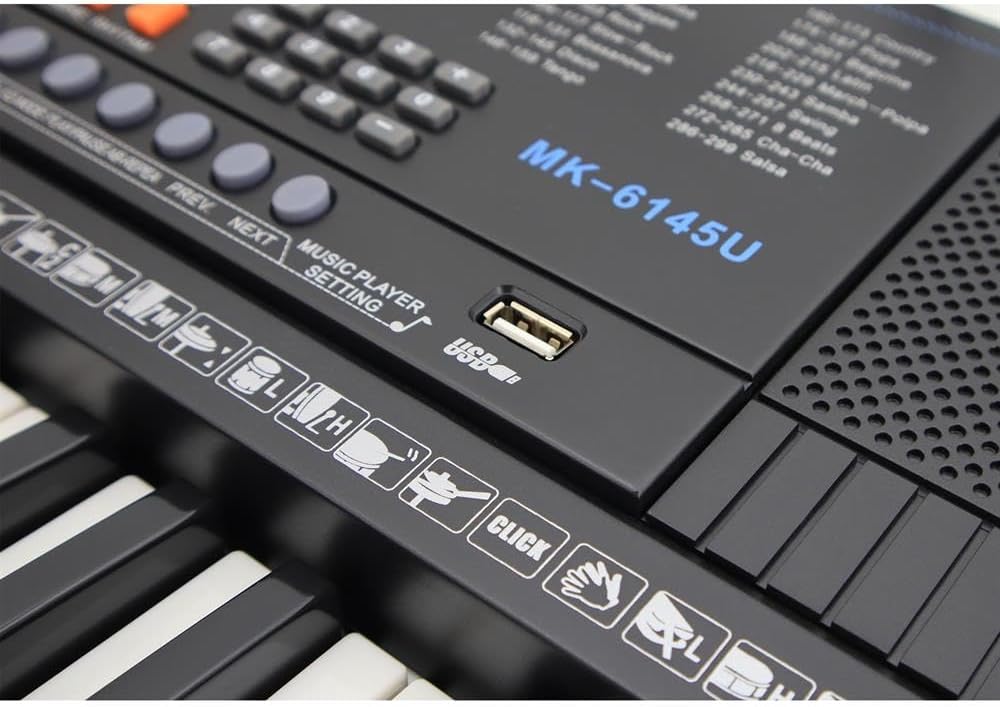
Figure 4.3: Close-up of the control panel on the JWIN MK-6145U, detailing the LCD screen, function buttons, and the USB port for music playback.
5. Setup
5.1 Power Connection
- Connect the provided power adapter to the DC IN jack on the rear of the organ.
- Plug the other end of the adapter into a standard electrical outlet.
- Press the Power button on the control panel to turn on the instrument. The LCD display will illuminate.
5.2 Connecting Accessories
- Headphones: Insert standard 3.5mm headphones into the Headphone Jack for private practice.
- Microphone: Connect a microphone to the Microphone Jack for vocal accompaniment.
- Audio Output: Use the Audio Output jack to connect the organ to external amplification systems or recording devices.
- USB MIDI: The MIDI USB port allows connection to a computer for MIDI data transfer, enabling use with music software.
6. Operating Instructions
6.1 Basic Playback
- Tones: Select from 300 available tones using the 'Tone' buttons and number pad. The selected tone will be displayed on the LCD screen.
- Rhythms: Choose from 300 rhythms using the 'Rhythm' buttons and number pad. Press 'Start/Stop' to begin or end the rhythm.
- Volume Control: Adjust the master volume using the dedicated volume control buttons or knob.
- Tempo Control: Modify the speed of rhythms and example songs using the tempo control.
6.2 Training Function
The organ includes 30 example songs and a 3-step training function to assist in learning. Refer to the on-screen prompts and specific training mode buttons for detailed guidance.
6.3 Recording and Playback
Use the 'Record' button to capture your performance. Press 'Playback' to listen to your recorded music. The organ supports basic recording and playback functions.
6.4 Chord Functions
- One Finger Chord: Simplifies chord playing by allowing a single key press to trigger a full chord.
- Multi Finger Chord: For more advanced chord playing, allowing multiple keys to form complex chords.
- Bass Chord: Engages a bass line accompaniment based on the chords played.
6.5 USB Music Player
Insert a USB memory stick into the USB port to play MP3 files. Use the 'Previous Song' and 'Next Song' buttons to navigate tracks and 'USB Music Volume Control' to adjust playback volume.
6.6 Advanced Features
- Metronome: Provides a steady beat for practice.
- Transposed: Adjusts the pitch of the entire keyboard up or down.
- Split: Divides the keyboard into two sections, allowing different tones to be played on each side.
- Dual Volume: Adjusts the volume balance between two layered tones.
- Sustain: Extends the decay of notes.
- Vibration: Adds a vibrato effect to the sound.
- Fill-In/Sync: Adds rhythmic fills or synchronizes rhythm start with key press.
- EQ Mode/AB Reread: Adjusts equalization settings or repeats a section of a song.
7. Maintenance
7.1 Cleaning
Wipe the surface of the organ with a soft, dry cloth. For stubborn dirt, slightly dampen the cloth with water and then wipe dry immediately. Avoid using chemical cleaners, waxes, or solvents as they may damage the finish.
7.2 Storage
When not in use for extended periods, store the organ in a cool, dry place away from direct sunlight and extreme temperatures. It is recommended to cover the instrument to protect it from dust.
8. Troubleshooting
- No Power: Ensure the power adapter is securely connected to both the organ and a working electrical outlet. Check if the power button is pressed.
- No Sound: Check the master volume level. If headphones are connected, disconnect them to check speaker output. Ensure the correct tone is selected.
- Rhythm Not Playing: Verify that a rhythm is selected and the 'Start/Stop' button has been pressed. Check the rhythm volume.
- USB Music Player Not Working: Ensure the USB memory stick is properly inserted and contains compatible audio files (e.g., MP3). Check the USB music volume.
- Keys Not Responding: If specific keys are not responding, ensure no 'Split' or 'Dual' modes are active that might affect key assignments. If the issue persists, contact customer support.
9. Specifications
| Feature | Description |
|---|---|
| Model Name | MK-6145U |
| Number of Keys | 61 Piano Style Keys (5 Octaves) |
| Display | LCD Display |
| Tones | 300 |
| Rhythms | 300 |
| Example Songs | 30 |
| Training Function | 3-Step |
| Drum Sounds | 8 |
| Controls | Volume, Accompaniment Sounds, Tempo, Transposed, Split, Dual Volume, Metronome |
| Functions | Recording/Playback, Sustain, Vibration, Fill-In/Sync, One Finger Chord, Multi Finger Chord, Bass Chord, EQ Mode/AB Reread |
| Connectivity | USB Memory Music Player, Adapter Jack, Headphone Jack, Microphone Jack, Audio Output, MIDI USB |
| Power Source | Adapter |
| Item Weight | 4.2 Kilograms |
| Dimensions | Approximately 88.6 x 37.8 x 16.2 cm |
| Color | Black |
10. Warranty and Support
For warranty information and customer support, please refer to the documentation provided at the time of purchase or visit the official JWIN website. Keep your proof of purchase for warranty claims.