
Sharp B08H3STVWG
Sharp Digital Clock with Alarm and Dual USB FastCharge Charging Ports
Model: B08H3STVWG
Brand: Sharp
1. Product Overview
The Sharp Digital Clock is designed for simplicity and convenience, featuring a clear green LED display and dual USB FastCharge ports for charging your devices. It includes an alarm function and a battery backup system to retain settings during power outages.

Figure 1: Front view of the Sharp Digital Clock, highlighting the large green LED display and dual USB charging ports.
2. Setup Guide
2.1 Power Connection
Connect the provided power adapter to the DC IN jack located at the back of the clock. Plug the other end into a standard electrical outlet. The display will illuminate, and the clock will be ready for time setting.
2.2 Battery Backup (Optional)
For battery backup functionality, which retains time and alarm settings during a power outage, install two (2) AAA batteries (not included) into the battery compartment located on the bottom of the unit. During battery backup, the display will go blank to conserve power, but settings will be preserved.
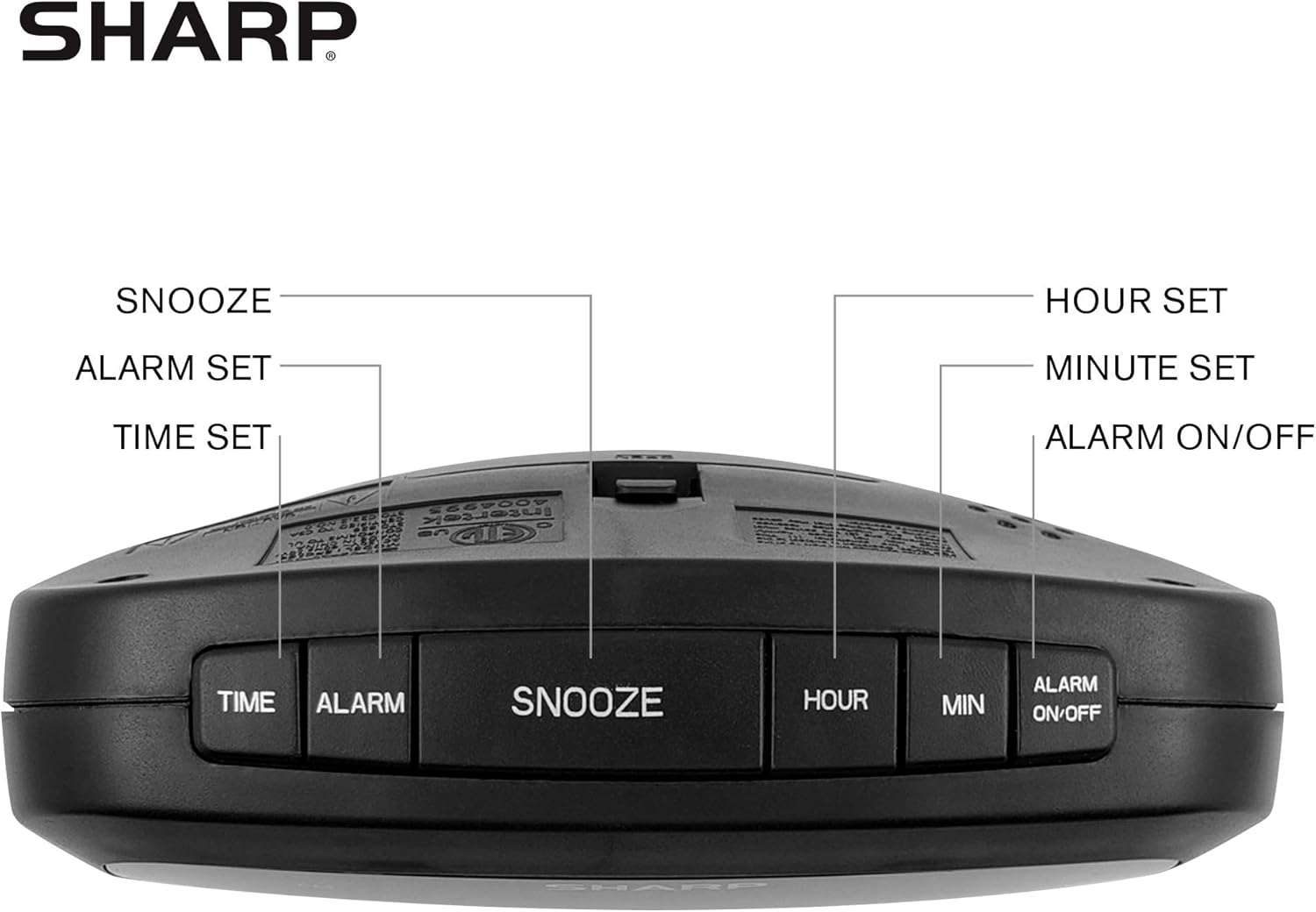
Figure 2: Underside of the clock with the battery compartment visible, requiring 2 AAA batteries for backup.
3. Operating Instructions
The clock features intuitive top-mounted buttons for easy operation.

Figure 3: Top panel of the clock with clearly labeled buttons for time, alarm, snooze/dimmer, hour, minute, and alarm on/off.
3.1 Setting the Time
- Press and hold the TIME button until the hour digits begin to flash.
- Press the HOUR button to adjust the hour. Pay attention to the PM indicator if setting a PM time.
- Press the MIN button to adjust the minutes.
- Press the TIME button again to confirm and save the time.
3.2 Setting the Alarm
- Press and hold the ALARM button until the alarm hour digits begin to flash.
- Press the HOUR button to adjust the alarm hour.
- Press the MIN button to adjust the alarm minutes.
- Press the ALARM button again to confirm and save the alarm time.
- To activate or deactivate the alarm, press the ALARM ON/OFF button. An alarm indicator light will appear on the display when the alarm is active.
3.3 Snooze and Dimmer Function
- When the alarm sounds, press the large SNOOZE/DIMMER button to temporarily silence the alarm for a few minutes.
- To adjust the brightness of the green LED display, repeatedly press the SNOOZE/DIMMER button when the alarm is not sounding. Cycle through bright, medium, and low brightness settings.
3.4 Using the USB Charging Ports
The clock is equipped with two 2 AMP USB charging ports on the front, allowing you to conveniently charge your smartphone or other USB-powered devices directly from the clock.

Figure 4: The clock demonstrating its dual USB charging capability with two smartphones connected.
- Simply connect your device's USB charging cable to one of the USB ports on the front of the clock.
- Ensure your device is compatible with 2 AMP charging for optimal speed.
4. Maintenance
To ensure the longevity and proper functioning of your Sharp Digital Clock, follow these simple maintenance guidelines:
- Cleaning: Wipe the clock with a soft, dry cloth. Do not use abrasive cleaners, waxes, or solvents as they may damage the finish.
- Placement: Place the clock on a stable, flat surface away from direct sunlight, heat sources, and excessive moisture.
- Battery Replacement: If using the battery backup, replace the AAA batteries annually or when the clock consistently loses time during power interruptions.
5. Troubleshooting
| Problem | Possible Cause | Solution |
|---|---|---|
| Clock display is blank. | No power or power outage. | Ensure the power adapter is securely plugged into the clock and a working electrical outlet. If there was a power outage, check if backup batteries are installed and functional. |
| Alarm does not sound. | Alarm not set or not activated. | Verify that the alarm time is correctly set and that the alarm indicator light is visible on the display (press ALARM ON/OFF). |
| USB ports are not charging devices. | Device incompatibility or faulty cable. | Ensure your device is compatible with USB charging. Try a different USB cable. Confirm the clock is powered on. |
| Display is too bright/dim. | Brightness setting needs adjustment. | Press the SNOOZE/DIMMER button repeatedly to cycle through brightness levels (bright, medium, low). |
6. Product Specifications
- Brand: Sharp
- Model: B08H3STVWG
- Display Type: Digital Green LED
- Power Source: Corded Electric
- Battery Backup: 2 x AAA batteries (not included)
- USB Ports: 2 x 2 AMP USB FastCharge Ports
- Product Dimensions: 5.95"W x 2.3"H
- Item Weight: 9.59 ounces
- Color: Green Led
- Material: Plastic
- UPC: 049353005089
7. Warranty and Support
This Sharp Digital Clock comes with a limited warranty. For detailed warranty information, product support, or to purchase accessories, please visit the official Sharp website or contact their customer service. You can also visit the Sharp Store on Amazon.
Please retain your purchase receipt for warranty claims.
Ask a question about this manual
Ask about setup, troubleshooting, compatibility, parts, safety, or missing instructions. Manuals+ will review the question and use this page’s manual context to help answer it.