
1. Introduction
This manual provides detailed instructions for the installation, operation, and maintenance of the MakerHawk ZK-TB21 Bluetooth Amplifier Board. This module is a high-fidelity stereo 2.1 channel audio power amplifier utilizing the TPA3116D2 chip, designed for various audio applications including home theater systems and custom speaker projects. It offers both Bluetooth 5.0 and AUX audio input methods, along with independent controls for bass, treble, and subwoofer frequency.

2. Package Contents
Please verify that all items listed below are included in your package. If any components are missing or damaged, please contact customer support.

- MakerHawk ZK-TB21 Amplifier Board
- Top and Bottom Acrylic Protection Plates
- Control Knobs (5 pieces)
- Standoffs and Screws for assembly
- Small Screwdriver
- DC Head Lead (for power connection)
3. Product Overview
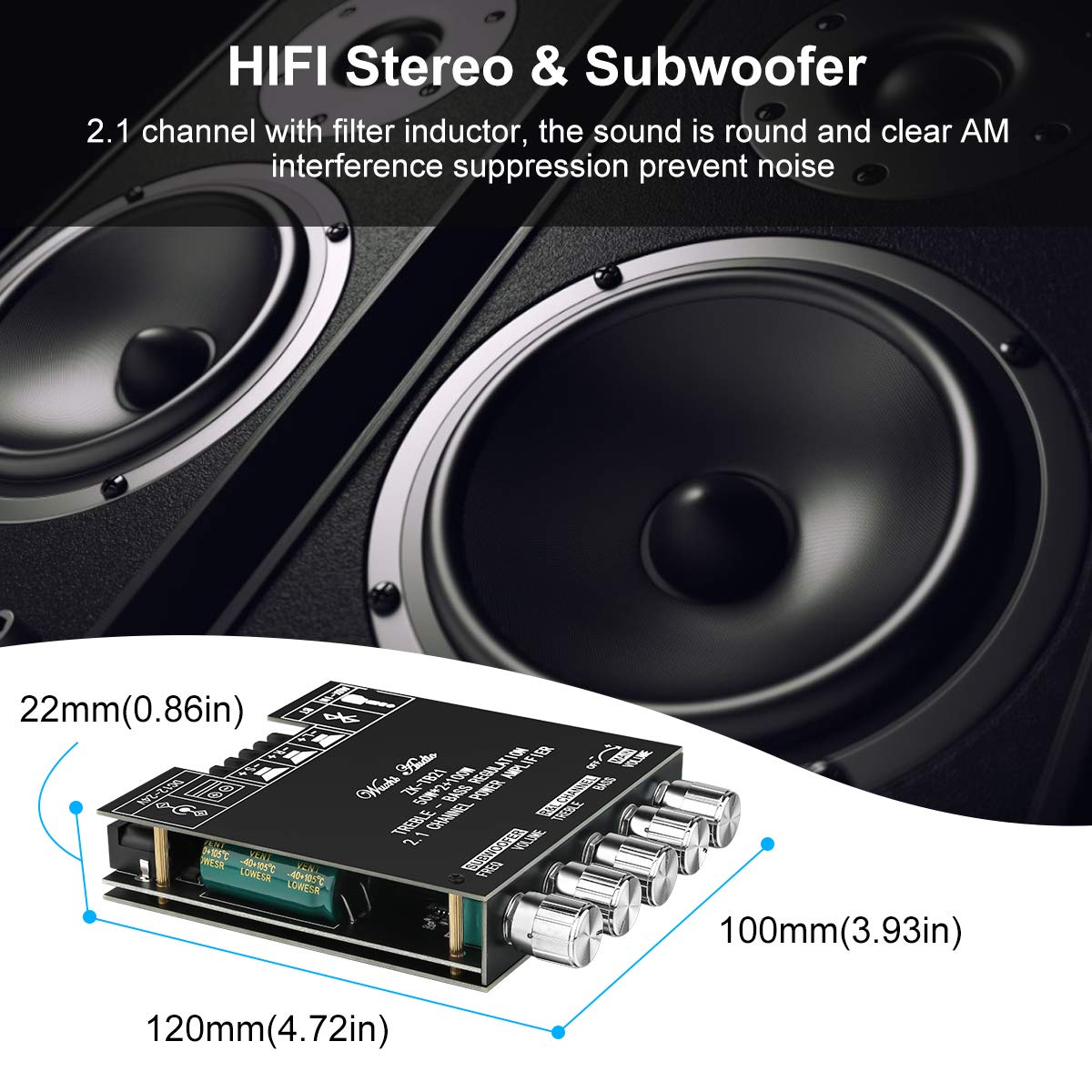
The ZK-TB21 amplifier board features a logical layout for easy connection and control. Familiarize yourself with the various components and their functions.

3.1. Controls and Indicators
- Main Volume: Adjusts the overall output volume.
- Left and Right Channel Treble: Adjusts the high-frequency response for the main stereo channels.
- Left and Right Channel Bass: Adjusts the low-frequency response for the main stereo channels.
- Subwoofer Volume: Adjusts the output volume specifically for the subwoofer channel.
- Subwoofer Frequency (FREQ): Adjusts the crossover frequency for the subwoofer, determining the upper limit of frequencies sent to the subwoofer.
- Bluetooth Indicator: Illuminates when Bluetooth is active and paired.
3.2. Input/Output Ports
- DC 12-24V Power Input: Connects to the external power supply.
- AUX-IN (3.5mm Audio Port): For wired audio input from devices like smartphones, PCs, or CD players.
- BT (Bluetooth): For wireless audio input from Bluetooth-enabled devices.
- Speaker Outputs (L+, L-, R+, R-): Connects to passive left and right stereo speakers.
- Subwoofer Output (S+, S-): Connects to a passive subwoofer.
4. Specifications
| Feature | Specification |
|---|---|
| Model Number | ZK-TB21 |
| Amplifier Chip | TPA3116D2 (Class D) |
| Channels | 2.1 (Left, Right, Subwoofer) |
| Output Power | 2 x 50W (Stereo) + 1 x 100W (Subwoofer) |
| Input Voltage | DC 12V - 24V |
| Audio Input Methods | Bluetooth 5.0, AUX (3.5mm) |
| Dimensions (L x W x H) | 4.65 x 3.94 x 0.87 inches (118 x 100 x 22 mm) |
| Weight | 6.88 ounces (195 grams) |
| Protection Mechanisms | Short-circuit, Thermal, Overvoltage, Undervoltage, DC Protection |
5. Setup
Follow these steps to assemble and connect your amplifier board.
5.1. Assembly
- Carefully unpack all components from the package.
- Place the bottom acrylic plate on a flat surface.
- Align the amplifier board with the standoffs and secure it to the bottom plate using the provided screws.
- Attach the control knobs to their respective shafts on the amplifier board.
- Place the top acrylic plate over the board, aligning the holes, and secure it with the remaining screws.
5.2. Power Connection
The ZK-TB21 requires a DC power supply between 12V and 24V. Ensure your power supply can provide sufficient current for your speakers (e.g., a 24V, 10A power supply is recommended for maximum output).
- Connect the DC power adapter to the DC 12-24V input port on the amplifier board.
- Alternatively, use the provided DC head lead to connect to a compatible power source, ensuring correct polarity.
5.3. Speaker Connection
Connect your passive speakers and subwoofer to the appropriate terminal blocks. Ensure correct polarity (+ to + and - to -) for optimal sound quality.
- Stereo Speakers: Connect the left speaker wires to the L+ and L- terminals, and the right speaker wires to the R+ and R- terminals.
- Subwoofer: Connect the subwoofer wires to the S+ and S- terminals.
6. Operating Instructions
6.1. Powering On/Off
Once the power supply is connected, the amplifier board will power on automatically. To turn off, disconnect the power supply.
6.2. Audio Input Selection
The ZK-TB21 supports two audio input methods: Bluetooth and AUX.

6.2.1. Bluetooth Connection
- Ensure the amplifier board is powered on.
- On your audio source device (e.g., smartphone, tablet), enable Bluetooth and search for available devices.
- Select "BT-AUDIO" or a similar name from the list of devices to pair.
- Once paired, the Bluetooth indicator on the amplifier board will illuminate, and you can play audio wirelessly.

6.2.2. AUX Input
- Connect a 3.5mm audio cable from your audio source device to the AUX-IN port on the amplifier board.
- The amplifier will automatically switch to AUX input when a cable is detected.
6.3. Adjusting Audio Settings
Use the control knobs to fine-tune your audio output:
- Rotate the Main Volume knob to adjust the overall loudness.
- Adjust the Treble and Bass knobs for the left and right channels to achieve your desired tonal balance.
- Use the Subwoofer Volume knob to control the bass intensity.
- Adjust the Subwoofer Frequency (FREQ) knob to set the crossover point for the subwoofer, typically between 20Hz and 200Hz.
7. Protection Features
The TPA3116D2 amplifier chip incorporates several protection mechanisms to ensure reliable operation and prevent damage to the device and connected components.
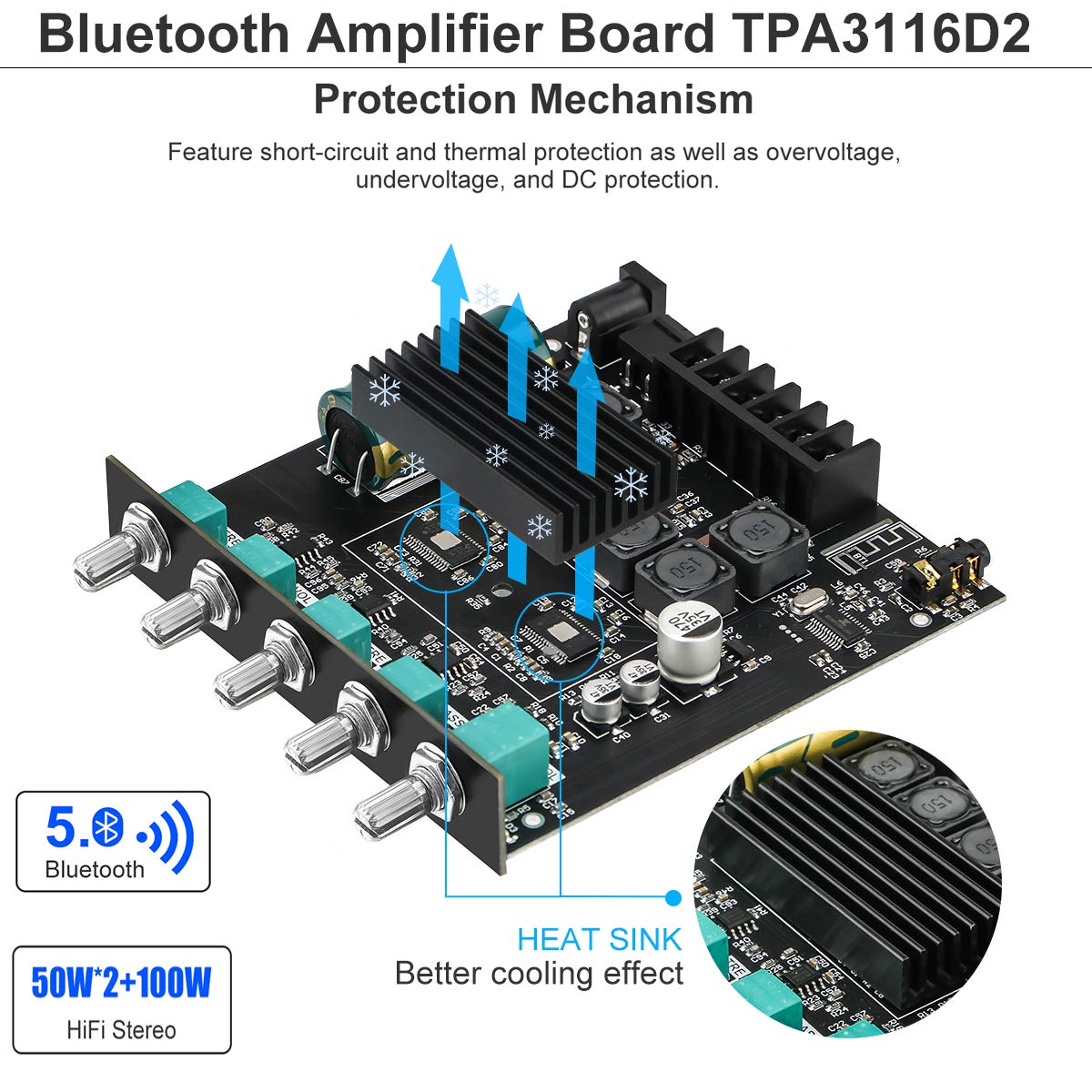
- Short-Circuit Protection: Automatically detects and protects against short circuits at the speaker outputs.
- Thermal Protection: Monitors the chip's temperature and reduces output or shuts down if overheating occurs.
- Overvoltage Protection: Safeguards the circuit from damage due to excessively high input voltage.
- Undervoltage Protection: Prevents unstable operation or damage from insufficient input voltage.
- DC Protection: Protects speakers from harmful DC offset in the audio signal.
In the event of an overload or fault condition, the device is designed to report the condition and protect itself from damage.
8. Troubleshooting
If you encounter issues with your MakerHawk ZK-TB21 amplifier board, refer to the following common problems and solutions:
| Problem | Possible Cause | Solution |
|---|---|---|
| No sound output | No power; incorrect speaker wiring; input source issue; volume too low. | Check power connection and supply voltage (12-24V DC). Verify speaker wire polarity and secure connections. Ensure audio source is playing and connected correctly. Increase main volume. |
| Poor sound quality / Distortion | Insufficient power supply; speaker impedance mismatch; volume too high; poor audio source quality. | Use a power supply within the recommended voltage range (12-24V) with adequate current (e.g., 24V 10A). Ensure speaker impedance is compatible (4Ω recommended). Reduce volume. Test with a different audio source. |
| Bluetooth connection issues | Device too far; interference; amplifier not in pairing mode. | Ensure your device is within close range (within 10 feet) and has a clear line of sight to the amplifier. Disconnect and reconnect Bluetooth. Try pairing with a different device. |
| Humming or buzzing noise | Ground loop; interference from power supply or audio source. | Ensure all components are properly grounded. Try a different power supply. If using AUX, consider an audio isolation transformer. |
| Amplifier turns off randomly | Overheating; power supply instability; protection circuit activation. | Ensure adequate ventilation around the heat sink. Verify power supply stability and current capability. Reduce load or volume. |
9. Maintenance
To ensure the longevity and optimal performance of your MakerHawk ZK-TB21 amplifier board, follow these maintenance guidelines:
- Cleaning: Use a soft, dry cloth to wipe the surface of the amplifier board. Avoid using liquid cleaners or solvents, as they may damage the electronic components.
- Environment: Operate the amplifier in a clean, dry environment. Avoid exposure to excessive dust, moisture, or extreme temperatures.
- Ventilation: Ensure the heat sink has adequate airflow to prevent overheating, especially during prolonged use at high volumes. Do not obstruct the heat sink.
- Connections: Periodically check all wire connections to ensure they are secure and free from corrosion.
10. Warranty and Support
For warranty information and technical support, please refer to the documentation provided at the time of purchase or contact MakerHawk customer service directly. You can often find support resources and contact details on the official MakerHawk website or through the retailer where the product was purchased.
For general inquiries or to explore other MakerHawk products, visit the official MakerHawk store: MakerHawk Store on Amazon.