1. Introduction
Thank you for choosing the SORAKO 600W Electric Jigsaw. This powerful and versatile tool is designed for precise cutting in various materials, including wood, plastic, and metal. This manual provides essential information for the safe and efficient operation, maintenance, and troubleshooting of your jigsaw. Please read this manual thoroughly before first use and keep it for future reference.
2. Safety Instructions
Always observe basic safety precautions to reduce the risk of fire, electric shock, and personal injury. Failure to follow these instructions may result in serious injury.
- Work Area Safety: Keep your work area clean and well-lit. Cluttered or dark areas invite accidents. Do not operate power tools in explosive atmospheres, such as in the presence of flammable liquids, gases, or dust.
- Electrical Safety: Power tool plugs must match the outlet. Never modify the plug in any way. Avoid body contact with earthed or grounded surfaces, such as pipes, radiators, ranges, and refrigerators.
- Personal Safety: Always wear appropriate personal protective equipment (PPE), including safety glasses, hearing protection, and a dust mask. Dress properly; avoid loose clothing or jewelry that can get caught in moving parts.
- Tool Use and Care: Do not force the power tool. Use the correct power tool for your application. Disconnect the plug from the power source before making any adjustments, changing accessories, or storing power tools.
- Secure Workpiece: Always clamp or otherwise secure the workpiece to a stable surface. Holding the workpiece by hand or against your body is unstable and may lead to loss of control.
- Blade Safety: Ensure the blade is correctly installed and secured before operation. Do not touch the blade immediately after cutting as it will be hot.
3. Product Overview
The SORAKO 600W Electric Jigsaw is engineered for precision and power, featuring a robust 600W motor and a stroke rate of up to 3000 strokes per minute (SPM). It includes several features designed to enhance cutting performance and user comfort.

Figure 3.1: SORAKO 600W Electric Jigsaw with two saw blades, a guide ruler, and an Allen wrench.
Key features of your SORAKO Jigsaw include:
- Powerful 600W Motor: Delivers up to 3000 SPM for efficient cutting.
- 6 Variable Speeds: Allows adjustment of cutting speed to match different materials and applications.
- 3 Orbital Sets (Pendulum Movement): Adjusts the blade's oscillation for faster cutting in softer materials or finer cuts in harder materials.
- 45° Bevel Cutting: The base plate can be adjusted for angled cuts up to 45 degrees in either direction.
- Tool-less Blade Change: Enables quick and easy blade replacement without additional tools.
- Dust Collection System: Helps maintain a clean work area by directing sawdust away from the cutting line.
- Lock Switch: Provides increased comfort and reduces fatigue during prolonged cutting tasks.
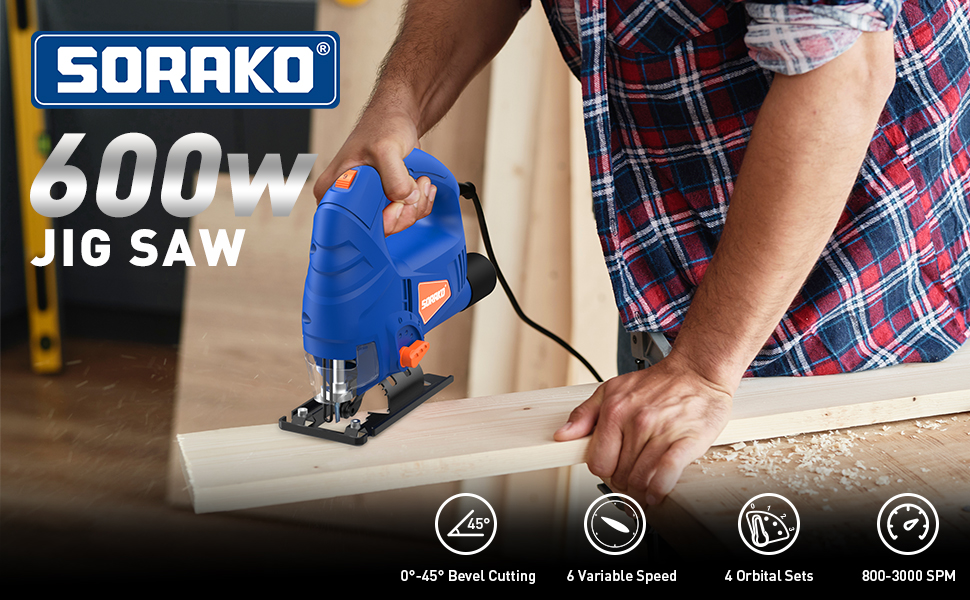
Figure 3.2: Overview of the SORAKO 600W Jigsaw's main features, including 0-45° bevel cutting, 6 variable speeds, 4 orbital sets, and 800-3000 SPM.
4. Setup
4.1 Unpacking
Carefully remove all components from the packaging. Verify that all items listed in the 'What You Get' section of the product description are present: 1x Corded Jigsaw, 2x Saw Blades, 1x Guide Ruler, 1x Dust Extraction Connector, 1x Allen Wrench, 1x Instruction Manual. Inspect the tool for any shipping damage. Do not operate the tool if any damage is observed.
4.2 Blade Installation
The SORAKO Jigsaw features a tool-less blade change system for convenience.
- Ensure the jigsaw is unplugged from the power source.
- Locate the quick-release lever or button on the front of the blade clamp mechanism.
- Press or flip the lever to open the blade clamp.
- Insert the shank of the saw blade into the clamp opening, ensuring the teeth are facing forward. Push the blade in until it clicks securely into place.
- Release the lever to lock the blade. Gently pull on the blade to confirm it is firmly seated.

Figure 4.1: Illustration of the quick blade change mechanism. Simply flip the button to insert or remove the saw blade.
4.3 Power Connection
Connect the jigsaw's power cord to a standard 230V AC power outlet. Ensure the power outlet is properly grounded and suitable for the tool's wattage (600W).
5. Operating Instructions
5.1 Variable Speed Control
The jigsaw features a variable speed trigger, allowing you to control the cutting speed from 800 to 3000 SPM. Pressing the trigger further increases the speed. This allows for precise control over every cut, adapting to the material's hardness and the desired finish.

Figure 5.1: The variable speed trigger provides excellent control for various cutting tasks.
5.2 Orbital Action Settings
The jigsaw is equipped with 4 pendulum movement (orbital action) settings (0-3). These settings control the forward motion of the blade in addition to its up-and-down movement. Higher orbital settings (3) provide faster, more aggressive cuts, ideal for rough cutting in soft materials like wood. Lower settings (0 or 1) provide finer, slower cuts, suitable for metal or delicate work.
- Setting 0: No orbital action, for fine cuts in hard materials.
- Setting 1-3: Increasing orbital action for faster cutting in softer materials.
5.3 Bevel Cutting Adjustment
The base plate of the jigsaw can be adjusted for bevel cuts from 0° to 45° in both left and right directions. This allows for angled cuts required in various woodworking and metalworking projects.
- Unplug the jigsaw.
- Loosen the screw or lever that secures the base plate.
- Tilt the base plate to the desired angle, using the angle scale as a guide.
- Tighten the screw or lever firmly to secure the base plate in position.

Figure 5.2: The adjustable bevel angle allows for versatile cutting, including 90° straight cuts and 45° angled cuts.
5.4 Dust Collection System
The jigsaw is equipped with a dust extraction port at the rear. Connect the included dust extraction connector to this port and attach a vacuum cleaner hose to keep your work area clean and improve visibility of the cutting line. The system supports two modes: blowing dust forward or collecting dust backward via the rear blower.

Figure 5.3: The dust collection system offers two modes for managing sawdust during operation.
5.5 Switch Locking Button
For extended cutting operations, the jigsaw features a lock-on button. To activate, press the trigger to start the tool, then press the lock button. The tool will continue to run without holding the trigger. To release, simply press the trigger again. This feature enhances comfort and reduces hand fatigue during prolonged use.

Figure 5.4: The switch locking button (circled) improves comfort and control during continuous operation.
5.6 Cutting Different Materials
The SORAKO Jigsaw is suitable for cutting various materials. Always select the appropriate blade type and adjust the speed and orbital settings for the material being cut.
- Wood: Use wood-specific blades. For faster cuts, use higher orbital settings and speeds. Maximum cutting depth for wood is 60mm.
- Plastic: Use fine-tooth blades. Use moderate speed and lower orbital settings to prevent melting. Maximum cutting depth for plastic is 15mm.
- Metal: Use metal-specific blades. Use lower speeds and orbital setting 0 for best results. Apply cutting oil for smoother cuts and to prolong blade life. Maximum cutting depth for metal is 5mm.

Figure 5.5: The jigsaw is versatile for cutting various materials, including wood, plastic pipes, and metal sheets.
6. Maintenance
Regular maintenance ensures the longevity and optimal performance of your jigsaw.
6.1 Cleaning
After each use, unplug the tool and clean it with a soft, damp cloth. Remove any sawdust or debris from the ventilation openings and the blade clamp area. Do not use harsh chemicals or abrasive cleaners.
6.2 Blade Replacement
Replace blades when they become dull or damaged. A dull blade can cause excessive vibration, poor cut quality, and strain on the motor. Refer to Section 4.2 for blade installation instructions.
6.3 Storage
Store the jigsaw in a clean, dry place, out of reach of children. Ensure the power cord is neatly coiled and not kinked. Protect the tool from direct sunlight and extreme temperatures.
7. Troubleshooting
This section addresses common issues you might encounter with your jigsaw.
| Problem | Possible Cause | Solution |
|---|---|---|
| Tool does not start | No power supply Faulty power cord/plug Internal fault | Check power outlet and connections Inspect cord for damage; replace if necessary Contact customer support |
| Blade not cutting efficiently | Dull or incorrect blade Incorrect speed/orbital setting Forcing the tool | Replace blade; ensure it's suitable for material Adjust speed and orbital setting Allow the tool to do the work; do not apply excessive pressure |
| Excessive vibration | Loose blade Damaged blade Worn components | Ensure blade is securely clamped Replace blade Contact customer support |
| Motor overheating | Blocked ventilation slots Overloading the tool Prolonged heavy use | Clean ventilation slots Reduce load; use appropriate speed/orbital setting Allow tool to cool down periodically |
8. Specifications
Detailed technical specifications for the SORAKO 600W Electric Jigsaw.
| Specification | Value |
|---|---|
| Manufacturer | SORAKO |
| Model Number | M1Q-DU13-65-570 |
| Item Weight | 2.1 Kilograms |
| Product Dimensions | 24 x 8 x 21 cm |
| Color | Blue |
| Style | Jig Saw |
| Material | Plastic |
| Power Source Type | Corded Electric |
| Voltage | 230 Volts |
| Wattage | 600 watts |
| Speed | 800-3000 RPM (Strokes Per Minute) |
| Blade Length | 60 Millimeters (Max. cutting depth for wood) |
| Special Features | Bevel Capability (0-45°), Variable Speeds, Orbital Action, Dust Collection |
9. Warranty and Support
SORAKO stands behind the quality of its products. This jigsaw comes with a 2-year warranty from the date of purchase. This warranty covers defects in materials and workmanship under normal use.
For any questions, technical assistance, or warranty claims, please contact SORAKO customer support. Our team is available to assist you 24/7.
Please retain your purchase receipt as proof of purchase for warranty purposes.


