
1. Introduction
Thank you for choosing the Infinix iRocker XE15 True Wireless Earbuds. This manual provides essential information on how to set up, operate, and maintain your earbuds to ensure optimal performance and longevity. Please read this manual carefully before using the product.
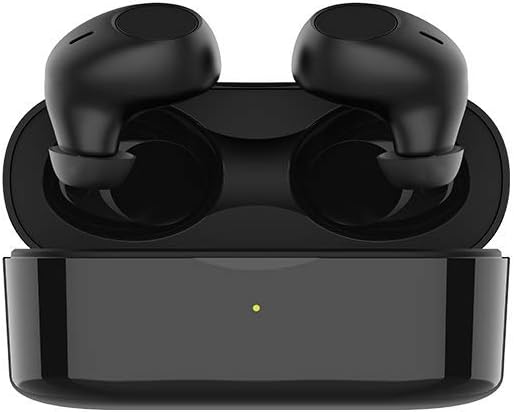
Image 1.1: Infinix iRocker XE15 True Wireless Earbuds and Charging Case. The image displays the black earbuds securely placed within their matching black charging case, which features a small LED indicator light.
2. Package Contents
Ensure all items are present in your package:
- Infinix iRocker XE15 True Wireless Earbuds (Left and Right)
- Charging Case
- USB Charging Cable
- User Manual
- Multiple Sizes of Eartips (typically S, M, L)
3. Product Overview
The Infinix iRocker XE15 earbuds are designed for comfort and high-quality audio. They feature a 'Goose Egg Design' for a secure fit and are equipped with multifunctional button controls.

Image 3.1: Ergonomic 'Goose Egg Design' of the Infinix iRocker XE15 Earbuds. This image highlights the unique shape of the earbuds, emphasizing their comfortable and secure fit for extended wear.
4. Setup
4.1. Charging the Earbuds and Case
Before first use, fully charge the charging case and earbuds. Place the earbuds into the charging case. Connect the USB charging cable to the charging case and a power source. The LED indicator on the case will show charging status.
- Each earbud provides up to 4 hours of playback or call time on a single charge.
- The charging case provides an additional 16 hours of battery life, totaling up to 20 hours of combined playtime.

Image 4.1: Playtime capabilities of the Infinix iRocker XE15 Earbuds. The graphic illustrates the total battery life, indicating 4 hours from the earbuds and an additional 16 hours from the charging case, for a combined 20 hours.
4.2. Pairing with a Device
- Open the charging case. The earbuds will automatically enter pairing mode.
- On your device (smartphone, tablet, etc.), enable Bluetooth.
- Search for available Bluetooth devices and select "Infinix iRocker XE15" from the list.
- Once connected, you will hear a confirmation tone, and the earbuds will be ready for use.
The earbuds utilize Bluetooth v5.0 for a stable and seamless connection.

Image 4.2: Bluetooth v5.0 connectivity for the Infinix iRocker XE15 Earbuds. This image visually represents the advanced Bluetooth technology ensuring a stable and efficient wireless connection.
5. Operating Instructions
5.1. Button Controls
The Infinix iRocker XE15 earbuds feature a multifunctional button on each earbud for easy control of music playback and calls.
- Play/Pause Music: Single press on either earbud.
- Next Track: Double press the right earbud.
- Previous Track: Double press the left earbud.
- Answer/End Call: Single press on either earbud.
- Reject Call: Press and hold on either earbud for 2 seconds.

Image 5.1: Multifunctional button control on the Infinix iRocker XE15 Earbuds. The image depicts a user interacting with the earbud's button, illustrating the ease of controlling music and calls with simple presses.
5.2. Voice Assistant
Activate your device's voice assistant (Google Assistant for Android, Siri for Apple) by pressing and holding the multipurpose button on either earbud for approximately 2 seconds.

Image 5.2: Google Assistant activation on Infinix iRocker XE15 Earbuds. This graphic shows an earbud near a speech bubble with the Google Assistant logo, indicating voice command functionality.
5.3. Single/Dual Mode
Thanks to independent chip designs, the earbuds can be used in either single (mono) or dual (stereo) mode. Simply take one earbud out of the case to use it individually, or both for a stereo experience.
6. Maintenance
6.1. Cleaning
Regularly clean your earbuds and charging case with a soft, dry, lint-free cloth. Do not use harsh chemicals or abrasive materials. Ensure charging contacts are free of debris.
6.2. Storage
When not in use, store the earbuds in their charging case to protect them from dust and damage. Store in a cool, dry place away from extreme temperatures.
6.3. Water Resistance
The earbuds have an IPX4 sweat- and splash-proof rating. This means they are resistant to splashes of water from any direction, making them suitable for workouts and light rain. They are not designed for swimming or submersion in water.

Image 6.1: IPX4 Sweatproof rating for the Infinix iRocker XE15 Earbuds. The image shows a person exercising, with text indicating the earbuds' resistance to sweat and splashes.
7. Troubleshooting
If you encounter issues with your Infinix iRocker XE15 earbuds, try the following solutions:
- No Sound: Ensure earbuds are charged, properly paired, and volume is up on both the earbuds and your device.
- Cannot Pair: Make sure Bluetooth is enabled on your device and the earbuds are in pairing mode. Try forgetting the device on your phone and re-pairing.
- Intermittent Connection: Ensure there are no obstructions between the earbuds and your device. Move closer to your device.
- One Earbud Not Working: Place both earbuds back in the charging case, close the lid, wait a few seconds, then take them out again to reset the connection.
- Charging Issues: Check the charging cable and power adapter. Ensure the charging contacts on the earbuds and case are clean.
8. Specifications
| Feature | Specification |
|---|---|
| Model Name | XE15 |
| Connectivity Technology | Wireless (Bluetooth v5.0) |
| Form Factor | In Ear |
| Earbud Battery Life | Up to 4 hours (40 mAh per earbud) |
| Total Playtime (with case) | Up to 20 hours |
| Water Resistance Rating | IPX4 (Sweat- and Splash-proof) |
| Control Type | Multifunctional Button, Voice Assistant (Siri, Google Assistant) |
| Material | Plastic |
| Manufacturer | infinix |

Image 8.1: Powerful Bass with Hi-Fi Speakers. This image emphasizes the audio quality of the earbuds, highlighting their capability to deliver strong bass and clear sound.
9. Safety Information
- Do not disassemble or modify the product.
- Keep away from extreme temperatures, direct sunlight, and open flames.
- Avoid exposing the product to excessive moisture or liquids beyond its IPX4 rating.
- Do not use abrasive cleaners or sharp objects to clean the earbuds.
- Listen at moderate volumes to prevent hearing damage.
10. Warranty and Support
For warranty information and customer support, please refer to the warranty card included in your product packaging or visit the official Infinix website. If you experience any issues not covered in this manual, please contact customer service for assistance.


