
1. Safety Instructions
Please read and understand all instructions before assembly and use. Keep this manual for future reference.
- Ensure all parts are present and undamaged before beginning assembly. Do not use if any parts are missing or damaged.
- Assemble the desk on a soft, clean surface to prevent scratches.
- Tighten all screws and bolts securely, but do not overtighten. Periodically check and retighten fasteners as needed.
- Do not stand or sit on the desk.
- Distribute weight evenly on the desktop and shelves. Do not exceed the maximum load capacity.
- Keep small parts away from children during assembly to prevent choking hazards.
- Use the adjustable leg pads to ensure the desk is stable on uneven floors and to protect your floor from scratches.
2. Package Contents
Verify that all components listed below are included in your package. If any parts are missing or damaged, please contact customer support.
- Desktop Panel
- Shelf Panels (4 tiers)
- Steel Frame Components
- Adjustable Leg Pads
- Assembly Hardware (screws, bolts, Allen wrench, screwdriver)
- Instruction Manual
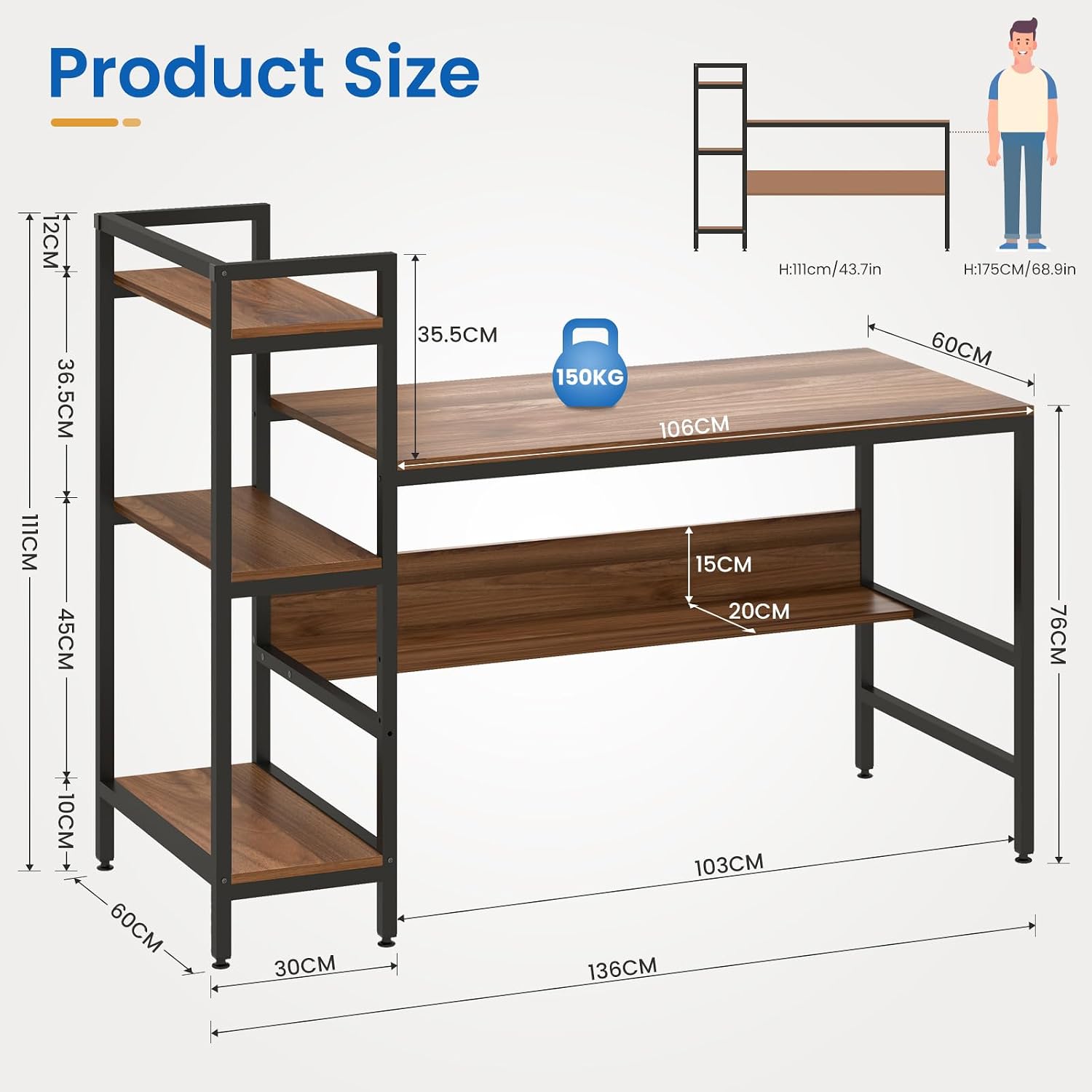
Image: Overview of the Dripex Computer Desk with 4-Tier Storage Shelves, illustrating the main desk surface and the integrated shelving unit.
3. Assembly Instructions
Follow these steps carefully to assemble your Dripex Computer Desk. It is recommended to have two people for assembly.
- Unpack and Identify Parts: Lay out all components on a clean, soft surface. Refer to the included parts list and diagrams to identify each piece. All parts are typically numbered for easy identification.
- Assemble the Steel Frame: Connect the steel tubing frame components according to the diagrams. Ensure all connections are secure but do not fully tighten screws until the entire frame is assembled.
- Attach Shelf Panels: Secure the 4-tier shelf panels to the designated steel frame sections. Note that the shelving unit features a reversible design, allowing it to be installed on either the left or right side of the main desk. Decide your preferred orientation before securing the shelves.
- Attach Desktop Panel: Carefully place the desktop panel onto the assembled frame and secure it using the provided hardware.
- Install Adjustable Leg Pads: Screw the adjustable leg pads into the bottom of the steel frame legs. These pads help protect your floor and stabilize the desk on uneven surfaces.
- Final Tightening: Once all components are in place and aligned, go back and fully tighten all screws and bolts.

Image: Illustration of the desk's reversible design, demonstrating how the shelving unit can be configured on either side to suit your space.

Image: Detailed view highlighting the robust steel tubing frame, the ample extra storage space provided by the shelves, and the adjustable floor protectors on the desk legs.
4. Usage
Your Dripex Computer Desk is designed for versatile use in various settings.
- Workstation: Use the spacious desktop for your computer, laptop, monitor, and other office essentials.
- Storage: Utilize the four-tier shelves to organize books, documents, office supplies, decorative items, or even a small printer.
- Adjustable Stability: Adjust the leg pads to ensure the desk remains level and stable, preventing wobbling and protecting your flooring.
- Placement: Suitable for home offices, study rooms, dormitories, living rooms, or bedrooms.
5. Maintenance
To ensure the longevity and appearance of your desk, follow these maintenance guidelines:
- Cleaning: Wipe the desk surface and frame with a soft, damp cloth. Avoid harsh chemicals or abrasive cleaners, as they may damage the finish.
- Spills: Clean up spills immediately to prevent staining or damage to the composite board surface. The surface is waterproof and wear-resistant, but prompt cleaning is still recommended.
- Fasteners: Periodically check all screws and bolts to ensure they are tight. Retighten if necessary to maintain stability.
- Avoid Extreme Conditions: Do not expose the desk to direct sunlight for prolonged periods or to extreme temperature changes, as this may cause warping or fading.
6. Specifications
| Feature | Detail |
|---|---|
| Model | Computer Desk with 4 Tier Storage Shelves |
| Brand | Dripex |
| Material | Composite board (desktop), Steel frame |
| Color | Red Walnut |
| Overall Dimensions (L x W x H) | 136 cm x 60 cm x 111 cm (53.54"L x 23.62"W x 43.70"H) |
| Desktop Dimensions (L x W x Thickness) | 106 cm x 60 cm x 1.5 cm (41.73"L x 23.62"W x 0.6" thick) |
| Height from Floor to Desktop | 76 cm (29.92") |
| Shelf Distance (Top) | 12 cm (4.72") |
| Shelf Distance (Second) | 40 cm (15.75") |
| Shelf Distance (Bottom) | 49 cm (19.29") |
| Net Weight | 21.15 kg (46.6 pounds) |
| Maximum Load Capacity | 150 kg (330 pounds) |
| Special Features | 4-tier storage shelves, Reversible design, Adjustable leg pads, Waterproof and wear-resistant surface |

Image: Comprehensive diagram illustrating all key dimensions of the computer desk and its integrated shelving unit.
7. Warranty & Support
The Dripex Computer Desk comes with a 12-month quality assurance guarantee from the date of purchase.
If you encounter any issues during assembly or use, or if you have any questions regarding your product, please do not hesitate to contact Dripex customer support. Please have your purchase details ready when contacting support.
For support, please refer to the contact information provided with your purchase documentation or visit the official Dripex website.
