
Introduction
Welcome to the official user manual for Tropico 6 on Nintendo Switch. This guide provides essential information for setting up, operating, and maintaining your game, ensuring an optimal experience as you steer the fate of your nation as El Presidente.
Tropico 6 is a city-builder and political simulation game where you manage an island nation through various historical eras, from colonial times to the modern age. Your decisions will shape the economy, infrastructure, and political landscape of your archipelago.

Image: The official game box art for Tropico 6 on Nintendo Switch, featuring El Presidente and a vibrant island city.
Setup
To begin playing Tropico 6 on your Nintendo Switch, follow these steps:
- Insert Game Card: If you have the physical edition, insert the Tropico 6 game card into the Nintendo Switch game card slot. Ensure it clicks into place.
- Digital Download: If you purchased the digital version, ensure the game is fully downloaded and installed from the Nintendo eShop. You can check the download progress on your Switch Home menu.
- System Update: Ensure your Nintendo Switch system software is up to date. Navigate to System Settings > System > System Update to check for and install any available updates.
- Launch Game: Select the Tropico 6 icon from the Nintendo Switch Home menu to launch the game.
- Initial Setup: Upon first launch, the game may prompt you to adjust display settings, audio preferences, or complete an initial tutorial. It is recommended to complete the tutorial to familiarize yourself with the game mechanics.
Operating Instructions
Tropico 6 offers a deep simulation experience. Here are key aspects of gameplay and operation:
Core Gameplay Mechanics
- Archipelago Management: For the first time in the series, manage multiple islands simultaneously. This requires strategic planning for resource distribution, infrastructure, and population needs across your entire archipelago.
- Infrastructure Development: Build bridges to connect islands, construct tunnels, and establish various transportation networks like taxis, buses, and aerial cable cars to facilitate movement of citizens and tourists.
- Political Decisions: Navigate complex political landscapes, make decisions that impact your citizens' happiness, loyalty, and the overall stability of your regime.
- Raids and World Wonders: Send your agents on covert raids to foreign lands to acquire world wonders and monuments, adding them to your collection and boosting your island's prestige.
- Palace Customization: Personalize your presidential palace with various architectural styles and decorative elements. Deliver election speeches from your balcony to influence public opinion.
- Eras Progression: Progress through four distinct eras, each presenting unique challenges and opportunities, requiring adaptation of your strategies.

Image: A view of a developed city in Tropico 6, showcasing residential and commercial buildings, roads, and a central obelisk.

Image: A closer look at a grand building within the game, demonstrating the architectural detail of structures in Tropico 6.

Image: A residential district featuring several apartment blocks, illustrating urban development in Tropico 6.

Image: A vibrant town square with diverse building styles and active citizens, reflecting the lively atmosphere of Tropico 6.

Image: An expansive city view centered around a large plaza, demonstrating the scale of urban planning in Tropico 6.

Image: An overhead map view of an island, highlighting different development zones and geographical features, including a volcano.

Image: A high-end residential district featuring large, elegant villas and a decorative pond, showcasing affluent areas in Tropico 6.

Image: A panoramic city view with a blend of housing and civic structures, set against a large body of water, illustrating coastal development.

Image: A scenic view of mountainous terrain with scattered settlements, under a hazy sky, depicting the diverse environments in Tropico 6.
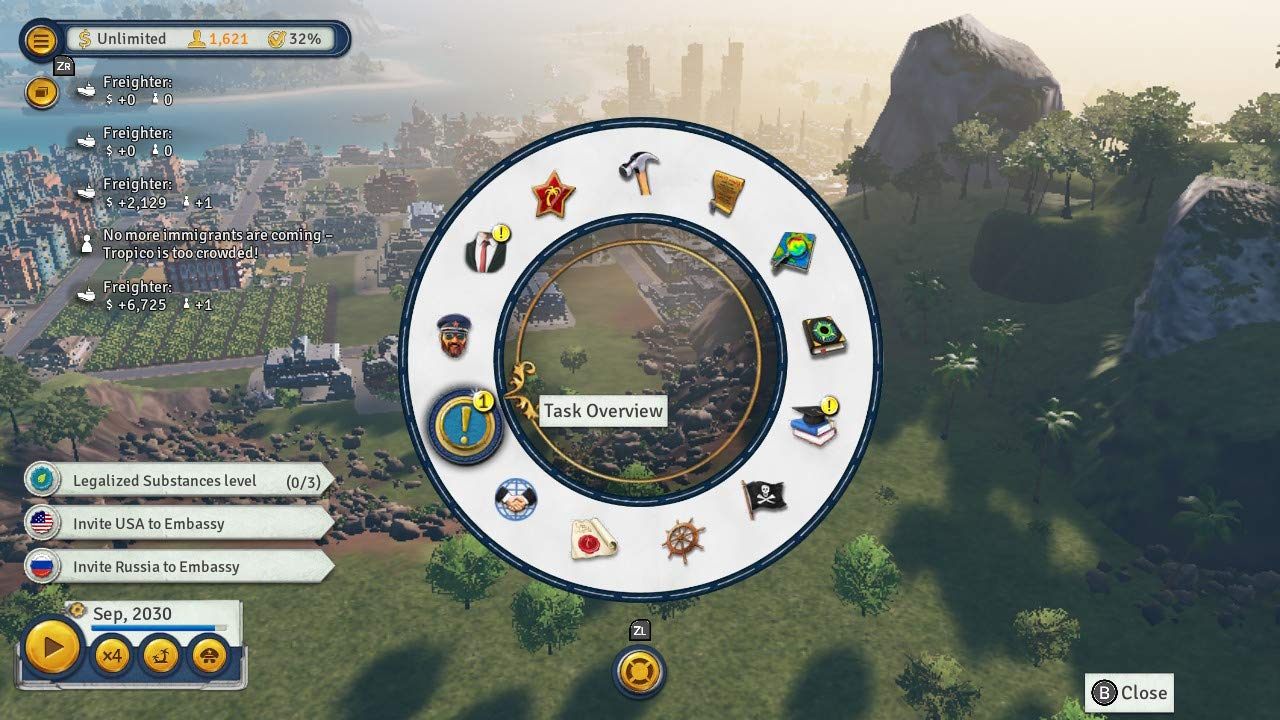
Image: The in-game task overview menu, displaying a circular selection of icons representing different administrative and gameplay functions.

Image: The in-game construction menu, presenting a wide array of building options for urban planning and infrastructure development.

Image: A volcanic island with visible lava flows, illustrating the dynamic and sometimes hazardous environments in Tropico 6.

Image: A majestic government building or palace with a fountain, representing the seat of power in Tropico 6.

Image: A densely populated urban area featuring numerous multi-story buildings and a prominent church or cathedral, showing city density.

Image: A busy port area with cargo ships, shipping containers, and industrial structures, highlighting trade and logistics in Tropico 6.
Nintendo Switch Edition Exclusive Features
- Exclusive Palace Design: Includes a unique palace design for your El Presidente.
- Captivating Flamingo Pond: A special decorative item to enhance your island's aesthetics.
- Tourist Costume for El Presidente: A unique outfit for your avatar.
Maintenance
To ensure the longevity of your game and console, consider the following maintenance tips:
- Game Card Care: If using a physical game card, handle it by the edges and store it in its case when not in use to prevent scratches or damage. Keep it away from dust and moisture.
- Digital Game Management: Ensure sufficient storage space on your Nintendo Switch for game updates and save data. Periodically check for and delete unnecessary software or archived games if storage becomes an issue.
- System Updates: Regularly check for and install Nintendo Switch system updates. These updates often include performance improvements and bug fixes that can enhance game stability.
- Game Updates: Ensure Tropico 6 is updated to its latest version. Game updates often address bugs, improve performance, and add new content. Your Switch typically downloads these automatically if connected to the internet.
- Saving Progress: Always ensure your game progress is saved correctly before exiting the game or turning off your console. Tropico 6 features an auto-save function, but manual saves are also recommended for critical moments.
Troubleshooting
If you encounter issues while playing Tropico 6, consider the following troubleshooting steps:
| Problem | Possible Solution |
|---|---|
| Game crashes or freezes during gameplay. |
|
| Poor graphics quality when playing on a TV. |
|
| Game not launching or showing an error message. |
|
| Controls are unresponsive or incorrect. |
|
If these steps do not resolve your issue, please refer to the official Deep Silver support channels or the Nintendo Support website for further assistance.
Specifications
| Attribute | Detail |
|---|---|
| Product Title | Tropico 6 - Nintendo Switch |
| Brand | Deep Silver |
| Model Number | 18279 |
| Platform | Nintendo Switch |
| UPC | 816819018279 |
| ASIN | B08GVCMY4W |
| Release Date | November 6, 2020 |
| Product Dimensions | 0.4 x 4.1 x 6.6 inches (Game Card/Packaging) |
| Item Weight | 0.32 ounces (Game Card/Packaging) |
| ESRB Rating | Teen |
Warranty and Support
Warranty information for Tropico 6 on Nintendo Switch is typically provided by the game publisher, Deep Silver, or the retailer from whom the game was purchased. Please refer to the documentation included with your game or visit the official Deep Silver website for specific warranty terms and conditions.
For technical support, gameplay assistance, or bug reporting, please contact Deep Silver's customer support. Their official website usually provides a dedicated support section with FAQs, contact forms, or email addresses.
As no official product videos from the seller were provided in the product data, this manual does not include embedded video content.