
WFCO WF-5110RS
WFCO WF-5110RS Pure Sine Wave Inverter User Manual
Model: WF-5110RS
1. Introduction
The WFCO WF-5110RS is a 1000-watt Pure Sine Wave Inverter designed to provide efficient and reliable AC power from a DC source. This inverter features an improved design that reduces parasitic draw, maximizing battery power and overall efficiency. It includes advanced protection mechanisms such as automatically resettable Reverse Polarity protection and an exclusive internal transfer system for seamless AC input bypass. This manual provides essential information for the safe and effective installation, operation, and maintenance of your WF-5110RS inverter.
2. Safety Information
Please read and understand all safety instructions before installing or operating the WF-5110RS inverter. Failure to follow these instructions may result in electric shock, fire, serious injury, or property damage.
- Electric Shock Hazard: Do not open the inverter casing. There are no user-serviceable parts inside. Refer all servicing to qualified service personnel.
- Explosion Hazard: Do not install or operate this unit in locations where ignition-protected devices are required, such as compartments containing gasoline engines, fuel tanks, or other flammable materials.
- Ventilation: Ensure adequate ventilation around the inverter to prevent overheating. Do not block ventilation openings.
- Marine Environment: This unit is not designed to be used in a marine environment.
- Reverse Polarity Protection: The WF-5110RS features automatically resettable reverse polarity protection. If the battery is connected backwards, the unit will not operate until connections are corrected.
- Grounding: Ensure the inverter is properly grounded according to local electrical codes.
- FCC Class B Compliance: This inverter is designed not to cause interference with televisions, radios, or other signals.
3. Product Features
The WF-5110RS inverter offers the following key features:
- Maximizes battery power and efficiency through reduced parasitic draw.
- Three status indicators: Amber (inverter mode), Green (AC input), Red (inverter fault).
- LCD Message Panel for displaying operation status.
- Maintains reverse polarity protection in the event that batteries are hooked up backwards.
- Automatic transfer system allows AC input to bypass the inverter when connected to an AC power source.
- High-efficiency power at full-load conditions.
- Safeguards include overload protection, over-temperature protection, and short-circuit protection.
- Cooling fan operation is controlled by the amount of load incurred by the inverter, enhancing efficiency.
- FCC Class B compliant, minimizing interference with electronic devices.
4. Setup and Installation
Proper installation is crucial for the performance and safety of your inverter. It is recommended that installation be performed by a qualified technician.
4.1. Choosing a Location
- Install the inverter in a dry, well-ventilated area, away from direct sunlight, heat sources, and flammable materials.
- Ensure sufficient clearance around the unit for proper airflow, especially around the cooling fan vents.
- Mount the inverter securely to a stable surface.
4.2. Wiring Connections
Before making any connections, ensure all power sources are disconnected.
- DC Input Connection: Connect the inverter directly to your 12V DC battery bank using appropriately sized cables. Ensure correct polarity: positive (+) to positive, and negative (-) to negative. The WF-5110RS features reverse polarity protection, but correct connection is always recommended.
- AC Output Connection: Connect your AC loads to the inverter's AC output receptacles.
- AC Input Connection (for Transfer System): If utilizing the automatic transfer system, connect a shore power or generator AC source to the designated AC input on the inverter. This allows the inverter to bypass its internal circuitry and pass the external AC power directly to your loads when available.
- Grounding: Connect the inverter's chassis ground terminal to a reliable earth ground.

5. Operating Instructions
5.1. Powering On/Off
Once all connections are secure, press the power button on the front panel to turn the inverter on or off.
5.2. Status Indicators and LCD Panel
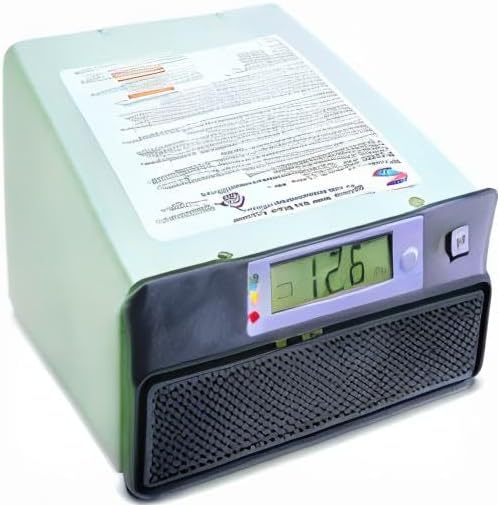
The front panel features three LED status indicators and an LCD message panel to provide real-time operational status:
- Amber LED: Illuminates when the inverter is actively converting DC power to AC power (Inverter Mode).
- Green LED: Illuminates when an external AC input source is detected and the inverter is in bypass mode, passing AC power directly to the loads.
- Red LED: Indicates an inverter fault. Refer to the troubleshooting section for common fault conditions.
- LCD Message Panel: Displays various operational statuses, such as input voltage, output power, and fault codes. Consult the display for detailed information.
5.3. Automatic Transfer System
The WF-5110RS is equipped with an automatic transfer system. When an external AC power source (like shore power or a generator) is connected to the inverter's AC input, the system automatically detects it and bypasses the inverter's internal conversion circuitry. This allows the external AC power to directly supply your loads, conserving battery power. When the external AC source is removed, the inverter automatically switches back to providing AC power from the battery bank.
6. Maintenance
The WF-5110RS inverter requires minimal maintenance. Regular checks can help ensure its longevity and optimal performance.
- Cleaning: Periodically clean the exterior of the inverter with a dry, soft cloth. Ensure ventilation openings are free from dust and debris. Do not use liquid cleaners.
- Connections: Annually inspect all electrical connections (DC input, AC output, AC input, and ground) to ensure they are tight and free from corrosion. Loose connections can cause overheating and poor performance.
- Environment: Ensure the operating environment remains within the recommended temperature and humidity ranges.
7. Troubleshooting
This section provides solutions to common issues you might encounter with your WF-5110RS inverter.
| Problem | Possible Cause | Solution |
|---|---|---|
| Inverter not turning on / No output power. |
|
|
| Red Fault LED is illuminated. |
|
|
| Inverter switches to bypass mode unexpectedly. |
|
|
8. Specifications
| Attribute | Value |
|---|---|
| Brand | WFCO |
| Model | WF-5110RS |
| Power Output | 1000 Watts |
| Input Voltage | 12V DC (Nominal) |
| Output Type | Pure Sine Wave |
| Item Weight | 11.92 pounds (approx. 5.4 kg) |
| Product Dimensions (L x W x H) | 13.25 x 8.75 x 3.75 inches (approx. 33.66 x 22.23 x 9.53 cm) |
| Manufacturer | Arterra |
| Features | Reverse Polarity Protection, Automatic Transfer System, Overload Protection, Over-temperature Protection, Short-circuit Protection, Cooling Fan, FCC Class B Compliance |
9. Warranty and Support
For warranty information, technical support, or service inquiries regarding your WFCO WF-5110RS Pure Sine Wave Inverter, please contact WFCO customer service directly. Refer to the product packaging or the official WFCO website for the most current contact details.
Note: Any unauthorized attempts to open or repair the unit will void the warranty.
Related documentsWF-5110RS


Ask a question about this manual
Ask about setup, troubleshooting, compatibility, parts, safety, or missing instructions. Manuals+ will review the question and use this page’s manual context to help answer it.