
1. Product Overview
The VENTION 3.5mm to 6.35mm Audio Stereo Cable is designed for high-quality audio transmission between devices with different audio jack sizes. It features a 3.5mm (1/8") male connector on one end and a 6.35mm (1/4") male connector on the other, enabling versatile connectivity for various audio equipment.

Image 1.1: VENTION 3.5mm to 6.35mm Audio Stereo Cable, showcasing both connector ends.
2. Key Features
- Enhanced Sound Quality: Features tin-plated copper conductors to reduce audio quality loss and minimize noise, ensuring clear audio transmission.
- Excellent Sound Quality: Equipped with 24K gold-plated connectors that resist corrosion and ensure optimal sound quality.
- Incredibly Durable: Designed with a 10000+ bend lifespan and a PVC shell for increased durability and tangle-free use.
- High Compatibility: Offers plug-and-play convenience with a wide range of devices.
- Reliable Signal Transmission: Delivers consistent audio performance for various applications.
3. Compatibility
This audio cable is designed for broad compatibility, allowing connection between devices with 3.5mm audio jacks and those with 6.35mm audio jacks. It supports a variety of equipment for both input and output.

Image 3.1: Diagram illustrating universal compatibility with devices such as PCs, phones, tablets, MP3 players (3.5mm) and speakers, amplifiers, guitars, mixers, electronic keyboards (6.35mm).
Compatible Devices Include:
- 3.5mm Devices: iPods, Laptops, Cell Phones, Tablets, MP3 Players, PCs.
- 6.35mm Devices: Mixing Consoles, Home Theater Devices, Amplifiers, Speakers, Guitars, Electronic Keyboards.
4. Setup and Connection
Connecting your VENTION audio cable is a straightforward plug-and-play process. Ensure both devices are powered off before making connections to prevent potential damage.
- Identify Ports: Locate the 3.5mm audio output port on your source device (e.g., laptop, smartphone) and the 6.35mm audio input port on your receiving device (e.g., speaker, amplifier, mixer).
- Connect 3.5mm End: Insert the 3.5mm male connector of the cable firmly into the 3.5mm audio jack of your source device.
- Connect 6.35mm End: Insert the 6.35mm male connector of the cable firmly into the 6.35mm audio jack of your receiving device.
- Power On Devices: Once both ends are securely connected, power on your devices and adjust volume levels as needed.

Image 4.1: A VENTION audio cable connecting a laptop (3.5mm) to a speaker (6.35mm) for high-fidelity clear sound.

Image 4.2: A VENTION audio cable connecting a smartphone (3.5mm) to a speaker (6.35mm) for premium sound experience.

Image 4.3: A VENTION audio cable connecting a guitar (3.5mm) to a computer (6.35mm) for audio input.
5. Operating Instructions
Once connected, the VENTION audio cable facilitates the transfer of stereo audio signals. For optimal performance, follow these guidelines:
- Secure Connections: Ensure both 3.5mm and 6.35mm connectors are fully inserted into their respective ports to prevent signal loss or intermittent audio.
- Volume Control: Adjust the volume on both your source and receiving devices to a comfortable listening level. Start with lower volumes and gradually increase.
- Audio Settings: Verify that your devices' audio output/input settings are correctly configured to use the connected cable.
- Cable Routing: Avoid bending the cable sharply or placing heavy objects on it to maintain its integrity and prevent internal damage.
Video 5.1: Demonstration of the VENTION 3.5mm to 6.35mm Audio Cable in use with a mixing console and smartphone, highlighting high-quality sound delivery and ease of tuning/recording.
6. Construction and Quality
The VENTION audio cable is engineered with high-quality materials to ensure durability and superior audio performance.
- 24K Gold-Plated Connectors: These connectors provide excellent conductivity and corrosion resistance, ensuring a stable and clear audio signal.
- Tinned Copper Core: The internal conductors are made of tinned copper, which enhances signal transmission and reduces interference.
- PVC Shell and Cover: The cable features a robust PVC shell and connector covers, offering protection against wear and tear, and contributing to its tangle-free design.

Image 6.1: Detailed diagram showing the internal components of the VENTION audio cable, including the 24K gold-plated connector, PVC shell, and tinned copper core.
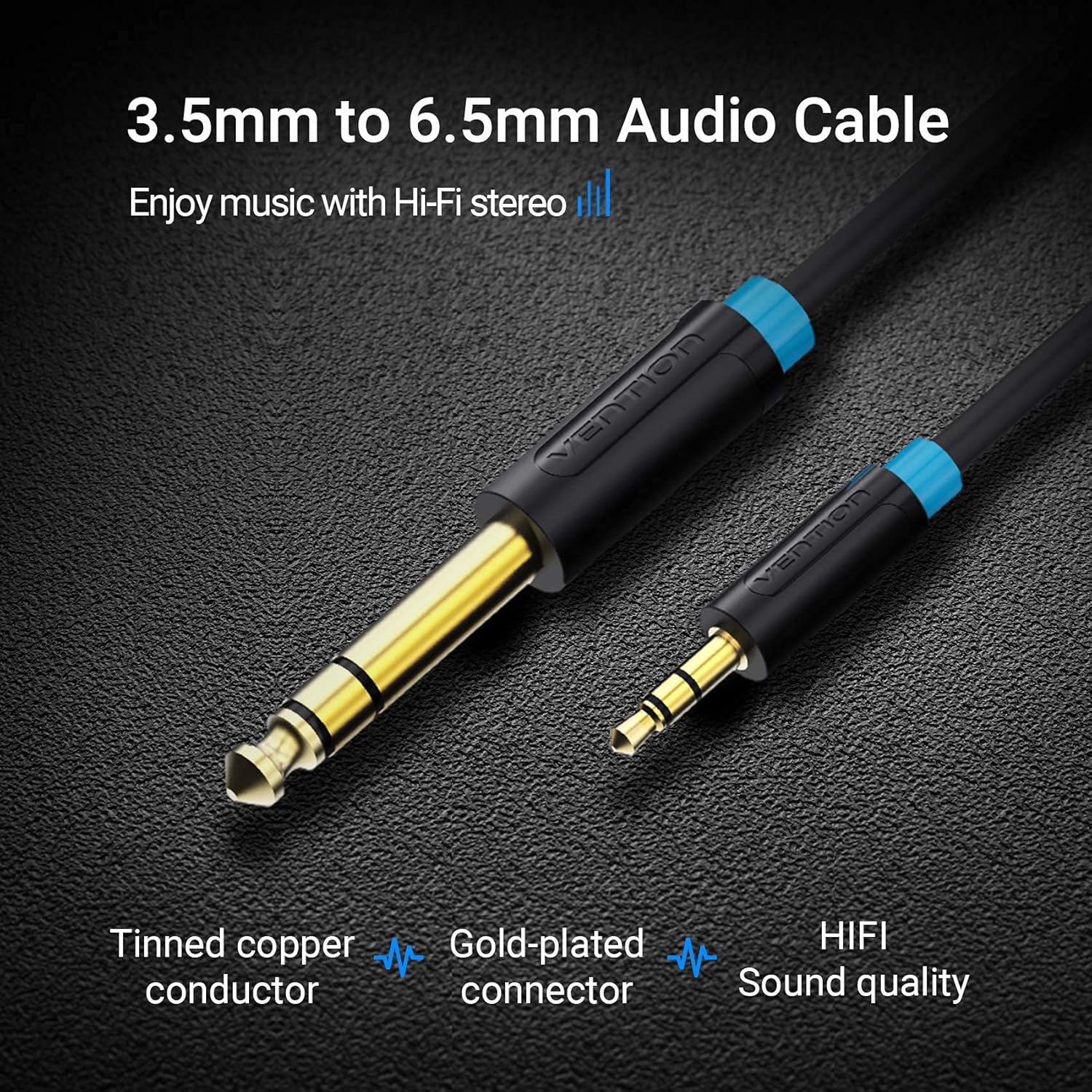
Image 6.2: Visual representation of the 3.5mm to 6.5mm audio cable, highlighting tinned copper conductor, gold-plated connector, and HIFI sound quality.
7. Maintenance
Proper care and maintenance will extend the lifespan of your VENTION audio cable and ensure consistent performance.
- Cleaning: Use a soft, dry cloth to wipe the cable and connectors. Avoid using harsh chemicals or abrasive materials.
- Storage: Store the cable in a cool, dry place away from direct sunlight and extreme temperatures. Avoid tightly coiling the cable or leaving it tangled.
- Handling: Always grasp the connector housing when plugging or unplugging the cable, rather than pulling on the cable itself.
8. Troubleshooting
If you encounter issues with your VENTION audio cable, try the following troubleshooting steps:
- No Sound:
- Ensure both ends of the cable are fully and securely plugged into the correct ports.
- Check the volume levels on both the source and receiving devices.
- Verify that the correct audio input/output is selected on your devices.
- Test the cable with different devices to rule out a device-specific issue.
- Poor Sound Quality (Static, Buzzing, Intermittent Audio):
- Ensure connections are secure and free from dust or debris.
- Check if the cable is damaged (e.g., kinks, cuts).
- Move the cable away from potential sources of electromagnetic interference (e.g., power cables, Wi-Fi routers).
- Test with another audio cable to determine if the issue is with the cable or the devices.
9. Technical Specifications
| Feature | Specification |
|---|---|
| Brand | VENTION |
| Model | BAB |
| Connector Type | 3.5mm Male (1/8") to 6.35mm Male (1/4") TRS |
| Cable Type | Audio Stereo Cable (AUX) |
| Conductor Material | Tin-plated Copper |
| Connector Plating | 24K Gold-plated |
| Shell Material | PVC |
| Durability | 10000+ bend lifespan |
| Color | Black |
| Item Weight | 50 Grams (approximate) |
| Indoor/Outdoor Usage | Indoor, Outdoor |
10. Warranty and Support
VENTION products are manufactured to high-quality standards. For warranty information, technical support, or any inquiries regarding your VENTION 3.5mm to 6.35mm Audio Stereo Cable, please refer to the official VENTION website or contact VENTION customer service directly. Keep your purchase receipt for warranty claims.