
Metrel MI 3290 GL
MI 3290 GL Earth Analyzer User Manual
Brand: Metrel
1. Introduction
The Metrel MI 3290 Earth Analyzer is a portable, robust, and versatile test instrument designed for comprehensive earth resistance, specific earth resistance, and earth potential measurements. It is suitable for various energetic and non-energetic objects, offering a wide range of measurement methods from classic 3-wire earth resistance to advanced 4-clamp methods for pylons. Its high electrical noise immunity makes it ideal for industrial environments.

Figure 1: The MI 3290 GL Earth Analyzer housed within its durable, protective carrying case.
2. Key Features
The MI 3290 GL Earth Analyzer offers a robust set of features for accurate and reliable earth measurements:
- Comprehensive Earth Resistance Testing: Supports 2, 3, and 4-pole earth resistance measurements, selective earth resistance with one clamp, and earth resistance with two iron clamps.
- Specific Earth Resistance: Utilizes Wenner and Schlumberger methods for detailed analysis.
- High-Frequency (HF) Earth Resistance: Measures at 25 kHz, compliant with IEEE Std 81.
- Pylon Earth Resistance: Capable of measuring earth resistance of mono pylons with 10m flex clamps and multi-leg pylons with up to four flex clamps.
- Current Measurement: Supports measurements using both iron and flex clamps.
- Low Ohm Measurement: Performs measurements at 7 mA and 200 mA.
- Earth Potential, Step, and Contact Measurements: Provides comprehensive analysis of earth systems.
- Impulse Earth Measurement: Simulates lightning strikes with 10/350 µs impulses.
- Wide Frequency Band Analysis: Analyzes earth impedance as a function of frequency (55 Hz to 15 kHz).
- Advanced Display: Features a 4.3" color LCD with backlight and touch screen for intuitive operation.
- Robust Design: Offers IP 65 protection when the case is closed and IP 54 when open, ensuring durability in various environments.
- PC Software Integration: Includes Metrel ES Manager PC software for test structure preparation, result download, data analysis (tree-view, table view, graphical view), storing, and printing.
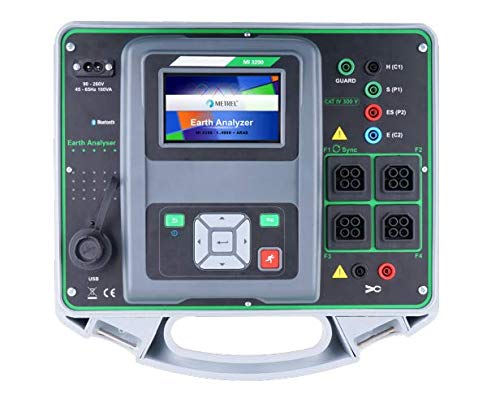
Figure 2: Detailed view of the MI 3290 GL's user interface and connection ports.
3. Included Accessories
The MI 3290 GL Earth Analyzer comes with a comprehensive set of accessories to facilitate various measurement tasks:
3.1 Standard Included Accessories
- Instrument MI 3290
- Current earth spike 90 cm, 2 pcs
- Potential earth spike 42 cm, 2 pcs
- Connection lead black 2 m
- Test lead 5 m blue
- Test lead 5 m red
- Test lead 50 m black on cable reel
- Test lead 50 m green on cable reel
- Test lead 50 m blue on cable reel
- Shielded test lead 75 m on reel
- G clamp
- Set of test probes, crocodile clip and 2 m test lead, 4 pcs
- Bag for accessories
- USB cable
- Mains cable
- Calibration certificate
- Instruction manual (this document)
- PC SW Metrel ES Manager
3.2 GL Set Specific Inclusions
- Licence GL
- Iron clamp A 1018-EA with 3.5 m test lead
- Iron clamp A 1019
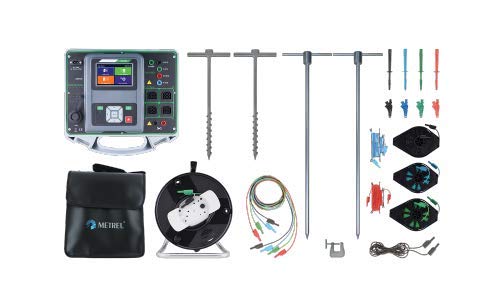
Figure 3: Overview of the MI 3290 GL Earth Analyzer and its comprehensive accessory kit.

Figure 4: The A 1018-EA and A 1019 Iron Clamps, part of the GL set.
4. Setup Guide
Proper setup is crucial for accurate measurements and safe operation. Follow these steps before beginning any testing:
4.1 Initial Inspection and Power
- Unpack the Instrument: Carefully remove the MI 3290 GL from its carrying case.
- Inspect for Damage: Check the instrument and all accessories for any visible signs of damage. Do not use if damaged.
- Power On: The device can be powered by its internal battery or via the mains cable. Ensure the battery is sufficiently charged or connect the mains cable to a suitable power outlet (90-260 VAC / 45-65 Hz).
- Self-Test: Upon powering on, the instrument will perform a self-test. Wait for this process to complete.
4.2 Connecting Accessories for Measurement
The connection method depends on the specific measurement type. Refer to the on-screen diagrams and the detailed operating instructions for precise wiring. General connection points are:
- Current (C1) and Potential (P1, P2) Terminals: For connecting earth spikes and potential leads in 3-pole, 4-pole, and specific earth resistance measurements.
- Earth (E) Terminal: For connecting the earth electrode.
- Clamp Terminals (F1-F4): For connecting current clamps (iron or flex) for selective earth resistance or multi-leg pylon measurements.
- USB Port: For connecting to a PC for data transfer and software interaction.
Always ensure all connections are secure and correctly polarized before initiating a measurement.
5. Operating Instructions
The MI 3290 GL offers a variety of measurement functions accessible via its touch screen interface. Navigate through the menus to select the desired test method.
5.1 Measurement Methods Overview
- Earth Resistance (2, 3, 4-pole): Standard methods for measuring the resistance of an earthing system. The 4-pole method provides the most accurate results by eliminating the resistance of the test leads.
- Selective Earth Resistance (1 x Clamp): Allows measurement of individual earth electrodes in parallel systems without disconnecting them, using one current clamp.
- Earth Resistance (2 x Iron Clamps): Measures earth resistance using two iron clamps, suitable for specific applications.
- Specific Earth Resistance (Wenner and Schlumberger): Used to determine soil resistivity, crucial for designing earthing systems. The instrument guides the user through the probe placement for these methods.
- HF-Earth Resistance (25 kHz): Measures earth resistance at high frequencies, relevant for lightning protection systems and high-frequency applications.
- Earth Resistance of Pylons: Specialized functions for measuring earth resistance of mono-leg and multi-leg pylons, utilizing flex clamps for accurate readings on large structures.
- Current Measurement: Measures AC current using iron or flex clamps, useful for identifying stray currents or load currents in earthing systems.
- Low Ohm Measurement (7 mA and 200 mA): For measuring low resistance values, such as continuity of protective conductors.
- Earth Potential, Step, and Contact Measurements: Assesses potential differences on the ground surface, critical for safety in substations and industrial sites.
- Impulse Earth Measurement (10/350 µs): Simulates lightning strike conditions to evaluate the earthing system's response to transient overvoltages.
5.2 Performing a Measurement
- Select Test: From the main menu, select the desired measurement function using the touch screen.
- Connect Leads: Follow the on-screen wiring diagram to connect the appropriate test leads, earth spikes, and/or clamps to the instrument and the system under test.
- Set Parameters: Adjust any necessary parameters (e.g., test frequency, current range) as prompted by the instrument or as required by the test standard.
- Initiate Test: Press the START button to begin the measurement.
- Review Results: The measurement results will be displayed on the screen. The instrument can store these results for later analysis.
- Save Data: Use the save function to store the measurement data in the instrument's internal memory.
For detailed step-by-step instructions for each specific measurement method, refer to the full technical manual provided with the instrument or the Metrel ES Manager software documentation.
6. Maintenance and Care
To ensure the longevity and accuracy of your MI 3290 GL Earth Analyzer, adhere to the following maintenance guidelines:
- Cleaning: Wipe the instrument's exterior with a soft, damp cloth. Do not use abrasive cleaners or solvents. Ensure all ports are dry before use.
- Storage: Store the instrument in its protective case in a dry, cool environment, away from direct sunlight and extreme temperatures.
- Battery Care: If storing for extended periods, ensure the battery is partially charged (around 50%) and recharge it periodically to prevent deep discharge.
- Accessory Inspection: Regularly inspect test leads, spikes, and clamps for wear, damage, or insulation integrity. Replace any damaged accessories immediately.
- Calibration: The instrument requires periodic calibration to maintain its measurement accuracy. Refer to the calibration certificate for recommended intervals. Contact authorized Metrel service centers for calibration services.
7. Troubleshooting
This section provides solutions to common issues you might encounter with the MI 3290 GL Earth Analyzer.
| Problem | Possible Cause | Solution |
|---|---|---|
| Instrument does not power on. | Low or depleted battery; loose mains cable connection. | Charge the battery or connect the mains cable securely. |
| Inaccurate or unstable readings. | Poor test lead connections; high noise environment; incorrect measurement setup; dry soil conditions. | Ensure all connections are secure. Move away from strong electromagnetic fields. Verify the correct test method and parameters. Moisten the soil around earth spikes if too dry. |
| "Open Circuit" or "High Resistance" error. | Broken test lead; poor contact with earth spike/electrode; test lead not connected to the correct terminal. | Check continuity of test leads. Ensure earth spikes are firmly inserted into the ground. Verify all connections match the selected measurement diagram. |
| Display is unresponsive or frozen. | Software glitch. | Perform a soft reset by holding the power button until the device restarts, or disconnect power and reconnect. |
| Cannot transfer data to PC. | Incorrect USB cable; driver issues; Metrel ES Manager software not running or configured correctly. | Use the supplied USB cable. Ensure Metrel ES Manager is installed and running. Check device manager for driver issues. Refer to the software manual. |
If the problem persists after attempting these solutions, contact Metrel customer support or an authorized service center.
8. Technical Specifications
The following table outlines the key technical specifications of the Metrel MI 3290 GL Earth Analyzer:
| Parameter | Value / Range | Additional Information |
|---|---|---|
| Earth Resistance (2,3,4-pole) | 0.00 Ω ... 19.99 kΩ | Test Frequencies: 55 Hz, 329 Hz, 1.6 kHz, 3.29 kHz, 15 kHz; Test Voltage: 20 or 40 VAC; Short-circuit current > 220 mA |
| Specific Earth Resistance | 0.00 Ωm ... 19.99 kΩm | Wenner and Schlumberger methods supported. |
| HF Earth Resistance | 0.0 Ω ... 299 Ω | Test Frequency: 25 kHz |
| Impulse Earth Measurement | 0.0 Ω ... 199.9 Ω | Impulse: 10/350 µs |
| DC Resistance (RLDW, CONT) | 0.0 Ω ... 19.99 kΩ | Test Current: 200 mA (RLDW) |
| Current RMS (Flex/Iron Clamp) | 0.0 mA ... 49.9 A | Nominal Frequency: 10 Hz ... 1.5 kHz |
| Earth Potential | 0.0 mV ... 49.99 V | Calculated value (consider uncertainty of 2-pole measurement) |
| Power Source | Battery Powered / Mains | Battery: 14.4 V DC (4.4 Ah Li-ion); Mains: 90-260 VAC / 45-65 Hz, 100 VA (200 V CAT II) |
| Display | 4.3" color LCD | With backlight and touch screen |
| Communication | USB, Bluetooth | For PC connectivity and data transfer. |
| Memory | >8 GB | Internal storage for measurement results. |
| Degree of Protection | IP 65 (case closed), IP 54 (case open) | Protection against dust and water ingress. |
| Dimensions (W x H x D) | 330 x 280 x 160 mm | Approximate dimensions of the instrument. |

Figure 5: Excerpt from the MI 3290 GL Technical Specifications datasheet.
9. Warranty and Support
The Metrel MI 3290 GL Earth Analyzer comes with a manufacturer's warranty and dedicated support services.
- Warranty Period: The product is covered by a two-year (24-month) warranty from the manufacturer, starting from the date of purchase. This warranty covers defects in materials and workmanship under normal use.
- Warranty Claims: For warranty service, please contact your authorized Metrel distributor or the manufacturer directly. Proof of purchase will be required.
- Technical Support: For technical assistance, operational queries, or troubleshooting beyond what is covered in this manual, please reach out to Metrel's customer support. Contact information can typically be found on the Metrel official website or in the packaging.
- Calibration Services: Regular calibration is recommended to ensure continued accuracy. Metrel offers professional calibration services through its authorized service network.
For the most up-to-date support information and resources, please visit the official Metrel website.
Ask a question about this manual
Ask about setup, troubleshooting, compatibility, parts, safety, or missing instructions. Manuals+ will review the question and use this page’s manual context to help answer it.