1. Safety Instructions
Please read all safety instructions carefully before assembling and operating your OUTON LED Floor Lamp. Keep this manual for future reference.
- Indoor Use Only: This lamp is designed for indoor use in dry locations. Do not use it in wet or damp environments.
- Electrical Safety: Ensure the power outlet matches the lamp's voltage (110 Volts). Do not overload electrical outlets.
- Handling: Avoid bending or twisting the lamp pole excessively. Do not attempt to disassemble the LED light source, as it is integrated and not user-replaceable.
- Stability: Always place the lamp on a flat, stable surface to prevent tipping. The weighted base provides stability, but caution should still be exercised around children and pets.
- Cleaning: Disconnect the power before cleaning. Use a soft, dry cloth. Do not use liquid or abrasive cleaners.
2. Package Contents
Verify that all components are present in the package:
- Lamp Head with integrated LED
- Multiple Lamp Pole Sections
- Weighted Lamp Base
- Remote Control
- User Manual (this document)

Video: Unboxing the OUTON Floor Lamp. This video demonstrates the unboxing process, showing the various components of the lamp as they are removed from the packaging.
3. Assembly Instructions
The OUTON LED Floor Lamp is designed for easy assembly without the need for additional tools. Follow these steps:
- Carefully unpackage all components and lay them out on a clean, flat surface.
- Screw the first lamp pole section into the weighted lamp base clockwise until secure.
- Continue screwing the remaining lamp pole sections together, connecting them one by one, ensuring each connection is firm.
- Attach the lamp head to the top pole section by screwing it clockwise until it is securely fastened.
- Plug the power adapter into a suitable electrical outlet.

Image: Visual guide illustrating the simple screw-together assembly of the lamp pole sections and base.

Image: Detailed view of the threaded connections between lamp pole sections, highlighting the tool-free assembly process.
4. Operating Instructions
Your OUTON LED Floor Lamp offers versatile control options and lighting modes.
4.1. Control Methods
The lamp can be controlled via the included remote control or the integrated touch control panel on the lamp pole.
Remote Control
- Power Button: Turns the lamp ON/OFF.
- Brightness Adjustment (+/-): Increases or decreases the light intensity (5% to 100% stepless dimming).
- Color Temperature (CCT) Button: Cycles through 4 color temperature settings: Warm (3000K), Warm White (4000K), Cool White (5000K), and Daylight White (6000K).
- 1H Timer Button: Activates a 1-hour timer, after which the lamp will automatically turn off.
- Mode Buttons: Pre-set lighting modes for various activities (e.g., Coffee, Book, Laptop, Baby, Night).
- Magnetic Feature: The remote can be conveniently attached to metal surfaces.
- Operating Range: The remote control functions effectively within a range of up to 49.2 feet.
Touch Control Panel
- Power Button: Short press to turn ON/OFF. Long press to activate the 1-hour timer.
- Brightness Adjustment (+/-): Tap to increase or decrease brightness.
- Mode (M) Button: Tap to cycle through the 4 color temperature settings.

Image: Overview of the remote control and the touch-sensitive buttons located on the lamp's pole for easy operation.

Image: Examples of different lighting modes, such as Leisure, Reading, Working, Breastfeeding, and Night Light, selectable via the remote.
4.2. Light Settings and Features
- Stepless Dimming: Adjust brightness from 5% to 100% to suit any mood or task.
- 4 Color Temperatures: Choose between 3000K (Warm), 4000K (Warm White), 5000K (Cool White), and 6000K (Daylight White).
- Memory Function: The lamp remembers your last brightness and color temperature setting when turned off and on again.
- 1-Hour Timer: Automatically turns off the lamp after one hour, ideal for bedtime.
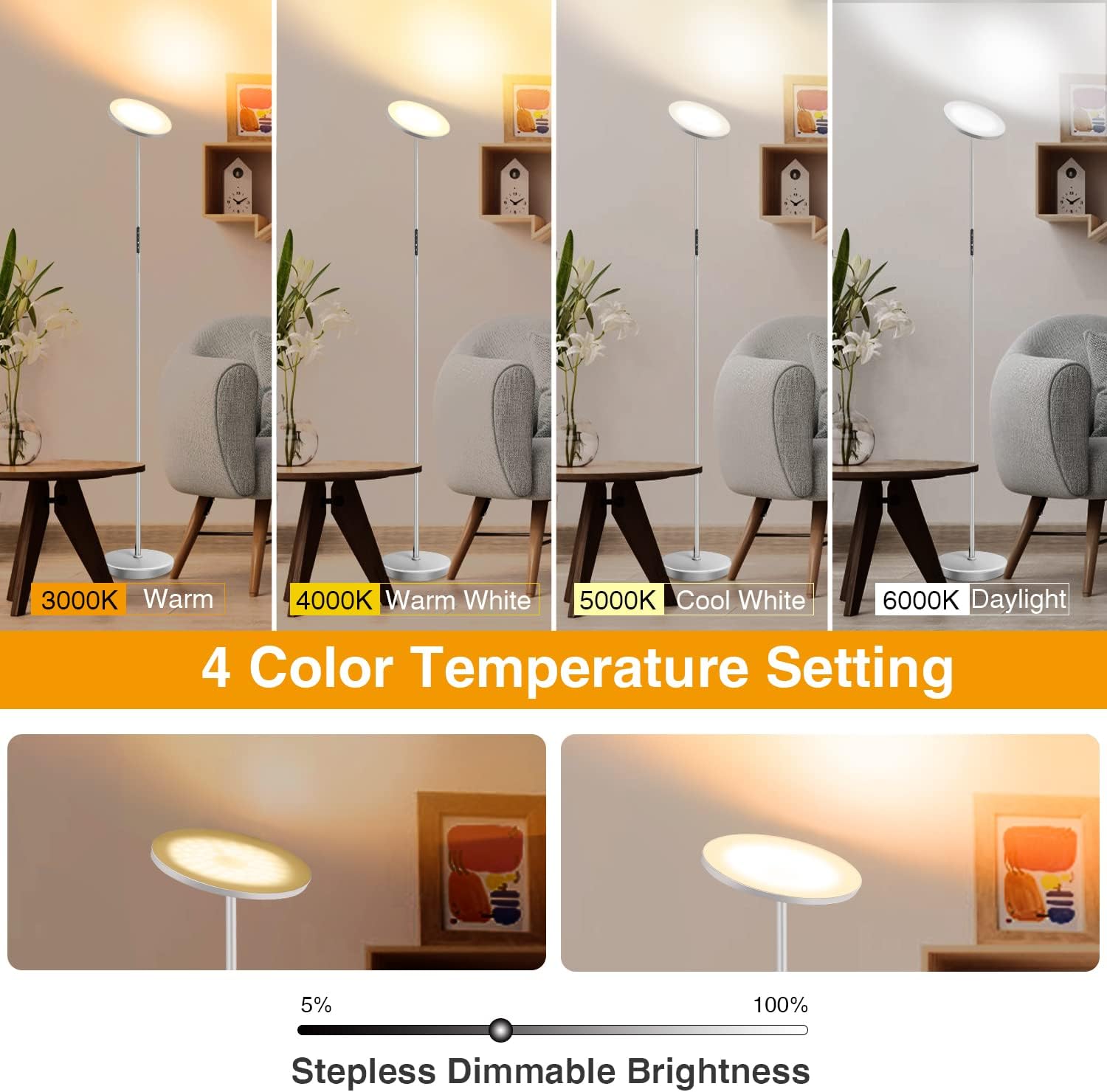
Image: Demonstration of the four distinct color temperature options and the smooth transition of stepless dimmable brightness.

Image: Visual representation of the 1-hour timer and memory function, designed for convenience and personalized lighting.
4.3. Adjustable Lamp Head
The lamp head can be rotated up to 360 degrees and tilted up to 85 degrees, allowing you to direct light precisely where needed.
Image: Illustration of the lamp head's flexibility, demonstrating its ability to rotate 360 degrees and tilt 85 degrees for optimal light direction.
Video: This video demonstrates the adjustable lamp head, showing how it can be tilted and rotated to direct light.
5. Maintenance
To ensure the longevity and optimal performance of your OUTON LED Floor Lamp, follow these maintenance guidelines:
- Cleaning: Always unplug the lamp from the power outlet before cleaning. Use a soft, dry cloth to wipe down the lamp. Do not use any liquid cleaners, abrasive materials, or chemical solvents, as these may damage the finish or electrical components.
- Bulb Replacement: The LED light source is integrated and designed for a long lifespan (50,000+ hours). It is not user-replaceable. Do not attempt to replace the LED bulb.
- Storage: If storing the lamp for an extended period, ensure it is clean, dry, and stored in a safe place away from extreme temperatures or humidity.
6. Troubleshooting
If you encounter any issues with your OUTON LED Floor Lamp, refer to the following common troubleshooting steps:
| Problem | Possible Cause | Solution |
|---|---|---|
| Lamp does not turn on. | Power cord not properly connected. Power outlet is not working. Remote control battery is dead. | Ensure the power cord is securely plugged into both the lamp and the wall outlet. Test the outlet with another device. Replace the remote control battery (AAA batteries required). |
| Remote control is unresponsive. | Remote battery is low or dead. Remote is out of range. Remote needs re-pairing. | Replace the remote control battery. Ensure the remote is within 49.2 feet of the lamp. To re-pair: unplug the lamp, plug it back in, then immediately press and hold the power button on the remote until the lamp flashes. If pairing multiple lamps, ensure only one is plugged in during pairing. |
| Light flickers or is unstable. | Loose connection. Incompatible power source. | Check all pole connections and ensure they are tightly screwed. Ensure the lamp is connected to a stable 110V power source. |
If the problem persists after trying these solutions, please contact OUTON Customer Service for further assistance.
7. Specifications
| Feature | Specification |
|---|---|
| Model Number | H10005-SGY-US |
| Brand | OUTON |
| Power Source | Corded Electric |
| Voltage | 110 Volts |
| Wattage | 30 watts |
| Brightness | 3000 Lumens |
| Light Source Type | LED |
| Color Temperatures | Warm (3000K), Warm White (4000K), Cool White (5000K), Daylight White (6000K) |
| Dimming | Stepless (5%-100%) |
| Control Method | Remote Control, Touch Control |
| Special Features | 1 Hour Timer, Memory Function, Adjustable Lamp Head |
| Material | Metal |
| Finish Type | Grey Silver |
| Product Dimensions | 9.5"D x 9.5"W x 70.8"H |
| Item Weight | 5.5 Pounds |
| Average Lifespan | 50,000+ Hours |
| Indoor/Outdoor Usage | Indoor |
| Water Resistance Level | Not Water Resistant |
8. Warranty and Support
OUTON is committed to providing high-quality products and excellent customer service.
- 2-Year Quality Support: Your OUTON LED Floor Lamp is backed by a 2-year quality support warranty.
- 24/7 Customer Service: If you have any problems or questions regarding your product, please contact OUTON Customer Service. We are available 24/7 to assist you.
For support, please visit the official OUTON website or refer to the contact information provided with your purchase.


